
Summary:
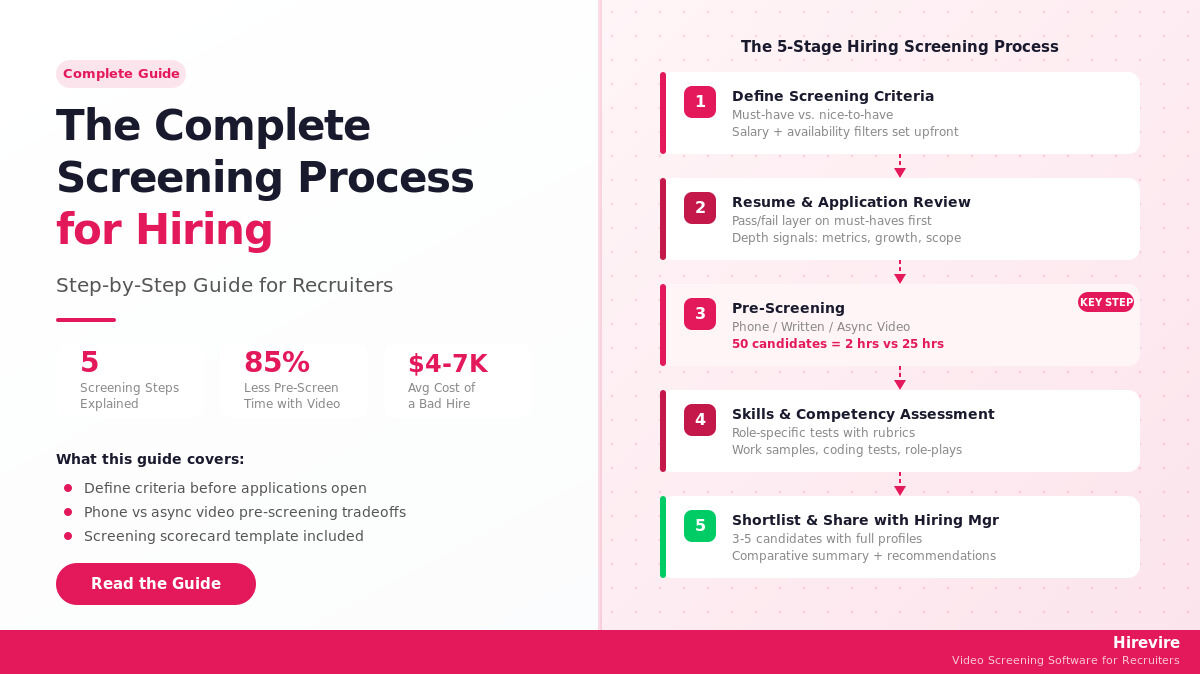
Effective hiring begins with a structured candidate screening process that minimizes errors and costs associated with poor hiring decisions. This involves five key stages: defining criteria, reviewing applications, pre-screening, assessing skills, and shortlisting candidates. Utilizing tools like async video pre-screening can significantly reduce time and enhance evaluation consistency, ensuring a more efficient and reliable hiring process.
Table of Contents
What Is Candidate Screening and Why It Matters
Step 1: Define Your Screening Criteria
Building a Screening Criteria Template
Salary and Availability as Early Filters
Step 2: Resume and Application Review
Application Questions as a First Filter
Step 3: Pre-Screening: Phone vs Video vs Written
Phone Screen: The Traditional Standard
Written Pre-Screen Questionnaire
Async Video Pre-Screening: The Better Method
Choosing the Right Pre-Screen Method
Step 4: Skills and Competency Assessment
When to Use Formal Assessments
Assessment Types by Role Category
Structured Competency Evaluation
Step 5: Shortlisting and Sharing with Hiring Managers
How Many Candidates to Shortlist
The Shortlist Presentation Package
Candidate Communication During Shortlisting
What Manual Screening Does Well
Where Manual Screening Falls Short
How Automation Addresses Each Weakness
How to Build a Screening Scorecard
Sample Screening Scorecard Template
What is the difference between screening and interviewing?
How long should the screening process for hiring take?
How many rounds of screening is too many?
What questions can I legally ask during candidate screening?
How do I screen candidates fairly to avoid bias?
What is a reasonable screening scorecard score threshold for advancement?
How does pre-screening differ for high-volume hiring vs. selective roles?
Should I use AI screening for every role?
How do I handle candidates who don't complete async video pre-screens?
What metrics should I track to improve my screening process?
How do I screen for [20 must-ask questions] before the interview?
Most hiring mistakes happen before the first interview. A recruiter skims 200 resumes in an afternoon, picks candidates based on incomplete information, and the hiring manager meets three people who were never right for the role. Two weeks and four rounds later, the position is still open.
According to SHRM research, a bad hire costs an average of $4,000-$7,000 in direct costs alone - and up to five times the annual salary when lost productivity and replacement time are factored in. The root cause, more often than not, is a broken screening process.
This guide covers the complete candidate screening process for hiring: five sequential stages that move applicants from application to shortlist in a structured, defensible way. It includes practical templates, time calculations, and a worked example showing how async video pre-screening cuts screening hours by 85%.
Quick Summary: The screening process for hiring involves five stages - defining criteria, reviewing applications, pre-screening candidates, assessing skills, and shortlisting. Hirevire automates the most time-intensive stage (pre-screening) by collecting async video responses that recruiters review at 2x speed, turning a 12-hour phone screen marathon into 90 minutes of structured evaluation.
Table of Contents
- What Is Candidate Screening and Why It Matters
- Step 1: Define Your Screening Criteria
- Step 2: Resume and Application Review
- Step 3: Pre-Screening: Phone vs Video vs Written
- Step 4: Skills and Competency Assessment
- Step 5: Shortlisting and Sharing with Hiring Managers
- Manual vs Automated Screening
- How to Build a Screening Scorecard
- FAQ
What Is Candidate Screening and Why It Matters
Candidate screening is the process of evaluating job applicants to determine which ones are qualified enough to advance to formal interviews. It sits between the application stage and the interview stage - filtering a large pool of applicants down to a manageable shortlist based on defined criteria.
The screening process for hiring is distinct from the interview process. Screening is about qualification and fit-at-a-high-level. Interviews go deeper into experience, judgment, and culture fit. Conflating the two wastes expensive interview time on candidates who should have been filtered earlier.
Why Screening Gets Broken
Three structural problems erode screening quality in most organizations:
Volume without structure. A single job post on LinkedIn can generate 300+ applications within 48 hours. Without a defined process, recruiters default to gut-feel pattern matching - favoring familiar universities, company names, or formatting styles rather than actual qualifications.
Inconsistent evaluation. Two recruiters reviewing the same candidate pool will produce different shortlists if they're working from different mental models of "qualified." This inconsistency compounds through rounds - a candidate who clears one recruiter's informal bar might not survive another's, making the process unreliable and legally exposed.
The pre-screen bottleneck. For roles with 50+ applicants, the pre-screening stage (initial conversations to verify basics) becomes the rate-limiting step. Each 15-minute phone call consumes calendar time, coordination overhead, and focused attention. At 50 candidates, that's over 12 hours of calls - before a single qualified candidate has been identified.
What Good Screening Delivers
A structured screening process for hiring does five things consistently:
- Reduces time-to-hire by eliminating unqualified candidates early
- Improves offer acceptance rates by identifying genuine fit before investing interview time
- Reduces interviewer fatigue by sending fewer, better-qualified candidates to panels
- Creates an auditable record of evaluation decisions for compliance purposes
- Surfaces passive disqualifiers (availability, salary expectations, relocation) before they become late-stage surprises
Step 1: Define Your Screening Criteria
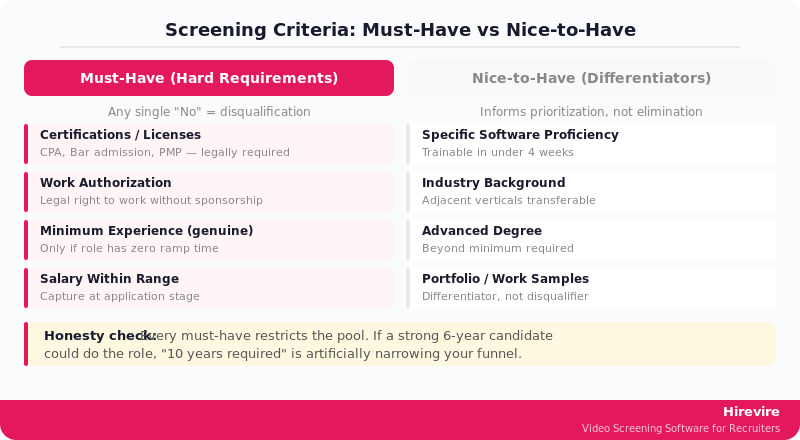
Every screening process fails or succeeds at this stage. If the criteria aren't defined before applications open, screening becomes reactive - reviewers invent standards on the fly, often influenced by whoever applied first.
Must-Have vs Nice-to-Have
Divide criteria into two categories before writing the job description:
Must-haves are genuine hard requirements. Candidates who don't meet these criteria cannot do the job. Examples:
- Specific certifications or licenses (CPA for a controller role, bar admission for in-house counsel)
- Minimum years of experience in a specific function when the role has no ramp time
- Legal authorization to work in the relevant jurisdiction
- Language requirements for customer-facing roles in specific markets
Nice-to-haves are genuine differentiators - things that would make a candidate perform better or onboard faster, but don't disqualify applicants who lack them. Examples:
- Experience with a specific software tool (trainable)
- Industry background in adjacent verticals
- Advanced degrees beyond the minimum required
The critical discipline here is honesty. Every criterion listed as a must-have restricts the pool. If "10 years of experience" is listed as required but the role could be done well by a strong 6-year candidate, that criterion is artificially narrowing the funnel.
Building a Screening Criteria Template
| Criterion | Type | How to Screen | Weight |
|---|---|---|---|
| Role-relevant technical skill | Must-have | Skills assessment or portfolio review | High |
| Legal work authorization | Must-have | Application question | Disqualifying |
| Industry/domain experience | Nice-to-have | Resume review | Medium |
| Specific software proficiency | Nice-to-have | Pre-screen question | Low |
| Communication clarity | Must-have | Pre-screen (video/phone) | High |
| Cultural alignment indicators | Nice-to-have | Pre-screen question | Medium |
Salary and Availability as Early Filters
Two criteria that routinely derail late-stage hiring can be captured at the application stage:
- Compensation range: Ask for salary expectations on the application or in an early written question. Misaligned expectations discovered at offer stage waste everyone's time.
- Start date and availability: Particularly important for time-sensitive roles. A candidate with a 3-month notice period may be excellent but unable to fill an urgent gap.
Neither question eliminates candidates automatically - but both give recruiters information they need to prioritize effectively.
Step 2: Resume and Application Review
Resume review is the first pass of the screening process for hiring. The goal isn't to identify the best candidate - it's to remove clearly unqualified applicants and flag promising ones for deeper evaluation.
A Structured Review Framework
Unstructured resume review is where bias most easily enters the process. Reviewers spend more time on resumes from prestigious universities or well-known companies, regardless of whether those credentials predict job performance.
A structured framework applies the same questions to each resume:
Pass/Fail Layer (must-haves only):
- Does the candidate meet each must-have criterion?
- Any single "No" answer here is a disqualification
Depth Signal Layer (nice-to-haves and experience depth):
- How directly relevant is the candidate's recent experience?
- Are there measurable outcomes described (results, metrics, scope)?
- Is there evidence of growth or increasing responsibility?
Attention Layer (presentation quality):
- Is the resume clear and logically organized?
- For roles requiring written communication, does the resume itself demonstrate that skill?
Resume Red Flags Worth Noting
Some patterns in resumes warrant closer examination, though none are automatic disqualifiers:
- Unexplained employment gaps longer than 6 months (worth a pre-screen question, not a disqualification)
- Very short tenures (less than 12 months) across multiple consecutive roles
- Responsibilities that appear inconsistent with job titles (inflated titles or scope)
- Vague impact language ("contributed to," "assisted with") in roles that should show ownership
Application Questions as a First Filter
Well-designed application questions can screen faster than resume review for certain criteria. For high-volume roles, four targeted questions at the application stage can eliminate 40-50% of unqualified applicants before any human review:
- "Are you authorized to work in [country] without sponsorship?"
- "This role requires [specific certification/license]. Do you hold this credential?"
- "What are your salary expectations for this role? Our range is [$X-$Y]."
- "How many years of experience do you have in [specific function]?"
Automatic disqualification should only be applied to hard must-haves. Everything else should inform prioritization, not elimination.
Step 3: Pre-Screening: Phone vs Video vs Written
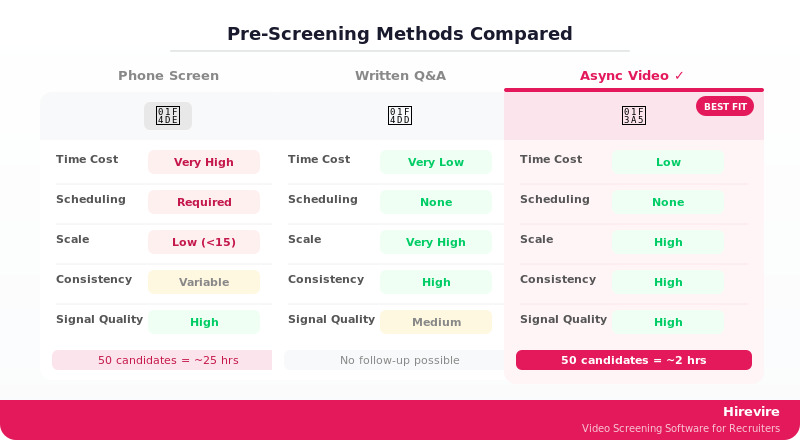
The pre-screening stage is where most screening processes break down. It's the highest-value stage for gathering real signal about candidates - but it's also the most time-intensive. Getting this stage right is the single biggest lever for improving the overall screening process for hiring.
Three methods exist: phone screens, written questionnaires, and async video pre-screening. Each has different cost, scale, and signal quality profiles.
Phone Screen: The Traditional Standard
A phone screen is a 15-30 minute structured call between a recruiter and a candidate to verify basics: role understanding, experience depth, salary alignment, and availability.
What phone screens do well:
- Allow follow-up questions when answers are vague
- Provide a real-time sense of communication style
- Build candidate experience through human contact
The time cost problem:
Consider a realistic scenario: 50 applicants pass resume review for a single role. Each phone screen takes 15 minutes. Factor in:
- 15 min per call x 50 candidates = 750 minutes of actual call time
- Scheduling overhead: 10 min per candidate = 500 minutes
- Note-taking and follow-up: 5 min per candidate = 250 minutes
Total: approximately 25 hours for a single role's phone screen stage. For a recruiter running 5 open roles simultaneously, that's a full week of calendar locked in pre-screen calls.
The result: either the screens get rushed (reducing signal quality), or the process takes weeks (increasing time-to-hire and candidate drop-off).
Written Pre-Screen Questionnaire
A written questionnaire asks candidates to answer 4-8 targeted questions in text form as part of the application process or immediately after.
Advantages:
- Zero scheduling overhead
- Candidates complete it on their own time
- Responses are easy to compare side by side
- Works at any volume
Limitations:
- No follow-up possible
- Text responses don't capture communication style or presence
- Easy for candidates to give polished, rehearsed answers
- Doesn't differentiate well between genuinely strong candidates
Written questionnaires work well as an additional filter between resume review and a deeper pre-screen, but rarely replace the pre-screen entirely for roles where communication skills matter.
Async Video Pre-Screening: The Better Method
Async (asynchronous) video pre-screening asks candidates to record video responses to a set of structured questions. Recruiters review the recordings on their own schedule - often at 1.5x or 2x playback speed.
Hirevire is built for this method. Recruiters create a question set, share a link with candidates, and receive completed video responses without a single scheduling conversation.
The time math, revisited:
Same 50 candidates, same role:
- Setup time: 30 minutes (create questions, configure link)
- Candidate completion: self-scheduled, 24-48 hour window
- Reviewer time: 50 candidates x 2-3 minutes (reviewed at 2x) = 100-150 minutes
- No scheduling overhead
Total recruiter time: approximately 2-3 hours vs. 25 hours for phone screens. That's an 85-90% reduction in pre-screen time for the same candidate pool.
What async video captures that phone can't:
- Consistent evaluation conditions (every candidate answers the same questions in the same format)
- Shareable recordings that hiring managers can review directly
- AI-generated transcripts for text-based review and search
- Timestamps for comparing specific answer segments across candidates
Hirevire adds AI screening on top of the video layer - automatically evaluating responses against custom criteria, generating match/non-match assessments, and flagging candidates worth priority review. Pricing starts at $39/month (billed annually) for individual recruiters, with no per-interview fees within plan limits.
For roles where candidates are unlikely to invest time in an async process, phone screens remain appropriate. For most professional and technical roles, async video outperforms phone on both efficiency and evaluation consistency.
Choosing the Right Pre-Screen Method
| Method | Best For | Time Cost | Signal Quality | Scale |
|---|---|---|---|---|
| Phone screen | Senior/executive roles, small pools (<15) | High | High (with follow-up) | Low |
| Written questionnaire | Initial volume filter, text-based roles | Very low | Medium | Very high |
| Async video | Most professional roles, 15+ applicants | Low | High (consistent) | High |
| Hybrid (written + async video) | High-volume, senior roles | Low-medium | Highest | High |
Step 4: Skills and Competency Assessment
After pre-screening, the remaining candidates have cleared basic qualification and communication filters. Skills assessment validates whether they can actually do the job - not just describe how they'd approach it.
When to Use Formal Assessments
Not every role needs a formal skills assessment. The decision depends on:
- Technical verifiability: Roles with clear right/wrong answers (coding, data analysis, accounting) benefit more from formal tests than roles with subjective outputs
- Volume at this stage: If 30 candidates remain after pre-screening, a 45-minute assessment is a significant collective time commitment - make sure it's worth it
- Assessment quality: A poorly designed take-home test signals organizational dysfunction to candidates and doesn't produce useful differentiation
Assessment Types by Role Category
Technical roles (engineering, data, finance):
- Work sample tests: short tasks representative of actual job work
- Technical coding challenges (HackerRank, Codility for engineering roles)
- Case studies with defined deliverables and evaluation criteria
Sales and customer-facing roles:
- Role-play scenarios evaluated against a structured rubric
- Writing samples (emails, proposals) scored for clarity and persuasion
- Recorded async video responses to objection-handling scenarios
Operations and administrative roles:
- Process exercise with a real-world scenario
- Tool proficiency tests for specific software in use
- Judgment questions about competing priorities
Structured Competency Evaluation
For each competency being assessed, define what good looks like before reviewing any responses:
| Competency | Poor (1-2) | Acceptable (3) | Strong (4-5) |
|---|---|---|---|
| Problem-solving | Restates the problem without analysis | Identifies one approach with partial reasoning | Multiple approaches considered, trade-offs explained |
| Communication | Unclear, needs significant interpretation | Understandable but unstructured | Clear structure, appropriate detail level |
| Technical depth | Incorrect or surface-level | Correct but lacks nuance | Accurate, nuanced, with edge cases considered |
Pre-defined rubrics like this reduce evaluator variance and make scoring decisions defensible.
Step 5: Shortlisting and Sharing with Hiring Managers
Shortlisting is the final stage of the screening process for hiring - the point at which the recruiter compiles a curated group of candidates to present to the decision-making team.
How Many Candidates to Shortlist
A common error is presenting too many candidates to hiring managers in the name of thoroughness. Presenting 15 candidates from a pool of 200 signals a failure to screen, not diligence.
A useful benchmark:
- For individual contributor roles: 3-5 candidates
- For senior/management roles: 4-6 candidates
- For executive searches: 2-4 candidates (with detailed profiles)
The Shortlist Presentation Package
Hiring managers should receive more than a list of names. A complete shortlist package includes:
For each candidate:
- Resume with recruiter annotations on key strengths and concerns
- Pre-screen notes or video links (with timestamps for key moments)
- Assessment scores and evaluator comments
- Salary expectation and availability
- Recruiter recommendation (advance / advance with reservations / pass)
Comparative summary:
- A one-page table comparing all shortlisted candidates on key criteria
- Flags for any material differences in timeline or compensation alignment
Hirevire makes sharing easier - video responses can be shared directly with hiring managers via link, with collaborative review features that allow multiple stakeholders to leave timestamped comments on the same recording.
Candidate Communication During Shortlisting
The candidates not selected for advancement deserve a prompt, professional response. The screening process for hiring includes a candidate experience dimension: how applicants are treated during evaluation shapes employer brand.
- Advance candidates promptly (within 2-3 business days of shortlist completion)
- Reject candidates who were pre-screened within 1 week
- Reject applicants who only submitted resumes within 2 weeks
Automated rejection emails are acceptable for resume-only rejections. Candidates who completed a pre-screen or assessment deserve a human acknowledgment, even if brief.
Manual vs Automated Screening
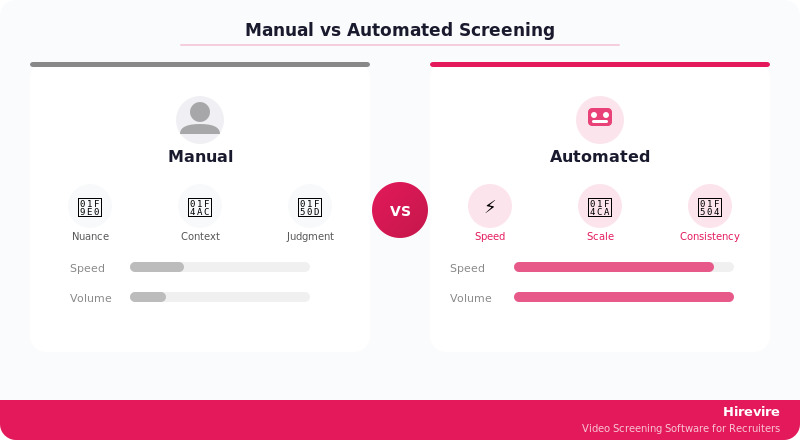
The shift from manual to automated screening is one of the most significant operational changes available to talent acquisition teams. Understanding where automation helps - and where it doesn't - is essential for designing a modern screening process.
What Manual Screening Does Well
Manual screening excels in nuanced, judgment-heavy evaluation:
- Detecting non-obvious patterns in career histories that suggest exceptional upward trajectory
- Reading between the lines in written communication
- Making contextual adjustments for candidates from non-traditional backgrounds
- Applying organizational knowledge about what actually predicts success in specific roles
No current automation tool matches human judgment for these tasks.
Where Manual Screening Falls Short
Manual screening degrades predictably under volume and time pressure:
- Cognitive load from reviewing large pools leads to pattern-matching shortcuts
- Inconsistency increases when multiple reviewers apply their own frameworks
- Documentation quality drops when screening is rushed
- Scheduling overhead for phone screens creates artificial bottlenecks
How Automation Addresses Each Weakness
| Manual Screening Challenge | Automated Solution |
|---|---|
| Volume overwhelm | AI initial screening processes all applications against defined criteria before human review |
| Inconsistent evaluation | Standardized rubrics applied identically across all candidates |
| Phone screen scheduling overhead | Async video collection eliminates scheduling entirely |
| Documentation quality | AI transcripts and scoring create automatic records |
| Candidate follow-up delays | Automated status communications at each stage |
Hirevire addresses the pre-screening bottleneck specifically. The AI screening layer evaluates video responses against custom criteria - covering keyword relevance, answer completeness, and communication clarity - and produces match assessments that help recruiters prioritize which recordings to review in depth first.
The AI candidate screening guide on Hirevire's blog covers the full AI screening workflow in detail.
Building a Hybrid Approach
The most effective modern screening process combines automation and human judgment:
- Application intake: Automated filtering on hard must-haves
- Initial review: Human review of flagged applications with AI-assisted ranking
- Pre-screening: Async video collection, AI screening, human review of top matches
- Skills assessment: Human-designed, automated-delivered, human-scored with rubrics
- Shortlisting: Human decision with AI-generated summaries
This hybrid approach keeps humans in the judgment roles and automates the mechanical work - scheduling, transcription, initial ranking, and documentation.
How to Build a Screening Scorecard
A screening scorecard is a structured evaluation form that applies consistent criteria to each candidate at a given screening stage. Scorecards reduce bias, improve consistency, and create documentation for compliance purposes.
Core Scorecard Components
1. Candidate information header
- Name, role, application date, screening stage, reviewer name
2. Must-have criteria checklist
- Binary pass/fail for each hard requirement
- Any "No" here is a disqualifier - document and move on
3. Scored criteria
- 4-6 criteria relevant to the role, each scored 1-5
- Each criterion must have a defined rubric (what does "4" look like?)
4. Overall recommendation
- Advance / Advance with reservations / Hold / Reject
- Required rationale statement (3-5 sentences minimum)
5. Follow-up questions or concerns
- Specific items to address in the next stage
Sample Screening Scorecard Template
CANDIDATE SCREENING SCORECARD

Candidate: _____________________ Role: _____________________
Stage: Resume Review / Pre-Screen / Assessment    Date: ________
Reviewer: _____________________

MUST-HAVE CRITERIA (any No = disqualification)
[ ] Work authorization confirmed
[ ] Minimum experience requirement met ([X] years)
[ ] Required certification/credential verified
[ ] Salary expectations within range

SCORED CRITERIA (1=Does Not Meet / 3=Meets / 5=Exceeds)

Relevant Experience Depth:    1  2  3  4  5
Notes: ___________________

Communication Clarity:         1  2  3  4  5
Notes: ___________________

Technical/Domain Knowledge:    1  2  3  4  5
Notes: ___________________

Role Understanding:            1  2  3  4  5
Notes: ___________________

Cultural/Values Alignment:     1  2  3  4  5
Notes: ___________________

TOTAL SCORE: ___ / 25

RECOMMENDATION:
[ ] Advance - Strong candidate, prioritize
[ ] Advance with reservations - Concerns noted below
[ ] Hold - Pending additional information
[ ] Reject - Does not meet requirements

RATIONALE (required - minimum 3 sentences):
___________________________________________________

NEXT STAGE QUESTIONS/CONCERNS:
___________________________________________________
Scorecard Best Practices
Calibrate before using. Before applying a scorecard to a real candidate pool, two or three team members should score the same sample candidate independently, then compare results. Significant disagreement signals that criteria definitions need clarification.
Score before discussing. In collaborative screening, each reviewer should complete their scorecard independently before any group discussion. Post-discussion revision to match the group consensus eliminates the benefit of multiple reviewers.
Weight by role requirements. Not all criteria matter equally. A customer success manager role might weight communication clarity at 40% of the total score; a data analyst role might weight technical knowledge at 50%. Define weights before the first candidate is reviewed.
Document disqualifications. For any candidate rejected at the must-have stage, the scorecard should record which criterion wasn't met. This documentation protects against compliance challenges and helps identify patterns in the applicant pool.
For roles requiring assessment of soft skills before live interviews, Hirevire's article on assessing soft skills before live interviews covers how to structure those evaluations through async video.
The available screening tools for recruitment guide provides a broader comparison of platforms for each screening stage.
FAQ
What is the difference between screening and interviewing?
Screening is the initial evaluation stage that filters a large applicant pool down to a qualified shortlist. It focuses on verifying minimum qualifications, basic fit, and communication competence. Interviewing goes deeper - exploring judgment, problem-solving, leadership ability, and cultural fit with the specific team. Screening should happen before any interview time is invested.
How long should the screening process for hiring take?
For most professional roles, a complete screening process from application close to shortlist delivery should take 5-10 business days. Longer than 10 days increases candidate drop-off risk, especially for candidates actively interviewing elsewhere. The pre-screening stage is typically the rate-limiting factor - async video collection resolves faster than phone screen scheduling.
How many rounds of screening is too many?
Most roles need two screening stages: initial application/resume review plus one pre-screen conversation or assessment. Three stages can be appropriate for senior roles. More than three stages before the first formal interview is excessive and signals poor funnel design. Every additional stage costs candidate goodwill.
What questions can I legally ask during candidate screening?
Pre-screening questions should focus on job-related qualifications: experience, skills, availability, and compensation alignment. Questions about age, national origin, religion, marital status, disability status, and pregnancy are prohibited in most jurisdictions. Work authorization can be verified (whether a candidate is authorized to work), but citizenship cannot be required unless legally mandated for the specific role. When in doubt, apply the test: is this question directly relevant to job performance? If not, don't ask it.
How do I screen candidates fairly to avoid bias?
Bias reduction in screening requires structural interventions, not just awareness:
- Define criteria before reviewing any applications
- Use the same questions with every candidate at the pre-screen stage
- Score candidates individually before group discussion
- Apply a written rubric to each scored criterion
- Audit shortlist demographics periodically against the applicant pool
Async video pre-screening with standardized questions helps because every candidate answers the same prompts in the same format - eliminating the variance that comes from different recruiters asking different follow-up questions in phone screens.
What is a reasonable screening scorecard score threshold for advancement?
Thresholds depend on pool size and role criticality. A common approach: set a must-advance score (e.g., 20/25 or 80%) and a consider score (e.g., 15/25 or 60%). Candidates above the must-advance threshold go to the next stage automatically. Candidates in the consider range are reviewed holistically before a decision. This prevents subjective variation in borderline cases.
How does pre-screening differ for high-volume hiring vs. selective roles?
For high-volume roles (retail, logistics, customer service), pre-screening focuses heavily on availability, basic qualifications, and reliability indicators - and needs to scale to hundreds of applicants per role. Async video works well here. Selective roles (senior individual contributors, managers) require deeper signal about judgment and communication quality - the pre-screen is longer and more diagnostic, but the candidate pool is smaller.
Should I use AI screening for every role?
AI screening adds the most value for roles with 20+ applicants that require consistent evaluation of communication quality and structured responses. It's less valuable for highly specialized roles with small candidate pools (less than 10 applicants) where manual review is fast, or for executive searches where personal judgment is the primary evaluation tool.
How do I handle candidates who don't complete async video pre-screens?
Completion rates for async video pre-screens typically range from 40-70%, depending on how the request is framed and how compelling the role appears. Best practices: send the pre-screen link within 24 hours of resume review, explain why the pre-screen is being used, keep the question set to 3-5 questions, and set a 5-7 day completion window. Candidates who don't complete within the window can receive a single reminder before being moved to a hold or rejected status.
What metrics should I track to improve my screening process?
Key metrics for screening process optimization:
| Metric | Definition | Target Benchmark |
|---|---|---|
| Screening conversion rate | % of applicants who pass each stage | Varies by stage, track trends |
| Pre-screen completion rate | % of invited candidates who complete | 50%+ for async video |
| Time-per-stage | Calendar days in each screening stage | 2-3 days per stage |
| Shortlist-to-offer rate | % of shortlisted candidates who receive offers | 30-50% |
| Offer acceptance rate | % of offers accepted | 80%+ is healthy |
Drops in completion rate signal that the pre-screen process is too burdensome. Drops in shortlist-to-offer rate signal that screening criteria aren't predicting interview performance.
How do I screen for [20 must-ask questions] before the interview?
For the most effective pre-screen questions by role type, see Hirevire's resource on 20 must-ask screening questions before interview - it covers specific questions for common hiring scenarios with guidance on what to listen for in responses.
Conclusion: Building a Reliable Screening Process
A structured candidate screening process for hiring doesn't have to be complex. The core architecture is five sequential stages - criteria definition, resume review, pre-screening, skills assessment, and shortlisting - with each stage producing a smaller, better-qualified group of candidates.
The biggest return on investment in modern screening comes from replacing phone screen marathons with async video pre-screening. The time math is straightforward: 50 candidates x 15 minutes of phone calls equals a full day and a half of recruiter time. The same 50 candidates via async video takes 2-3 hours of review at 2x speed - and produces higher-quality evaluation data because every candidate answers the same questions in the same format.
Key Takeaways
- Define must-have and nice-to-have criteria before applications open - post-hoc criteria are where bias enters
- Use application questions to filter hard disqualifiers before any human review
- Async video pre-screening reduces screening hours by 85-90% vs. phone screens at the same signal quality
- Scoring rubrics applied consistently across candidates reduce evaluator variance and improve legal defensibility
- Shortlist 3-5 candidates for individual contributor roles - more signals a screening failure, not thoroughness
Your Next Steps
- Audit your current screening process against the five-stage framework - identify which stage has the most friction or inconsistency
- Build or revise your screening scorecard using the template in this guide
- Run a time calculation on your current pre-screen approach - if it's more than 2 hours per role, async video pre-screening will save significant recruiter time
Ready to cut your pre-screening time by 85%?