Hiring Process Flowcharts: Your Guide to Better Recruitment Processes
Most hiring problems aren't caused by bad candidates. They're caused by inconsistent processes - different recruiters asking different questions, hiring managers making decisions without structured criteria, and no one knowing who is responsible for what.
A well-designed hiring process workflow fixes this. According to SHRM research, organizations with structured hiring processes are twice as likely to make good hires compared to those using informal approaches. The same research shows that a bad hire at the mid-level can cost between $15,000 and $40,000 once you factor in lost productivity, training time, and replacement recruiting.
This guide gives you the actual workflow templates - flowcharts, RACI matrices, and process stages you can copy directly into your own hiring system. Each workflow includes an async video pre-screening step, because that single addition consistently cuts time-to-hire by 30-50% without sacrificing quality.
Quick Summary: This guide covers the standard 6-stage hiring workflow, downloadable flowchart templates, a RACI chart for recruitment teams, and workflow variants for remote and high-volume hiring. Hirevire fits into every workflow at the pre-screen stage, replacing phone screens with async video responses that candidates record on their own time.
Table of Contents
- The Standard 6-Stage Hiring Workflow
- Hiring Process Flowchart
- RACI Chart for Recruitment Teams
- Where Async Video Pre-Screening Fits
- Remote Hiring Workflow Adjustments
- High-Volume Hiring Workflow Variant
- How to Automate Each Stage
- Frequently Asked Questions
The Standard 6-Stage Hiring Workflow
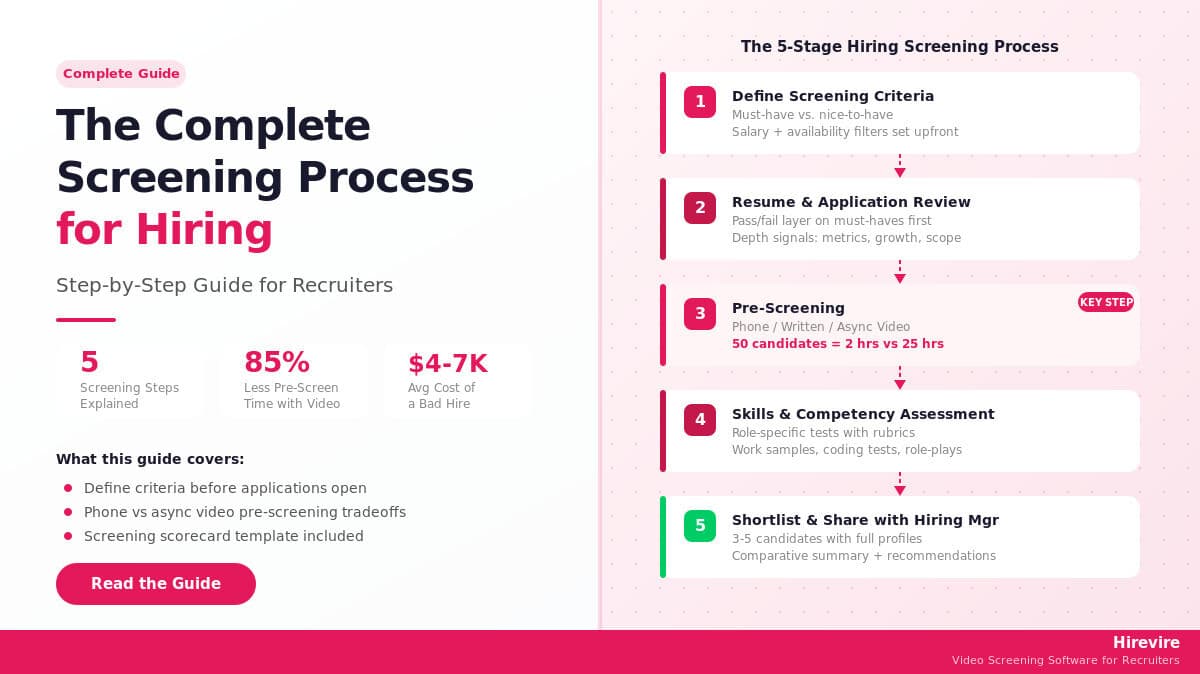
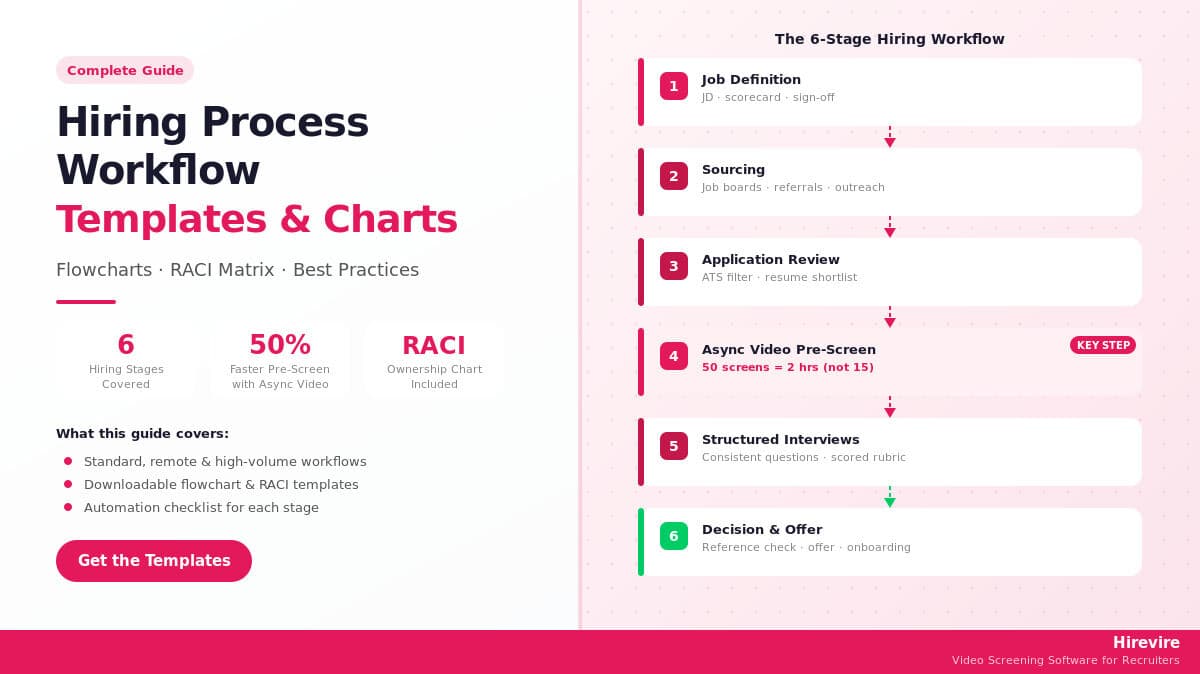
The standard hiring workflow breaks down into six stages. Every organization adds or removes steps within these stages, but the stages themselves are consistent across industries and company sizes.
Stage 1: Job Definition
Before posting anything, define what you actually need. This stage is where most hiring processes go wrong - a vague or outdated job description generates the wrong applicants and wastes everyone's time downstream.
Job definition includes:
- Writing a clear, specific job description with measurable requirements
- Getting sign-off from the hiring manager on must-haves vs. nice-to-haves
- Setting the salary range internally (even if it stays internal)
- Defining what a successful hire looks like at 30, 60, and 90 days
Stage 2: Sourcing
Sourcing covers everything from job board postings to employee referrals to proactive outreach. The goal is generating enough qualified applicants to have real options.
This stage includes:
- Posting to relevant job boards (LinkedIn, Indeed, industry-specific boards)
- Running employee referral campaigns
- Reaching out to passive candidates via LinkedIn or talent databases
- Coordinating with any staffing agencies
Stage 3: Application Review
Resume screening narrows the applicant pool before any human time is spent. Most teams use a combination of ATS filters and manual review to get from 100+ applications to a manageable shortlist of 15-20 candidates.
The problem: resume review is notoriously inconsistent. Two recruiters looking at the same resume often reach opposite conclusions, and there's no record of why anyone was rejected.
Stage 4: Pre-Screening
Pre-screening bridges the gap between resume review and formal interviews. Traditional pre-screening means 15-30 minute phone calls with every shortlisted candidate - which, for a role with 20 shortlisted candidates, costs 5-10 hours of recruiter time for a single opening.
Hirevire replaces this with async video responses. Candidates receive a link to answer 3-5 questions on video at their own convenience. The recruiter reviews responses in batches - typically spending 6-8 minutes per candidate instead of 20-30 minutes per phone call. For high-volume roles, the time savings compound quickly.
Stage 5: Structured Interviews
Structured interviews use the same questions for every candidate, rated on consistent criteria. Research consistently shows structured interviews are 2x more predictive of job performance than unstructured conversations.
This stage typically includes:
- One or two rounds of structured interviews
- Technical assessments or work samples (where relevant)
- A final-round conversation with a hiring decision maker
Stage 6: Decision and Offer
The final stage covers reference checks, offer generation, negotiation, and candidate acceptance. Many companies also include a background check at this stage, depending on the role and industry requirements.
Workflow Summary Table
| Stage | Owner | Typical Duration | Output |
|---|---|---|---|
| Job Definition | HR + Hiring Manager | 3-5 days | Approved JD + scorecard |
| Sourcing | Recruiter | Ongoing (2-4 weeks) | Applicant pool |
| Application Review | Recruiter | 1-2 weeks | Shortlist of 15-25 |
| Pre-Screening | Recruiter | 3-5 days | Interview list of 5-8 |
| Structured Interviews | Hiring Team | 1-2 weeks | Final candidates (2-3) |
| Decision + Offer | HR + Hiring Manager | 3-7 days | Accepted offer |
For a standard role, this adds up to 4-8 weeks from job posting to accepted offer. Replacing phone screens with async video pre-screening through Hirevire typically cuts 5-7 days from Stage 4 alone.
Hiring Process Flowchart [Download]
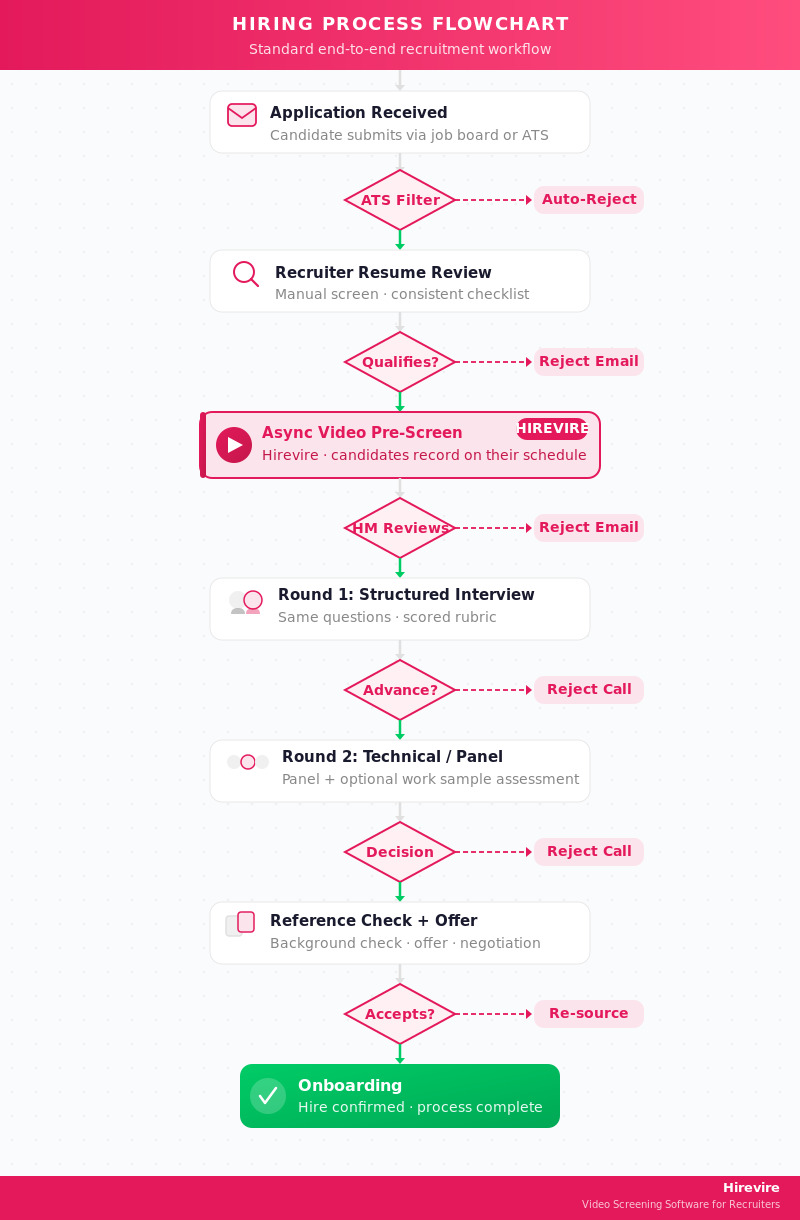
A hiring flowchart maps decision points in your process - specifically where candidates advance, where they're rejected, and who makes each decision.
Standard Hiring Flowchart
Key Decision Points
Every flowchart has decision gates where someone evaluates a candidate and makes a pass/reject call. The quality of your hiring process depends on how clear these criteria are at each gate.
Gate 1: ATS filter - Automated, based on must-have qualifications. Keep this list short (3-5 criteria max). Over-filtering here rejects qualified candidates.
Gate 2: Recruiter resume review - Manual, usually 60-90 seconds per resume. Reviewers should use a consistent checklist, not gut feel.
Gate 3: Async video pre-screen - Reviewers watch candidate responses and score on defined criteria. Hirevire's AI scoring gives recruiters a head start by flagging strong matches before they watch every response.
Gate 4: Structured interviews - Panel or individual interviews using the same question set for every candidate, scored on a rubric.
Flowchart Template: Hiring Manager Version
Some organizations separate the recruiter's process from the hiring manager's process. Here's a condensed flowchart for the hiring manager's involvement:
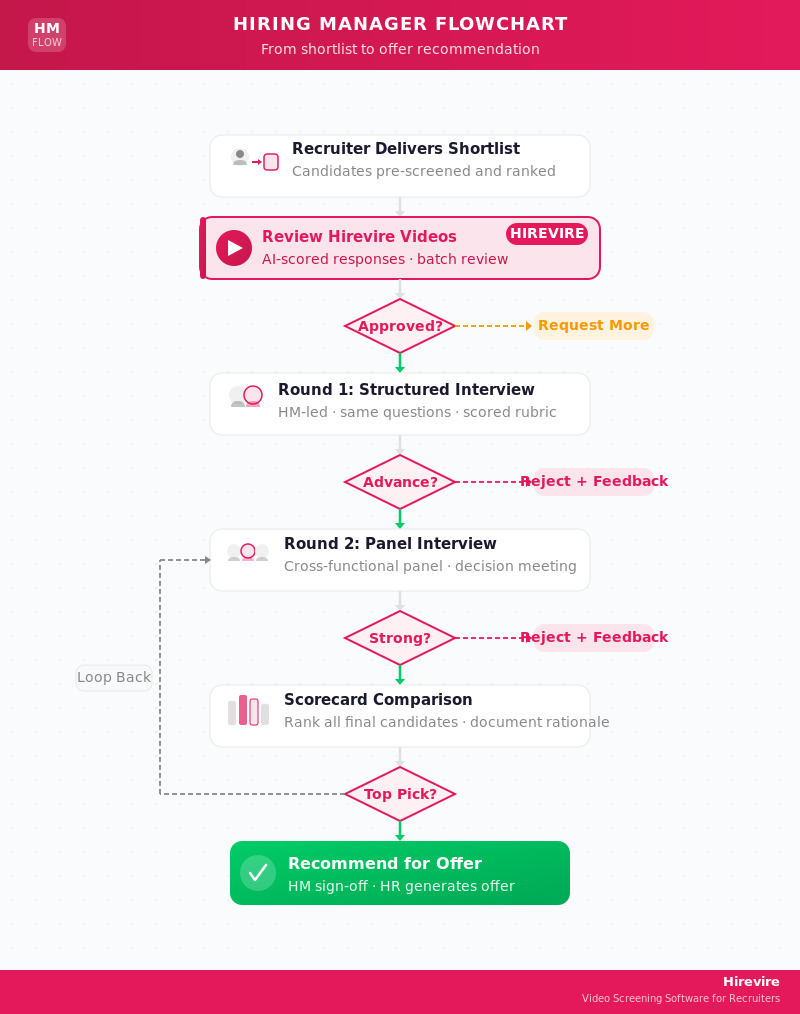
The key addition in the hiring manager flow is the scorecard comparison step before making an offer. When multiple final candidates look strong, a documented scorecard comparison makes the decision defensible and consistent.
RACI Chart for Recruitment Teams
A RACI chart (Responsible, Accountable, Consulted, Informed) defines who does what across the hiring process. Without it, tasks fall through the cracks or get duplicated.
RACI Definitions
- R (Responsible) - Does the actual work for this task
- A (Accountable) - Owns the outcome; approves the output
- C (Consulted) - Provides input before the task completes
- I (Informed) - Gets notified when the task is complete
Recruitment RACI Template
| Activity | Recruiter | Hiring Manager | HR Director | Panel Interviewers | Candidate |
|---|---|---|---|---|---|
| Write job description | R | C | A | - | - |
| Approve job posting | C | A | I | - | - |
| Source candidates | R | I | I | - | - |
| Resume screening | R | C | I | - | - |
| Send pre-screen invites | R | I | I | - | I |
| Review Hirevire responses | R | C | I | - | - |
| Schedule Round 1 interviews | R | I | I | I | I |
| Conduct Round 1 interview | C | R | - | R | - |
| Score interview | R | R | - | R | - |
| Schedule Round 2 | R | I | I | I | I |
| Conduct Round 2 | - | R | - | R | - |
| Reference checks | R | C | I | - | - |
| Make offer decision | C | A | I | - | - |
| Generate offer letter | R | C | A | - | - |
| Negotiate offer | R | A | C | - | - |
| Communicate rejection | R | I | I | - | I |
Notes on Common RACI Mistakes
Mistake: Too many "A"s on one task. Accountability must be singular. If three people are accountable for the offer decision, nobody is accountable.
Mistake: Hiring manager is "I" on resume screening. This creates misalignment. Hiring managers should be "C" - consulted before the shortlist is finalized, not informed after.
Mistake: No "R" on candidate communication. Someone needs to own rejection emails and status updates. When this isn't defined, candidates get ghosted, which damages employer brand.
For Hirevire users, async video pre-screening becomes its own row in the RACI - the recruiter owns sending invites and reviewing responses, the hiring manager is consulted on final scoring, and candidates are informed with clear instructions for recording.
Where Async Video Pre-Screening Fits [HIREVIRE]
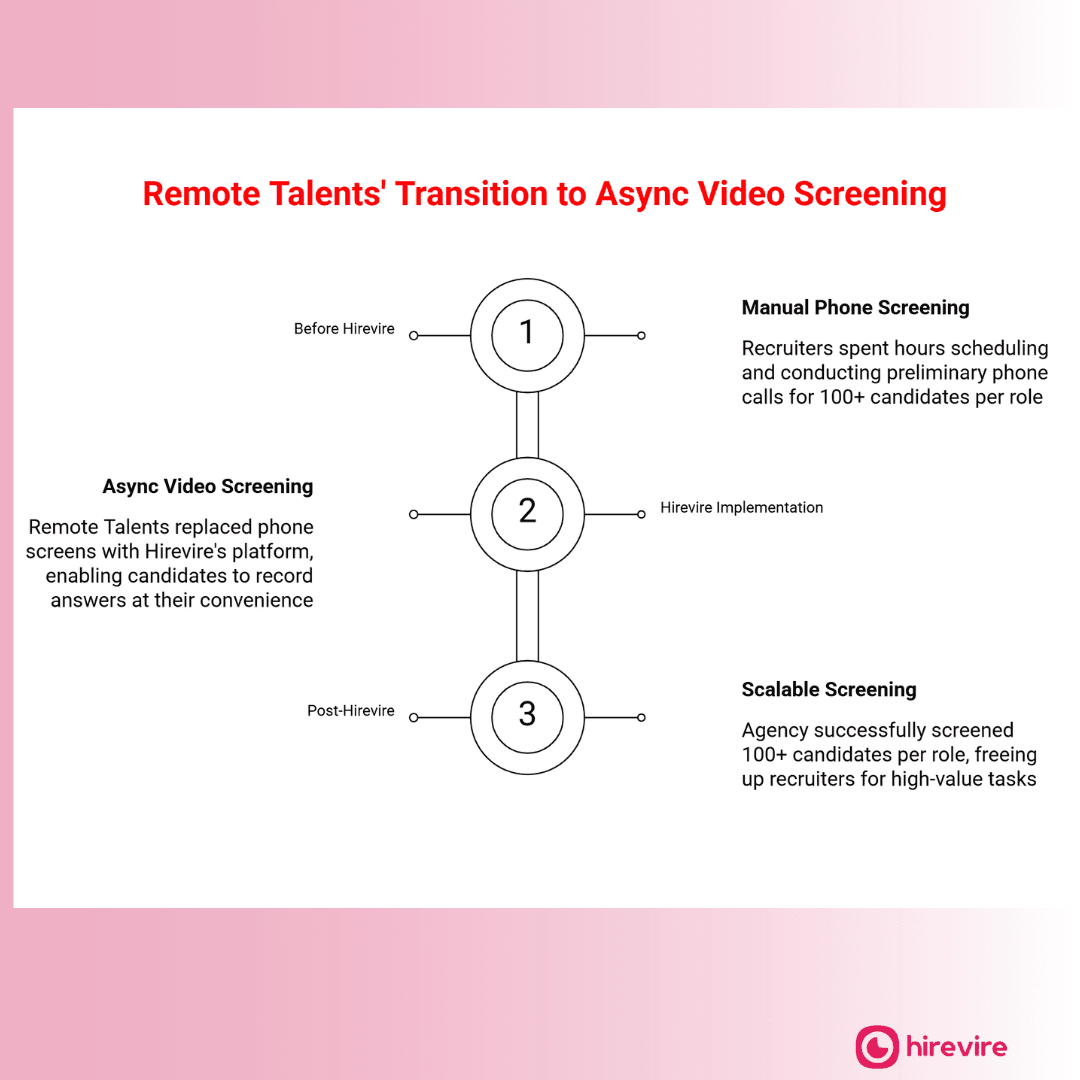
Async video pre-screening sits between resume review and live interviews. It solves the single most time-consuming part of early-stage screening: scheduling and conducting phone calls with 15-25 candidates.
The Traditional Pre-Screen Problem
A recruiter with 20 shortlisted candidates for a single role faces a scheduling problem. Each phone call takes 20-30 minutes to schedule, plus 20-30 minutes to conduct. That's 40-60 minutes per candidate, or 13-20 hours of recruiter time before a single live interview is scheduled.
For a team hiring for 5 open roles simultaneously, this compounds fast.
How Async Video Pre-Screening Works
With Hirevire, the process looks like this:
- Recruiter creates a pre-screen question set in Hirevire (3-5 questions, typically)
- Candidates receive a link to record their responses at any time - no scheduling required
- Candidates record video, audio, or text responses within a deadline the recruiter sets
- Recruiter (and hiring manager, if needed) reviews responses in a shared dashboard
- Hirevire's AI scores each response and flags strong matches
- Recruiter advances top candidates to live interviews
The candidate records once. The recruiter reviews on their schedule. No calendar coordination required.
What to Ask in Pre-Screen Videos
Strong pre-screen questions are short, specific, and reveal something a resume can't. Good examples:
Motivation questions:
- "What specifically drew you to this role, and what do you know about [Company]?"
- "Walk me through what you're looking for in your next position."
Experience validation:
- "Describe a specific project where you used [key skill]. What was the outcome?"
- "Tell me about your experience with [tool/process]. How did you apply it day-to-day?"
Role-specific questions:
- For customer-facing roles: "Tell me about a time you handled a difficult customer. What did you do?"
- For technical roles: "Walk me through how you'd approach [common scenario in this role]."
Hirevire lets you set a time limit per question (30 seconds to several minutes) and allows candidates unlimited re-recording attempts so they can present their best answer.
Async Video in the Workflow Diagram
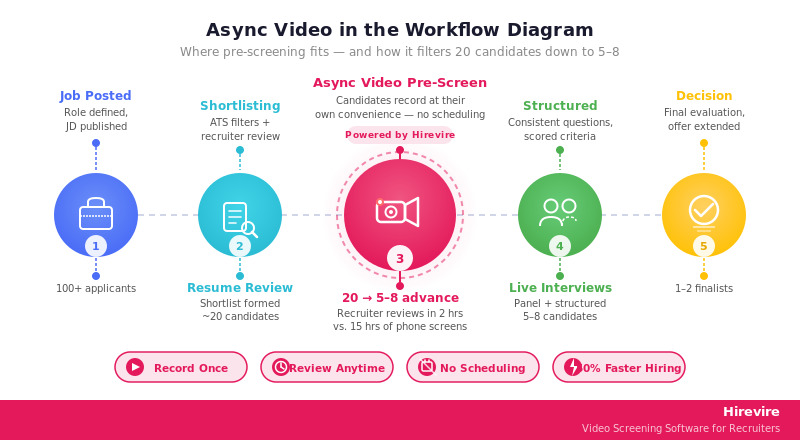
The practical impact: a recruiter who previously spent 15 hours on phone screens now spends 2 hours reviewing async video responses, with better information per candidate.
Hirevire Pricing
| Plan | Monthly Price | Yearly Price | Interviews/Year | Active Jobs |
|---|---|---|---|---|
| Essentials | $49/month | $39/month | 300 | 1 |
| Professional | $149/month | $99/month | 1,200 | 5 |
| Agency | $249/month | $199/month | 12,000 | 20 |
All plans include no per-interview fees within your allocation, unlimited questions per interview, AI transcripts, and unlimited re-recording attempts for candidates.
Ratings: G2: 4.7/5 (25+ reviews) | Capterra: 5/5 (20+ reviews) | AppSumo: 4.9/5 (70+ reviews)
Remote Hiring Workflow Adjustments
Remote hiring doesn't require a completely different process, but it requires adjustments at three specific stages: sourcing, pre-screening, and live interviews.
Sourcing Adjustments for Remote Roles
Remote roles attract geographically distributed applicants, which changes volume and profile mix. A remote engineering role at a US company might attract 3-5x more applications than the equivalent on-site role.
Practical adjustments:
- Add timezone requirements explicitly in the job description (e.g., "Must overlap 4 hours with US Eastern time")
- Specify whether the role is "remote anywhere" or remote within specific regions
- Note work authorization requirements upfront to avoid wasted screens
Pre-Screening Adjustments
Async video pre-screening is actually better suited to remote hiring than phone screens. Candidates in different timezones don't need to coordinate schedules, and you can require video responses to assess communication clarity before investing live interview time.
For remote roles, add these pre-screen questions:
- "Describe your current remote work setup - where you work and how you manage distractions."
- "How do you prefer to stay in sync with teammates across timezones?"
- "Walk me through a time you worked on a project with team members in multiple locations."
Hirevire candidates can record responses from anywhere, and the recruiter sees written transcripts alongside the video - useful when assessing written communication for distributed team roles.
Interview Stage Adjustments for Remote Candidates
Live interviews for remote roles happen over video by default. A few adjustments make a difference:
- Use the same video platform for all interviews (don't have some candidates on Zoom and others on Teams)
- Test audio/video setup as part of the scheduling confirmation
- Include one interview question about async communication: "How do you document decisions when your team is distributed?"
- For senior roles, add a structured async exercise (written response or take-home) to assess independent work quality
Remote Hiring RACI Additions
| Activity | Recruiter | Hiring Manager | HR Director |
|---|---|---|---|
| Verify timezone compatibility | R | C | I |
| Confirm work authorization | R | I | A |
| Technical setup check pre-interview | R | I | I |
| Remote work culture interview question | C | R | I |
Remote Hiring Workflow Template
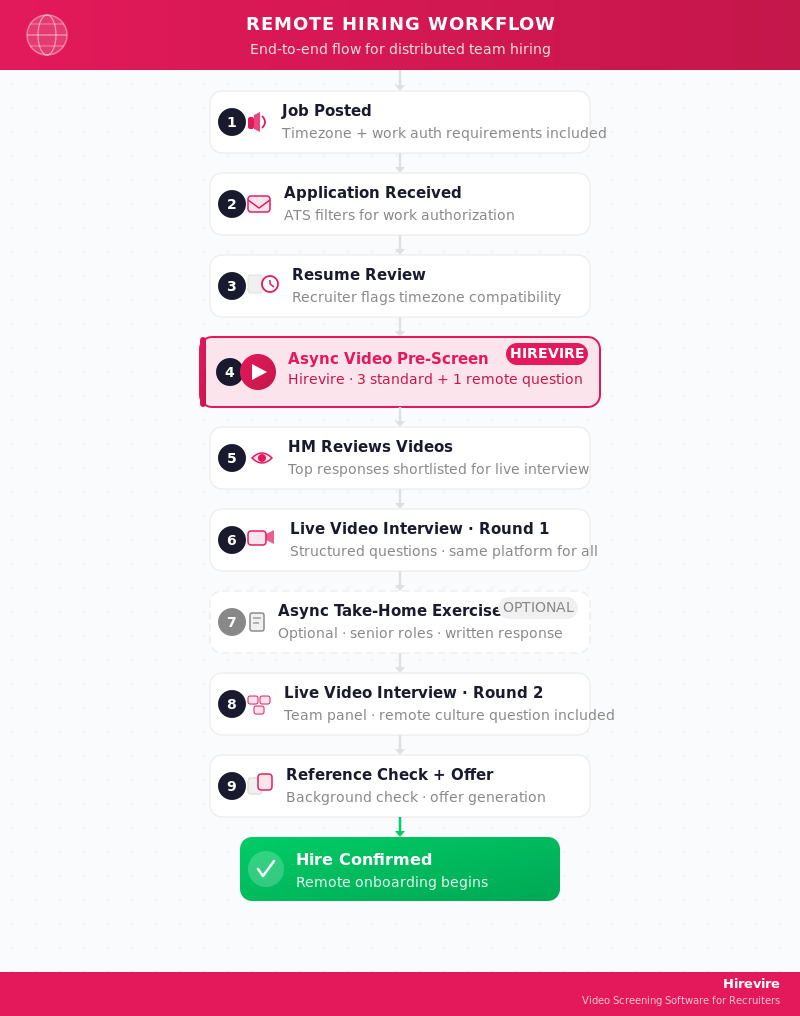
For roles on the modern hiring process guide, remote-specific steps like work authorization verification and timezone screening belong at the earliest possible stage to avoid wasting interview resources on candidates who aren't actually eligible.
High-Volume Hiring Workflow Variant
High-volume hiring - defined as filling 10+ identical or similar roles simultaneously - requires a fundamentally different approach to the pre-screen and interview stages.
Where High-Volume Hiring Breaks Down
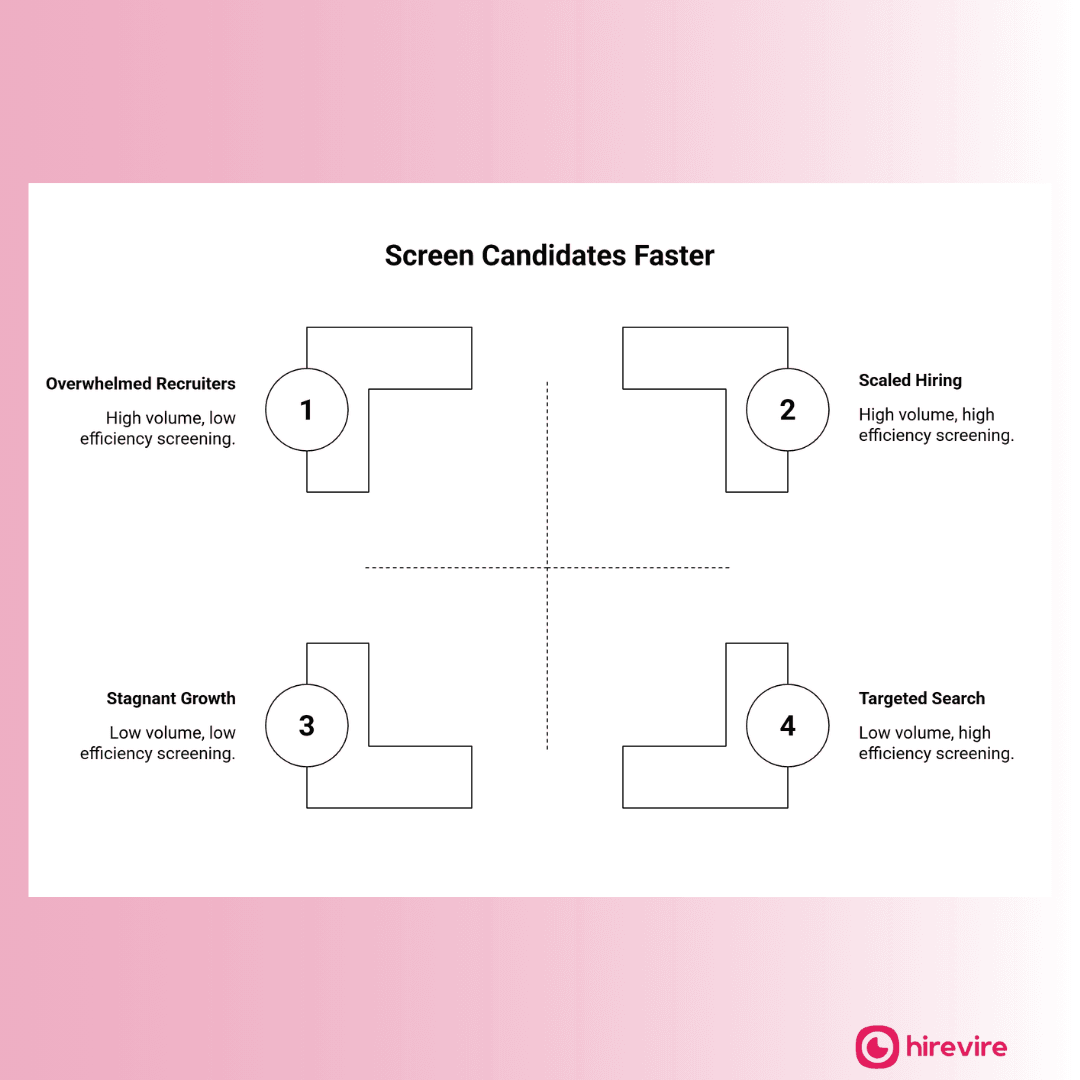
Traditional workflows fail at high volume because they were designed for one-at-a-time hiring. The problems:
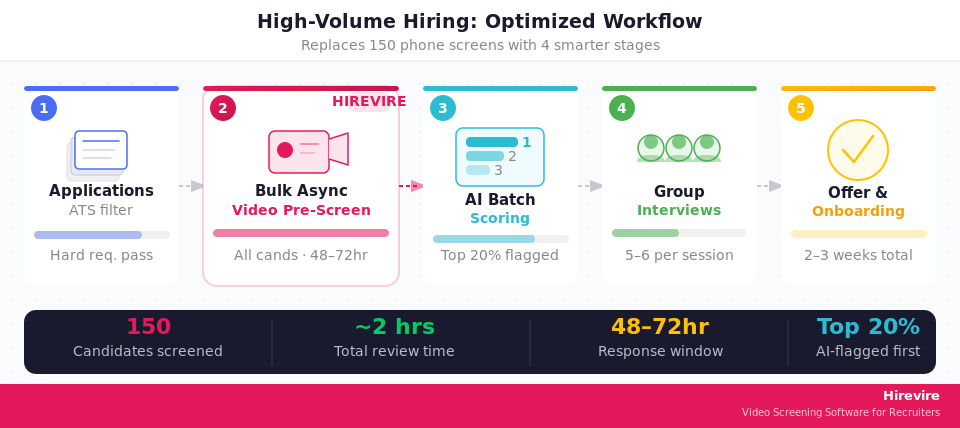
- Scheduling bottleneck: Coordinating 150 phone screens for 25 open warehouse associate roles is a full-time job
- Evaluator fatigue: Interviewers reviewing their 8th candidate of the day score differently than they did on candidate 1
- Inconsistency: When 5 recruiters each conduct their own phone screens with different questions, the resulting shortlists aren't comparable
- Candidate drop-off: Candidates applying to multiple employers accept the first offer. Long screening processes mean you lose strong candidates while still evaluating
High-Volume Workflow Design
Async Video for High-Volume Roles
Hirevire is particularly effective for high-volume hiring because the same question set goes to all candidates at once. You send 150 pre-screen links. Candidates respond over 48-72 hours. You review the top-scored responses rather than conducting 150 phone calls.
The Agency plan ($199/month billed yearly) covers 12,000 interviews/year and 20 active job postings - enough for sustained high-volume programs.
Practical tips for high-volume async pre-screens:
- Keep the question set to 4 questions maximum (candidates are less likely to complete a long pre-screen)
- Set a tight deadline - 48-72 hours - to maintain hiring speed
- Use Hirevire's scoring to review the top 20% of responses first; only go deeper if needed
- Standardize rejection communication so it goes out automatically when candidates are archived
High-Volume RACI
| Activity | Recruiter | Sourcing Specialist | Hiring Manager | Operations Lead |
|---|---|---|---|---|
| Set up Hirevire question template | R | - | C | - |
| Bulk send pre-screen invites | R | R | - | I |
| Review AI-scored responses | R | - | I | - |
| Conduct group interview sessions | R | - | R | C |
| Track offer acceptance rate | R | - | I | A |
| Adjust volume targets weekly | C | C | - | A |
Benchmarks for High-Volume Hiring
According to industry benchmarks from LinkedIn Talent Solutions, high-volume roles should target:
- Application-to-interview rate: 10-20% (if lower, job description may be too narrow)
- Interview-to-offer rate: 30-50%
- Offer acceptance rate: 70%+ (if lower, compensation or process may be the issue)
- Time from posting to first day: 2-3 weeks for hourly/volume roles
For roles with strong retention problems, the high-volume hiring complete guide has additional guidance on connecting hiring criteria to 90-day retention rates.
How to Automate Each Stage
Automation in hiring isn't about replacing human judgment. It's about removing administrative tasks that add no value to the decision.
Stage-by-Stage Automation Options
Stage 1: Job Definition
- Automation: Job description templates that auto-populate role-specific requirements
- Approval workflows that route JD sign-off to the right people
- Integration between HRIS headcount requests and ATS job creation
Stage 2: Sourcing
- Automation: Job board syndication (post once, distribute to multiple boards)
- Employee referral tracking with automated follow-up
- Passive candidate outreach sequences via LinkedIn Recruiter
Stage 3: Application Review
- Automation: ATS keyword filters for hard requirements (degree, location, authorization)
- Auto-rejection with templated emails for candidates who don't meet minimum criteria
- Resume scoring tools to prioritize review order
Stage 4: Pre-Screening
- Automation: Hirevire handles the entire pre-screen workflow - link generation, candidate invites, response collection, AI scoring, and recruiter notifications
- Automated deadline reminders sent to candidates who haven't yet completed their pre-screen
Stage 5: Structured Interviews
- Automation: Interview scheduling tools (Calendly, GoodTime) that let candidates self-schedule within recruiter-defined availability windows
- Interview question distribution to all panel members via ATS
- Automated interview confirmation and preparation emails to candidates
Stage 6: Decision and Offer
- Automation: Reference check via automated surveys (SparkHire, Checkster)
- Offer letter generation from approved templates
- Background check integrations with providers like Checkr
- Onboarding document collection via DocuSign or similar
Automation Priorities
Not everything is worth automating. The highest-ROI automations in hiring are:
- Async video pre-screening - Replaces 15-30 minute phone calls with structured video responses. Hirevire handles this end-to-end.
- Interview scheduling - Self-scheduling eliminates back-and-forth email chains for live interviews
- Candidate status emails - Automated status updates at each stage reduce recruiter admin time
Lower-priority automation: AI resume scoring (still benefits from human review), automated reference checks for senior roles (these should be personal conversations).
Workflow Automation Checklist
| Stage | Automation Available | Priority | Tool Examples |
|---|---|---|---|
| Job posting | Multi-board syndication | Medium | Greenhouse, Workable |
| Resume filtering | ATS keyword filter | High | Most ATS platforms |
| Pre-screen | Async video responses | Very High | Hirevire |
| Interview scheduling | Self-scheduling | High | Calendly, GoodTime |
| Candidate communications | Status email sequences | Medium | ATS native or HubSpot |
| Offer generation | Template + e-sign | High | DocuSign, PandaDoc |
| Background checks | Automated ordering | Medium | Checkr, Sterling |
For organizations building out full hiring workflow automation, the realistic order of operations is: automate pre-screening first (highest time savings), then interview scheduling, then offer generation.
Frequently Asked Questions
What are the 6 stages of a hiring process workflow?
The standard hiring workflow covers: (1) job definition - writing the JD and getting internal sign-off; (2) sourcing - generating applicants through job boards, referrals, and outreach; (3) application review - screening resumes against criteria; (4) pre-screening - assessing shortlisted candidates before live interviews; (5) structured interviews - consistent interview rounds with scored criteria; and (6) decision and offer - reference checks, offer generation, and candidate acceptance.
The duration of each stage varies by role and volume, but the full process typically runs 4-8 weeks for professional roles.
What should a hiring process flowchart include?
A hiring flowchart should map decision points (pass/reject gates), show who owns each decision, and specify what happens to rejected candidates at each stage. At minimum, include: application receipt, ATS filter, resume review, pre-screen, interview rounds, and offer.
The value of a flowchart isn't completeness - it's clarity. If everyone on your recruiting team follows the same decision tree, your screening will be more consistent, and you'll be able to identify which stage is creating bottlenecks when time-to-hire creeps up.
What is a RACI chart in recruitment, and why does it matter?
A RACI chart defines who is Responsible, Accountable, Consulted, and Informed for each activity in the hiring process. It prevents the most common hiring failures: tasks that fall through the cracks because no one owns them, and decisions made by the wrong person because accountability isn't clear.
The recruiter is typically Responsible for most day-to-day tasks. The hiring manager is Accountable for the final hire decision. HR leadership is Informed at key milestones. Panel interviewers are Responsible for conducting their interviews but rarely Accountable for the final decision.
How does async video screening fit into a hiring workflow?
Async video screening replaces the phone screen stage. Candidates receive a link to record 3-5 video responses at their convenience, with no scheduling required. The recruiter reviews responses asynchronously - typically in 1/3 the time it would take to conduct live phone screens.
Hirevire places this step between resume review and live interviews. The result: hiring managers see video responses from pre-qualified candidates before scheduling any live time, which improves both the quality and the efficiency of the interview stage.
What adjustments are needed for a remote hiring workflow?
Remote hiring workflows need adjustments at three points: sourcing (add timezone and work authorization requirements to the job description), pre-screening (add remote-work-specific questions about async communication and home setup), and interviews (standardize on one video platform and include questions about distributed work experience).
Async video pre-screening is particularly well-suited to remote hiring because it eliminates the timezone scheduling problem entirely. A candidate in Manila and a recruiter in Austin don't need overlapping availability - the candidate records when it's convenient, and the recruiter reviews when it's convenient.
What makes a good high-volume hiring workflow?
High-volume workflows need to prioritize speed and consistency over customization. The key differences from standard hiring: use bulk async pre-screening to process all candidates through the same question set simultaneously, use AI scoring to identify the top candidates before a human reviews anyone, and consider group interview formats to increase interview throughput.
Hirevire is built for this - the Agency plan handles 12,000 interviews/year across 20 active positions, which covers most sustained high-volume hiring programs.
How should you structure an interview scorecard for consistent evaluation?
An interview scorecard should have 4-6 competency areas with a defined rating scale (1-5 is standard) and behavioral anchors for each score. Each interviewer on the panel should evaluate the candidate independently before comparing scores to avoid anchoring bias.
Required elements: candidate name, role, interviewer name and date, competency categories with ratings, written notes for each category, an overall hire/no-hire recommendation, and an overall score. For a structured scorecard template, see how to design a better hiring process for downloadable examples.
What's the right time-to-hire benchmark for different role types?
Time-to-hire benchmarks vary significantly by role complexity. According to LinkedIn Talent data: hourly/volume roles average 7-14 days; individual contributor professional roles average 25-35 days; senior/management roles average 45-60 days; and executive roles often run 90+ days.
The pre-screen stage is usually where the most time savings are available. Replacing phone screens with async video pre-screening through Hirevire typically cuts 5-10 days from the standard workflow, primarily by eliminating scheduling friction.
How do you prevent bias in a hiring workflow?
Bias in hiring enters most often at two points: resume review (where name, school, and formatting trigger unconscious responses) and unstructured interviews (where interviewers are effectively deciding on likeability rather than capability).
Structural fixes: blind resume review where possible, consistent scoring criteria applied before reviewing any applicant, structured interview questions asked in the same order for every candidate, independent scoring before panel debrief, and documentation of rejection reasons at every gate.
Async video pre-screening through Hirevire adds a consistent data point between resume review and live interviews - every candidate answers the same questions, and recruiters can score responses against the same rubric.
How do you schedule interviews efficiently for candidates across multiple time zones?
For remote and distributed hiring, the most effective approach is candidate self-scheduling within recruiter-defined availability windows. Tools like Calendly or GoodTime let recruiters block their interview times once, then send a scheduling link to candidates who self-select a slot.
For async pre-screening via Hirevire, there's no scheduling at all - candidates record on their own time, and the deadline is set by the recruiter (typically 48-72 hours). This eliminates the timezone problem entirely for the pre-screen stage.
Conclusion
A hiring workflow that works is one that runs consistently regardless of which recruiter is handling it. That means documented decision criteria at each stage, clear RACI ownership, and automation for the steps that don't require human judgment.
The flowcharts and RACI templates in this guide give you a starting point. Adapt them to your team size, role types, and tools. The one addition that consistently delivers the biggest time savings with no quality tradeoff: async video pre-screening at Stage 4.
Key Takeaways
- The standard hiring workflow has 6 stages; most time savings come from Stage 4 (pre-screening)
- A hiring flowchart should map decision points, not just list steps
- A RACI chart with one Accountable owner per decision prevents dropped tasks and bad decisions
- Async video pre-screening replaces phone screens with faster, more consistent evaluation
- Remote and high-volume hiring require workflow adjustments at specific stages, not full rebuilds
- The highest-ROI automation in hiring is pre-screening; interview scheduling is second
Your Next Steps
- Download the RACI template from this guide and fill in the names for your team
- Map your current process against the 6-stage flowchart - identify which stage is your biggest bottleneck
- Try Hirevire free to add async video pre-screening to your workflow with no setup fee
Ready to cut pre-screen time by 50%?
Last updated: March 2026. All pricing and workflow information verified as of March 2026.