How Candidates Showcase Skills and Personality Beyond the Resume
A resume is a document. It lists titles, dates, and bullet points. What it cannot do is tell a hiring manager how a candidate thinks under pressure, whether they can explain a complex idea clearly, or how they carry themselves when speaking to a client for the first time.
That gap is expensive. According to LinkedIn's Global Talent Trends research, 92% of talent professionals say soft skills matter as much as or more than hard skills when hiring, yet resumes capture none of them. The result: recruiters spend hours on phone screens trying to get a read on people that a well-designed async question could surface in minutes.
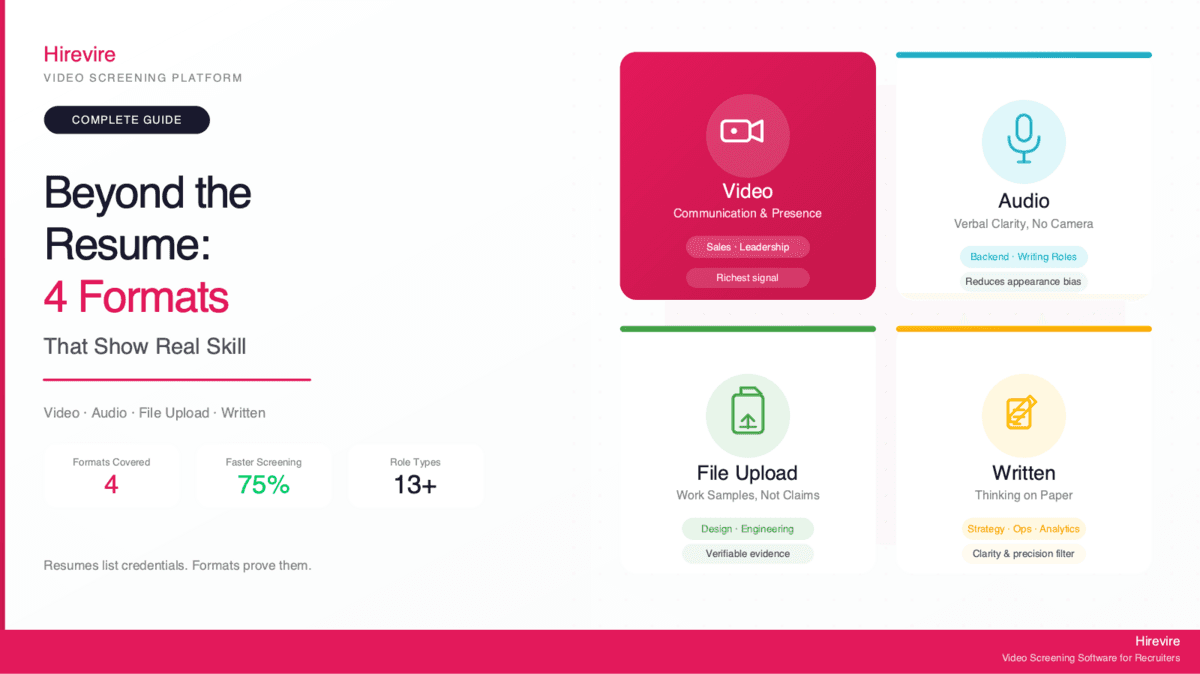
Quick Summary: This guide covers the four response formats - video, audio, file uploads, and written - that let candidates demonstrate what resumes hide. Hirevire collects all four formats in a single async screening flow, giving recruiters richer candidate insight before any live interview is scheduled.
TL;DR - What Resumes Can't Show, and What Does
Resumes were designed for a world where all hiring happened face-to-face. They list credentials and work history well. They fail completely at capturing the qualities that predict whether someone will actually succeed in a role.
| Skill type | Resume reveals it? | Best format to assess |
|---|---|---|
| Communication clarity | No | Video response |
| Problem-solving approach | No | Written or video |
| Actual work output | No | File upload |
| Personality and presence | No | Video or audio |
| Technical credentials | Yes | Resume + file upload |
| Work history | Yes | Resume |
| Analytical thinking | Partially | Written response |
| Interpersonal warmth | No | Video response |
The formats covered in this guide - video, audio, file uploads, and written responses - are not replacements for resumes. They are complements that surface the information resumes structurally cannot carry.
Four Things Resumes Don't Show
Before looking at the formats themselves, it helps to understand exactly what information is missing from a traditional resume review.
1. Communication ability
A resume can claim "excellent written and verbal communication skills." It cannot demonstrate them. A candidate who struggles to articulate ideas in conversation may have a polished resume written with help from a template or a friend. The reverse is also true: strong communicators with non-traditional backgrounds often produce resumes that undersell them because they haven't optimized for applicant tracking systems. According to research from the National Association of Colleges and Employers, communication skills rank as the top attribute employers seek in candidates - yet the resume review stage does almost nothing to surface them.
2. Problem-solving approach
How someone reaches an answer matters as much as whether they get it right. A written question - "Walk us through how you'd handle an unhappy customer who received the wrong order" - reveals thought process, empathy, and structured reasoning in a way no resume bullet point can. Resumes show outcomes; async questions show the path.
3. Actual work samples
Claims like "designed high-converting landing pages" or "wrote technical documentation for a product launch" are impossible to verify from a resume alone. A file upload changes that completely. A designer can submit a portfolio link or PDF. A writer can attach a published article. An analyst can share a sanitized data model. The claim becomes verifiable evidence.
4. Personality and cultural fit
This is the most subjective category, but also the one hiring managers most often cite as a make-or-break factor. A video response showing a candidate who is warm, direct, and genuinely enthusiastic about the role tells a story no document can.
Video Responses: Showing Communication and Presence
Video is the richest format for async candidate assessment. It combines verbal communication, tone, pacing, and non-verbal cues in a way no other format replicates.
Hirevire lets recruiters send candidates a set of video questions they answer on their own time, from any device, with no login or download required. The recruiter reviews responses asynchronously - often at 1.5x or 2x speed - and can share them with teammates for a second opinion.
Best for:
- Customer-facing roles (sales, account management, support)
- Leadership and management positions
- Roles where presence and communication style affect team or client outcomes
- Any position where accent, tone, or interpersonal warmth matters for day-to-day performance
What video reveals that resumes don't:
- Whether a candidate can organize their thoughts under mild time pressure
- How they present themselves in a professional context
- Whether their communication style matches the team's culture
- Energy level and engagement with the role
Example question that works well in video format: "Tell us about a time a project didn't go as planned. What happened, and what did you do differently afterward?"
A written answer to that question produces structured text. A video answer shows pacing, self-awareness, and how the candidate handles a moment of vulnerability in a professional context.
"Being able to see and hear candidates through videos and audios before even scheduling an interview has made our selection process more efficient and effective." Flávio Pavanelli, CEO Moinhos Vieira, AppSumo
Audio Responses: When Video Adds Friction
Video is not always the right format. For some roles and some candidates, requiring a camera introduces friction that filters out good people for the wrong reasons.
A backend engineer applying for a remote role may find video requirements invasive or irrelevant to the job. A candidate applying from a shared workspace or a home with limited privacy may produce a low-quality video that reflects their environment, not their ability. Neurodiverse candidates sometimes find video format more cognitively demanding in ways unrelated to job performance.
Hirevire supports audio-only responses as a standalone format, giving candidates the option to record without appearing on camera.
Best for:
- Writing-heavy roles (editors, copywriters, technical writers)
- Backend or data-focused technical roles where presence isn't a job requirement
- Roles where the candidate pool may skew toward privacy-conscious applicants
- Organizations that want to reduce potential appearance-based bias in early screening
What audio reveals:
- Verbal communication clarity and vocabulary
- Tone, confidence, and composure
- Thoughtfulness without the additional cognitive load of camera presence
Audio responses are also easier to review in bulk. A recruiter can listen to a set of audio responses during a commute or between tasks in a way that video does not easily allow.
File Uploads: Actual Work, Not Claims of Work
The most direct way to assess whether a candidate can do a job is to look at work they have already done. File uploads make that possible at scale, without a portfolio review process that requires back-and-forth email.
Hirevire accepts file uploads as a response format alongside video, audio, and text. A recruiter can add a file upload question to the same screening flow as other response types - candidates submit everything in one pass.
Best for:
- Design roles (UX, graphic design, brand)
- Writing and content roles (samples, published work, case studies)
- Engineering roles (code samples, GitHub links, architecture diagrams)
- Finance and analytics roles (sanitized models, reports, dashboards)
- Any role where past work is more predictive than interview performance
What file uploads replace:
Traditional portfolio review requires a recruiter to email candidates, wait for responses, follow up on incomplete submissions, and then manually organize what arrives. An async file upload question at the screening stage consolidates all of that into a single structured response.
Practical considerations:
- Request a specific deliverable, not just "any work sample." "Please share one piece of work you're proud of and include a brief note explaining the brief you were given and the decisions you made" produces more useful signal than "share your portfolio."
- File uploads work best when combined with a written or video question asking the candidate to contextualize the work. The file shows the output; the question surfaces the thinking.
"Being able to set up questions that can be answered with video, text, audio, an image, a file, multiple-choice options, or even a single-choice test style is fantastic." Sergio Arias Merino, AppSumo
Written Responses: Thinking on Paper
Written responses occupy a different space than video or audio. They strip away vocal delivery and presence, focusing entirely on how a candidate structures and expresses their thinking.
For some roles, that is exactly the right filter. A strategist who cannot write a clear recommendation memo is going to struggle regardless of how well they interview in person. A customer success manager whose written responses are disorganized or full of errors will create problems in client communication down the line.
Hirevire includes written response questions in the same screening flow as other formats, so recruiters can mix formats to match the role's actual demands.
Best for:
- Strategy and analytical roles
- Operations roles with heavy documentation requirements
- Any position where async written communication is core to the job (remote teams, distributed organizations)
- Roles where grammar, clarity, or precision in writing matters professionally
What written responses reveal:
- How a candidate organizes and prioritizes information
- Vocabulary and precision
- Whether their thinking is clear enough to put in writing
- Attention to detail (typos, formatting, completeness of answer)
What to watch for:
Written responses are the format most susceptible to AI assistance. For roles where authentic written communication matters, ask questions that require specificity - "Give an example of a decision you made that turned out to be wrong. What information did you have, what did you miss, and what would you do differently?" - rather than generic prompts that produce templated answers.
Which Format for Which Role: Quick Reference
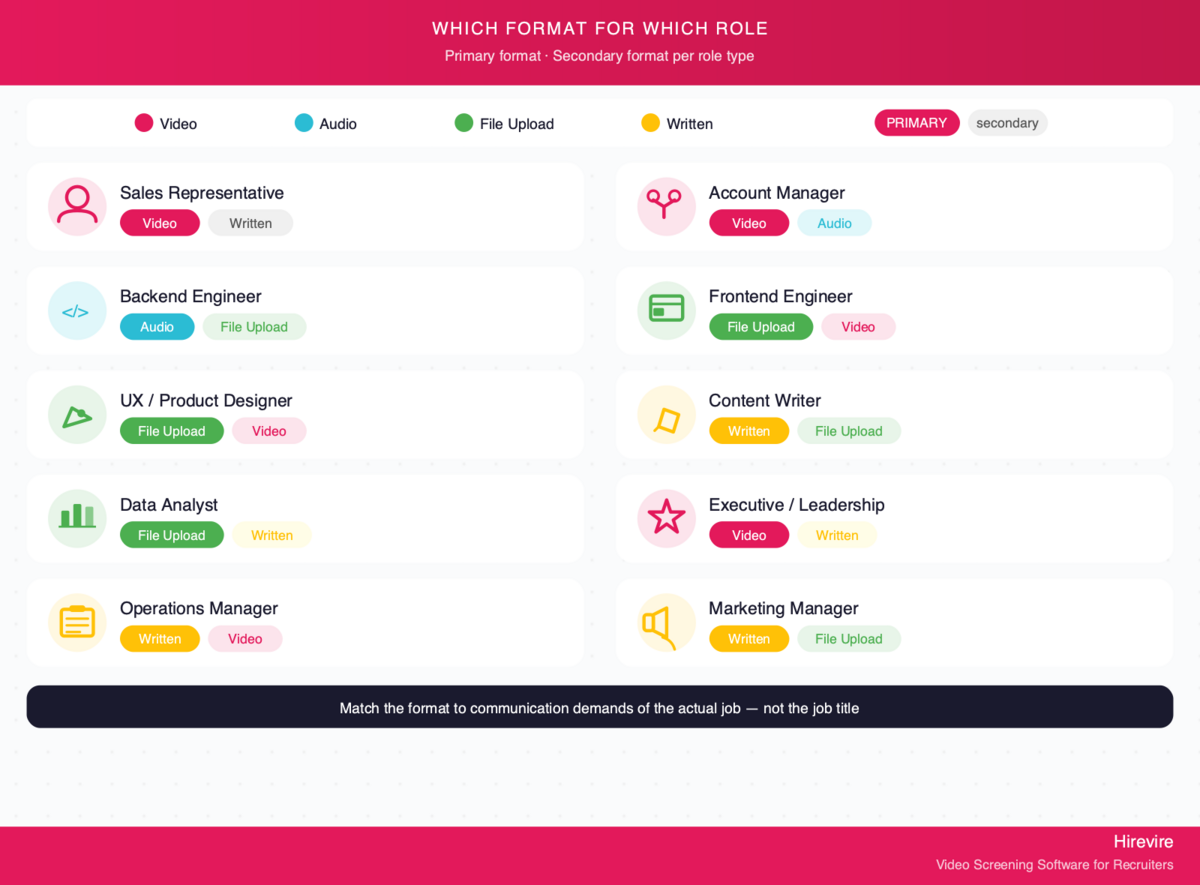
| Role type | Recommended primary format | Useful secondary format |
|---|---|---|
| Sales representative | Video | Written (email sample) |
| Account manager | Video | Audio |
| Customer support | Video | Written |
| Backend engineer | Audio or written | File upload (code) |
| Frontend engineer | File upload | Video or audio |
| UX/Product designer | File upload | Video |
| Content writer | Written | File upload (samples) |
| Data analyst | File upload | Written |
| Operations manager | Written | Video |
| Executive/Leadership | Video | Written |
| Recruiter/HR | Video | Written |
| Finance/Accounting | Written | File upload |
| Marketing manager | Written | File upload (campaigns) |
This table is a starting point, not a rule. A sales role at a company that communicates almost entirely through Slack may weight written communication more heavily. An engineering role at a client-facing consultancy may warrant video despite the technical focus. Match the format to the actual communication demands of the job.
How Hirevire Brings All Four Formats Together
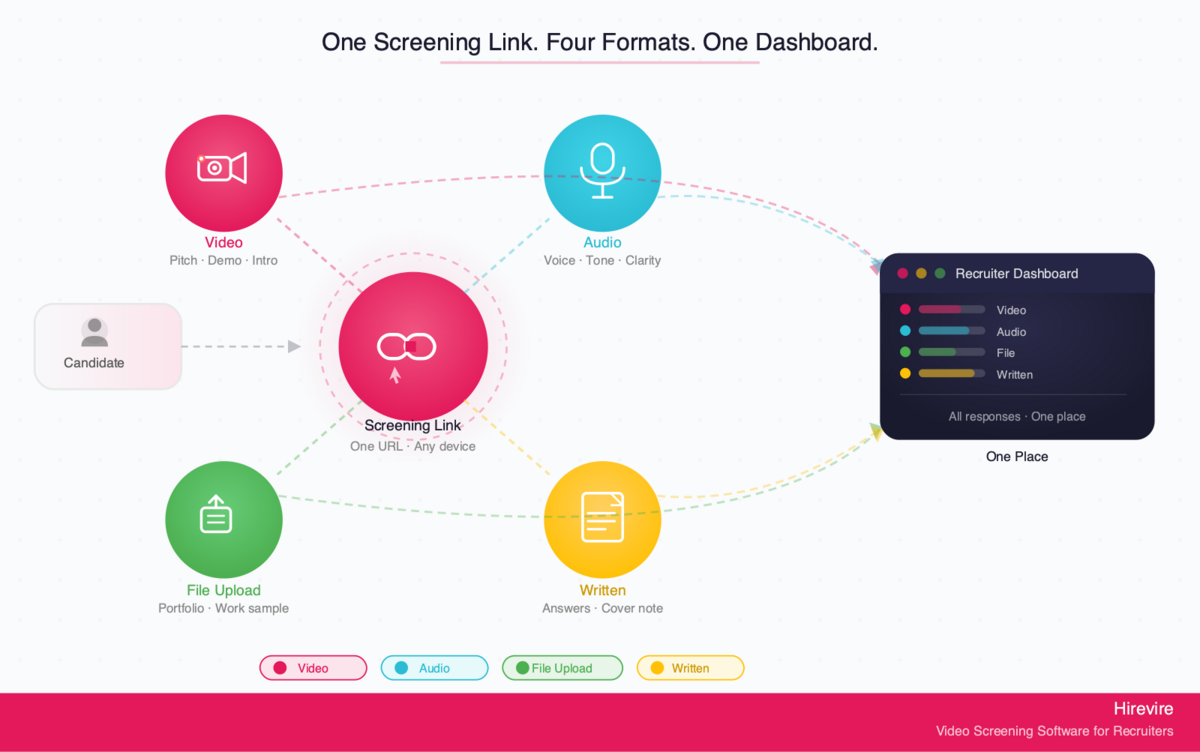
The practical challenge with multi-format screening is logistics. Collecting video responses through one tool, written answers through another, and work samples via email creates fragmentation that slows down the process and makes it hard to compare candidates.
Hirevire collects all four response formats in a single screening link. A recruiter builds a question set - one video question, one written question, one file upload request - and candidates complete everything in one session from any device, without creating an account.
What this means in practice:
- Candidates submit everything in one pass, reducing drop-off from multi-step processes
- Recruiters review all responses for a candidate in one place, making comparison straightforward
- Teams can share response links with hiring managers without needing them to log in to a separate system
- AI-generated transcripts (available in 90+ languages) make video and audio responses searchable and reviewable in text form for reviewers who prefer reading to watching
Pricing:
| Plan | Monthly | Yearly | Best for |
|---|---|---|---|
| Essentials | $49/mo | $39/mo (billed yearly) | Single active role |
| Professional | $149/mo | $99/mo (billed yearly) | Up to 5 active roles, AI features |
| Agency | $249/mo | $199/mo (billed yearly) | Up to 20 active roles, white-label |
Customer Reviews:
"I really like how easy it is to use. The platform helps me collect video, audio, and text answers from candidates without needing to call or meet them first. It saves me a lot of time and keeps everything organised in one place." Muhamad Hariz M., G2
Capterra: 5/5 stars (20+ reviews)
AppSumo: 4.9/5 (70+ reviews)
"It cuts down my hiring process by at least 75% and made it sooo much easier to see/feel who the candidates were before having to hop on a call with them." ElevateClients, AppSumo
Frequently Asked Questions
Format Basics
What's the difference between a video response and a video interview?
A video interview is a live, scheduled call - either in-person or over Zoom - that requires both parties to be available at the same time. A video response is a pre-recorded answer to a set question, submitted by the candidate on their own schedule. Video responses are asynchronous: the candidate records when it suits them, the recruiter reviews when it suits them, and neither party needs to coordinate calendars for the screening stage.
Can candidates retake their responses if they're unhappy with the first recording?
This depends on the platform settings. Hirevire allows recruiters to configure whether candidates can re-record their responses, giving organizations control over how much editing candidates can do. Allowing re-recording generally produces better-quality responses but introduces some rehearsed polish; limiting re-records captures more spontaneous, in-the-moment communication.
Which format is best for reducing bias?
There is no single answer, but structured async screening generally reduces certain types of bias compared to unstructured phone screens. A phone screen where a recruiter forms an impression based on name, accent, or conversational style in the first 30 seconds is more susceptible to first-impression bias than a structured set of questions where all candidates answer the same prompts. File uploads and written responses are the most neutral in terms of presence-based signals. Audio responses reduce appearance bias. The key is consistency: asking every candidate the same questions in the same format.
Comparison to Live Interviews
Do async response formats replace the live interview?
No. Async screening formats replace the early-stage phone screen, not the substantive interview. The goal is to gather enough signal to decide whether a live interview is worth scheduling - and to make that live interview more productive by entering it with context about the candidate's communication style and work. Hirevire is positioned as candidate screening software that sits between application review and the first live conversation.
What about roles where live conversation is the whole job?
For high-stakes client-facing roles, it sometimes makes sense to include a live component earlier. But even then, an async video response question first can filter out candidates who clearly are not a fit before a recruiter invests time in a live call. The async stage does not need to be the only gate - it can be a first gate.
How do candidates respond to async screening?
Mixed, but trending positive as the format becomes more familiar. Candidates who have completed async screens before generally prefer them to phone screens because they can record at a time that suits them and give more considered answers than they would in a live call. The main friction point is candidates who are unfamiliar with the format. Clear instructions and a short introductory video from the hiring manager or recruiter - which Hirevire supports - significantly improve candidate completion rates.
Setup
How many questions should a screening flow include?
Three to five questions is the standard range. Below three, the recruiter does not gather enough signal to make a confident decision. Above five, candidate completion rates drop and the review process becomes time-consuming. For most roles, a flow of one "tell us about yourself" prompt, one role-specific scenario question, and one work sample or written question covers the key assessment areas without overwhelming candidates.
What makes a good async screening question?
Specificity. "Tell me about yourself" produces answers ranging from life stories to five-second non-answers. "Tell us about the last hiring process you ran from start to offer letter - what went well and what would you change?" gives a recruiter context, judgment, and communication style in two minutes of video. The best questions are ones where a wrong answer is possible - they have enough specificity that a candidate who does not have relevant experience cannot fake an answer convincingly.
Can async screening integrate with an ATS?
Yes. Hirevire integrates with major ATS platforms via webhooks and Zapier, meaning screening responses can be automatically tied to candidate records without manual data entry.
Conclusion: What Gets Measured Gets Hired Well
Resumes will remain part of hiring for the foreseeable future. They provide a structured, comparable record of work history and credentials. But the skills that predict whether someone succeeds in a role - communication, judgment, initiative, cultural fit - are not on the resume, and they do not emerge from resume review.
The four formats covered here - video, audio, file uploads, and written responses - are the practical tools that bridge that gap. Each format surfaces different information. The right combination depends on the role's actual demands.
Hirevire makes multi-format async screening accessible to teams of any size, with no per-candidate fees within plan limits and no candidate login required. Starting at $39/month billed yearly, it fits into hiring workflows at small businesses, growing startups, and agencies handling volume recruiting alike.
Key takeaways:
- Resumes capture credentials and history; they do not capture communication, judgment, or work output
- Video is the richest format for presence and interpersonal communication
- Audio reduces appearance-based signals without losing verbal communication quality
- File uploads replace portfolio review email chains with structured, searchable evidence
- Written responses filter for clarity of thought and precision in roles where those matter
- Three to five questions, matched to the role's actual demands, is the right scope for a screening flow
Start collecting richer candidate responses with Hirevire →
Last updated: May 2026. All features and pricing verified as of May 2026.