7 Step Asynchronous Video Interview Process (2025) : Comprehensive Guide for Hiring Teams
The hiring landscape has transformed in recent years. Research shows that the average time-to-hire is 41 days, and 76% of hiring managers struggle with scheduling coordination, so traditional interview processes are showing their limitations.
If you're managing recruitment in 2025, you're likely familiar with the challenges:
- Endless back-and-forth scheduling emails
- Time-consuming initial screening calls
- Coordination across multiple time zones
- Limited candidate information before live interviews
- High no-show rates for scheduled screens
But here's the encouraging news: asynchronous video interviews are revolutionizing how companies screen and evaluate talent. According to recent research:
- Organizations using async interviews report a 70% faster recruitment process
- 80% of candidates better understand job opportunities through video content (Monster)
- Job postings with video elements see a 34% increase in applications (CareerBuilder)
- 46% of candidates are more likely to consider jobs that incorporate video in their hiring process (Lighthouse Research & Advisory)
Why Traditional Interview Processes Need an Upgrade
The traditional interview process typically looks something like this:
- Review resumes
- Schedule screening calls
- Deal with timezone coordination
- Handle last-minute cancellations
- Finally, connect with candidates who may not be a fit
This approach isn't just inefficient—it's costly. According to SHRM's latest research, the average cost-per-hire has reached $4,700, and companies can't afford to waste resources on ineffective screening processes.
The Promise of Modern Interview Methods
What if you could:
- Eliminate the back-and-forth of scheduling screening calls
- Evaluate candidates' communication skills before investing in live interviews
- Share candidate responses easily with your hiring team
- Make faster, more informed decisions about who to advance
This isn't just wishful thinking. Companies embracing asynchronous video interviews are seeing remarkable results, with some reporting:
- 50% reduction in time-to-hire
- 40% decrease in screening costs
- 90% positive candidate feedback
- Significant improvement in quality of hire
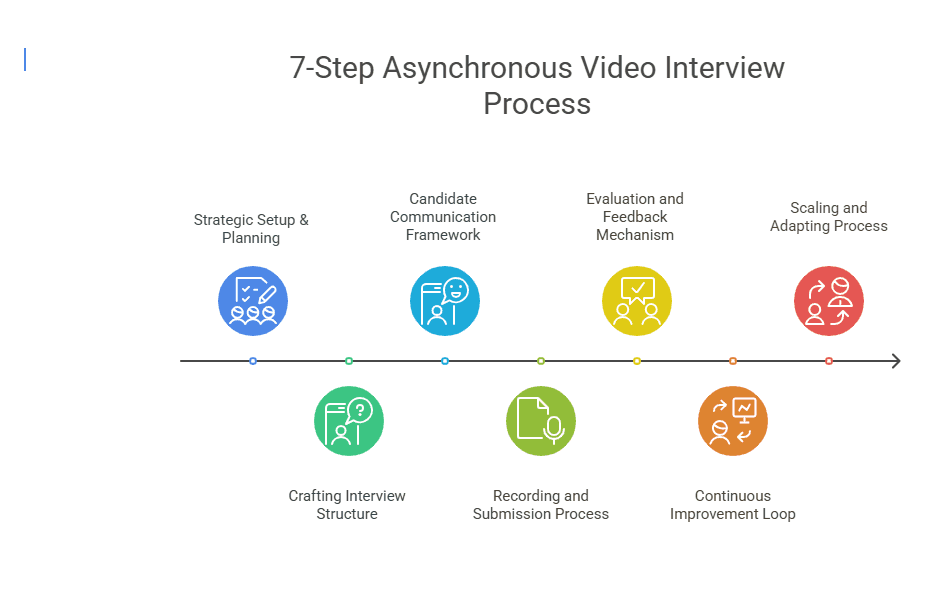
In this comprehensive guide, we'll walk through seven essential steps to implement an effective asynchronous video interview process. Whether you're a startup experiencing rapid growth or an established company looking to streamline your recruitment, these steps will help you build a more efficient, effective screening process that saves time and resources while improving the quality of your hires.
Let's dive in 👇
Step 1: Strategic Setup & Planning
Jumping into asynchronous video interviews without proper planning is like trying to navigate without a map. Research shows that companies taking a strategic approach to video screening are 2.5 times more likely to report improved hiring outcomes.
Let's break down how to build your strategic foundation.
Define Your Screening Requirements
Before diving into platform setup and question creation, ask these essential questions:
- What specific skills are crucial to evaluate early?
- Which aspects of communication matter most for this role?
- What cultural elements need to be assessed?
- How will you evaluate technical capabilities?
Pro Tip: Create a "Screening Impact Document" that outlines specific evaluation criteria for different role types. This clarity helps both in creating questions and setting consistent evaluation standards.
Setting Your Evaluation Framework
77% of employers globally report that video screening helps them assess candidates more effectively when using a structured approach.
Your evaluation framework should:
✅ Define clear scoring criteria
✅ Establish minimum qualification thresholds
✅ Create standardized rating scales
✅ Include both technical and soft skill assessments
Implementing Your Tech Stack
This is where modern tools like Hirevire transform the process. Key features to look for:
-
Multi-Format Response Collection
-
Video responses for communication assessment
-
Audio recordings for specific roles
-
File uploads for technical evaluations
-
Rich text responses for detailed explanations
-
Accessibility & Ease of Use
-
No login required for candidates
-
Cross-device compatibility
-
Multiple recording attempts allowed
-
Clear instructions and support
-
Team Collaboration Tools
-
Easy response sharing
-
Structured feedback collection
-
Automated notifications
-
Centralized evaluation system
Creating a Realistic Timeline
A structured implementation timeline helps manage expectations and resources efficiently. Here's a data-driven framework:
-
Platform Setup Phase: 2-3 days
-
Tool configuration
-
Team access setup
-
Integration testing
-
Initial customization
-
Question Development: 3-4 days
-
Question creation
-
Time limit settings
-
Instructions preparation
-
Team review and refinement
-
Pilot Testing: 2-3 days
-
Internal team testing
-
Technical verification
-
Process refinement
-
Feedback collection
Key Insight: Companies using structured implementation timelines report a 70% improvement in team adoption and process adherence.
Success Metrics to Track
Establish these key metrics from the start:
- Time-to-screen
- Candidate completion rates
- Team feedback scores
- Technical issue frequency
- Candidate experience ratings
Planning for Scale
As your hiring needs grow, your screening process must scale efficiently. Consider these factors:
- How will you maintain consistency across different departments?
- What parts of the process can be templated?
- How will you train new hiring team members?
- What metrics will indicate success?
Moving forward with your strategic foundation in place, you're ready to create your interview structure. The key is to leverage modern tools that can automate repetitive tasks while maintaining high standards for candidate evaluation.
Ready to implement your strategic screening plan? Start with Hirevire's intuitive platform →
Step 2: Crafting Your Interview Structure
With your strategic foundation in place, it's time to create an interview structure that scales. According to RecruiterFlow's research, companies that invest in well-structured video interviews see a 2-3x improvement in the quality of their hires.
Let's explore how to create an effective interview framework.
The Evolution of Interview Questions
Traditional screening often follows this pattern:
- Generic questions about experience
- Basic behavioral scenarios
- Surface-level technical queries
- Inconsistent evaluation methods
This approach misses opportunities to deeply evaluate candidates and often wastes time discovering deal-breakers that could have been identified earlier.
Designing Effective Questions
Modern video screening requires a different approach. Here's how to structure your questions:
-
Opening Questions
-
Brief personal introduction
-
Career journey overview
-
Role-specific motivation
-
Company interest alignment
-
Technical Assessment
-
Scenario-based problems
-
Process explanations
-
Tool/technology experience
-
Project walkthrough requests
-
Behavioral Evaluation
-
Specific situation responses
-
Challenge resolution examples
-
Team collaboration stories
-
Leadership demonstrations
Pro Tip: Hirevire's platform enables you to create question banks that can be easily customized for different roles while maintaining consistency in your core evaluation areas.
Time Management Best Practices
Research shows optimal video response lengths for different question types:
Question Type Recommended Time Max Limit Introduction 60-90 seconds 2 minutes Technical 2-3 minutes 4 minutes Behavioral 1-2 minutes 3 minutes Project Examples 2-4 minutes 5 minutes
Question Format Guidelines
✅ Do:
- Start with clear context
- Use specific scenarios
- Request concrete examples
- Include time expectations
- Offer response guidance
❌ Don't:
- Ask multiple questions at once
- Use vague language
- Request overly long responses
- Include leading questions
- Make assumptions about experience
Implementation Success Story
"After implementing structured video screening questions through Hirevire, we reduced our time-to-hire by 50% while improving the quality of candidates reaching final interviews. The ability to carefully craft and standardize our questions transformed our hiring process."
HR Manager at a fast-growing tech startup
Question Categories to Include
- Role-Specific Technical Skills
Example: "Walk us through how you would debug a production issue. Please include your approach to identifying the root cause and implementing a solution."
- Communication Assessment
Example: "Describe a time when you had to explain a complex technical concept to a non-technical stakeholder. How did you ensure understanding?"
- Problem-Solving Capabilities
Example: "Share a recent challenge you faced in your current role and walk us through your problem-solving process."
- Cultural Alignment
Example: "Describe your ideal work environment and how you contribute to creating it."
Building for Scale
As your hiring needs grow, your question structure should scale efficiently. Hirevire offers:
- Templated question banks
- Role-specific variations
- Team collaboration features
- Easy updating capabilities
Key Metrics to Track
Monitor these question effectiveness metrics:
- Response completion rates
- Average response quality scores
- Question clarity ratings
- Candidate feedback scores
- Team evaluation consistency
Step 3: Candidate Communication Framework
According to LinkedIn's research, 83% of candidates say a negative interview experience can change their mind about a role they once liked. Let's explore how to create a communication framework that enhances candidate experience while maintaining efficiency.
The Modern Communication Challenge
Traditional candidate communication often suffers from:
- Delayed responses
- Inconsistent messaging
- Unclear instructions
- Limited technical support
- Poor candidate experience
Research shows that 62% of candidates expect clear communication about interview processes and requirements.
Building an Effective Communication Strategy
- Initial Contact
Create templates that cover:
- Clear process overview
- Time expectations
- Technical requirements
- Support resources
- Next steps
- Interview Instructions
Provide detailed guidance on:
- Platform access (Hirevire's no-login advantage)
- Recording best practices
- Time limitations
- Re-recording options
- File upload specifications
Sample Communication Timeline
Stage Timing Communication Type Key Content Invitation Day 0 Email Process overview, timeline, platform access Reminder Day 3 Automated email Gentle reminder, support contact Final Notice Day 5 Automated email Last call, extended deadline if needed Completion Same day Automated confirmation Receipt confirmation, next steps
Creating Clear Instructions
✅ Essential Elements to Include:
-
Technical Requirements
-
Supported browsers
-
Camera/microphone setup
-
Internet speed recommendations
-
Quiet environment guidance
-
Process Guidelines
-
Response time limits
-
Number of allowed attempts
-
Question preview options
-
File upload specifications
-
Support Resources
-
FAQ access
-
Technical support contact
-
Practice options
-
Troubleshooting guides
Best Practices for Communication
- Clarity and Transparency
Example Template:
"You'll have 3 days to complete the video interview, which includes 5 questions. Each question allows up to 3 recording attempts, with 2 minutes per response."
- Technical Guidance
Example Template:
"Before starting, please test your camera and microphone using our system check button. We recommend using Chrome or Firefox for the best experience."
- Support Information
Example Template:
"Having technical issues? Our support team is available 24/7 at [email protected] or via live chat on the platform."
Success Metrics to Track
Monitor these communication effectiveness metrics:
- Response rate within deadline
- Support ticket volume
- Candidate satisfaction scores
- Technical issue frequency
- Completion rate analysis
Scaling Your Communication
As your hiring volume grows, ensure your communication framework can scale by:
- Creating role-specific templates
- Automating follow-ups
- Maintaining consistent messaging
- Tracking effectiveness metrics
- Regular process optimization
Ready to streamline your candidate communication? Experience Hirevire's automated messaging system →
Step 4: Recording and Submission Process
According to Monster's research, 80% of candidates better understand job opportunities through video content. Let's explore how to create a recording and submission process that benefits both candidates and hiring teams.
Revolutionizing the Submission Experience
Traditional screening methods often create barriers:
- Complex login requirements
- Single-attempt limitations
- Rigid time constraints
- Technical complications
- Limited format options
Modern video screening platforms like Hirevire eliminate these obstacles while maintaining high-quality submissions.
Setting Up the Perfect Recording Environment
-
Platform Preparation
-
Easy access setup
-
Mobile optimization
-
Browser compatibility
-
Network stability checks
-
Candidate Experience
Features to highlight:
- No login required
- Multiple recording attempts
- Practice options
- Cross-device compatibility
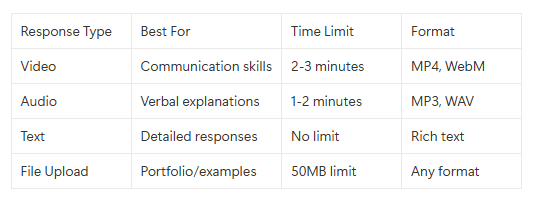
Multi-Format Response Options
Hirevire enables candidates to showcase their best selves through:
Quality Assurance Measures
✅ Automated Checks:
- Video resolution verification
- Audio quality assessment
- File format validation
- Upload completion confirmation
- Platform compatibility check
Success Story Highlight
"The flexibility of Hirevire's recording options increased our candidate completion rate by 65%. Candidates particularly appreciated the ability to re-record responses and the option to choose their preferred format."
Recruitment Manager, Software Company
Recording Best Practices Guide
-
For Video Responses
-
Well-lit environment
-
Professional background
-
Clear audio setup
-
Professional dress code
-
Camera positioning
-
For Audio Submissions
-
Quiet environment
-
Quality microphone
-
Clear speech pace
-
Background noise elimination
-
Volume level check
-
For File Uploads
-
Correct format verification
-
Size limit adherence
-
File naming conventions
-
Upload confirmation
-
Backup copy retention
Technical Support Framework
Hirevire provides comprehensive support through:
- Real-time Assistance
- Live chat support
- Email help desk
- FAQ resources
- Troubleshooting guides
- System status updates
Key Metrics to Monitor
Track these submission quality indicators:
- Completion rates
- Technical issue frequency
- Format preferences
- Re-recording statistics
- Support ticket volume
Scaling Your Submission Process
As your hiring volume grows, ensure scalability through:
- Automated quality checks
- Bulk processing capabilities
- Storage optimization
- Format standardization
- Performance monitoring
Pro Tip: Hirevire's platform automatically optimizes video submissions for quality and file size while maintaining professional standards.
Implementation Checklist
✅ Platform setup complete
✅ Format options configured
✅ Quality checks enabled
✅ Support resources ready
✅ Metrics tracking active
Ready to streamline your video submission process? Try Hirevire's user-friendly platform →
Step 5: Review Process Implementation
According to SHRM's research, organizations using structured video review processes see up to a 70% improvement in the quality of their hires. Let's explore how to create an efficient and effective review system.
The Evolution of Review Processes
Traditional screening reviews often face challenges:
- Inconsistent evaluation criteria
- Limited team collaboration
- Time-consuming coordination
- Poor documentation
- Delayed feedback cycles
Modern platforms like Hirevire transform this experience through structured evaluation and collaboration.
Creating a Standardized Evaluation Framework
Assessment Criteria Matrix
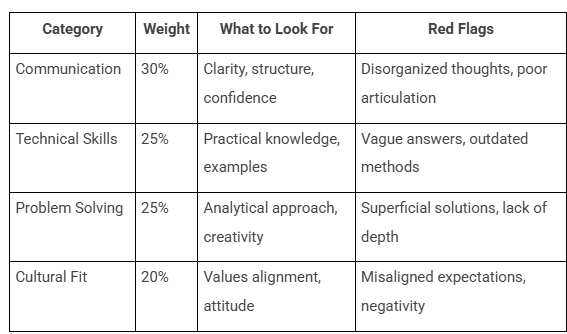
Scoring System Implementation
5: Exceeds expectations
4: Meets expectations
3: Partially meets expectations
2: Below expectations
1: Significant concerns
Team Collaboration Features
Hirevire enables efficient team review through:
✅ Real-Time Collaboration
- Simultaneous review capabilities
- Instant feedback sharing
- Comment threading
- Rating synchronization
- Decision tracking
Success Story Spotlight
"After implementing Hirevire's structured review process, we reduced our time-to-decision by 60% while improving team alignment on candidate evaluations. The ability to collaborate in real-time transformed our hiring efficiency."
HR Director, Technology Startup
Best Practices for Review Efficiency
-
Initial Screening
-
Quick disqualification criteria
-
Automated flag system
-
Basic requirements check
-
Technical assessment review
-
Communication baseline evaluation
-
Detailed Assessment
-
Comprehensive scoring
-
Team input collection
-
Reference point comparison
-
Strength/weakness analysis
-
Cultural fit evaluation
-
Final Decision Process
-
Score aggregation
-
Team consensus building
-
Red flag review
-
Hiring manager input
-
Next steps determination
Review Process Automation
Hirevire streamlines reviews through:
- Automated scoring calculations
- Review assignment distribution
- Progress tracking
- Deadline management
- Notification system
Key Metrics to Track
Monitor these review effectiveness indicators:
- Time per review
- Team participation rate
- Score consistency
- Decision alignment
- Process efficiency
Scaling Your Review Process
As hiring volume increases, maintain quality through:
- Templated evaluation forms
- Automated workflow triggers
- Team capacity management
- Quality control measures
- Performance analytics
Pro Tip: Use Hirevire's analytics dashboard to identify bottlenecks and optimize your review workflow regularly.
Implementation Checklist
✅ Evaluation criteria defined
✅ Team roles assigned
✅ Automation configured
✅ Metrics tracking set up
✅ Training completed
Ready to transform your review process? Experience Hirevire's collaborative review platform →
Step 6: Analytics and Optimization
Research by LinkedIn shows that data-driven hiring decisions are 2.5 times more likely to result in successful placements. Let's explore how to leverage analytics to optimize your video interview process.
The Power of Data-Driven Decisions
Traditional vs Data-Driven Approach:
Traditional Method Data-Driven Method Rely on intuition Use objective metrics Inconsistent evaluation Standardized assessment Limited documentation Comprehensive tracking Difficult to scale Scalable processes Hard to justify choices Clear decision rationale
Key Performance Metrics to Track
-
Process Efficiency
-
Time-to-complete
-
Response rates
-
Completion rates
-
Technical issue frequency
-
Support ticket volume
-
Quality Metrics
-
Candidate quality scores
-
Team feedback ratings
-
Interview-to-hire ratio
-
Hire success rate
-
Candidate experience scores
Leveraging Hirevire's Analytics Dashboard
✅ Available Insights:
- Real-time completion tracking
- Team collaboration metrics
- Response quality analysis
- Technical performance data
- Candidate feedback collection
Success Story Highlight
"Using Hirevire's analytics suite, we identified that technical questions longer than 3 minutes had a 40% lower completion rate. Adjusting our question length improved candidate completion by 65% while maintaining response quality."
Talent Acquisition Manager, SaaS Company
Optimization Framework
-
Data Collection Phase
-
Define key metrics
-
Set up tracking systems
-
Ensure data accuracy
-
Monitor consistently
-
Document findings
-
Analysis Process
-
Regular data review
-
Pattern identification
-
Bottleneck detection
-
Success factor analysis
-
Team feedback integration
-
Implementation Cycle
-
Action plan creation
-
Controlled changes
-
Result monitoring
-
Process adjustment
-
Performance tracking
ROI Calculation Guide
Track these elements for accurate ROI measurement:
Metric Calculation Method Target Improvement Time Savings Hours saved × hourly rate 50% reduction Cost Reduction Previous cost - New cost 40% decrease Quality Improvement Hire success rate change 25% increase Team Efficiency Tasks per hour increase 35% improvement
Continuous Improvement Strategy
Hirevire enables ongoing optimization through:
- A/B testing capabilities
- Performance benchmarking
- Trend analysis tools
- Predictive insights
- Customizable reports
Key Areas for Optimization
-
Question Effectiveness
-
Response quality analysis
-
Completion rate tracking
-
Time utilization data
-
Answer relevance scores
-
Format effectiveness
-
Technical Performance
-
Platform stability metrics
-
Upload success rates
-
Device compatibility data
-
Support ticket analysis
-
User experience scores
-
Team Collaboration
-
Review time tracking
-
Decision alignment rates
-
Feedback timeliness
-
Communication efficiency
-
Process adherence
Pro Tip: Use Hirevire's custom report builder to create focused analytics dashboards for different stakeholders.
Implementation Checklist
✅ Analytics setup complete
✅ Key metrics defined
✅ Reporting automated
✅ Team trained on tools
✅ Review cycle established
Ready to optimize your video interview process? Explore Hirevire's analytics capabilities →
Step 7: Integration and Scaling
According to Gartner's research, organizations that successfully integrate their hiring tools see a 60% improvement in recruitment efficiency. Let's explore how to effectively scale your video interview process.
Modern Integration Requirements
The success of video interviewing depends heavily on seamless integration with your existing workflow:
-
ATS Integration
-
Automatic candidate sync
-
Status updates
-
Profile sharing
-
Document transfer
-
Workflow automation
-
Team Communication
-
Notification systems
-
Feedback channels
-
Decision tracking
-
Collaboration tools
-
Status updates
Hirevire's Integration Capabilities
✅ Available Connections:
- Zapier integration (5000+ apps)
- Make/Integrately (2000+ apps)
- Webhook functionality
- Custom API access
- Gmail integration
Success Story Spotlight
"After implementing Hirevire's integration with our ATS, we reduced manual data entry by 85% and accelerated our hiring process by 40%. The seamless workflow has transformed how we manage high-volume hiring."
Recruitment Operations Manager, E-commerce Company
Scaling Strategy Framework
- Process Documentation
Component Documentation Needed Update Frequency Question Banks Template library Quarterly Evaluation Criteria Scoring guides Bi-annually Technical Setup Configuration docs As needed Team Training Onboarding materials Monthly
-
Team Expansion Support
-
Role-based access control
-
Training modules
-
Best practice guides
-
Performance metrics
-
Quality controls
Automation Opportunities
Hirevire enables scaling through:
- Bulk candidate processing
- Automated communications
- Template management
- Workflow triggers
- Performance monitoring
Building for Growth
-
Technical Infrastructure
-
Scalable storage solutions
-
Performance optimization
-
Security enhancements
-
Backup systems
-
Load management
-
Process Scalability
-
Template standardization
-
Workflow automation
-
Quality maintenance
-
Team training
-
Support scaling
Key Metrics for Scale
Monitor these scaling indicators:
- System performance metrics
- Integration efficiency
- Team productivity
- Process adherence
- Quality consistency
Implementation Best Practices
✅ Do:
- Start with pilot programs
- Document everything
- Train team thoroughly
- Monitor metrics closely
- Gather regular feedback
❌ Don't:
- Rush implementation
- Skip testing phases
- Ignore team input
- Neglect documentation
- Compromise on quality
Success Metrics to Track
-
Integration Performance
-
Data sync accuracy
-
System uptime
-
Response times
-
Error rates
-
User adoption
-
Process Efficiency
-
Time savings
-
Cost reduction
-
Quality maintenance
-
Team satisfaction
-
Candidate experience
Pro Tip: Use Hirevire's scalability features to maintain quality while growing your hiring volume.
Implementation Checklist
✅ Integration plan defined
✅ Systems connected
✅ Teams trained
✅ Processes documented
✅ Monitoring established
Ready to scale your video interview process? Experience Hirevire's enterprise-grade platform →
Bringing It All Together: The Modern Video Interview Advantage
By implementing these seven steps and leveraging modern video interview tools, you create a hiring process that is:
Measurable Impact
Organizations implementing structured video interview processes report:
- 50% reduction in time-to-hire
- 40% decrease in recruitment costs
- 90% improvement in team collaboration
- Significant enhancement in candidate quality
- Better hiring decisions through data
Key Implementation Successes
-
Time Efficiency
-
Eliminated scheduling coordination
-
Automated initial screening
-
Reduced administrative tasks
-
Streamlined team reviews
-
Faster decision-making
-
Quality Improvements
-
Better candidate evaluation
-
Consistent assessment criteria
-
Enhanced team collaboration
-
Data-driven decisions
-
Improved hire success rates
-
Candidate Experience
-
Flexible response options
-
Professional impression
-
Clear communications
-
Efficient process
-
Timely feedback
The Path Forward
Your next steps should include:
-
Evaluate Your Current Process
-
Identify pain points
-
Document requirements
-
Set success metrics
-
Define timeline
-
Align stakeholders
-
Choose the Right Tools
-
Compare platform features
-
Check integration capabilities
-
Assess scalability
-
Review pricing models
-
Test user experience
-
Plan Implementation
-
Create rollout strategy
-
Train team members
-
Set up workflows
-
Monitor results
-
Gather feedback
Transform Your Hiring Process
The future of hiring is here, and it's video-first. Organizations that embrace this transformation are seeing remarkable results in their recruitment efficiency and effectiveness.
Ready to modernize your entire hiring process? Start your free trial with Hirevire today →
Frequently Asked Questions About Asynchronous Video Interviews
Q: What are the most important steps in implementing a video interview process? A: The seven essential steps are:
- Strategic setup and planning
- Interview structure creation
- Candidate communication framework
- Recording and submission process
- Review process implementation
- Analytics and optimization
- Integration and scaling
Each step benefits from modern tools like video screening platforms that help automate and optimize the process.
Q: How can we reduce time-to-hire without sacrificing quality? A: The most effective ways include:
- Using automated screening tools like Hirevire for initial candidate evaluation
- Implementing asynchronous video interviews to eliminate scheduling bottlenecks
- Standardizing evaluation criteria
- Automating routine communications
- Streamlining team collaboration in the decision process
Research shows companies using modern screening tools reduce their time-to-hire by up to 50%.
Q: What's the role of asynchronous video interviews in modern hiring? A: Async video interviews serve multiple crucial functions:
- Eliminate initial phone screening scheduling
- Provide consistent candidate evaluation
- Allow team collaboration in review
- Improve candidate experience
- Reduce time-to-hire
According to Monster's research, 80% of candidates better understand opportunities through video content.
Q: How do we measure the success of our video interview process? A: Key metrics to track include:
- Time-to-hire
- Cost-per-hire
- Quality of hire
- Candidate experience scores
- Offer acceptance rates
- Team satisfaction
- New hire retention
Q: What makes a good video screening process? A: An effective screening process should:
- Be consistent across all candidates
- Use standardized evaluation criteria
- Include video or audio responses
- Allow for team collaboration
- Provide clear documentation
- Scale efficiently with volume
Q: How can we improve candidate experience during video interviews? A: Best practices include:
- Providing clear instructions
- Offering flexible response options
- Maintaining regular communication
- Respecting candidate time
- Using user-friendly technology
- Providing prompt feedback
Q: What are the benefits of asynchronous video interviews? A: Key benefits include:
- Elimination of scheduling coordination
- Consistent candidate evaluation
- Better team collaboration
- Reduced time-to-hire
- Improved candidate experience
- Better documentation
Q: How do we choose the right video interview technology? A: Consider these factors:
- Ease of use for both recruiters and candidates
- Integration capabilities with existing systems
- Scalability for growth
- Cost-effectiveness
- Customer support quality
- Security features
Q: What are common video interview process bottlenecks? A: Common bottlenecks include:
- Technical issues during recording
- Team feedback collection
- Decision-making delays
- Integration challenges
- Training requirements
Modern tools like video screening platforms help eliminate these bottlenecks.
Q: How can we make better hiring decisions using video interviews? A: Improve decision-making by:
- Using structured evaluation criteria
- Collecting comprehensive screening data
- Implementing standardized assessments
- Gathering team feedback systematically
- Using data-driven decision frameworks
Q: How do we handle high-volume hiring efficiently with video interviews? A: Best practices include:
- Using automated screening tools
- Implementing standardized questions
- Standardizing evaluation processes
- Automating routine communications
- Leveraging bulk processing features
Platforms like Hirevire are specifically designed to handle high-volume hiring efficiently.
Q: What are the most important features in a video screening platform? A: Essential features include:
- Video interview capabilities
- Team collaboration tools
- Automated communications
- Analytics and reporting
- ATS integration
- Mobile optimization
- Security features
Q: How do we maintain consistency in candidate evaluation? A: Key strategies include:
- Using standardized questions
- Implementing scoring rubrics
- Recording all interactions
- Using video screening for initial evaluation
- Maintaining structured feedback forms
- Regular team calibration
Transform your hiring process with Hirevire's comprehensive video interview platform →