Why Mobile-First Hiring Matters: How Candidate Behavior Changed and What It Means for Your Process
The job seeker moved to a phone years ago. The hiring process didn't follow. Every day, a qualified candidate taps an "Apply Now" button at a bus stop, watches a career site stutter into a tiny desktop layout, pinch-zooms into a PDF resume upload field, and closes the tab. That candidate isn't coming back. Mobile friendly recruitment isn't a checkbox on a RFP. It's the gap between who actually wants your job and who actually completes your application.
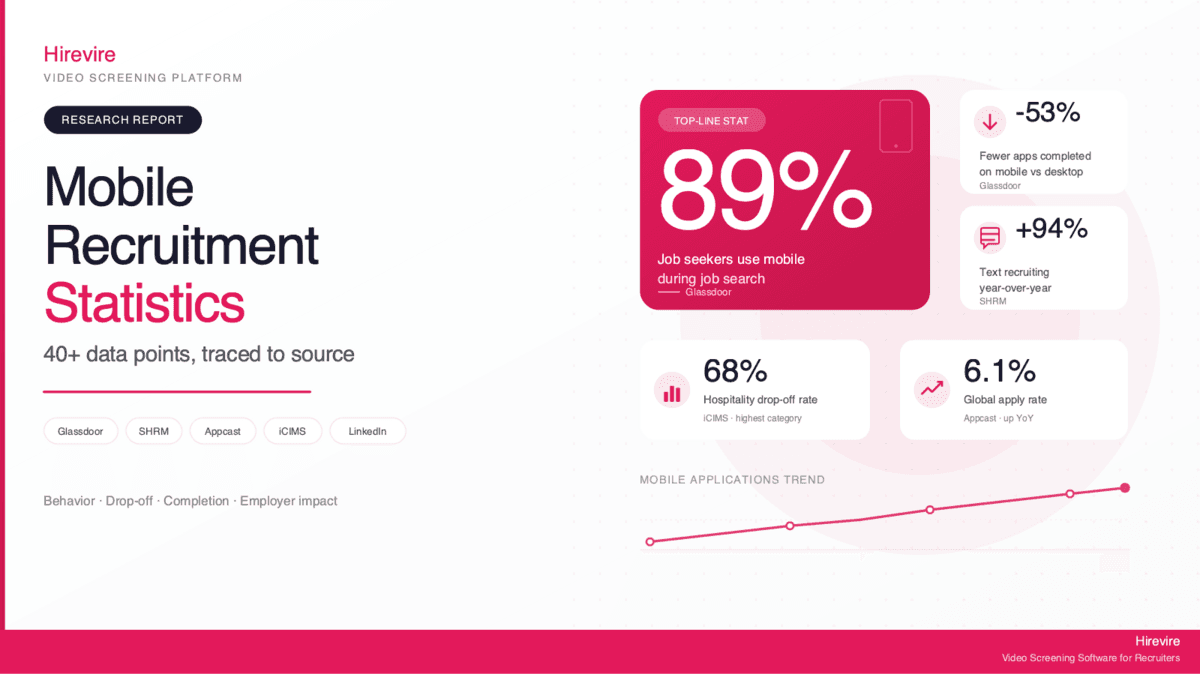
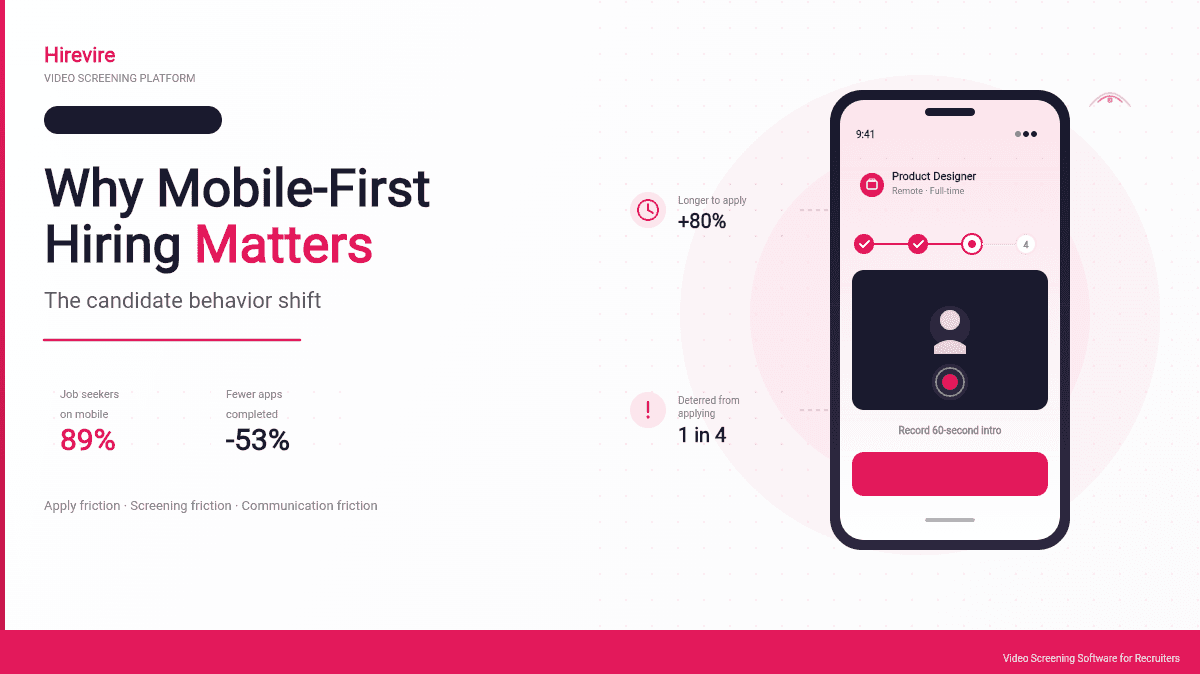
Here's the disconnect: according to Glassdoor research, 89% of job seekers say they will use a mobile device during their job search in the next 12 months, and 35% actively prefer to apply from their phones. Meanwhile, most hiring workflows were designed for recruiters sitting at desktops, reviewing PDFs in multi-tab browsers, and writing long emails. The tooling optimises for the recruiter's working day, not the candidate's commute.
The cost of this mismatch is measurable. Glassdoor's data shows that mobile job seekers successfully complete 53% fewer applications and take 80% longer to finish each one. One in two (49%) say it is difficult to apply to jobs from a mobile device. A quarter of candidates report being deterred from applying at all when a career site isn't mobile-ready. Those aren't candidates you lost to a competitor. Those are candidates you never saw.
This guide reframes what it means for a hiring process to be mobile-ready. Most teams hear "mobile" and think about whether their ATS is responsive. That's table stakes, not strategy. The real shift is from mobile-friendly (reactive: does it work on a phone?) to mobile-first (proactive: is the phone the default assumption?). Three frictions stand between the two: application friction, screening friction, and communication friction. Fix all three, and your hiring funnel starts looking like your candidate's behaviour already does.
Quick Summary: Mobile-first hiring treats the phone as the primary surface for every candidate interaction, from first impression to offer letter. This guide covers what changed in candidate behaviour, why responsive design isn't enough, the three frictions you need to remove, and a self-audit you can run on your own process this week. Hirevire appears as an example of what mobile-first screening looks like when built around the candidate, not the recruiter.
What Mobile-First Hiring Actually Means
"Mobile-first" is thrown around loosely. In most job descriptions, it means the careers page doesn't break on an iPhone. That is a low bar and it is not what the term was designed to capture. Mobile-first, applied honestly to recruitment, means a hiring process designed around the assumption that the candidate will encounter, evaluate, and complete every step on a phone. Desktop becomes the secondary surface, not the primary one.
The distinction matters because reactive mobile support and proactive mobile-first design produce very different candidate experiences.
Mobile-Friendly vs. Mobile-First
Mobile-friendly is a defensive posture. The product was built for desktop, then adapted to survive on smaller screens. Forms work. Tables scroll sideways. PDFs open, badly. Nothing is broken, but nothing is delightful either. The candidate can apply on a phone, but the experience punishes them for it.
Mobile-first is an offensive posture. Every flow is designed around thumb reach, one-handed use, short attention spans, and unstable connections. File upload doesn't assume a candidate has their resume on the device, so video, audio, and text alternatives exist. Login is optional or absent because account creation on a phone is where drop-off happens. Every notification, every reminder, every feedback loop assumes the candidate will read it on a lock screen, not an inbox.
The difference shows up in one metric: completion rate. Mobile-friendly processes measure whether the candidate could finish. Mobile-first processes measure whether the candidate did finish, and how quickly, and how happily.
The Candidate Behaviour Underneath the Shift
Candidate behaviour changed for reasons that have nothing to do with recruitment technology. The phone is where people live now. They browse jobs between meetings, on public transport, at dinner tables, in bed before sleeping. They don't sit down at a laptop to job hunt unless the role is serious enough to justify it, and by then a competitor with a faster mobile flow has already captured them.
Research published in the Glassdoor mobile job search report found that mobile job search usage peaks at 55% among Gen Xers aged 35 to 44, not Gen Z. This matters because it means mobile-first hiring isn't a niche concern for retail or gig work. The mid-career engineer, the finance director, the healthcare manager, they are all tapping "Apply" from their phone and abandoning when the experience insults them.
The Cost of Ignoring Mobile
The financial and reputational cost of desktop-biased hiring is larger than most teams estimate because the damage happens outside the funnel you can see. A candidate who bounces at the "upload resume" step never shows up in your applicant tracking dashboard. Your pipeline looks healthy. Your quality of hire looks fine. The people you never attracted are invisible to your metrics.
The Drop-Off Nobody Counts
Industry research on applicant drop-off rates suggests that on average only 10.6% of candidates who click "Apply" actually complete the application. The remaining 89% abandon somewhere in the funnel. Mobile drop-off is a large slice of that number. When a flow is designed for desktop, the candidate hits a physical or cognitive wall: the form is too long, the file picker is hostile, the password requirements are too strict, the layout shifts when the keyboard opens.
Most recruiting teams don't instrument this. They see applications that came through, not applications that almost came through. The result is a hiring funnel that looks full from the top (traffic to the careers page) and narrow at the bottom (interviews scheduled), and the space between is unexplained. Mobile friction explains most of it.
The Qualified-Candidate Problem
Drop-off isn't evenly distributed across candidate quality. Busy, in-demand candidates have the lowest tolerance for friction because they already have a job and aren't desperate. They apply opportunistically, on the way to somewhere else, with about 90 seconds of attention. If you lose them in the first two taps, you don't get another chance.
This creates an adverse selection problem. Desktop-biased hiring processes disproportionately retain candidates who are willing to sit at a laptop and grind through a form, which skews toward candidates with more time and less market leverage. The strongest candidates are also the ones most likely to abandon a bad mobile flow. If you rely on gut feelings about who applied, you are sampling from the wrong distribution.
The Employer Brand Damage
A broken mobile application isn't just a lost candidate. It's a Glassdoor review waiting to happen. Candidates talk about bad application experiences the same way they talk about bad customer service experiences. Industry data on candidate experience shows that contentment among candidates has been declining since 2021 while resentment remains elevated. A phone-hostile application is one of the fastest ways to convert a passive admirer of your brand into a public critic.
Mobile-Friendly Is Table Stakes, Not a Strategy
Here is the uncomfortable statement: your ATS being responsive is not a mobile hiring strategy. It's the absence of one liability. You get no competitive advantage from a careers page that renders correctly on iOS, the same way you get no competitive advantage from a front door that closes properly. It's simply the price of being taken seriously.
Strategy starts where responsive design ends. Responsive design assumes the underlying flow is correct and only the presentation needs adapting. Mobile-first strategy assumes the underlying flow is wrong because it was designed for a surface the candidate no longer uses.
Why "Responsive" Hides the Problem
Responsive frameworks are good at preventing obvious breakage. They are not good at preventing experience failure. A responsive careers page can still require a 17-field application with a resume upload, three dropdowns, a salary expectation, and an equal opportunity questionnaire, then funnel the candidate into a "we'll email you to confirm your account" loop that never completes on mobile email clients.
Every single step in that flow renders correctly on a phone. The page is responsive. The experience is terrible. Responsiveness measured the wrong variable.
Where Strategy Actually Lives
A mobile-first hiring strategy makes decisions responsive design can't make. It decides:
- Whether a resume upload is mandatory, given that most candidates don't have one on their phone
- Whether account creation is required before applying, given that 20 to 25% of candidates drop off at account creation
- Whether the initial screen is a form or a recorded response, given that typing on mobile is slower and more error-prone than speaking
- Whether the application is one long page or several short steps, given that attention spans on mobile are measured in tens of seconds
- Whether communication happens through email, SMS, or an in-product thread, given that email on mobile is less habitually checked than SMS
These are product decisions, not design decisions. Responsive design cannot fix a form that shouldn't have existed in the first place.
The Three Frictions Every Mobile Hiring Process Must Remove
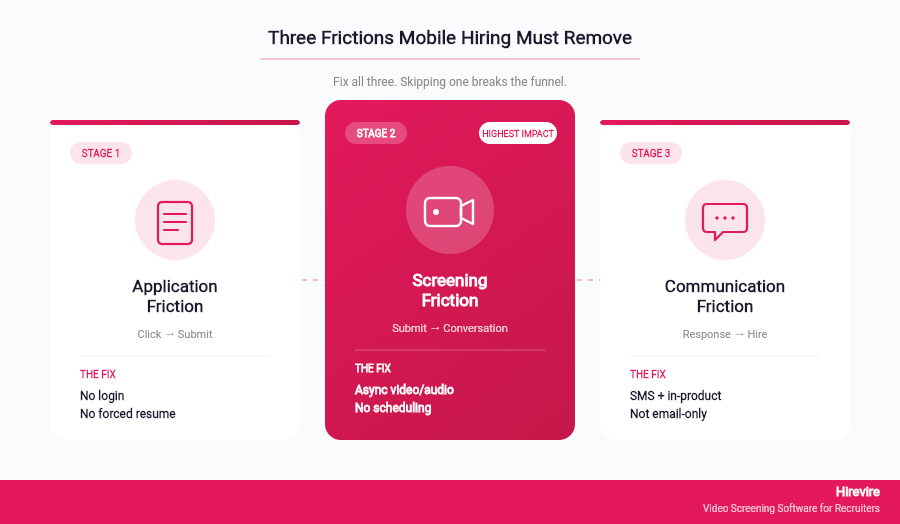
If you strip mobile hiring down to what actually matters, you find three distinct frictions. A process can be mobile-friendly in one or two of these and still fail the third. A mobile-first process removes all three.
Friction 1: Application Friction
Application friction is the distance between seeing a job and submitting an application. On mobile, that distance is usually filled with account creation, file uploads, and multi-screen forms. Each is a small drop-off event. Together they explain the gap between clicks and completions.
The mobile-first answer isn't to make each step prettier. It's to delete as many steps as possible. No login. No resume upload as a hard requirement. No long form when a short one will do. The candidate should be able to express interest in a job, provide the one or two pieces of information you actually need to shortlist, and move forward. The rest belongs to later stages of the funnel.
This isn't a reduction in rigour. It's a redistribution of it. If you collect less at the application stage, you collect more at the screening stage, where you have the candidate's attention because they have explicitly moved forward. The modern hiring process guide at Hirevire covers how to sequence this redistribution without losing information.
Friction 2: Screening Friction
Screening friction is everything between "application submitted" and "first meaningful conversation with a recruiter." In traditional hiring, this step is a phone screen. On mobile, scheduling a phone screen is its own drop-off event: calendar links don't behave well on small screens, timezone selection is hostile, and the back-and-forth of "does Tuesday work?" emails often never reaches a mobile inbox that the candidate actively checks.
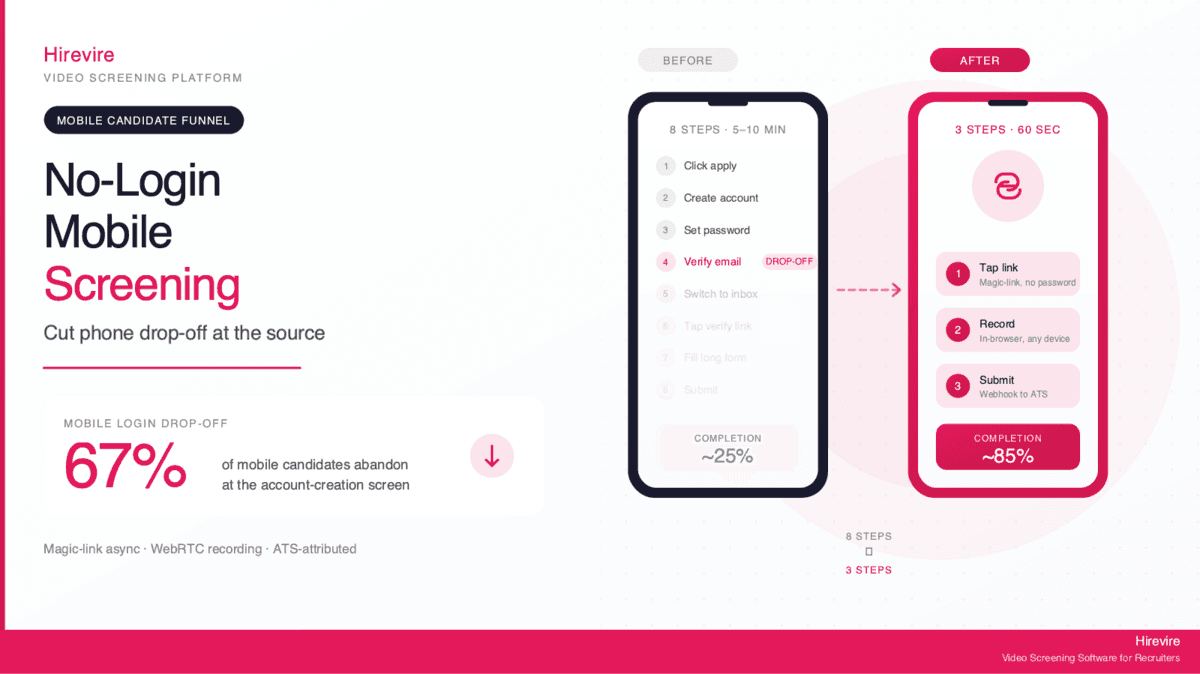
Mobile-first screening replaces the phone screen with asynchronous, candidate-paced response collection. The candidate gets a link, taps it, records a short video or audio answer to the recruiter's questions, and submits. No scheduling. No timezone. No login. The recruiter reviews when convenient. The candidate completes when convenient.
This is where platforms like Hirevire became relevant. Hirevire was designed around a core premise: screening friction is the largest unsolved problem in mobile hiring, and fixing it requires removing both login and scheduling. Candidates tap a link, record responses in any format (video, audio, text, file), and finish without ever creating an account. Recruiters review asynchronously. The process happens on the candidate's thumb, at the candidate's pace.
Friction 3: Communication Friction
Communication friction is what happens after the response is in. Traditional processes default to email for every update: interview confirmation, rejection, offer, document request. Email on mobile is a low-priority inbox. Important updates get buried. The candidate doesn't know whether they're still being considered, and the recruiter doesn't know why the candidate went dark.
Mobile-first communication uses the channels candidates actually check. SMS for time-sensitive updates. In-product notifications for status changes. Short, scannable messages that don't require a desk to read. According to SHRM research on candidate experience, 36% of U.S. candidates say they had not heard back from employers one to two months after they applied. That silence isn't necessarily because the employer didn't try. It's often because the employer tried through the wrong channel.
What Mobile-First Screening Looks Like in Practice
Most guides on mobile hiring stop at "optimise your careers page and ATS." This is the easy advice. The harder and more valuable advice is what happens after the application: the screening layer, where candidate quality actually gets determined and where mobile friction compounds fastest.
Hirevire serves as a concrete example of mobile-first screening, so this section works through its approach as a case study. The goal isn't to sell the tool. It's to describe what the mobile-first pattern looks like when built end-to-end, so you can evaluate whether your current stack implements it or fakes it.
No-Login Access as a Default
The single most consequential design choice in mobile screening is whether the candidate needs to create an account. Account creation on mobile is where 20 to 25% of candidates drop off, according to varied industry estimates. On Hirevire, candidates tap a link and begin immediately. No password. No verification email. No forgotten credentials a week later. The absence of login sounds like a small detail. It's the single largest lever on mobile completion rates.
Multi-Format Response Collection
Mobile-first screening doesn't assume video is always the right format. Some candidates prefer to type. Some don't have a quiet room to record video. Some are answering a technical question that's better expressed as a file or code snippet. Hirevire supports video, audio, rich text, and file uploads, so the candidate picks the format that works for their context, not the recruiter's preference.
AI Transcription and Scoring for Async Review
When a screening step is asynchronous, the recruiter's workload shifts: instead of live conversations, they are reviewing a stack of recorded responses. Without automation, this becomes its own bottleneck. Hirevire includes AI transcription in 90+ languages, so every response is searchable text, and AI Match scoring that ranks responses against the job criteria. The recruiter spends their time on the top-scored candidates, not on transcription.
Customer Reviews
G2: 4.7/5 stars (25+ reviews) - View Reviews
"It saves a lot of time, otherwise we would need to interview people manually. The software always works, it's really easy for our candidates to use and their support is really 10/10."
—Roy Lammers, CEO Remote Talents
Capterra: 5/5 stars (20+ reviews) - View Reviews
"Being able to see and hear candidates through videos and audios before even scheduling an interview has made our selection process more efficient and effective."
—Flávio Pavanelli, CEO Moinhos Vieira
AppSumo: 4.9/5 stars (70+ reviews) - View Reviews
"It cuts down my hiring process by at least 75% and made it sooo much easier to see/feel who the candidates were before having to hop on a call with them."
—ElevateClients
A Self-Audit You Can Run on Your Own Hiring Process This Week
You don't need a consultant to evaluate your mobile hiring posture. You need a phone, a test candidate persona, and thirty minutes. Here is an audit grounded in the three frictions above. Run it today, document what breaks, fix what you can this quarter.
Step 1: Apply to Your Own Job on a Phone
Pick an open role on your careers site. Open it on your personal phone on a mobile data connection, not Wi-Fi. Try to complete the application from "Apply Now" to "Application Submitted" without touching a desktop at any point. Time how long it takes.
What to look for:
- Does the careers page take more than three seconds to load?
- Does the application require a login before you can even see the form?
- Does the resume upload expect a file you don't have on your phone?
- Are form fields tappable with a thumb, or do they demand precision?
- Does the keyboard obscure the field you're typing into?
- Does the page refresh and lose your progress at any point?
If any of these happen, write it down. Each one is a known drop-off driver.
Step 2: Receive a Communication on Mobile
Submit a test application with your own email and phone. Wait for the follow-up: the confirmation, the next steps, any request for information. Open it first on mobile, not on your laptop.
What to look for:
- Did the confirmation arrive as email only, or also SMS?
- Is the email readable on a phone screen, or does it include formatting that breaks?
- Does any link in the email require a desktop browser?
- If you were the candidate, would you know what to do next?
Step 3: Complete Your Screening Step on Mobile
If your process includes a screening questionnaire, technical test, or video interview step, complete it as the candidate would, on your phone. Measure the completion rate among a small sample of real recent hires by asking them: "What device did you use for each stage?" The answers often reveal that candidates completed early stages on mobile and switched to desktop only when forced to.
What to look for:
- Does the screening step require software that doesn't run on mobile?
- Does it require scheduling, which introduces timezone and calendar friction?
- Is the candidate expected to upload files, connect cameras, or grant permissions a mobile browser handles poorly?
- Can the candidate complete the step without creating an account?
Step 4: Map Friction to Fixes
For every point of friction you documented, categorise it as application friction, screening friction, or communication friction. Prioritise by the stage with the highest drop-off (usually application for volume roles, screening for specialised roles, communication for candidate experience).
Most teams find they can address application friction within the existing ATS by simplifying forms and removing mandatory account creation. Screening friction usually requires adding a layer, since traditional ATS tools weren't built for async mobile screening. Communication friction requires adding SMS to the channel mix, which most modern ATS systems already support as a configurable option. The hiring process flowcharts guide covers how to remap your workflow once you've identified the friction points.
Traditional Hiring vs. Mobile-First Hiring
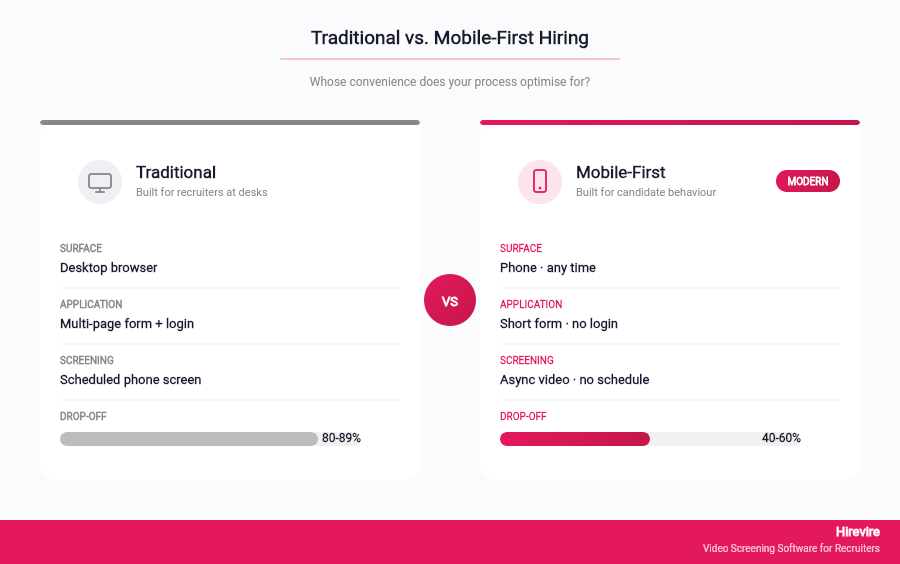
The contrast between traditional and mobile-first hiring isn't about technology. It's about whose convenience the process optimises for.
| Aspect | Traditional Hiring | Mobile-First Hiring |
|---|---|---|
| Primary surface | Desktop browser, office hours | Phone, any time |
| Application | Multi-page form, resume upload, account required | Short form or no-login link, optional resume |
| Initial screening | Phone screen requiring scheduling | Async video/audio/text response, no scheduling |
| Communication | Email only | Email plus SMS or in-product updates |
| Completion measurement | Applications received | Applications started vs. finished, by device |
| Typical drop-off | 80 to 89% between click and submit | 40 to 60% between click and submit |
| Candidate attention required | 15 to 30 minutes continuous | Stackable short sessions |
| Who the process serves | Recruiter workflow | Candidate behaviour |
Notice that the last row is the root of everything above it. Traditional hiring is designed around the recruiter's working day. Mobile-first hiring is designed around the candidate's attention. That single reframing drives every other difference in the table.
Implementation: Moving From Mobile-Friendly to Mobile-First
Most teams can't rebuild their hiring stack overnight, and shouldn't. Mobile-first is a progression, not a rip-and-replace. Here's a realistic sequence that most teams can implement in one or two quarters.
Phase 1: Measure the Gap
Before fixing anything, instrument the funnel so you know where drop-off actually happens. Most ATS tools can report application start vs. completion, and many can break this down by device. If yours can't, add basic analytics to your careers page that captures entry point, device, and exit step.
Without this data, every intervention is a guess. With it, the priorities usually reveal themselves: one specific step is leaking 30% of mobile traffic, and that step is where you start.
Phase 2: Remove the Worst Application Friction
Target the two steps with the highest mobile drop-off. Common offenders: mandatory account creation, resume upload before a candidate knows whether they're a fit, equal-opportunity questionnaire placed before the "review your answers" step. Moving these later in the funnel, or making them optional, usually recovers 10 to 20% of completions without any other change.
Phase 3: Add an Async Screening Layer
If your current screening step requires scheduling a call, add an async layer in front of it. Candidates respond to three or four role-specific questions on their own time, recruiters review asynchronously, and only top candidates move to a live conversation. Hirevire is designed for this layer specifically and integrates with most ATS systems through Zapier, webhooks, or direct integrations, which avoids the rip-and-replace objection.
Phase 4: Upgrade Communication Channels
Add SMS as a parallel channel for time-sensitive communications: application received, screening link sent, next step scheduled, offer extended. Email can still handle longer-form content. SMS handles the "did this actually reach the candidate?" question.
Phase 5: Re-measure and Iterate
Return to the funnel instrumentation. Completion rates should be visibly higher. If they aren't, the remaining friction is further up the funnel (careers page, job description, employer brand) or further down (live interview scheduling, offer process). Mobile-first thinking applies at every stage, not just at the application form.
Common Pitfalls to Avoid
Three patterns trip up most teams that attempt this transition.
Pitfall 1: Treating mobile as an engineering problem. It's a product problem. Engineering can make a form responsive. It can't decide whether the form should exist. Mobile-first requires the hiring team and the product or IT team to make joint decisions about what data is actually collected at each stage.
Pitfall 2: Over-indexing on volume roles. Mobile-first often starts with hourly or volume hiring because the gains are largest there. But mid-career and executive candidates are equally mobile-driven. Don't leave the white-collar funnel untouched just because the ROI is harder to model upfront.
Pitfall 3: Adding mobile features without removing desktop assumptions. Bolting a mobile app onto a desktop-first workflow usually makes things worse, because now candidates have two broken paths instead of one. Mobile-first means redesigning the flow, not duplicating it.
Frequently Asked Questions
What is mobile friendly recruitment?
Mobile friendly recruitment means a hiring process that functions on mobile devices: careers pages that render correctly, application forms that can be completed on a phone, and communication that arrives in channels candidates check. It's the baseline. Mobile-first goes further by designing every stage around the assumption that mobile is the primary surface.
What percentage of candidates apply from mobile devices?
Glassdoor research reports that 89% of job seekers plan to use a mobile device during their job search within the next 12 months, and 35% actively prefer to apply from phones. For hourly and volume roles, mobile-first behaviour is even more dominant, often exceeding 70% of total applicants.
Why do mobile candidates drop off more than desktop candidates?
Mobile candidates face friction desktop candidates don't: smaller screens, harder file uploads, less tolerance for long forms, less stable connections, and less continuous attention. Glassdoor data shows mobile job seekers complete 53% fewer applications and take 80% longer per application, largely because most hiring flows were designed for desktop.
Is responsive design enough for a mobile-first hiring strategy?
No. Responsive design makes a desktop flow survive on mobile. Mobile-first means redesigning the flow itself: fewer fields, no mandatory login, async screening, and communication through channels candidates actually check. Responsive is table stakes. Mobile-first is strategy.
What is mobile candidate experience?
Mobile candidate experience is how it feels to go through a hiring process entirely from a phone: finding the job, applying, completing screening, communicating with the recruiter, and accepting an offer. High-quality mobile candidate experience prioritises short sessions, thumb-friendly interaction, multi-format responses, and proactive SMS communication.
How can I reduce mobile application drop-off?
Start by instrumenting the funnel to see where drop-off actually happens by device. Common fixes with the largest impact: remove mandatory account creation, make resume upload optional at the application stage, shorten forms to the minimum data needed for shortlisting, and replace phone-screen scheduling with async screening tools like Hirevire.
What are the biggest mobile recruitment trends in 2026?
The dominant mobile recruitment trends include no-login application flows, async video and audio screening on the candidate's phone, SMS as a primary communication channel, and AI-assisted review of mobile-submitted responses. The common thread is designing for the candidate's thumb, not the recruiter's laptop.
Does mobile-first hiring work for technical roles?
Yes. Technical candidates are as mobile-driven as any other segment, often more so because they're paid well enough to be choosy about friction. Mobile-first hiring for technical roles usually means async screening for first-round questions, followed by a live technical interview on desktop. The phone handles discovery and first impressions. Desktop handles depth.
How does async video screening fit into mobile hiring strategy?
Async video screening removes screening friction, which is the hardest to fix inside a traditional ATS. Candidates record responses on their phone at their own pace. Recruiters review on their schedule. Nothing needs to be scheduled, which eliminates the timezone and calendar-friction drop-off typical of phone screens. Hirevire is built specifically for this step.
What's the difference between a mobile-first ATS and a mobile-first screening tool?
A mobile-first ATS handles the full hiring lifecycle (job postings, applications, candidate database, offer management) with mobile as the primary surface. A mobile-first screening tool handles only the screening layer but goes deeper on mobile-specific design. Many teams keep their existing ATS and add a mobile-first screening tool like Hirevire on top, since replacing the ATS is usually a much larger project.
How long does it take to implement a mobile-first hiring strategy?
Most teams can make visible progress within a single quarter by focusing on the two or three highest-impact friction points: form simplification, async screening, and SMS communication. A full transition (measurement, application, screening, communication, and offer process all redesigned for mobile) typically takes two to three quarters. The gains compound, so early wins often fund later investment.
Can Gen Z candidates be reached any other way?
Gen Z candidates skew even more mobile than other generations, but mobile-first hiring isn't about Gen Z specifically. Glassdoor's research shows mobile job search peaks among Gen X aged 35 to 44, at 55%. Mobile-first is a behaviour shift across generations, not a demographic targeting strategy.
Conclusion: Mobile-First Is Not Optional Anymore
The candidate already lives on their phone. Every hour your hiring process assumes otherwise is an hour of qualified candidates walking away from jobs they would have been great at. Mobile friendly recruitment is the minimum you owe them. Mobile-first hiring is the minimum you owe yourself, if you care about quality of hire and competitive talent attraction.
The three frictions covered in this guide (application, screening, communication) are not technical problems. They are product and strategy problems. Fixing them doesn't require replacing your ATS. It requires making joint decisions with your product or IT team about what data you actually collect, when you collect it, and through which channel you communicate.
Key Takeaways
- 89% of job seekers use mobile during job search. Most hiring processes still default to desktop.
- Mobile-friendly (responsive design) is table stakes. Mobile-first (redesigned flow) is strategy.
- The three frictions that break mobile hiring: application friction, screening friction, communication friction.
- A self-audit using your own phone exposes more drop-off causes than a consultant report will.
- Screening friction is the hardest to fix inside traditional ATS tools, which is why mobile-first screening layers like Hirevire exist.
Your Next Steps
- Run the self-audit in this guide on your own hiring process this week.
- Instrument mobile completion rates in your funnel, or confirm your ATS already reports them.
- Pilot an async mobile-first screening step on one role. Measure completion rate vs. your existing phone-screen flow.
- Try Hirevire free to see what mobile-first screening looks like when built around the candidate.
Ready to make your hiring process look like your candidate's behaviour?
Last updated: April 2026. All statistics and research findings verified as of April 2026.
Related Reads
Mobile Accessibility Review: How 6 Popular ATS Platforms Actually Perform on Phones
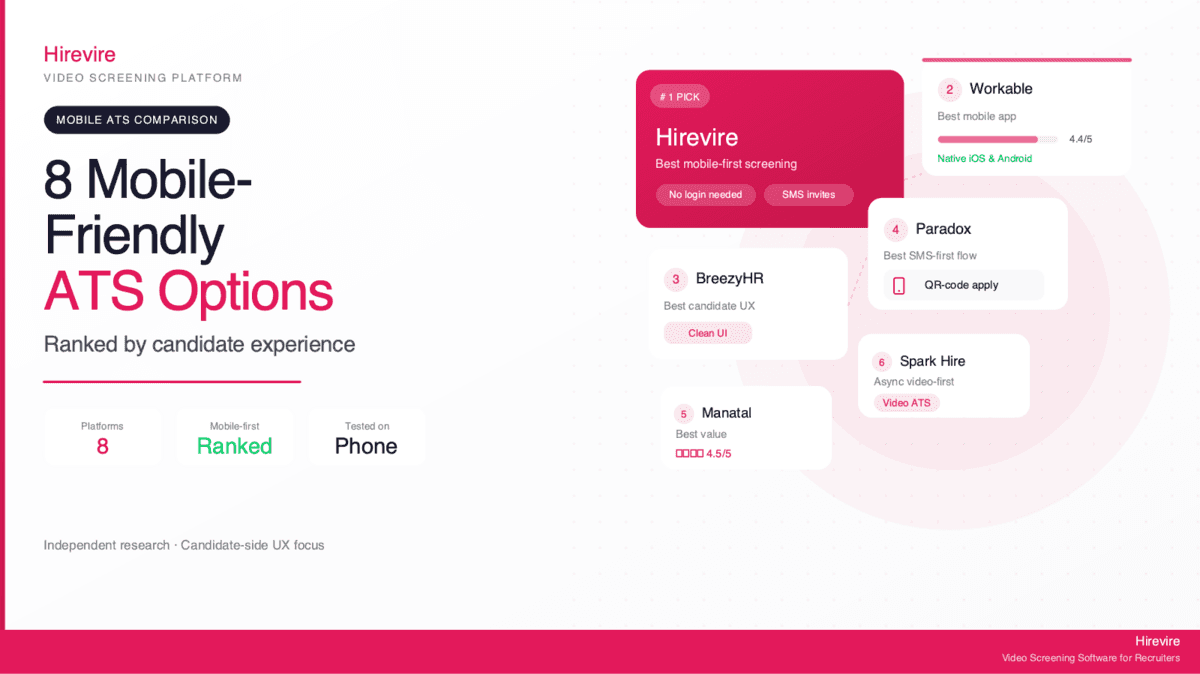
8 User-Friendly ATS Options for Mobile Recruitment 2026: Ranked by Candidate Experience