Customizable Hiring Workflow: Hiring Process Templates, Examples, and Tools
Most hiring teams don't need to rebuild their workflow from scratch. They need to adjust it - tighten a stage here, add a screening step there, adapt the process for a sales hire versus a developer hire. That's what a customizable hiring workflow actually means in practice: a flexible process that bends to your role, your volume, and your team structure without requiring you to rethink hiring from the ground up.
According to SHRM research, organizations with structured, documented hiring workflows reduce time-to-fill by up to 50% and improve quality of hire significantly compared to ad-hoc processes. The key word is "structured" - not rigid.
Quick Summary: This guide covers what's actually customizable in a hiring workflow, the six-stage template most teams start from, and the five layers where real customization happens. It also breaks down customization patterns by role type, volume, and team structure - and explains where tools like Hirevire fit as a flexible screening step you can drop into any existing process.
TL;DR - What's Actually Customizable in a Hiring Workflow
Before getting into depth, here's the direct answer: most of the customization in a hiring workflow happens at the stage level and screening layer, not at the process architecture level. You're not rebuilding a house; you're rearranging the furniture.
Key Takeaways
| Stage | What's Customizable | Common Variation |
|---|---|---|
| Application | Required fields, knockout questions, format (form vs. link) | Job boards for high-volume vs. referral-heavy for senior roles |
| Screening | Questions, format (video/audio/text), timing, who reviews | Async video for speed vs. phone screen for senior roles |
| Assessment | Skills tests, work samples, case studies | Tech: code challenge; Sales: roleplay; Creative: portfolio |
| Interview | Panel vs. one-on-one, structured vs. semi-structured | 1-2 rounds for SMB; 3-5 rounds for enterprise |
| Reference | Formal check vs. casual conversation | Skipped for contract roles; mandatory for leadership |
| Offer | Negotiation window, offer letter format, onboarding trigger | Automated offer flow vs. manual negotiation for exec hires |
The screening stage - specifically the async screening step - is where the most meaningful customization happens for most teams, because it's the highest-leverage point. Get that right and the rest of the workflow becomes more manageable.
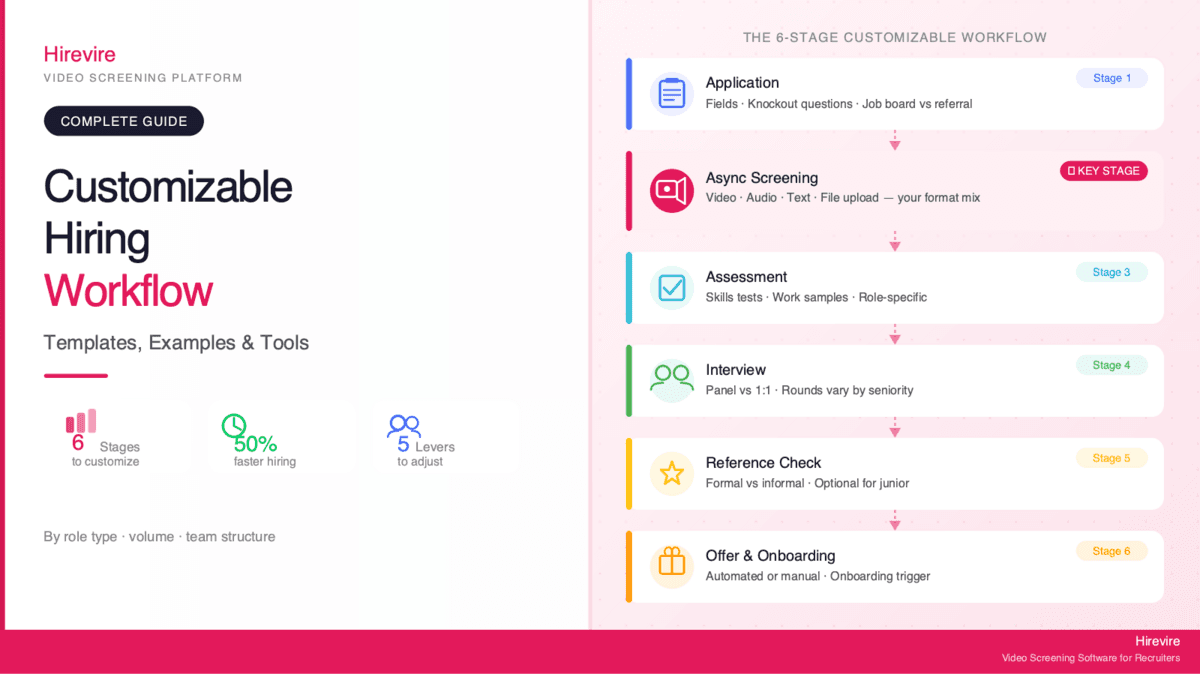
The Six-Stage Workflow Most Teams Start With
A solid baseline for most hiring teams looks like this: Application Collection, async Screening, Assessment, Interview, Reference Check, and Offer.
This is covered in depth in the hiring process workflow templates and flowcharts guide. What matters here is understanding what each stage can look like before customizing it.
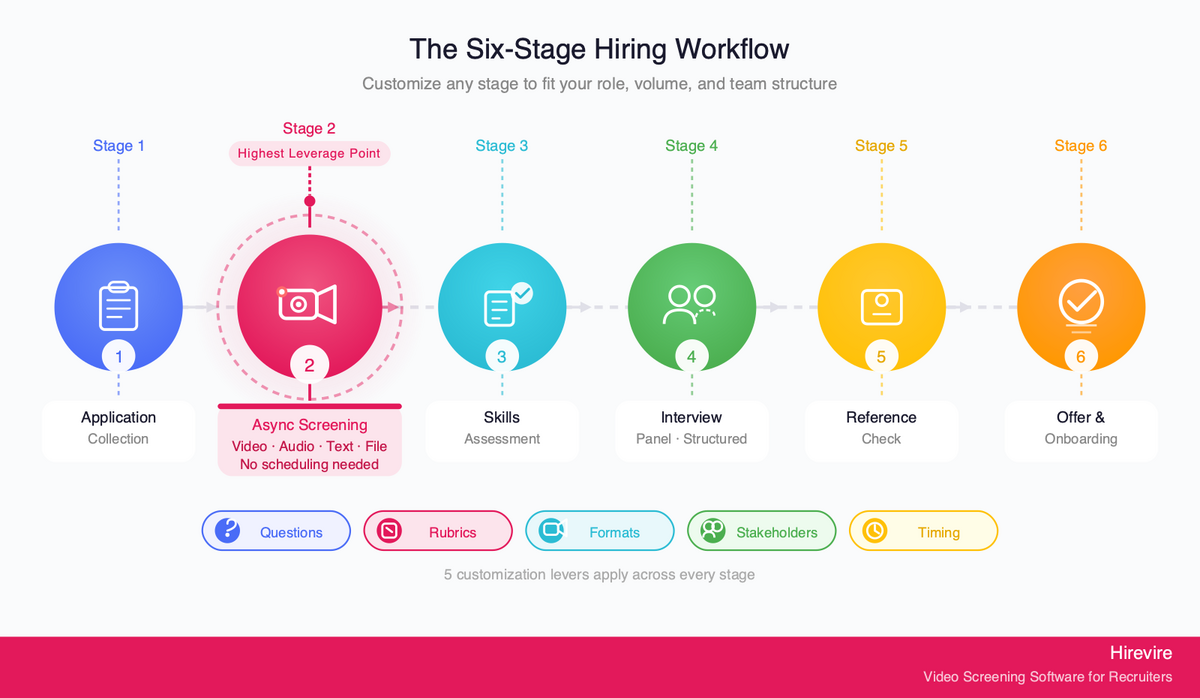
Stage 1: Application Collection
This is how candidates enter your pipeline. Customization options include required vs. optional fields, knockout questions (must answer yes/no to proceed), application format (ATS form, career page, job board), and pre-screening questions baked into the application.
Stage 2: Async Screening
The flexible layer. This is where most workflow customization actually lives - and where platforms like Hirevire come in. Instead of scheduling phone screens, candidates respond to structured questions via video, audio, text, or file upload at their convenience. Recruiters review responses when ready.
Stage 3: Skills Assessment
Format varies dramatically by role. Tech roles get coding challenges (HackerRank, take-home projects). Sales roles might get a mock pitch. Creative roles submit portfolios. This stage can be a standalone step or embedded as part of the screening stage.
Stage 4: Interview
Panel composition, number of rounds, structure (fully scripted vs. semi-structured), and format (in-person vs. virtual) all vary. Most customization here involves who is in the room and what questions they ask.
Stage 5: Reference Check
Often skipped for junior roles, mandatory for leadership. The level of formality - structured questionnaire vs. informal conversation - is the main customization point.
Stage 6: Offer and Onboarding Trigger
Offer letter format, negotiation process, and the handoff to onboarding. For high-volume hiring, this often needs automation. For senior roles, it's usually manual and relationship-driven.
Five Things You Customize at Every Stage
Across all six stages, the actual customization levers are the same five things. Understanding this simplifies the process considerably.
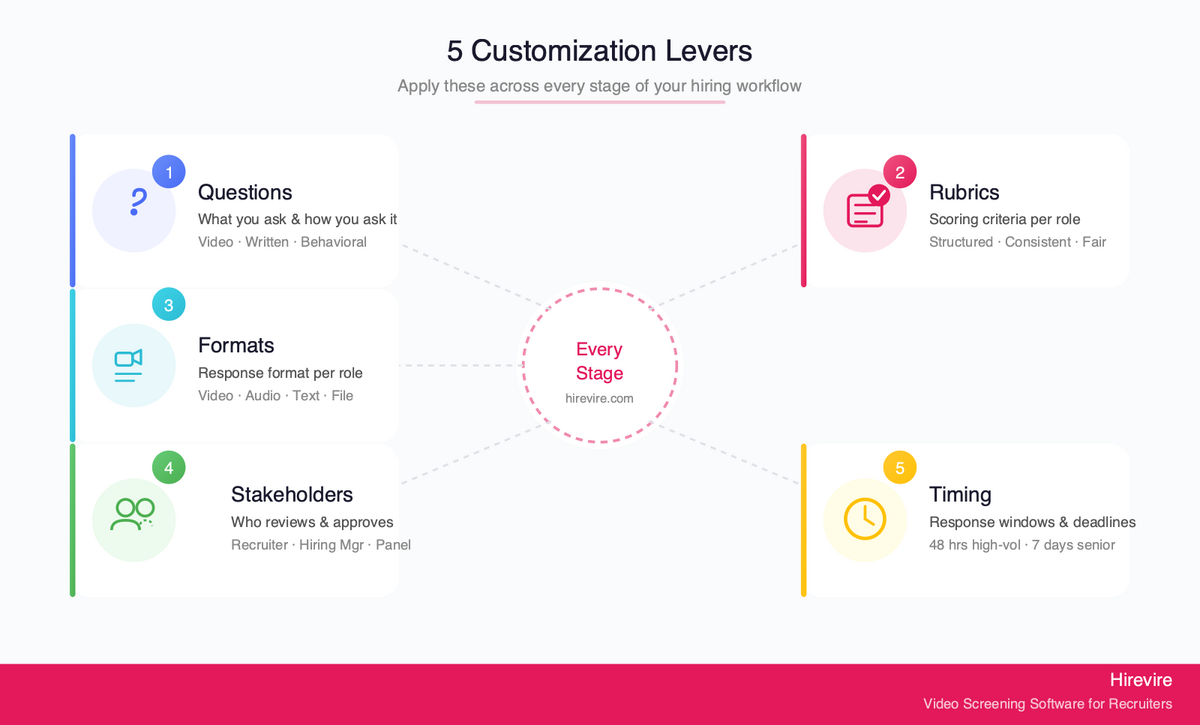
1. Questions
What you ask - and how you ask it - is the most direct form of workflow customization. In the screening stage, this means choosing between open-ended video questions, structured written prompts, or behavioral scenarios. In interviews, it means choosing competency-based questions vs. situational prompts.
With Hirevire, you can configure custom video, audio, text, or file-upload questions per job. A customer service role gets: "Describe a time you turned around an unhappy customer." A developer gets: "Walk us through a recent technical decision and why you made it." The question set is fully configurable and role-specific.
2. Evaluation Rubrics
How you score answers is as important as what you ask. A structured rubric - even a simple 1-5 scale with defined criteria per score - reduces subjectivity dramatically. Rubrics should be customized per role: communication clarity matters more for client-facing roles; technical accuracy matters more for engineering.
Hirevire's AI Match feature generates scorecards automatically based on candidate responses, and you can add custom rating criteria per job.
3. Response Formats
Not every question needs a video answer. Written responses work better for analytical roles. Audio-only works better for candidates on poor connections or who interview better verbally. File uploads are essential for creative and technical roles.
The ability to mix formats within a single screening step - video question 1, written question 2, file upload for question 3 - is a real customization point that most teams underuse. Hirevire supports all formats in a single job posting.
4. Stakeholders and Handoffs
Who reviews what at each stage - and who approves the handoff to the next stage - is one of the most overlooked customization points. For a startup with a single founder-recruiter, the handoff is informal. For a large team with a panel review committee, you need a structured handoff with defined approval criteria.
Hirevire allows recruiters to share candidate response links with hiring managers without requiring them to create an account. Comments and ratings from multiple reviewers consolidate in one place.
5. Timing and Deadlines
Response windows, stage deadlines, and automatic progressions are customizable in most modern tools. Giving candidates a 72-hour window to complete async screening vs. a 7-day window changes your pipeline velocity significantly. Automated email reminders reduce drop-off without recruiter intervention.
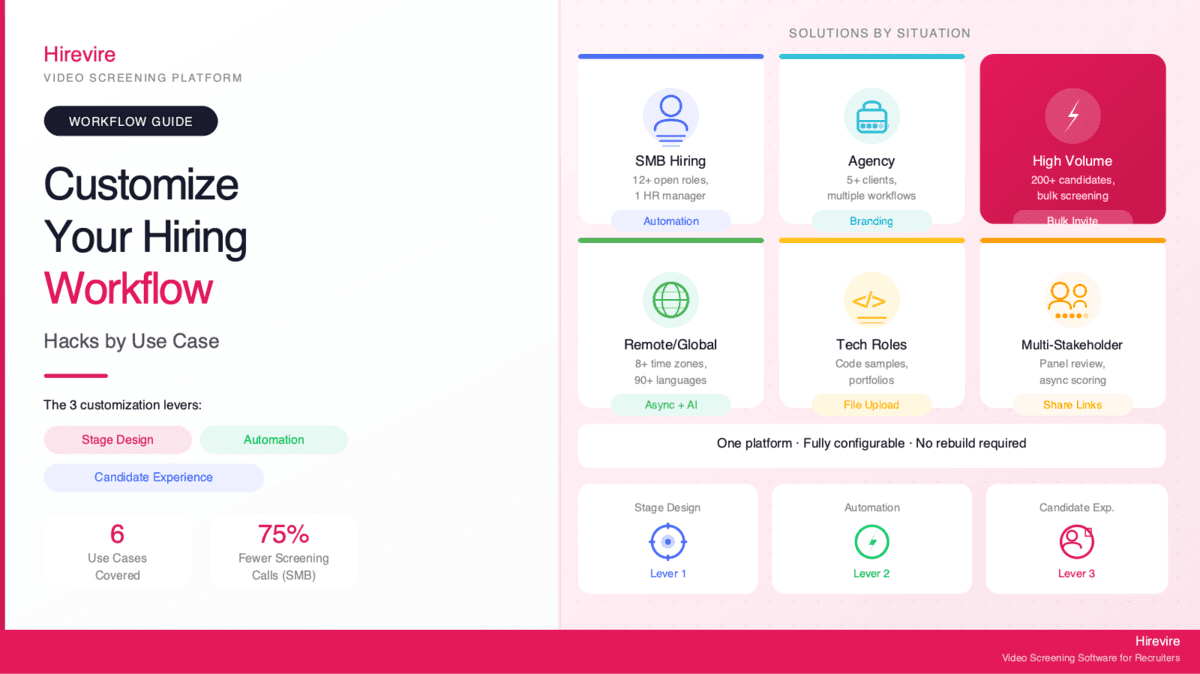
Customization by Role Type
The most practical way to approach workflow customization is to start from the role type, not the abstract process. Here's how common role categories should change your workflow.
Tech Roles (Software Engineers, Data, DevOps)
What changes: Assessment stage is primary. Screening is secondary.
For technical roles, the work sample is the most signal-dense step. The screening stage should focus on culture fit and communication clarity - saving the deep technical evaluation for a code challenge or take-home project.
Recommended customization:
- Short async screening (2-3 questions max): why this role, approach to problem-solving, example of a recent technical decision
- Add a file upload option for portfolio links, GitHub repos, or code samples
- Route to technical assessment after screening, before any live interview
Hirevire integrates natively with Ashby, which is common in engineering teams. The async screening step sits cleanly before technical rounds.
Sales Roles (Account Executives, BDRs, SDRs)
What changes: Screening is where most signal comes from. Communication is the assessment.
For sales roles, the screening step IS the assessment. A 2-minute video pitch - "Sell me on why you're the right person for this role" - tells you more than a resume and a 30-minute phone call combined.
Recommended customization:
- Require video response (not audio or text) for all sales roles
- Ask one roleplay prompt: "You've just left a voicemail for a cold prospect who hasn't responded in 2 weeks - what do you say in the follow-up email?"
- Score on energy, structure, and persuasion using a custom rubric
Operations and Admin Roles
What changes: Written response quality matters. Scenarios over theory.
Operations roles require judgment and clarity under real-world constraints. Written scenario responses - "Here's a problem: what do you do?" - work better than video for evaluating analytical thinking.
Recommended customization:
- Mix video intro question with written scenario questions
- File upload for any relevant certifications or process documentation
- Shortlist criteria focused on completeness and structure of written answers
High-Volume Entry-Level (Retail, Hospitality, BPO, Warehouse)
What changes: Speed and automation are the primary customization levers. See the best high-volume recruiting software guide for dedicated tool recommendations.
Recommended customization:
- Short screening: 1-2 questions maximum, 60-90 second response time limits
- Bulk CSV invite to send screening links to all applicants at once
- Automated shortlisting triggers via Zapier based on completion
- AI transcription scanning for must-have qualifications
Hirevire's bulk invite feature and Zapier integration make this workflow feasible at scale without adding headcount to the screening process.
Customization by Hiring Volume
Volume changes the workflow more than almost any other variable. Here's how the same six-stage framework adapts across low, medium, and high volume.
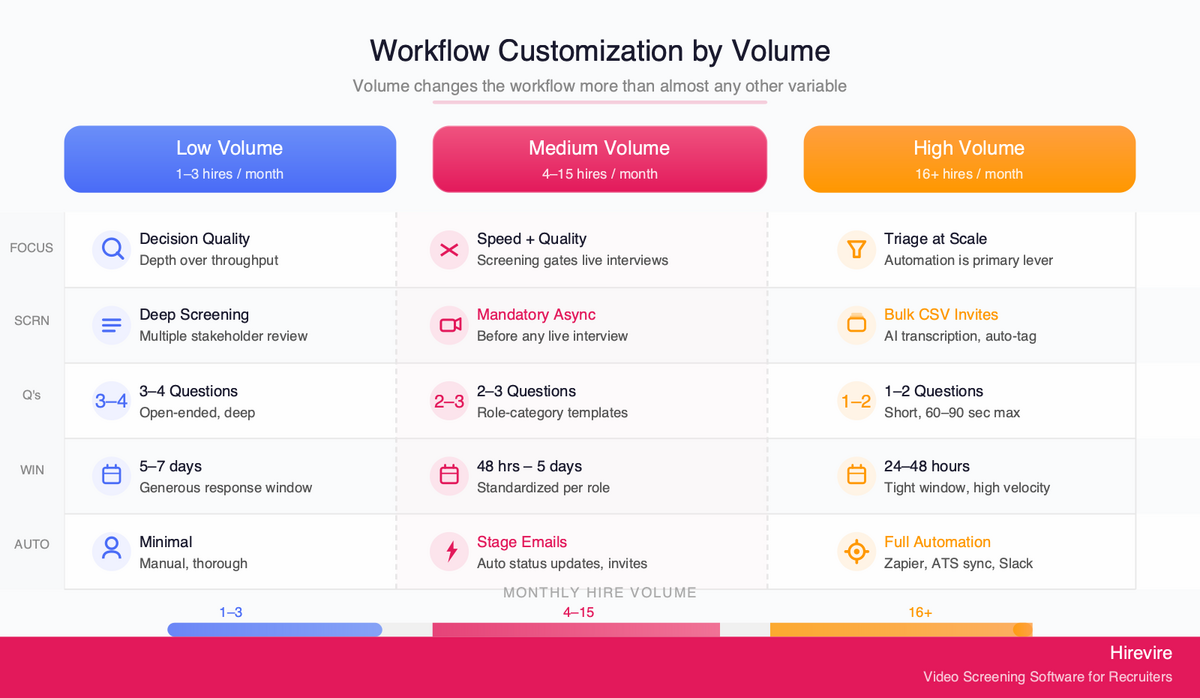
Low Volume (1-3 hires/month)
At low volume, the bottleneck is usually decision quality, not throughput. Customization should focus on depth of assessment at each stage rather than automation.
- Fewer, deeper screening questions (3-4 questions, open-ended)
- Multiple stakeholder reviewers in the screening stage
- Structured interview scorecard with weighted criteria
- Longer response windows for candidates (5-7 days)
A team making 1-2 senior hires per quarter has the bandwidth to be thorough at every stage. The tool setup doesn't need to be elaborate - it needs to be well-structured.
Medium Volume (4-15 hires/month)
At medium volume, time-per-candidate becomes a real constraint. The screening stage becomes essential for filtering before live interviews.
- Async screening as a mandatory step before any live interview
- Automated status emails at each stage transition
- Sharing candidate responses with hiring managers via link (no calendar coordination needed)
- Standardized question sets per role category (not per individual role)
Hirevire's automated email templates per stage - confirmation on application, screening invite, status update - handle a significant portion of recruiter communication overhead at this volume.
High Volume (16+ hires/month)
At high volume, the screening stage is a triage mechanism. Automation is the main customization lever.
- Bulk invitations via CSV upload
- Short response windows (24-48 hours) to maintain pipeline velocity
- AI transcription review for knockout qualification check
- Automated Zapier triggers to tag and move candidates through pipeline
- Integration with ATS to keep all candidate data synchronized
At this volume, a tool that can't scale the screening step creates a bottleneck that grows with every additional hire. Hirevire's Agency plan handles up to 12,000 screening interviews per year - enough for most high-volume teams without per-interview charges.
Customization by Team Structure
The right workflow also depends on who's running it.
Solo Recruiter or HR Generalist
The challenge: wearing multiple hats, limited time per candidate, need for asynchronous handoffs to hiring managers.
The customization: set up the screening stage once and let it run. Automated invite emails, standardized question sets per role type, and one-click sharing with hiring managers via response links.
"I really like how easy it is to use. The platform helps me collect video, audio, and text answers from candidates without needing to call or meet them first. It saves me a lot of time and keeps everything organised in one place." Muhamad Hariz M., G2
Small In-House Recruiting Team (2-5 people)
The challenge: coordinating review across team members without duplicate work.
The customization: role-based question sets, shared candidate response links, rating and comment features to consolidate team feedback before advancing candidates to live interviews.
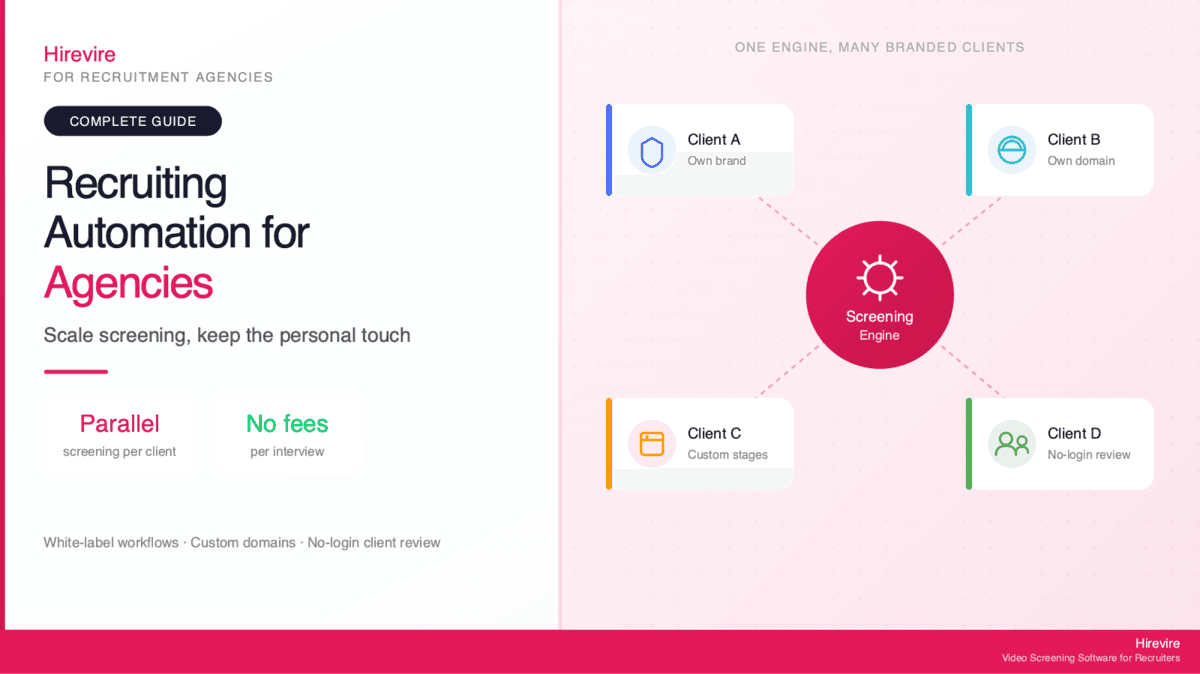
Recruitment Agency (Multi-Client)
The challenge: different clients want different processes. Running one generic workflow across clients creates confusion and dilutes quality.
The customization: create separate job setups per client with custom branding (client logo, colors, intro video), use shareable application response links to deliver candidate packets to each client, and use CSV export for structured weekly reporting. Hirevire's custom domain feature means candidates land on a branded URL, not a generic platform URL.
Multi-Stakeholder Enterprise Team
The challenge: panel reviewers, department heads, and founders all want input - but coordinating schedules for joint reviews is impossible.
The customization: asynchronous stakeholder review via shared response links, structured rating with comment features, Zapier integration to push ratings to a shared Slack channel. Hiring decisions happen in comment threads, not debrief calls.
"Easy to use, intuitive software. Benefits for both candidates and hiring managers, providing both with qualitative information and context." J O., G2
The Screening Step Is Where Most Customization Happens
There's an honest positioning point worth making here: if your primary frustration is "I can't customize my hiring workflow," there's a good chance the actual problem is the screening step, not the workflow architecture.
Most full-ATS platforms - Greenhouse, Lever, Workable, Manatal - offer workflow configuration at the macro level: you can define stages, set up automations, and build approval gates. What they don't do as well is give you deep control over what happens inside the screening stage itself.
That's where Hirevire fits. It's not a configurable ATS. It's a flexible async screening layer that slots into the workflow you already have. It connects to your ATS via Zapier, Make, native integrations (including Ashby, Recruitee, Manatal), or webhooks. Candidates complete their screening on Hirevire; the results flow back into your existing pipeline.
The pitch is honest: if you need to rebuild your entire hiring workflow, you need an ATS. If the problem is that your screening step is slow, inconsistent, or adding too much calendar overhead, Hirevire solves that problem at a fixed monthly cost ($39-199/month) without requiring you to touch the rest of your process.
For details on connecting Hirevire to your specific ATS or building Zapier automations around it, see the integrations page.
For stage-level customization - setting up custom stages with email templates per stage - the email templates with custom stages guide covers the setup in detail.
Hirevire Pricing
| Plan | Monthly | Yearly | Interviews/Year | Best For |
|---|---|---|---|---|
| Essentials | $49/mo | $39/mo (billed yearly) | 300 | Single role, small team |
| Professional | $149/mo | $99/mo (billed yearly) | 1,200 | Regular hiring, multiple roles |
| Agency | $249/mo | $199/mo (billed yearly) | 12,000 | High volume, multiple clients |
G2: 4.7/5 stars (25+ reviews) | Capterra: 5/5 stars (20+ reviews) | AppSumo: 4.9/5 (70+ reviews)
How to Build a Custom Recruitment Workflow: Step-by-Step
Most hiring managers approach workflow customization backwards - they pick tools first, then try to retrofit a process around them. The more effective approach is to map your actual constraints first, then identify which stages need the most adjustment, then choose tools that fit the gaps.
Step 1: Map Your Current Hiring Process
Before customizing anything, document what you currently do. For each role category you hire for regularly, identify:
- How long each stage takes on average (application to screen, screen to interview, interview to offer)
- Where candidates drop off most often (application stage? after screening? after interviews?)
- Where recruiter time is spent most heavily (manual scheduling? repeated emails? coordinating stakeholder feedback?)
- What feedback you get from candidates about the experience
This takes 30-60 minutes and almost always reveals two or three specific pain points that are driving the perception that "our workflow doesn't work." Most of the time, the problem is concentrated in one or two stages, not the whole process.
Step 2: Define Your Role Categories
Most hiring teams benefit from having 3-4 distinct workflow templates by role type rather than one universal process or a different process per job.
A common set of role categories:
- Individual contributors / entry-level - faster screening, more automation, shorter evaluation cycle
- Technical roles - work sample emphasis, structured screening with specific questions, deeper interview rounds
- Client-facing / sales roles - video screening mandatory, communication evaluation primary, faster time-to-hire expectations
- Management and leadership - more stakeholders in the process, structured references, longer evaluation cycle acceptable
Once you have 3-4 templates defined, new roles slot into an existing template rather than requiring a fresh workflow build. Adjustments are variations on a template, not blank-page designs.
Step 3: Configure Your Screening Stage
The screening stage is the highest-value configuration step. For each role category template, define:
- Number of screening questions (2-4 for most roles; 1-2 for high volume)
- Question types (video for communication-heavy roles; written for analytical roles; file upload for creative/technical roles)
- Response time limit per question (60-90 seconds for video; no limit for written)
- Candidate response window (48 hours for high-volume; 5-7 days for senior roles)
- Who reviews responses (solo recruiter vs. hiring manager review required)
- Advancement criteria (what makes a candidate worth moving to interview?)
Hirevire lets you save question sets as templates and reuse them across jobs in the same category. Once you've configured a "sales role screening" template, creating a new sales job takes about 10 minutes.
Step 4: Build Your Automation Layer
For medium- and high-volume teams, the automation layer between stages is where workflow customization delivers compounding returns. Key automations to set up:
- Stage transition emails - candidate gets a confirmation when they apply, a screening invite when advanced, a status update when shortlisted or not moving forward
- Hiring manager notifications - when a candidate is shortlisted for review, the hiring manager gets a link to the response (no calendar coordination)
- ATS sync - when a candidate advances past screening, their data and a note sync to the ATS automatically
- Slack notifications - when a candidate completes screening, a Zapier trigger posts a summary to the relevant Slack channel
Hirevire's built-in automated emails cover stage transitions without needing Zapier. For Slack notifications and ATS sync, the Zapier integration handles the connection. See the integrations page for specific setup documentation.
Step 5: Test and Iterate
Run your customized workflow on 2-3 hires before treating it as fixed. Track time-per-stage, candidate completion rates, and feedback from hiring managers. The most common first-iteration issues are:
- Screening questions too long (candidates don't complete them) - cut to 2-3 questions max
- Response windows too short (quality candidates drop off) - extend to 5 days minimum for senior roles
- Hiring manager review not happening fast enough - simplify the share mechanism or add a Slack ping
- Stage transition emails feel generic - personalize the subject line and opening with role-specific context
Most teams reach a stable, well-functioning workflow after 2-3 iterations. After that, customization becomes incremental - adjusting a question here, adding an automation there - rather than wholesale redesign.
Role-Specific Workflow Templates
Template: Customer Success / Account Management
| Stage | Format | Time Window |
|---|---|---|
| Application | Standard ATS form | Ongoing |
| Screening | 3 video questions (2 min each): background, a customer challenge story, interest in the specific role | 5 days |
| Assessment | Skip or lightweight written scenario | 3 days |
| Interview | 2 rounds: recruiter + hiring manager | 1 week |
| Offer | Standard | 3-5 days |
Template: Engineering / Technical Roles
| Stage | Format | Time Window |
|---|---|---|
| Application | Standard ATS form + portfolio/GitHub link | Ongoing |
| Screening | 2 video questions (communication focus) + file upload (code sample or project brief) | 5 days |
| Technical Assessment | Take-home challenge or HackerRank | 5-7 days |
| Interview | 3 rounds: recruiter, technical panel, hiring manager | 1.5-2 weeks |
| Offer | Standard | 3-5 days |
Template: High-Volume Entry-Level
| Stage | Format | Time Window |
|---|---|---|
| Application | Short form with 2 knockout questions | Ongoing |
| Screening | 1-2 video questions (90 sec max each) sent via CSV bulk invite | 48 hours |
| Interview | One 30-min video call for shortlisted candidates | 3-5 days |
| Offer | Automated offer letter | Same day |
These templates are starting points. Adjust timing and format based on your specific role requirements and candidate pool characteristics.
Frequently Asked Questions
What does "customizable hiring workflow" actually mean?
A customizable hiring workflow is one where you can change the stages, questions, evaluation criteria, stakeholder involvement, and automation rules to match your specific role, volume, and team without rebuilding the process from scratch. In practice, most customization happens at the screening and interview stages - what you ask, how candidates respond, who reviews responses, and how they progress.
Can I use different workflows for different roles at the same company?
Yes, and this is common practice. A standard approach is to define 3-4 workflow templates by role category (technical, sales, operations, leadership) and then adjust slightly per individual role. Tools like Hirevire let you configure separate question sets, response formats, and branding per job posting without creating a separate account setup for each.
How do I customize a hiring workflow for high-volume roles?
For high-volume roles, the primary customization levers are: short screening questions (1-2 max), response time limits, bulk CSV invitations, automated shortlisting triggers via Zapier, and AI transcription scanning for knockout qualifications. The goal is to filter a large pool quickly without watching every response individually. Hirevire handles bulk invites natively and integrates with Zapier for automated tagging.
What's the difference between a hiring workflow and an ATS?
A hiring workflow is the process - the sequence of stages candidates move through from application to offer. An ATS (Applicant Tracking System) is the software that manages and tracks that workflow. Most ATS platforms let you configure stages but offer limited control over what happens inside each stage. Hirevire is not an ATS - it's a specialized tool for the screening stage that integrates with your existing ATS via Zapier or native connections.
How long does it take to set up a custom hiring workflow?
For most teams, setting up a basic customized workflow takes 2-4 hours of initial configuration: defining stages, writing screening questions, setting up email templates, and connecting integrations. Hirevire can be configured in under an hour per job posting. After initial setup, creating a new job with a customized question set takes 15-20 minutes.
What does a customizable recruitment workflow look like by team size?
A solo recruiter needs a self-running screening step - async video questions, automated invite emails, one-click share with hiring managers. A 3-5 person team needs shared review features and role-based question sets. An agency needs per-client branding and shareable candidate packets. All of these are customization patterns within the same six-stage framework, adapted to team structure and capacity.
Can Hirevire be used as a standalone tool or does it require an ATS?
Hirevire works as a standalone tool - you can post jobs directly via Hirevire career pages and manage the full screening process without an ATS. Many SMB teams use it this way. It also integrates with existing ATS platforms (Ashby, Recruitee, Manatal, and thousands more via Zapier) for teams that want the screening step to feed back into a larger workflow.
What makes a hiring workflow "flexible" vs. "rigid"?
A rigid workflow applies the same stages, questions, and timelines regardless of role or context. A flexible workflow adapts stage length, question format, evaluation criteria, and automation rules based on role type, volume, and stakeholder requirements. The most common flexibility point is the screening stage - whether you use async video, phone screen, or skills test, and how you evaluate responses. The rest of the workflow architecture (application, interview, offer) typically stays stable.
How do I handle multi-language hiring in a customized workflow?
For global teams, the main adaptations are: async screening over live phone calls (eliminates time zone conflicts), AI transcription of responses in the candidate's first language, and no-login candidate experience (removes friction for candidates unfamiliar with Western SaaS onboarding). Hirevire supports AI transcription in 90+ languages and offers a no-login candidate flow. See the no-login mobile screening guide for setup details.
How many custom stages should a hiring workflow have?
The right number depends on role seniority and team structure, not a universal rule. For most roles, 4-6 stages is optimal: Application, Screening, Assessment (or skip for junior roles), Interview, and Offer. Adding stages has diminishing returns and increases time-to-fill. The exception is senior or executive roles, where 6-8 stages with multiple stakeholder touchpoints is standard.
Conclusion
A customizable hiring workflow is less about architectural flexibility and more about knowing the right levers to pull at each stage. The six-stage framework gives you the structure; the five customization points - questions, rubrics, response formats, stakeholders, and timing - give you the flexibility to adapt it.
The screening step is where most teams have the most to gain. It's the highest-leverage point in any hiring workflow, and it's where tools like Hirevire earn their place - not by replacing your ATS or rebuilding your process, but by making the one stage that matters most work better for your specific situation.
Key Takeaways
- Most customization in a hiring workflow happens at the screening stage and inside each stage, not at the process architecture level
- The five universal customization levers - questions, rubrics, response formats, stakeholders, and timing - apply across all six stages
- Volume changes the workflow more than almost any other variable; high-volume hiring needs automation; low-volume needs depth
- Hirevire is a flexible async screening layer, not a configurable ATS - it fits into your existing workflow via Zapier, webhooks, or native ATS integrations
- Setting up a customized workflow takes 2-4 hours of initial configuration; ongoing adjustments per job take 15-20 minutes
Your Next Steps
- Map your current workflow against the six-stage framework - identify which stages feel most rigid or manual
- Identify your primary pain point: is it volume, speed, consistency, or stakeholder coordination?
- Start customizing at the screening stage first - it has the highest leverage-to-effort ratio
- Try Hirevire as a drop-in screening step for your next open role - no ATS rebuild required
Ready to build a hiring workflow that actually fits the way your team works?
Last updated: May 2026. All information verified as of May 2026.