How to Customize Your Hiring Workflow: Hiring Process Hacks and Solutions by Use Case
Most hiring teams don't have a workflow problem. They have a wrong workflow problem.
They're running a generic five-stage process designed for a mid-sized company with a full HR team - and they're an agency with eight clients, or a retail chain screening 300 applicants, or a startup trying to get four hiring managers to agree without putting everyone in a room.
According to SHRM research, organizations with structured, role-appropriate hiring workflows reduce time-to-fill by 40% and cut cost-per-hire significantly compared to ad hoc processes. The bottleneck isn't the number of stages. It's the mismatch between the workflow design and the actual hiring context.
This guide gives you the specific customizations that work - organized by situation. Not abstract frameworks. Actual stage setups, automation triggers, and candidate experience decisions that Hirevire customers use in production across six distinct use cases.
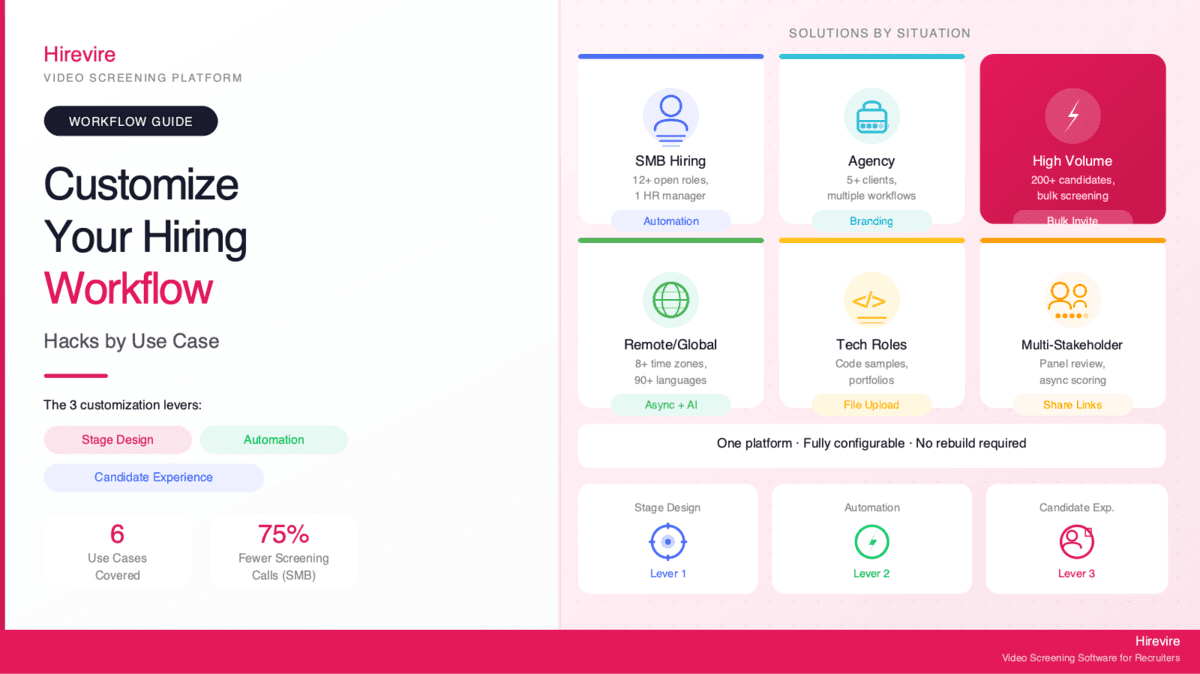
Quick Summary: The three levers for customizing any hiring workflow are stage design, automation between stages, and the candidate experience inside each stage. This guide maps each lever to your specific hiring context. Hirevire makes all three configurable without rebuilding your process from scratch.
The Three Customization Levers for Any Hiring Workflow
Before diving into specific use cases, it helps to name the three layers where customization actually happens. Most hiring frustration comes from trying to fix the wrong layer.
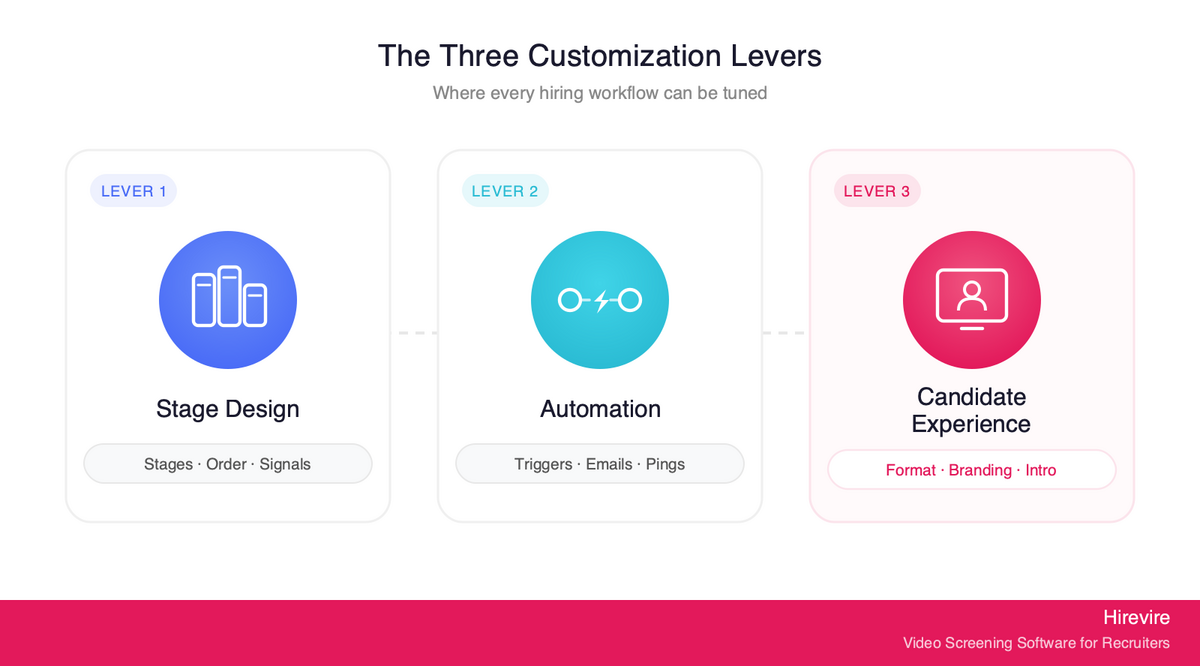
Lever 1: Stage Design
Stage design answers: what stages exist, what does each stage collect, and what happens between them? This is where you decide whether candidates go through a resume screen before an async video, whether there's a take-home between the async screen and the live interview, and whether the final stage is a panel or a one-on-one.
The most common mistake: treating stage design as fixed and trying to compensate with better questions. Better questions can't save a workflow with the wrong number of stages, or stages collecting the wrong type of signal.
Lever 2: Automation Between Stages
Automation answers: what triggers fire when a candidate moves between stages? Confirmation emails when an application arrives. Screening invites when a candidate passes initial review. Status updates when they're moved forward or declined. Slack pings to hiring managers when responses come in.
Manual workflows don't fail because people forget - they fail because the coordination overhead adds up. One recruiter managing 12 open roles cannot manually send 60 status emails per week and also do the actual hiring work.
Lever 3: Candidate Experience Inside Each Stage
Candidate experience answers: what does the candidate see and do inside each stage? Response format (video, audio, text, file upload). Whether login is required. Branding (your logo, colors, custom domain). Intro/outro videos from the hiring manager. Retake options. Time limits per question.
This layer has the highest variance by use case. A remote candidate on a slow connection in Southeast Asia needs a different experience than a senior engineer in San Francisco who's already used five other interview platforms.
The Key Takeaways Table
| Use Case | Biggest Customization Lever | Quick Win |
|---|---|---|
| SMB hiring (small HR team) | Automation between stages | Triggered emails per custom stage |
| Agency recruiter (multi-client) | Stage design + branding | Per-client custom stages and intro videos |
| High-volume entry-level | Bulk operations + automation | CSV bulk invite + auto-shortlist via Zapier |
| Remote/global hiring | Candidate experience layer | Multi-format responses + AI transcription in 90+ languages |
| Tech roles | Stage design (response formats) | File upload stage for code/portfolios |
| Multi-stakeholder hiring | Automation + async review | Shareable response links + async rating |
Use Case 1: SMB HR Manager Juggling 12+ Open Roles
The Problem
One HR manager. Multiple open roles with different hiring managers. No bandwidth for scheduling screening calls. Each hiring manager wants input but won't coordinate their own calendars. Candidates go dark after applying because nobody followed up fast enough.
The Workflow Hack
Set up Hirevire with five custom stages: Application Received → Async Screen → Hiring Manager Review → Live Interview → Offer.
What this changes:
- Async Screen stage collects 3-5 video questions (60-90 seconds each). Candidates complete on their own time. No scheduling required from the HR manager.
- Automated email templates per stage: candidates receive a confirmation when they apply, a screening invite with instructions when they're moved to Async Screen, and a status update when they advance or are declined. Set these once, fire them automatically.
- Hiring Manager Review uses shareable response links - the HR manager sends a single link per candidate. The hiring manager watches three video responses at 1.5x speed, leaves a rating and comment, and moves on. No calendar coordination, no debrief call for early-stage candidates.
- Zapier integration: when a candidate is marked "shortlisted" in Hirevire, a Zapier trigger posts the candidate's name, role, and response link to a dedicated Slack channel. Hiring managers see it in their normal flow, not their inbox.
What this fixes: 70% fewer screening calls. Hiring manager involvement without scheduling overhead. Candidates get prompt responses because the status emails are automated, not manual.
Customer validation: "It cuts down my hiring process by at least 75% and made it sooo much easier to see/feel who the candidates were before having to hop on a call with them." - ElevateClients, AppSumo
See also: Email Templates with Custom Stages in Hirevire for a deep-dive on the automated email setup.
Use Case 2: Agency Recruiter Managing 5+ Clients Simultaneously
The Problem
Different clients want different screening processes. Client A wants culture-fit video questions; Client B wants technical problem-solving prompts; Client C wants candidates to submit portfolio links. Running a single generic workflow confuses candidates, confuses clients, and confuses the recruiter.
On top of that: clients want professional presentation. Sending candidates to a generic hirevire.com/apply link doesn't look like a premium service.
The Workflow Hack
Create separate Hirevire jobs per client. This takes 10 minutes per new job and opens up full per-client customization:
- Custom branding per job: upload the client's logo and set the accent colors for that job. Candidates applying to a manufacturing client see that company's brand; candidates applying to a SaaS client see theirs. Same platform, different presentation for each.
- Client-specific intro videos: record a 30-60 second intro video for each job that introduces the role, the team, and why the candidate would want to work there. This is the highest-ROI customization for agencies - it communicates effort and professionalism without the recruiter being on a call.
- Custom domain: set
careers.youragency.comas the domain so candidates land on a branded URL, not a generic one. This matters for agencies charging premium placement fees. - Custom screening questions per client: Client A's async screen is three culture questions; Client B's is two technical prompts and a file upload for work samples. Stage design is entirely separate per job.
- Shareable candidate packets: instead of exporting a spreadsheet, share a link to each candidate's response page with the client. They review video responses directly, see transcripts, and can comment. No platform login required on their end.
- CSV export for weekly reporting: export structured candidate data per client for delivery in weekly status calls.
What this fixes: one platform running multiple branded client workflows simultaneously. No client confusion about process. Professional presentation that justifies premium fees.
Customer validation: "The custom domain feature is an excellent detail. The implementation is straightforward, and the result looks highly professional." - Sergio Arias Merino, AppSumo
Related: AI-Assisted Candidate Screening - how agencies use async screening to scale without adding headcount.
Use Case 3: High-Volume Entry-Level Hiring (Retail, Hospitality, BPO)
The Problem
200+ applications per role. Screening calls would take 400 hours just for one position. Resumes are nearly identical for entry-level roles. Standard ATS filtering eliminates good candidates on technicalities. The team needs to move fast and can't afford to miss candidates who are qualified but don't write polished resumes.
The Workflow Hack
Hirevire has a CSV bulk invite feature designed specifically for this pattern:
- Bulk CSV invite: export your applicant list from your job board or ATS, format as a CSV with names and emails, upload it to Hirevire. All 200 candidates receive screening invitations in one operation. No individual sending.
- Short, focused video questions: 2-3 questions with 60-90 second limits each. Keep candidate effort low. High-volume roles need high completion rates. A four-question screen with unlimited time will kill completion.
- AI transcription: Hirevire transcribes every video response automatically. Recruiters can scan transcripts in 30 seconds each instead of watching 3-minute videos for every candidate. For 200 candidates, this turns a 10-hour review into a 2-hour review.
- Zapier auto-tagging: set up a Zapier workflow that reads transcript text via webhooks and auto-tags candidates based on keyword presence (required certifications, specific experience mentions, scheduling availability). Candidates matching must-have criteria surface automatically.
- Automated decline emails: candidates who aren't advancing get a status update automatically when marked in Hirevire. No manual email drafting, no candidates left waiting two weeks for a response.
What this fixes: processing 200 candidates in the time it used to take to screen 20. Faster time-to-offer because bottlenecks are removed from the review process rather than just the scheduling.
Customer validation: "Hirevire is a game-changer in streamlining the hiring process. Its automated screening software saves lots of time and provides a good view of candidates. It's user-friendly, efficient, and perfect for high-volume hiring or short-staffed HR teams." - Mohammad Awais, AppSumo
See also: Best High-Volume Recruiting Software for a full comparison of tools built for volume hiring.
Use Case 4: Remote and Global Hiring Across Time Zones and Languages
The Problem
A live screening call with a candidate 8 time zones away requires someone to work at 6am or 11pm. That's not a sustainable process at scale. And for candidates whose first language isn't English, a 30-minute live call under time pressure produces worse signal than a written response or video recorded on their own schedule.
The Workflow Hack
Async video removes the time zone problem at the root. When candidates record at 2am their time and recruiters review at 9am theirs, time zones become irrelevant. Here's how to set up Hirevire for global hiring:
- No-login candidate flow: candidates receive an email with a direct link to the screening page. No account creation, no app download, no password. This removes friction for candidates unfamiliar with Western SaaS tools and candidates on slower connections where page load time matters.
- Multi-format responses: give candidates the option to respond via video, audio only, or written text. Some candidates interview significantly better in writing. Some have unreliable video setups. Forcing video-only screens out qualified candidates on a technical issue rather than a qualification issue.
- AI transcription in 90+ languages: candidates can respond in their first language. Hirevire transcribes and the recruiter reviews the translated text. This improves response quality - candidates who aren't writing in their second language express themselves more clearly and give better answers.
- Extended response deadlines: set a 5-7 day window for candidate response rather than 48 hours. This accommodates international holidays, shift work, and communication delays across time zones.
- Custom intro video: record a brief intro in English with visual cues (slide with key role details) so candidates can understand context even with imperfect audio.
What this fixes: truly global candidate pools without coordination overhead. Candidates who respond better in their native language give better signal. Completion rates improve when friction is removed from the candidate-side experience.
Customer validation: "I really like how easy it is to use. The platform helps me collect video, audio, and text answers from candidates without needing to call or meet them first. It saves me a lot of time and keeps everything organised in one place." - Muhamad Hariz M., G2
Related: No-Login Mobile Screening for the full breakdown of how the no-login candidate flow works.
Use Case 5: Tech and Creative Role Screening
The Problem
A five-minute video doesn't tell you whether a developer can debug under pressure or a designer's visual taste matches your brand. Resumes list skills; they don't demonstrate them. Adding a separate take-home platform means another tool to integrate, another login for candidates, and another review interface for the team.
The Workflow Hack
Hirevire supports file uploads, rich text responses, and native ATS integrations that turn the async screen into a full work-sample stage:
- File upload stage: add a stage where candidates submit code repositories, portfolio links, design files, or writing samples as part of their screening. This doesn't replace technical interviews - it precedes them. You're establishing baseline signal before committing live interview time.
- Pairing file upload with a reasoning question: after the portfolio/code submission, ask a short video question: "Walk me through the most interesting decision you made on this project." This gives you work sample plus explanation of thinking. Two signals from one stage.
- Rich text response for written take-homes: for short written prompts (a strategy brief, a copy exercise, a quick product critique), the rich text response type lets candidates submit directly in Hirevire rather than emailing a document or using a separate form. Everything lives in one place.
- Native Ashby integration: for engineering teams already running Ashby as their ATS, Hirevire sits cleanly before the live coding round. Async screening happens inside the Hirevire workflow; when a candidate advances, the integration updates their Ashby record. No double entry.
- Stage design for senior roles: senior engineering and design roles often get a two-stage async screen: first a brief culture/context video (2 questions, 60 seconds each), then the technical work sample (file upload + reasoning video). This structure gives candidates context before asking them to invest in the work sample.
What this fixes: full-signal screening for technical and creative roles without adding a separate assessment platform. Work samples surface earlier, which means the live interview time is spent on depth rather than basics.
Customer validation: "Being able to set up questions that can be answered with video, text, audio, an image, a file, multiple-choice options, or even a single-choice test style is fantastic." - Sergio Arias Merino, AppSumo
See also: Hiring Process Workflow Templates and Flowcharts for structured workflow examples by role type.
Use Case 6: Multi-Stakeholder Hiring with Panel Reviewers
The Problem
Multiple hiring managers, panel reviewers, and founders all want input. Coordinating even three people's calendars for a joint review call produces calendar chains that extend the process by two to three weeks. And by the time the debrief happens, reviewers have forgotten what they thought about specific candidates.
The Workflow Hack
Hirevire's shareable response links eliminate the synchronization requirement entirely:
- Shareable response links: the recruiter shares a candidate's response page with each stakeholder via a simple link. The stakeholder watches the video, reads the AI transcript, and leaves a rating and comment at their own pace. No platform login required.
- Structured async feedback: each reviewer uses Hirevire's rating and comment interface to leave score-and-note feedback. Scores are visible to all reviewers in the shared thread, which surfaces misalignments early. If two reviewers rate a candidate 5/5 and one rates 2/5, the discrepancy is visible before anyone gets on a call.
- Zapier to Slack: configure a Zapier trigger that posts candidate scores to a dedicated Slack channel when ratings are added. The full team sees scoring in real-time without needing to check a separate platform. Founders and busy stakeholders get a summary in their main communication channel.
- Decision in comment threads: for many candidates, the hiring decision emerges from the comment thread itself. Reviewers respond to each other's comments, reach alignment, and the recruiter advances or declines without scheduling a debrief call.
- Debrief calls reserved for finalists: instead of joint review calls for every candidate, debrief calls happen only when reviewers disagree or when the candidate is in the final two. This reduces meeting time by 60-80% while preserving the collaboration that actually matters.
What this fixes: multi-stakeholder hiring without the meeting overhead. Structured feedback instead of general impressions. Faster decisions because alignment happens asynchronously before finalists are identified.
Customer validation: "Easy to use, intuitive software. Benefits for both candidates and hiring managers, providing both with qualitative information and context." - J O., G2
The Customization Mistake to Avoid
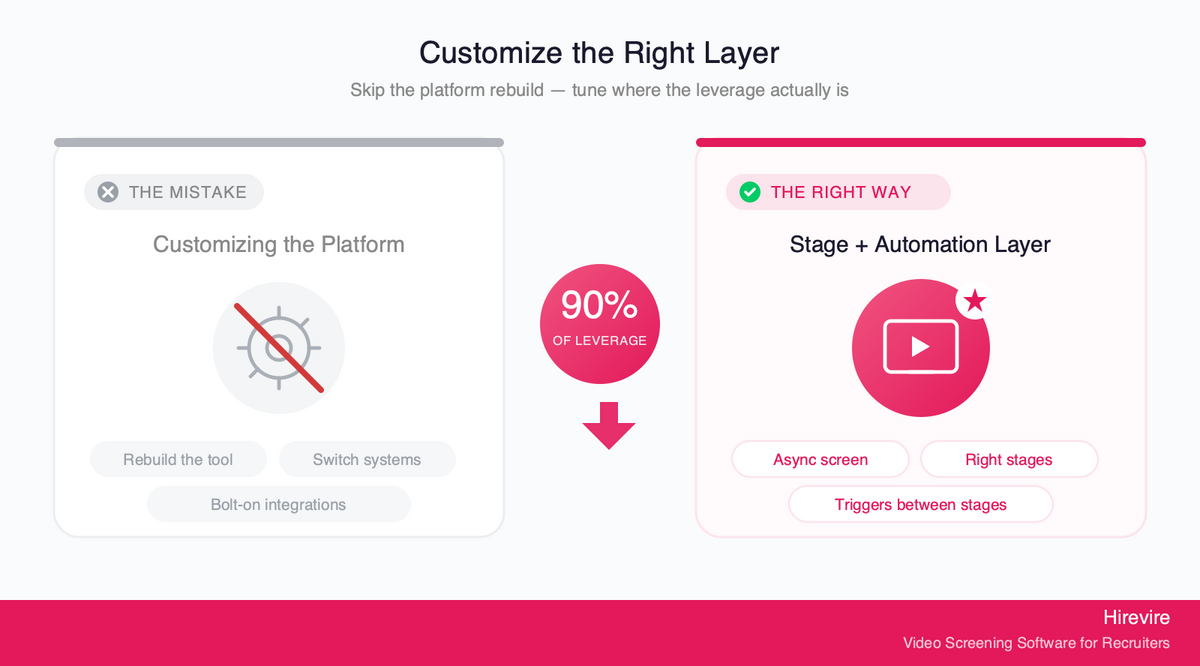
Most hiring workflow frustration comes from trying to customize at the platform layer - rebuilding the whole tool, switching systems, adding integrations that don't solve the real problem. In practice, 90% of customization happens at the stage and integration layer: what stages exist, what each stage collects, and what fires automatically between them.
The highest-leverage customization point in any workflow is the async screening stage. One well-designed async screen - right format for the role, right number of questions, right automation around it - changes the shape of the entire process downstream.
For SMB teams, it eliminates scheduling load. For agencies, it becomes the branded deliverable. For high-volume hiring, it makes 200 candidates reviewable. For global teams, it makes time zones irrelevant. For tech roles, it becomes the work-sample stage. For panel review, it becomes the shared evidence layer.
That's why Hirevire focuses on making async screening fully configurable - custom stages, all response formats, full automation hooks, flexible branding - rather than building a rigid workflow everyone has to fit into.
Hirevire Pricing and Plans
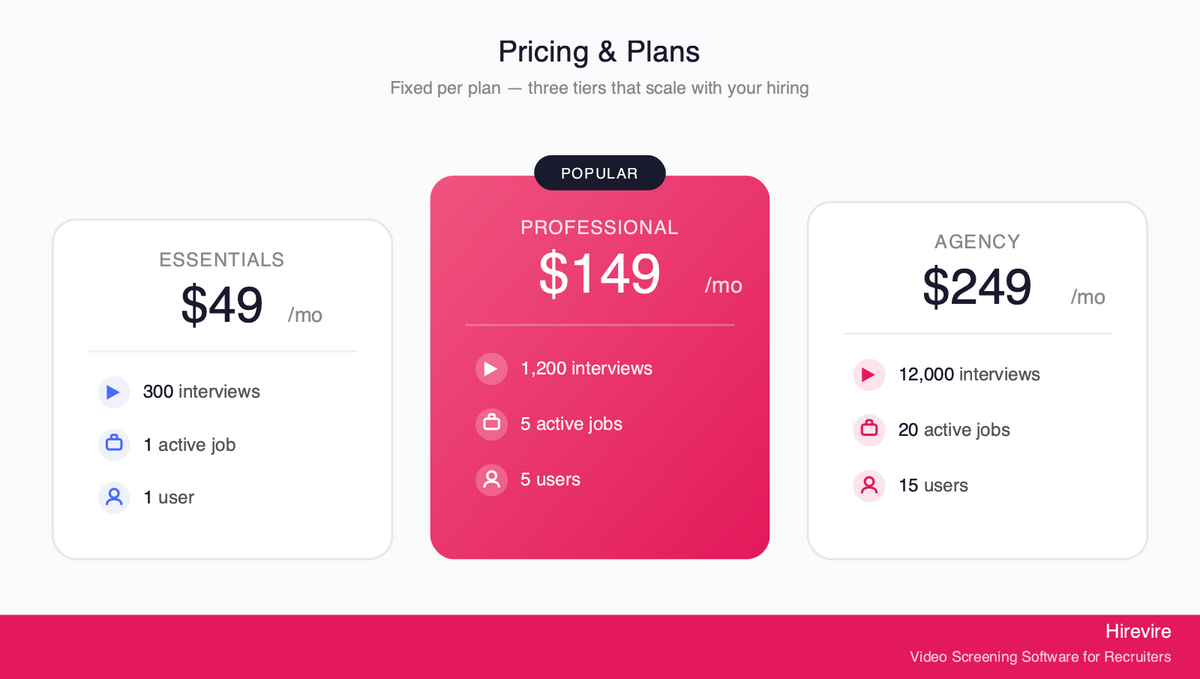
Hirevire pricing is fixed per plan, not per interview or per candidate beyond the allocation:
| Plan | Monthly | Yearly | Interviews/Year | Active Jobs | Users |
|---|---|---|---|---|---|
| Essentials | $49/month | $39/month | 300 | 1 | 1 |
| Professional | $149/month | $99/month | 1,200 | 5 | 5 |
| Agency | $249/month | $199/month | 12,000 | 20 | 15 |
All plans include: custom stages, custom branding, automated email templates, multi-format responses (video, audio, text, file upload), and AI transcription. The Professional and Agency plans add AI match scoring and scorecards, and the Agency plan includes white-label features (custom domain, client-specific branding).
Ratings: G2: 4.7/5 (25+ reviews) | Capterra: 5/5 (20+ reviews) | AppSumo: 4.9/5 (70+ reviews)
Frequently Asked Questions
How long does it take to customize a hiring workflow in Hirevire?
Initial setup for a single job - creating the application page, writing questions, setting up automated email templates, and configuring the stage pipeline - takes 20-40 minutes. Once you've set up your first job, duplicating it for a new role takes around 5 minutes (copy the job, update the title and role-specific questions, adjust the intro video if needed). Agencies setting up a new client workflow for the first time typically spend 30-45 minutes on the first client job, then 10-15 minutes per subsequent client.
Can I copy a workflow across multiple jobs?
Yes. In Hirevire, you can duplicate a job and carry over the stage structure, question set, email templates, and branding. This is the core workflow for agency use: set up one well-designed job per client type (entry-level screening, senior screening, technical screening), then duplicate and modify for each new opening rather than building from scratch.
Can I run different workflows for different clients as an agency?
Yes - this is the primary agency use case. Each job in Hirevire is independently configurable: separate branding, separate questions, separate stage structure, separate automated email templates. Candidates applying through Client A's job see Client A's branding and questions; candidates applying through Client B see Client B's setup. You manage everything from one account but the candidate-facing experience is fully separated.
How do I handle high-volume vs senior hiring in the same platform?
Stage design differs by role level. For high-volume entry-level roles: short async screens (2-3 questions, 60-90 second limits), bulk invite via CSV, AI transcript review to scan responses fast. For senior roles: more questions (4-6), longer time limits (2-3 minutes), optional file upload stage for work samples, and structured reviewer access for panel feedback. The same platform handles both because stage design, question format, and review workflow are all configurable per job.
Does Hirevire customize per ATS?
Hirevire integrates natively with Ashby and several other ATS platforms, with Zapier and webhook support for connecting to virtually any ATS that has an API. The Ashby integration syncs candidate status bidirectionally - when a candidate is moved forward in Hirevire, their record updates in Ashby. For ATS platforms without native integration, Zapier workflows can push candidate data and status changes to your ATS automatically. See the integrations page for the full list of native and Zapier-supported ATS connections.
What can I trigger via Zapier vs webhooks?
Zapier triggers in Hirevire include: new application submitted, candidate moved to a specific stage, candidate marked shortlisted/declined, response received. Webhooks fire on the same events and send raw JSON payloads to any endpoint you specify. Zapier is the right choice if you're routing data to Slack, Google Sheets, your ATS, or another SaaS tool without writing code. Webhooks are the right choice if you have a developer and want to build custom logic - for example, auto-scoring transcripts based on custom criteria or syncing to a proprietary internal system. Both are available on the Professional and Agency plans.
Can the candidate-facing side be customized per role?
Yes - per-job customization includes: logo, accent color, custom domain or subdomain, intro video (recorded from the recruiter's camera or uploaded), outro video, company description, and the full question set. The candidate experience for a retail chain job and a fintech startup job can be completely different while being managed from the same recruiter account.
Can I add intro videos per job?
Yes. Hirevire supports per-job intro and outro videos. You can record directly from your browser or upload a pre-recorded video. Intro videos run before the candidate starts responding. Most agencies use these to introduce the specific role (not a generic company intro) and give candidates context on what the hiring manager cares about. Intro videos improve completion rates because candidates understand what they're being asked to do and why, before they start recording.
What happens when multiple hiring managers need to review the same candidate?
The recruiter shares a candidate's response link with each reviewer. Reviewers access the response page directly (no login required), watch the video, read the AI transcript, and leave a numeric rating and written comment. All ratings are visible to all reviewers in the shared thread. Hirevire also supports Zapier triggers that post scores to Slack when reviews come in, so the team sees scoring without actively checking the platform. Debrief calls can then focus on genuine disagreements rather than repeating what everyone individually thought.
How does AI transcription work for non-English responses?
Hirevire transcribes video and audio responses automatically in 90+ languages. When a candidate responds in Spanish, Portuguese, German, or any supported language, the transcript is generated in that language and displayed alongside the video. Recruiters reviewing responses in a language they don't speak can use the transcript with their browser's translation tools to read the content. This gives candidates the advantage of expressing themselves in their strongest language while giving recruiters reviewable written output regardless of language match.
Conclusion: Match Your Workflow to Your Actual Hiring Context
The three levers - stage design, automation between stages, and candidate experience inside each stage - work differently depending on who you are and what you're hiring for. An SMB team's biggest win is usually automation (fewer manual tasks per candidate). An agency's biggest win is stage design and branding (per-client customization). A high-volume team's biggest win is bulk operations and faster review.
The practical path: identify which use case in this guide most closely matches your situation, apply the specific hacks from that section, and then layer in the adjacent customizations as the workflow stabilizes.
All the customizations covered here are available through Hirevire without coding or complex integrations. Custom stages, all response formats, automated email templates, shareable links, CSV bulk invites, Zapier triggers, AI transcription, per-job branding - these are standard features across the Professional and Agency plans, not premium add-ons.
Key Takeaways
- The three customization levers are stage design, automation between stages, and candidate experience. Most workflow problems come from fixing the wrong layer.
- Agency and multi-client workflows require per-job customization - same platform, separate branded experience per client.
- High-volume hiring is unsolvable with manual processes; bulk invites and AI transcript review are the operational fixes.
- Remote and global hiring becomes tractable when you remove synchronous coordination requirements and format constraints.
- Tech and creative roles need work-sample stages, not just video screens. File upload + reasoning question is the highest-signal combination.
- Multi-stakeholder review works asynchronously when reviewers have shareable structured feedback tools rather than email chains.
Your Next Steps
- Identify your closest use case from the six sections above.
- Map your current stage design against the recommended setup for that use case.
- Set up one automated email template per stage - this single change reduces recruiter coordination overhead by more than any other.
- Try Hirevire with a free trial to configure the specific workflow for your context.
Last updated: May 2026. All features and pricing verified as of May 2026.