No-Login Mobile Screening for Better Candidate Experience: Reduce Candidate Drop-Off on Phones
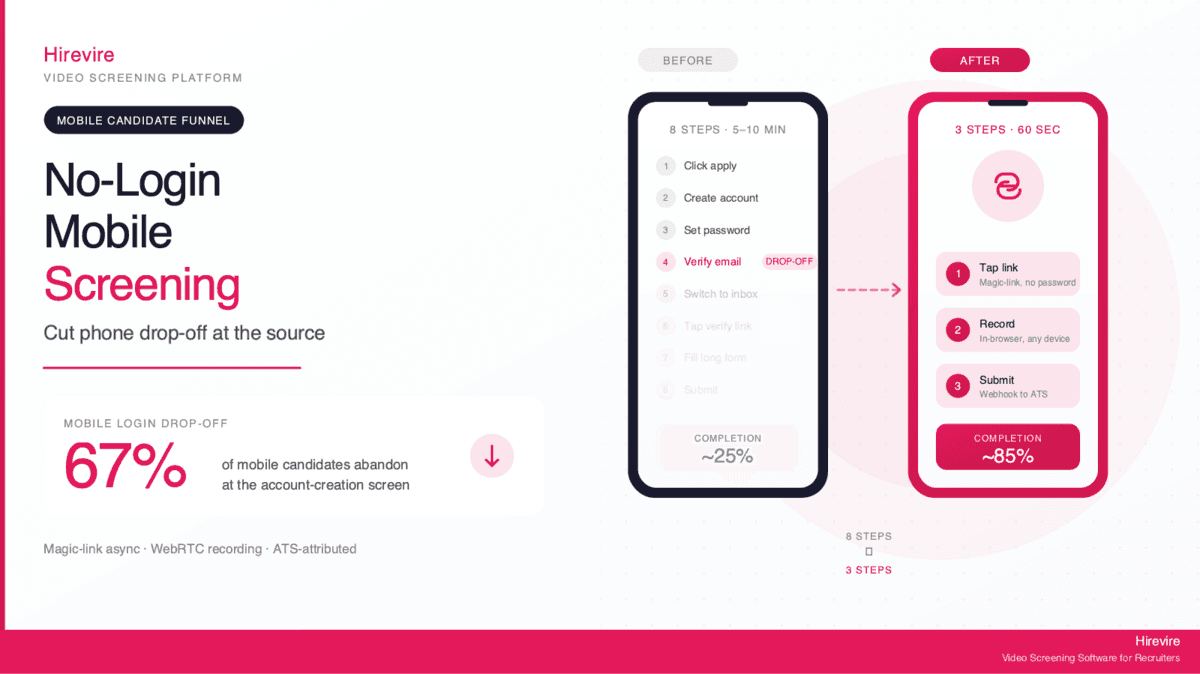
Sixty-seven percent of mobile candidates abandon a job application when they hit a login screen. That number is not a marketing line. It is the single biggest preventable leak in modern recruiting funnels, and the assumption causing it - that candidates need accounts before they can be screened - is wrong.
This guide is about what changes when you remove the login. Specifically, it is about a category of screening tool that lets a candidate apply from their phone in under sixty seconds without creating an account, without verifying an email, and without setting a password. The technical name is no-login mobile screening, and the search term most often used by recruiters looking for it is mobile screener hire. The approach, also referred to as no-login video interview, is now mainstream enough that platforms supporting it report completion rates two to three times higher than equivalent video interview tools that gate the candidate experience behind an account.
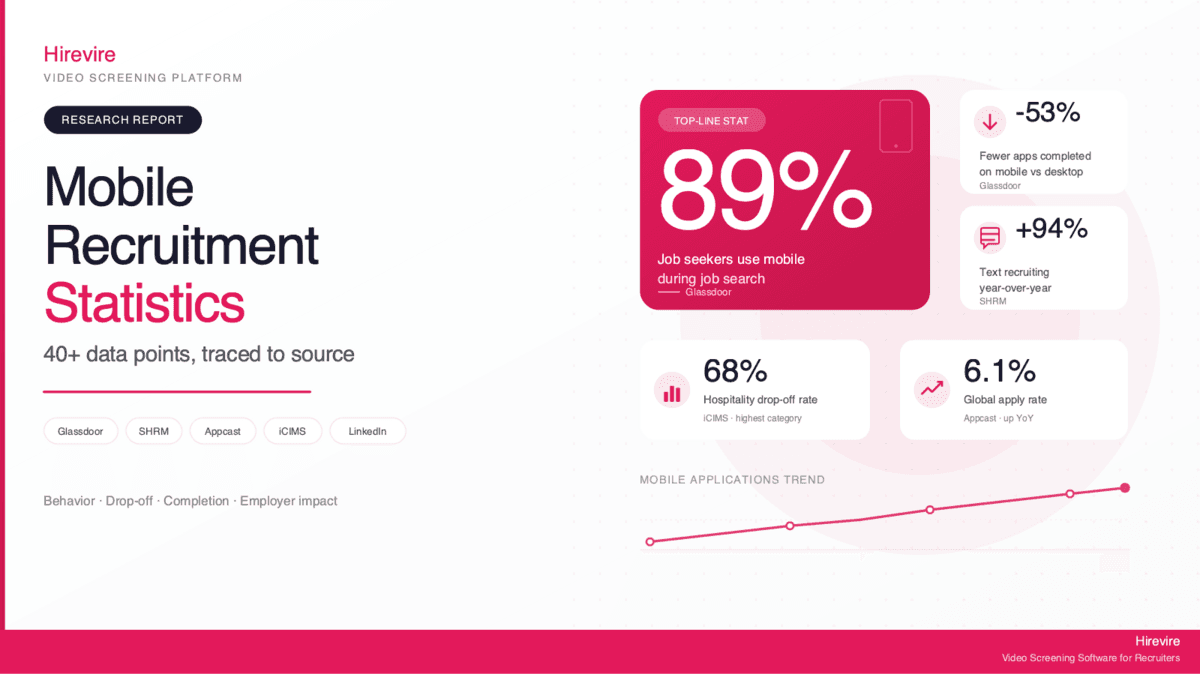
The shift matters because mobile is no longer a secondary channel for job applications. According to Glassdoor research on mobile job seekers, nine in ten job seekers use mobile devices during the search process, and a Pew Research Center study on smartphone-only internet users found that more than fifteen percent of Americans rely on a phone as their primary internet device. When the candidate is on a phone and the application path requires a password reset email, that path often ends in the trash folder.
Quick Summary: This guide walks through the math of mobile login friction, the mechanics of how no-login screening actually works under the hood, the security and compliance objections that come up most often, and a step-by-step walkthrough for setting up no-login mobile screening with Hirevire in roughly ten minutes. The frictionless candidate experience this approach creates is the most direct lever a recruiter has on completion rate, and it is one of the few changes that does not require a budget conversation.
The Math of Mobile Login Friction
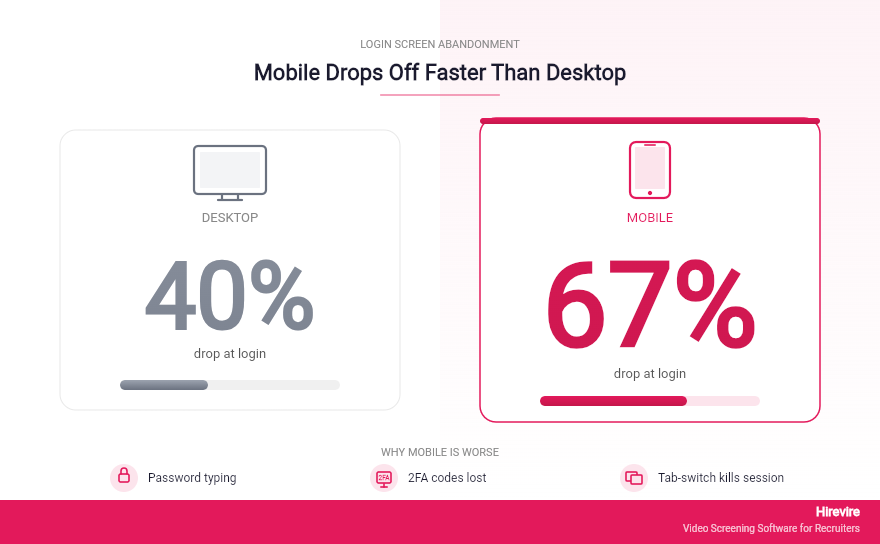
Login friction is not a soft cost. It is a measurable conversion problem with a measurable conversion fix.
The Drop-Off Numbers Across Devices
Studies of digital application funnels consistently show a step-change in abandonment when a login or account-creation screen appears. On desktop, the drop at this step is roughly forty percent. On mobile, where typing a password is harder, two-factor codes get lost in the SMS app, and tab-switching frequently kills the session, the drop is closer to sixty-seven percent. Baymard Institute's checkout abandonment research tracks similar patterns in e-commerce, and the recruitment funnel inherits the same behaviors. The candidate is, in effect, a customer evaluating whether the prize at the end is worth the cost of admission.
For a job posting that draws three hundred mobile applicants, a mandatory login costs roughly two hundred qualified candidates before they ever record an answer. That is the entire top of the funnel.
Why Mobile Is Worse Than Desktop
Three things make mobile login friction disproportionately destructive. First, password managers behave inconsistently in mobile browsers, so candidates often type credentials manually under a tiny keyboard. Second, the verify-your-email loop breaks the application flow because most candidates open the verification link in a new tab without recognizing they need to return to the original session. Third, mobile sessions are interrupted constantly. A notification, a phone call, or a tab switch can kill a half-completed account creation, and many candidates do not return.
The cumulative effect is that every required field before the actual interview is taxed at a higher rate on mobile than on desktop. Login is the largest tax of all.
What "Frictionless Candidate Experience" Actually Means
The phrase frictionless candidate experience gets thrown around as a tagline. In practical terms it has a precise definition: the number of taps between clicking the apply link and submitting the first interview answer should be five or fewer, and none of those taps should require typed credentials. A no account video interview meets this definition. A traditional ATS-gated mobile apply flow does not. The rest of this guide is about how to deliver the first one without sacrificing tracking, security, or ATS hygiene.
What Is No-Login Mobile Screening?
No-login mobile screening is an asynchronous interview model in which a candidate accesses an interview through a unique tokenized URL, records video, audio, text, or file responses directly in their mobile browser, and submits, all without creating an account or supplying a password.
Defining the Three Pillars: Mobile, No-Login, Async
Three properties have to be present at once for the model to work. Mobile-first means the interview interface is designed for a phone first and progressively enhanced for desktop, not the other way around. No-login means the candidate is identified by a magic link, not a credential. Async means the candidate records on their own time and the recruiter reviews on their own time, removing the scheduling negotiation that kills two to three days of cycle time per candidate.
A platform missing any one of these properties produces a different category of product. Skype-style live interviews are mobile and async-capable but do not solve the scheduling problem. Most ATS-embedded video tools are mobile and async but force a login. Pure SMS bots strip out the visual signal that makes video screening valuable in the first place.
Where It Sits in the Hiring Funnel
No-login mobile screening sits between resume submission and the first live conversation. It replaces the phone screen, not the structured interview. A resume gets the candidate into the pool, the no account video interview surfaces who can communicate clearly and meet basic role requirements, and the live round is reserved for the short list. This is the same shape as a traditional funnel, just with the most expensive human time, the recruiter phone screen, replaced by asynchronous review.
In mobile-first video recruitment workflows, the no-login screen often becomes the single most predictive stage of the entire pipeline because it captures something a resume cannot: how the person actually presents and explains their experience.
Compatibility with Existing ATS Pipelines
The most common objection to a no-login model is that it will break ATS hygiene. It does not, and the section below on attribution explains why. The short version is that the candidate's identity is tied to the link itself, not to an account, so submissions land back in the ATS or pipeline tool with full attribution intact.
How Magic Links and Browser-Based Recording Work Under the Hood
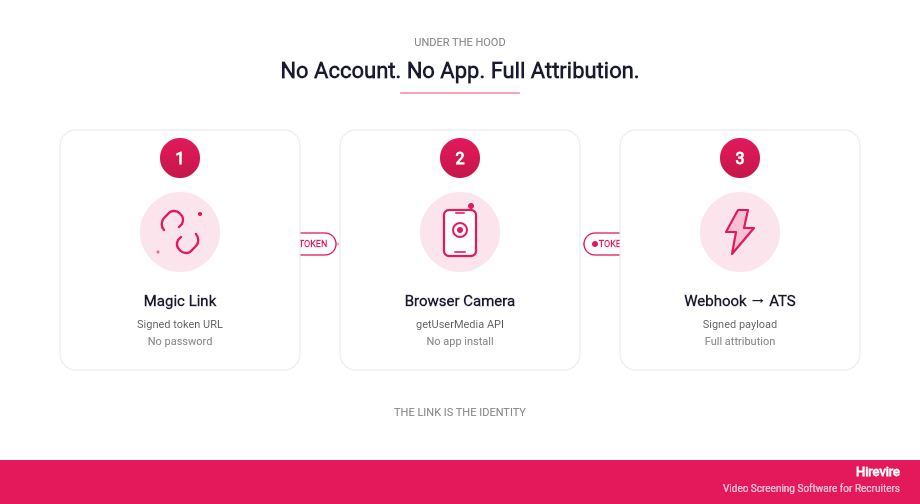
The reason no-login mobile screening seems too good to be true is that the engineering behind it is genuinely modern. Three things had to mature before this approach became viable: secure tokenized URLs, browser-native camera APIs, and webhook-driven attribution.
Tokenized URLs and Identity Without Accounts
A magic link is a URL containing a cryptographically signed token. When a candidate clicks the link, the platform reads the token, validates it against the original invitation record, and binds the session to that record without ever asking for a password. This is the same primitive that powers passwordless email login on services like Slack and Notion, applied to a one-time interview session.
The candidate's identity, role, and metadata are stored on the platform side, not derived from anything the candidate types. That means the candidate cannot mistype an email, cannot lock themselves out, and cannot end up on the wrong job posting. The link is the identity.
Browser-Based Camera Access
Modern mobile browsers, both Safari and Chrome, expose a JavaScript API called getUserMedia that lets a web page request the phone's camera and microphone. No app download. No plugin. No SDK. The browser handles the permission prompt natively, and once granted, the recording happens directly in the page.
This is the second piece of magic. Five years ago, candidates often had to download a proprietary app to record a video answer. Today, the WebRTC standard makes that step unnecessary, and platforms like Hirevire take advantage of it to remove the entire app-install funnel.
How Responses Get Attributed Without Accounts
Attribution is where the no-login model has to prove itself. When a candidate submits a video response, the platform packages the recording, the metadata, and the original invitation token into an event payload. That payload fires a webhook to whatever destination the recruiter configured: an ATS like Greenhouse or Workable, a Zapier flow, a Slack channel, or a CRM. The receiving system updates the candidate record using the token as the key, and the response shows up attached to the right candidate, the right job, and the right campaign.
In practice, this means a recruiter using Hirevire connected to an ATS sees the video response appear inside the ATS exactly as if the candidate had logged in. The difference is that the candidate did not have to.
Addressing the Security and Compliance Objections
A no-login flow is faster, but the question every TA leader asks is whether faster comes at the cost of safe. The honest answer is no, and in some specific ways the no-login model is more compliant than the account-based alternative.
"Don't We Need Candidate Accounts for Tracking?"
The short answer is no, because tracking happens server-side via the invitation record, not client-side via the candidate's account. Every interaction with the link, click, view, recording start, recording submit, is logged with timestamps and bound to the candidate identifier. The recruiter has more granular data than they would from a typical ATS account, not less.
What you lose is the ability for a candidate to log back in later and edit their submission. For most pre-screening workflows this is a feature, not a bug, because the value of the screen is capturing a first-take answer.
Data Security Without Stored Credentials
Storing fewer credentials is more secure, not less. The most damaging breaches in HR tech over the last decade have involved leaked password hashes from candidate account databases. A platform that does not ask candidates to create passwords cannot leak them. The data that is stored - video responses, transcripts, candidate name and email - is encrypted in transit and at rest, and access on the recruiter side is gated by SSO or multi-factor authentication.
GDPR's right-to-erasure and right-of-access apply identically whether or not the candidate has an account. The candidate emails the platform or the employer to request deletion, and the record is purged. The account layer adds nothing on top of this requirement.
Webhooks and ATS Attribution Compliance
For employers operating under SOC 2 or ISO 27001 frameworks, the question is whether webhook-based attribution maintains an auditable trail. It does. Each webhook event includes a signed payload with the originating invitation token, timestamps, and the recruiter who initiated the invite. The receiving ATS stores the event, and the linkage between candidate, role, and submission is fully reconstructable on audit.
Traditional Mobile Apply Versus No-Login Async
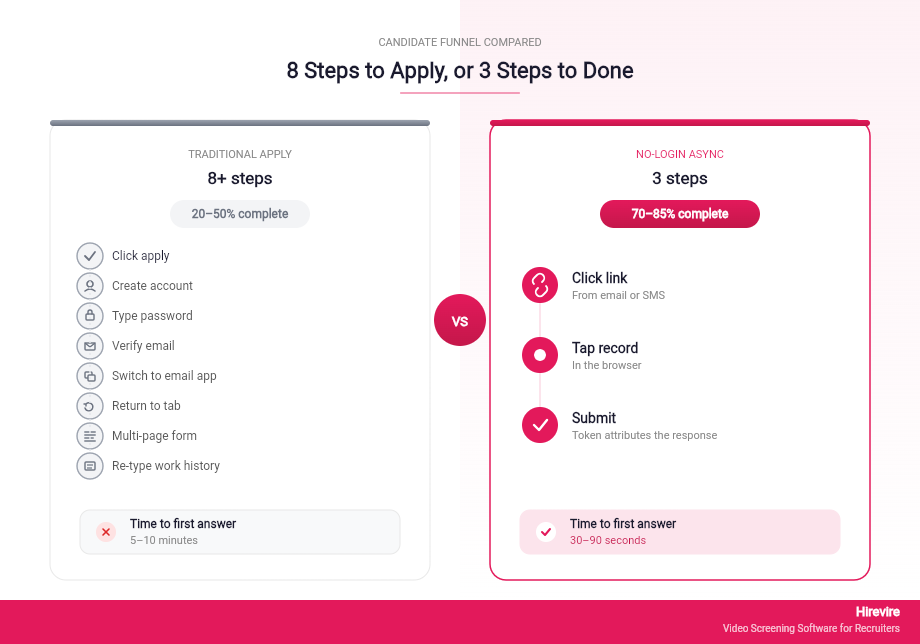
The before-and-after comparison is the clearest way to see what changes.
The Traditional Mobile Apply Workflow
A traditional mobile apply flow, even for a well-funded ATS, looks like this: candidate clicks apply, lands on a careers page that requires account creation, types email and password on a phone keyboard, receives a verification email, switches to email app, taps the verification link, opens a new browser tab, returns to the original tab if they remember to, encounters a multi-page application form, types out their work history again despite uploading a resume, and finally lands on a confirmation page. Eight or more steps, and that is before any interview content has been recorded.
The completion rate for this flow on mobile is typically twenty to thirty percent for hourly roles and up to fifty percent for white-collar roles where candidates are more motivated.
The No-Login Async Workflow
The no-login async workflow looks like this: candidate clicks the link in an email, SMS, or job board, lands directly on the interview page, taps record, answers the questions, taps submit. Three steps. No password. No verification email. No tab switching. The phone never leaves the candidate's hand and the recording never leaves the browser tab.
Completion rates in this flow regularly exceed seventy percent, and platforms targeting hourly hiring report rates above eighty-five percent.
Side-by-Side Comparison
The table below compares the two workflows on the dimensions that matter for mobile candidate screening.
| Dimension | Traditional Mobile Apply | No-Login Async Mobile |
|---|---|---|
| Steps to first response | 8+ | 3 |
| Account required | Yes | No |
| Email verification required | Yes | No |
| Average completion rate (mobile) | 20-50% | 70-85% |
| Time to first answer | 5-10 minutes | 30-90 seconds |
| ATS attribution | Account-based | Token-based |
| Candidate friction points | Login, email verify, form | Link click only |
| Re-record allowed | Sometimes | Yes, before submit |
How Hirevire Implements No-Login Mobile Screening
Most of the technical principles above are vendor-agnostic. The implementation choices, though, vary widely between platforms, and they are what determine whether a no-login flow actually works at scale.
The Magic-Link Invitation System
Hirevire generates a unique invitation link for every candidate, automatically embedded in invitation emails, SMS triggers via Zapier, or shareable application URLs posted directly to job boards. The link encodes the job, the candidate identifier, and the original campaign source, so a single application URL can serve thousands of candidates while maintaining individual attribution.
The recruiter never has to manually generate links per candidate. A bulk CSV upload or an ATS-triggered webhook spawns the links automatically.
Multi-Format Response Collection
The candidate experience inside Hirevire is not video-only. Candidates can answer with video, audio, rich text, or a file upload depending on what the question calls for. A retail role might use video for communication assessment and audio for a quick scenario question. A developer role might use video for the introduction and a file upload for a code sample or GitHub link. Multi-format response collection is what makes the platform usable for tech screening without forcing candidates onto camera for every answer.
The async model means a candidate uncomfortable on video can still complete the screen using audio or text, which improves accessibility and completion across populations that traditional video-only platforms exclude.
Mobile-First Browser Recording
The recording interface is built for a phone screen first. Buttons are large enough for thumb taps, the camera preview fills the visible area, and the re-record flow is a single tap. There is no app to install. The candidate's phone storage is not consumed because the recording uploads as it is made.
Hirevire supports unlimited re-records before submission, which is a candidate experience choice that matters more than it sounds. When candidates know they can re-record, they take risks in their answers and the quality of submission goes up.
Pricing and Plan Mapping
| Plan | Monthly | Yearly | Best Fit for No-Login Mobile |
|---|---|---|---|
| Essentials | $49/month | $39/month (billed yearly) | Single role, 300 interviews/year, testing the model |
| Professional | $149/month | $99/month (billed yearly) | Regular hiring, 1,200 interviews/year, AI Match and Scorecards |
| Agency | $249/month | $199/month (billed yearly) | High-volume mobile screening, 12,000 interviews/year, white-label |
For teams running their first no-login mobile screening pilot, Essentials is the right starting point. The annual billing of $39/month with 300 interviews/year covers a single open role with significant headroom, and the cost-per-completion comparison against any per-interview-priced alternative starts looking obvious by the fiftieth candidate.
Customer Reviews
G2: 4.7/5 stars (25+ reviews) - View Reviews
"It cuts down my hiring process by at least 75% and made it sooo much easier to see/feel who the candidates were before having to hop on a call with them."
—ElevateClients, AppSumo
Capterra: 5/5 stars (20+ reviews) - View Reviews
"The software always works, it's really easy for our candidates to use and their support is really 10/10."
—Roy Lammers, CEO Remote Talents, G2
AppSumo: 4.9/5 (70+ reviews) - View Reviews
"I've tried dozens of tools on AppSumo but nothing has impressed me like Hirevire. It works flawlessly, it's super intuitive, and it does exactly what it promises."
—AndrewMag, AppSumo
Setting Up No-Login Mobile Screening in 10 Minutes
The walkthrough below is intentionally specific. If you follow it end to end, you will have a working no-login mobile screening flow with a candidate who can apply from their phone in under sixty seconds.
Step 1: Define the Five Questions
Most teams overshoot here. For a pre-screen, five questions is the sweet spot. The first should be a simple introduction, the second a role-relevant scenario, the third a motivation question, the fourth a logistical question (availability, location, salary expectation), and the fifth a wildcard that signals genuine interest in the role.
Set the time limit to ninety seconds per question for video and one hundred and twenty seconds for audio. Longer limits do not produce better answers; they produce more rambling.
Step 2: Configure Response Format Per Question
In Hirevire, each question has an independent response format. Make the introduction video, the scenario audio or video depending on the role, the motivation video, the logistical question multiple choice or text, and the wildcard whatever fits. Mixing formats reduces fatigue and produces a richer screening picture than five back-to-back video questions.
Step 3: Customize the Career Page Branding
The career page the candidate lands on is the first impression of the company on a phone screen. Upload the logo, set the brand color, and add a thirty-second introduction video at the top explaining the role and what comes next. Candidates who watch the intro video complete the screen at much higher rates than candidates who do not.
Step 4: Generate the Application Link and Embed It
The unique application URL from Hirevire goes anywhere a job seeker might click: the careers page, the job board listing, the LinkedIn post, the email signature of the recruiter. SMS distribution via Zapier or Twilio is particularly effective for hourly roles. There is no need to gate the link behind a form.
Step 5: Wire Up Webhooks for ATS Attribution
If you use Greenhouse, Workable, Lever, Ashby, Bullhorn, or Manatal, Hirevire connects via direct integration or Zapier. Configure the webhook to fire on submission, mapping candidate fields and the video URL into the appropriate ATS columns. Test with one candidate, confirm the record lands correctly, and turn it on for the live job.
Step 6: Test on Your Own Phone
Open the link on your own phone before the first candidate sees it. Record an answer. Re-record. Submit. Confirm the result lands in the ATS or in Hirevire's dashboard. The end-to-end test takes ninety seconds and surfaces ninety percent of the issues that would otherwise show up on candidate one.
Real Results: Customer Case Studies
Two Hirevire customers illustrate the impact of a no-login mobile screening rollout.
KDG: Cut Screening Time by 75 Percent
KDG, a digital agency, used Hirevire to replace phone screens with async video for their content and design hires. Mobile completion rates climbed past eighty percent, time per role dropped by three days, and the team reported recouping more than fifteen hours per week of recruiter time. The frictionless candidate experience also raised the quality of the candidate pool, because applicants who would have dropped off at the login screen were now reaching the recorded answer stage.
E-Commerce Customer Service Hire
A direct-to-consumer e-commerce company hiring for a customer service team needed to screen high volumes of hourly applicants quickly. They used Hirevire's no-login mobile flow with SMS distribution. Completion rate landed at eighty-five percent, average time-to-first-response was forty seconds from SMS, and the team filled twelve roles in ninety days against an internal benchmark of one hundred and twenty days.
The pattern across both cases is the same: removing the login removes the bottleneck, and once the bottleneck is gone, the rest of the funnel can move faster.
Common Pitfalls and How to Avoid Them
Even with a good platform, three patterns regularly produce disappointing results in a first deployment.
Asking Too Many Questions
Eight questions is too many. Five is the right number. Recruiters consistently overestimate how much candidates will record on the first ask, and the marginal information from question six onward rarely justifies the drop in completion rate.
Forcing Video for Every Question
Audio-only is faster, more accessible, and better for some kinds of questions. Reserve video for the questions where you actually want to evaluate presentation. Mixing formats raises completion across populations that would otherwise self-select out of the screen.
Skipping the Mobile Test
The single most common operational mistake is testing the link only on a desktop. Always test on a phone, preferably an old phone with a slow connection, before the first candidate sees it. The mobile-first video recruitment promise depends on the experience working under the worst conditions, not the best.
Frequently Asked Questions
What is a no-login video interview?
A no-login video interview is an asynchronous screening flow where a candidate clicks a unique link, records video, audio, text, or file responses directly in their mobile or desktop browser, and submits without ever creating an account or entering a password. The candidate's identity is tied to the invitation token, not to a credential they have to remember. Platforms like Hirevire implement this model as the default candidate experience.
Why does the login screen cause so much drop-off on mobile?
Mobile keyboards make typing passwords slow, password managers behave inconsistently across mobile browsers, and email-verification loops break the application session because candidates open verification links in new tabs and forget to return. Studies of digital application funnels consistently put mobile login drop-off at sixty-five to seventy percent, roughly double the desktop rate.
Don't I need a candidate account for tracking and attribution?
No. Tracking and attribution happen server-side through the invitation record, not client-side through the candidate's account. Every link click, recording start, and submission is logged against the original invitation token, and webhook events deliver the data to your ATS or CRM with full attribution intact. Recruiters often end up with more granular data than account-based tracking provides, because the platform can log behaviors a candidate would not have logged in to perform.
Is no-login screening secure?
Yes, and arguably more secure than account-based screening. The most damaging breaches in HR tech over the last decade have involved stolen password hashes from candidate account databases. A no-login model does not store passwords, so they cannot leak. Data in transit and at rest is encrypted, recruiter access is gated by SSO and multi-factor authentication, and webhook payloads are signed for audit purposes.
How does no-login screening handle GDPR and right-to-erasure?
The same way account-based screening does. The candidate or employer requests deletion, the platform purges the record, and the audit log retains the deletion event. The presence or absence of a candidate account changes nothing about the GDPR obligation or the deletion mechanism.
Can a candidate edit their submission after the fact in a no-login flow?
Generally no, and that is intentional. Pre-screening derives much of its value from capturing a first-take answer. Most no-login platforms allow unlimited re-records before submission and lock the response after submission. If you need a flow that allows post-submission edits, that is a different product category, typically a portfolio platform rather than a screening tool.
Will candidates take the screen seriously without an account?
Completion rates above seventy percent on mobile suggest yes. The question implicitly assumes that creating an account signals seriousness, but the data points the other way: candidates who care about the role complete the screen at higher rates when the friction is lower, and candidates who do not care drop off at every stage regardless of whether there is a login.
What happens if the candidate's phone runs out of battery mid-recording?
The candidate clicks the link again from the same email or SMS and resumes from where they were. The token in the link is the identity, so the platform recognizes the returning candidate and presents either the unfinished question or the next question depending on the configuration.
How does no-login screening integrate with my existing ATS?
Most modern platforms, including Hirevire, connect to ATS systems either through direct integrations (Greenhouse, Workable, Lever, Ashby, Bullhorn, Manatal, and others) or through Zapier and webhook flows that work with effectively any ATS. The candidate record lands in the ATS as if the candidate had completed a traditional flow, with the video URL and transcript attached.
What's the difference between no-login mobile screening and a chatbot screen?
A chatbot screen replaces the recorded answer with text or multiple-choice responses, which strips out the visual and verbal signal that makes pre-screening valuable. A no-login mobile screening flow keeps the video and audio while removing the friction. The two approaches are complementary, not equivalent: chatbots are good for hard filters (work authorization, location, certifications), and async video is good for soft filters (communication, motivation, presentation).
How long should a no-login mobile screening interview be?
Five questions, ninety seconds each on video, two minutes each on audio. Total screen length under ten minutes for the candidate, under three minutes of recruiter review per candidate. Anything longer suppresses completion rates without producing proportional information gain.
Can I run a no-login mobile screening flow for multilingual candidates?
Yes. Hirevire generates AI transcripts in over ninety languages, so candidates can answer in their native language and recruiters can review the transcript in any of those languages without needing a bilingual reviewer. The candidate experience is identical regardless of which language the candidate uses to respond.
What does mobile-first video recruitment actually require from my team?
Less than most teams expect. The setup is roughly ten minutes per role, the review is roughly three minutes per candidate, and the integration with the existing ATS is one-time. The largest behavior change is trusting that a video answer is sufficient signal to advance or reject a candidate, which most recruiters internalize after the first cohort.
Conclusion: The Login Was Always the Problem
The defaults of digital recruiting were set in an era when desktop applications and account-based access patterns were the norm. Those defaults have not aged well. Sixty-seven percent of mobile candidates abandon at the login screen, and that number is the single largest preventable leak in the modern hiring funnel.
No-login mobile screening fixes the leak by removing the assumption that caused it. Magic links handle identity, browser-native recording handles the interview, and webhooks handle the attribution. The candidate's path goes from eight steps to three, the completion rate roughly triples, and the recruiter ends up with a richer screening artifact than a phone screen would have produced.
Key Takeaways
- The mobile login screen costs roughly two-thirds of mobile candidates before they ever record an answer.
- A frictionless candidate experience requires a flow with five or fewer taps and zero typed credentials.
- No-login does not mean unattributed. Tokenized invitations and webhook-based ATS sync provide full tracking.
- Setup time for a working no-login mobile screening flow is approximately ten minutes per role.
- Completion rates above seventy percent on mobile are achievable and routine, not exceptional.
Your Next Steps
- Run the math on your current funnel. If you do not know your mobile login drop-off rate, ask your ATS or careers-page provider for the conversion from career-page-view to first-application-step. The gap between those two numbers is what no-login mobile screening is fixing.
- Pick one open role for a pilot. Hourly or high-volume roles produce the clearest before-and-after comparison.
- Try Hirevire's free trial and walk through the ten-minute setup walkthrough above on a real role.
The category's default assumption - that candidates need accounts before they can be screened - is wrong. The math says so, the technology says so, and the customer results say so. The faster the assumption goes, the faster the funnel works.
Last updated: April 2026. All pricing and integrations verified as of April 26, 2026.
Related Reads
Mobile Accessibility Review: How 6 Popular ATS Platforms Actually Perform on Phones
8 User-Friendly ATS Options for Mobile Recruitment 2026: Ranked by Candidate Experience
Why Mobile-First Hiring Matters: How Candidate Behavior Changed and What It Means for Your Process