How to Automate Your Recruitment Process, Stage by Stage: Recruiting Automation
Most hiring teams do not lose time to one big bottleneck. They lose it to dozens of small, repeatable tasks scattered across every stage: posting the same job to five boards, reading near-identical resumes, chasing candidates for interview slots, and copy-pasting status updates. Recruiting workflow automation fixes this by handing each repeatable task to software, one stage at a time, so recruiters spend their hours on judgment instead of busywork.
The data backs up where the time goes. Recruiters spend much of their hiring time on administrative tasks rather than talking to people, according to LinkedIn's Future of Recruiting research. And adoption is accelerating: 43% of organizations now use AI in HR tasks, up from 26% in 2024, with just over half using it to support recruiting, per SHRM's 2025 Talent Trends.
This guide is the actionable "how" behind that shift. It walks through every stage of a recruiting workflow, from sourcing to manager handoff, and gives a concrete automation move for each one, the tool category that handles it, and the part you should keep human. The goal is not a fully automated, hands-off pipeline. It is a workflow where machines do the repetitive lifting and people make the decisions that matter.
Quick Summary: To automate your recruiting workflow, automate one stage at a time: source with an ATS, screen with async video (the biggest single time saver), schedule with a booking tool, and trigger candidate communication automatically, while keeping evaluation and offers human. Hirevire handles the screening stage with custom stages, auto-disqualification, automated emails, and bulk SMS and email invites.
Key Takeaways
| Stage | Automate this | Keep human | Time payoff |
|---|---|---|---|
| Sourcing & distribution | Multi-board posting, application capture, resume parsing | Final sourcing channel strategy | Medium |
| Screening | Async video, auto-disqualification, custom stages, AI scorecards | The hire/no-hire judgment | Highest |
| Scheduling | Self-serve booking, calendar sync, reminders | The live interview itself | High |
| Communication | Triggered status emails, reminders, bulk SMS invites | Personalized offer conversations | Medium |
| Reporting & handoff | Shared review links, deep search, dashboards | Final ranking and the offer | Medium |
| Connecting stages | Integrations, webhooks, MCP for agent-assisted steps | Decision authority | Foundational |
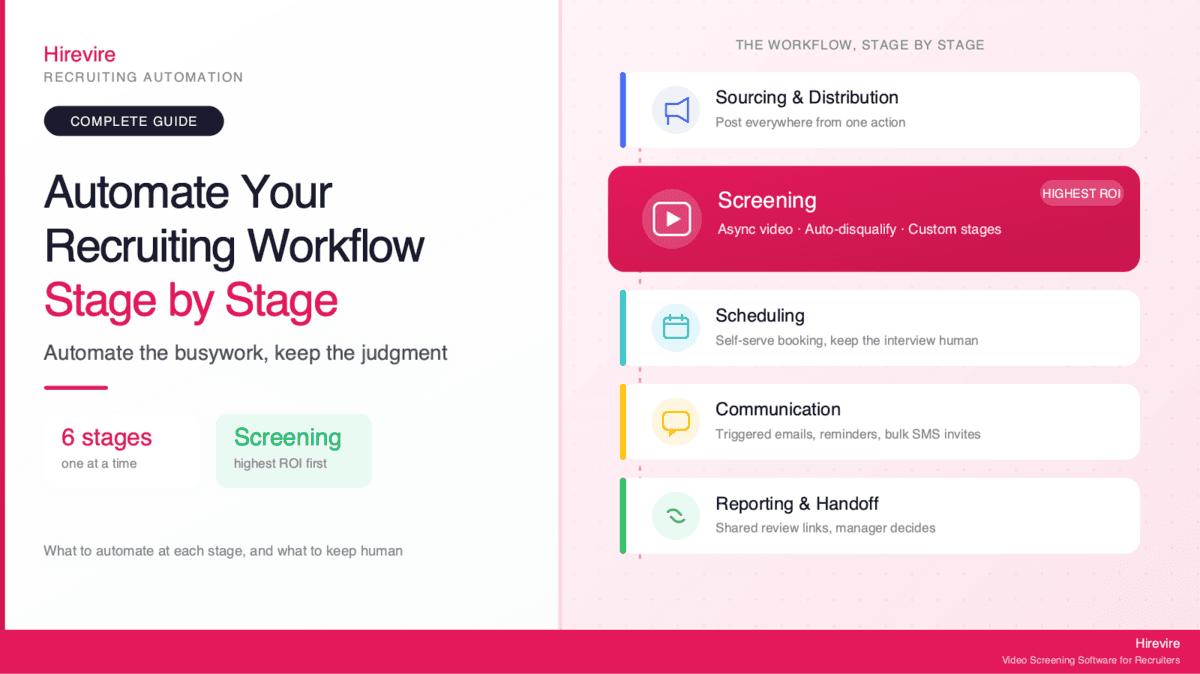
The single highest-ROI move is automating screening, because it sits at the widest point of the funnel where volume is highest and manual effort scales worst. Start there.
Map Your Recruiting Workflow Before You Automate Anything
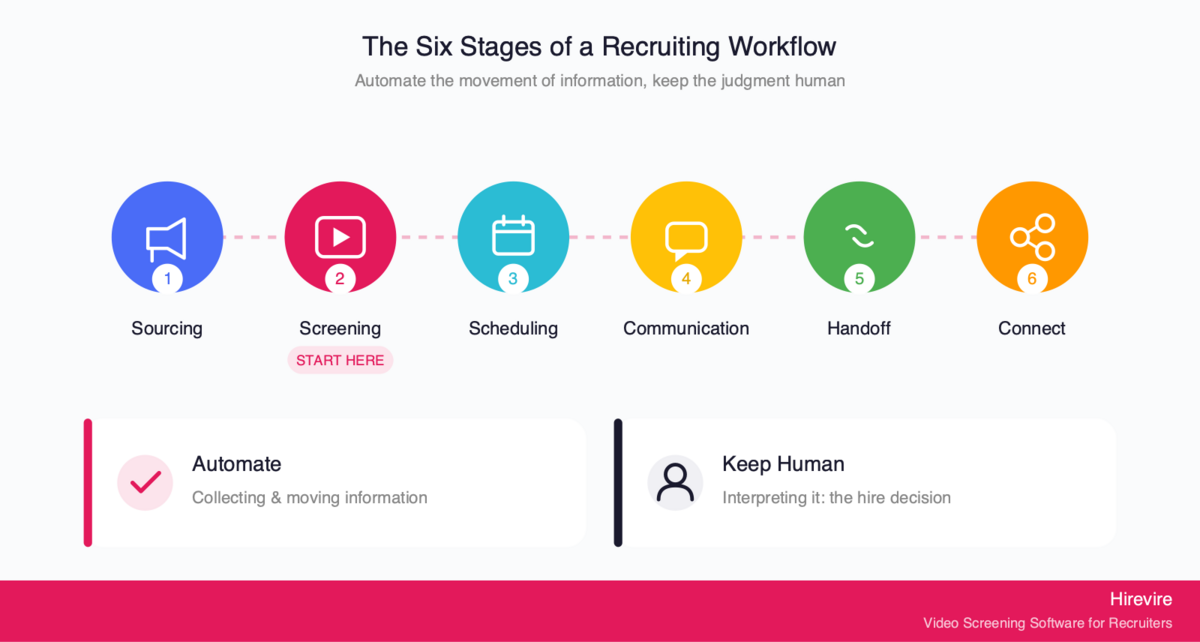
Automating a broken process just makes the mess move faster. Before adding a single tool, map what actually happens between "we have an open role" and "the candidate accepts." Most teams discover their real workflow has more steps, more handoffs, and more waiting than they assumed.
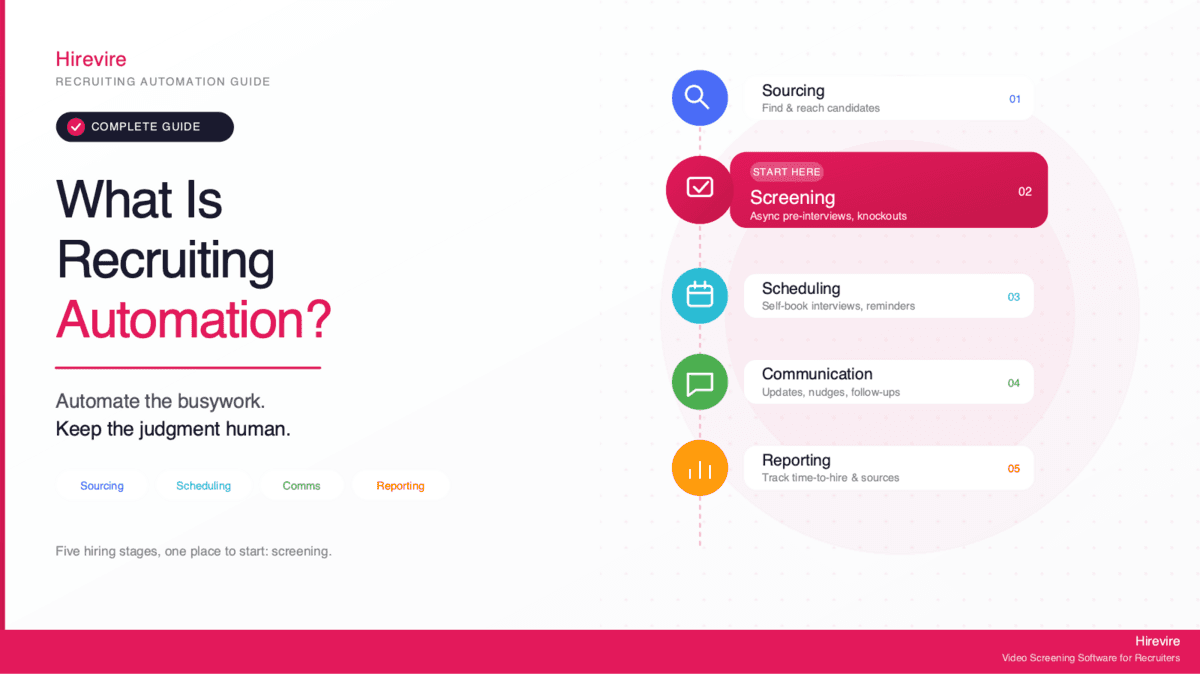
A typical recruiting workflow breaks into six stages:
- Sourcing and job distribution - getting the role in front of candidates and capturing applications
- Screening - filtering the applicant pool down to people worth interviewing
- Scheduling - booking the interviews that survive screening
- Communication - keeping candidates informed at every step
- Reporting and manager handoff - sharing shortlists and getting decisions
- Connecting the stages - the integrations that move data between tools
For each stage, write down three things: how long it takes, how many times the same task repeats per role, and how much human judgment it actually requires. That last column is the most important one. A task that repeats often and requires little judgment is a prime automation target. A task that happens once and depends on context, like deciding whether a borderline candidate is worth a second look, should stay manual.
Find Your Biggest Time Drain First
The instinct is to automate the stage that annoys you most. The better move is to automate the stage that costs the most total hours. For most teams that is screening, because it operates on the largest number of candidates. Posting a job happens once. Reviewing applicants happens hundreds of times.
This is why the conversion hook of any automation project should be "automate the stage that wastes the most time first," not "automate everything at once." Pick one stage, prove the time savings, then expand. Trying to automate all six stages simultaneously usually means none of them get done well.
Decide What Stays Human
Drawing the line early prevents over-automation later. As a rule, automate the collection and movement of information, and keep the interpretation of that information human. Software should gather resumes, transcribe video answers, and route candidates between stages. People should decide who is actually a good fit, how to handle an unusual background, and what to offer.
This split matters legally as well as practically. Title VII applies to an employer's use of software, algorithms, and AI in selection procedures, and a tool that screens out candidates on a protected basis can create unlawful disparate impact even when the employer relied on a vendor's tool, per the EEOC's technical assistance. Keeping a human accountable for selection decisions is not just good practice, it is part of staying compliant.
Sourcing and Job Distribution: Automate the Posting, Not the Strategy
Sourcing is where a role first meets the market. The strategic part, deciding which channels, communities, and audiences to target, is a human call. The mechanical part, actually distributing the post and capturing the applications, is pure automation territory.
What to Automate at the Sourcing Stage
The core automation move here is multi-board distribution. Instead of manually posting to your careers page, then to job boards, then to niche communities one by one, an applicant tracking system pushes a single job to every channel at once and pulls every application back into one place.
Specific tasks worth automating:
- Multi-channel posting: publish one job to multiple boards and your careers site from a single action
- Application capture: route every applicant from every source into one structured pipeline
- Resume parsing: extract name, experience, skills, and contact details automatically so no one retypes them
- Knockout questions on the form: capture must-have answers (work authorization, location, minimum experience) at application time
The tool category for this stage is the applicant tracking system (ATS). Platforms like Greenhouse, Workable, and Ashby handle distribution and application capture. The ATS is the backbone every other stage connects to, so this is usually the first piece teams put in place.
What to Keep Human
Channel strategy stays with the recruiter. Knowing that a particular Slack community or a referral from a specific team produces your best engineers is institutional knowledge no tool replaces. Automate the act of posting; keep the decision of where and why to post.
Writing the job description is a gray area. AI can draft one quickly, and 44% of organizations use AI to screen resumes while two-thirds use it to write job descriptions, per SHRM. But a human should always edit the draft for accuracy and tone, because the job post is the first impression of your employer brand.
Screening: The Highest-ROI Automation in Your Workflow
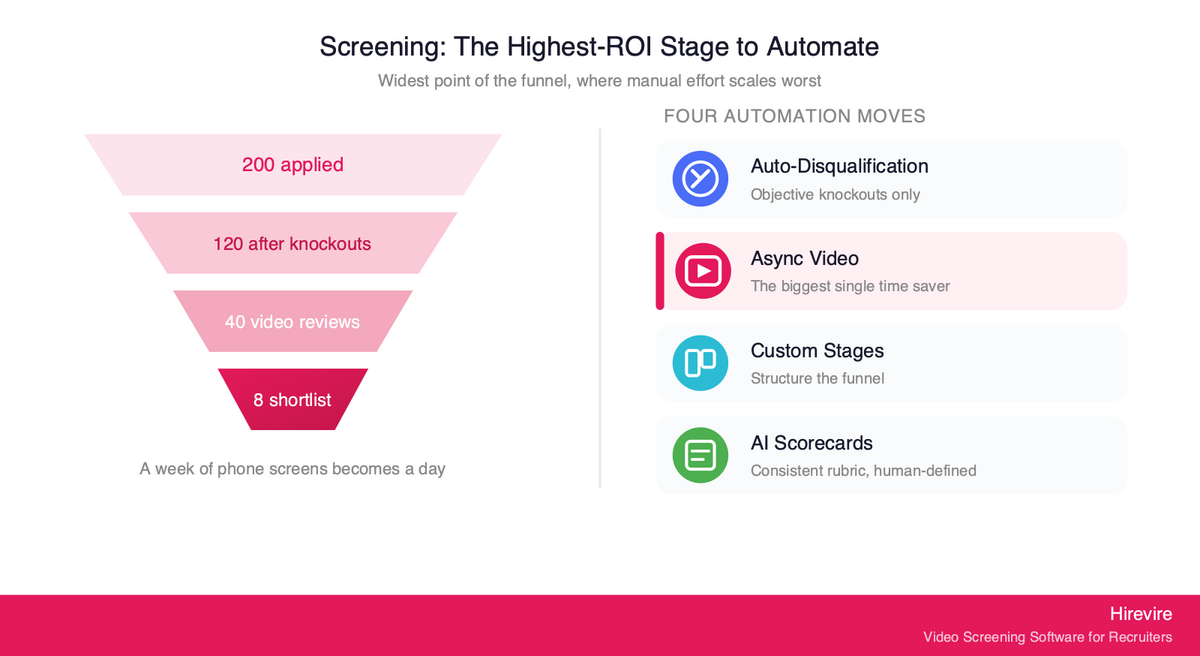
If you automate one stage, make it this one. Screening is where the funnel is widest, where the same repetitive judgment gets applied hundreds of times, and where manual effort scales the worst. It is also where async video, the single biggest time saver in modern recruiting, lives.
The traditional screening sequence is brutal on a recruiter's calendar: read every resume, shortlist some, schedule a phone screen with each, conduct each call live, write up notes, repeat. A round of 200 applicants can consume an entire week before anyone reaches a real interview. Async screening collapses that week into a day.
Automate Early Filtering With Auto-Disqualification
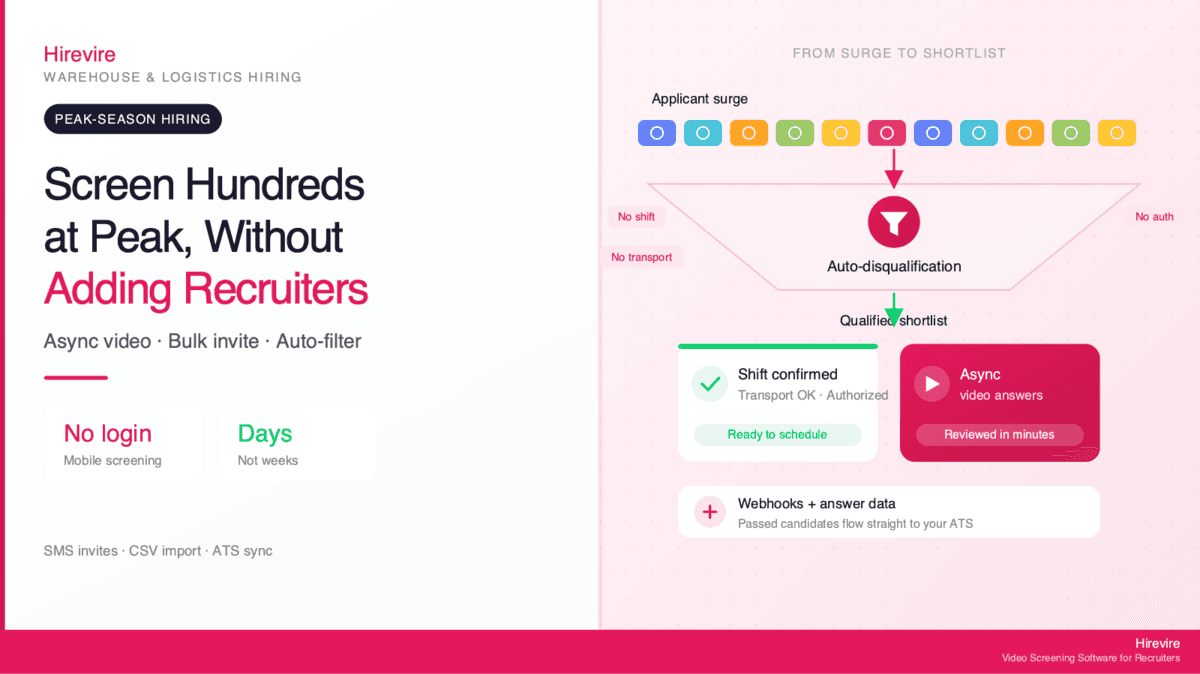
Before a recruiter reads anything, objective knockouts should already be handled. With Hirevire's auto-disqualification, the recruiter sets must-have criteria such as minimum experience, required certifications, location, or work authorization. Applicants who fail those criteria are filtered to a separate tab before they record anything, which saves both review time and response credits.
The important guardrail: auto-disqualification handles objective knockouts only. It filters on facts a candidate either has or does not have, not on subjective quality. A candidate without the legal right to work in your country is a clear knockout. A candidate whose communication "feels off" is a human judgment, not an automated one.
Replace Phone Screens With Async Video
The biggest time win in screening is moving the first conversation off the calendar entirely. Instead of scheduling dozens of live phone screens, you send every qualified applicant a short set of questions they answer on their own time, by video, audio, text, or file upload. The recruiter reviews the responses in batches, at 2x speed, whenever it suits them.
This async workflow is exactly what Hirevire is built for, and it requires no login from candidates, which keeps completion rates high. The time savings are dramatic in practice:
"It cuts down my hiring process by at least 75% and made it sooo much easier to see/feel who the candidates were before having to hop on a call with them."
— ElevateClients, AppSumo
One async video answer carries far more signal than a resume line and far less scheduling overhead than a live call. A recruiter can screen 50 candidates in the time a calendar would have allowed for five phone screens.
"Being able to see and hear candidates through videos and audios before even scheduling an interview has made our selection process more efficient and effective."
— Flavio Pavanelli, CEO Moinhos Vieira, AppSumo
Structure the Funnel With Custom Stages
Once candidates are in the pipeline, automation should move them through it without manual bucket-shuffling. Hirevire's custom stages let teams build a screening funnel that matches their actual process, with named stages such as Applied, Video Review, Shortlist, and Manager Review, so every candidate's position is visible at a glance and movement between stages can trigger the next automated step.
Custom stages turn an unstructured pile of applicants into a pipeline where each stage has a clear entry and exit, and where automated emails or invites can fire as candidates advance.
Add Consistency With AI Scorecards
Reviewing async responses at volume creates a new risk: the tenth review of the day is not scored the same way as the first. Hirevire's AI scorecards address this by letting the hiring team define custom evaluation criteria with weighted factors and 1-to-5 scoring levels. The AI then applies that human-created rubric to every candidate, producing consistent scores plus detailed feedback.
The distinction worth emphasizing: this is transparent rubric scoring, not a black box. The humans define what "good" means and how much each factor weighs; the AI just applies that definition consistently across the whole pool. This matters for compliance. New York City's Local Law 144 requires employers using an automated employment decision tool to commission an independent annual bias audit and publish the results before using the tool to screen candidates, so transparency about how scoring works is not optional in some jurisdictions.
What to Keep Human at the Screening Stage
The hire or no-hire judgment stays with people. Automation gathers the responses, filters the obvious knockouts, structures the funnel, and applies a consistent rubric. A human reviews the scored shortlist and decides who advances. The recruiters who get the most out of Hirevire describe it as removing the busywork while keeping their judgment central:
"The platform helps me collect video, audio, and text answers from candidates without needing to call or meet them first. It saves me a lot of time and keeps everything organised in one place."
— Muhamad Hariz M., G2
Scheduling: Automate the Handoff, Keep the Interview Human
Scheduling is one of the most automatable stages in the entire workflow, and one of the most universally hated tasks when done manually. The back-and-forth of "does Tuesday at 3 work, no, how about Thursday" multiplied across a shortlist of candidates and a panel of interviewers is a pure coordination problem that software solves cleanly.
What to Automate at the Scheduling Stage
The automation move here is self-serve booking. Once a candidate clears screening, they receive a link to book directly into an interviewer's real availability, with no human acting as a switchboard.
Tasks to automate:
- Self-serve booking: candidates pick from open slots that reflect live calendar availability
- Calendar sync: confirmed interviews write straight to interviewer calendars, with conflicts blocked automatically
- Time zone handling: slots display in the candidate's local time, eliminating a common source of no-shows
- Automated reminders: the system nudges both sides before the interview to cut no-show rates
Booking tools and ATS scheduling modules handle this stage. The handoff from screening to scheduling can be automated end to end: when a candidate moves into a "Shortlist" custom stage, an automated email with a booking link fires immediately, so the candidate books while their interest is highest.
What to Keep Human
The interview itself is the human core of the entire process and should never be automated away. The point of automating scheduling is to protect the interview, not replace it. By removing the coordination overhead, you free interviewers to focus entirely on the conversation that actually decides the hire. Automate the booking; keep the interview a real, human conversation.
Communication: Trigger Updates Automatically, Personalize the Moments That Matter
Candidate communication is where good intentions go to die. Recruiters mean to keep everyone updated, then volume takes over and candidates fall silent for weeks. Automated, triggered communication solves the silence problem without adding manual work.
What to Automate at the Communication Stage
The principle is simple: any status-driven message that says roughly the same thing every time should be automated, triggered by a candidate moving between stages.
Hirevire handles this with automated emails, email reminders, and bulk SMS and email invites, available through its feature set. Specific automations worth setting up:
- Application received confirmations: every applicant gets an immediate acknowledgment
- Stage-change updates: when a candidate advances or is set aside, a triggered email goes out automatically
- Email and SMS reminders: candidates who have not completed their async video get a nudge, lifting completion rates
- Bulk invites: invite an entire batch of qualified applicants to the screening stage with one action, by email or SMS
SMS invites matter more than they sound, because most frontline and hourly candidates apply and respond from their phones. Most hourly and frontline candidates apply from their phones, according to Indeed Hiring Lab research, so a text invitation reaches them where they actually are and gets answered faster than email.
What to Keep Human
The offer conversation, and any sensitive rejection for a candidate who reached the final stages, should stay personal. A templated "we have decided to move forward with other candidates" is fine for an early-stage knockout. A finalist who spent hours interviewing deserves a real note or a call. Automate the high-volume, low-stakes updates; personalize the low-volume, high-stakes ones.
Reporting and Manager Handoff: Automate Visibility, Keep the Decision
The final stretch of the workflow is getting decisions out of hiring managers, who are busy and rarely live inside the recruiting tool. Automation here is about removing every barrier between a manager and a fast decision.
What to Automate at the Handoff Stage
The friction in manager handoff is almost always access. Managers will not log into yet another platform to review three candidates. The automation move is to bring the candidates to them in a format they can act on instantly.
Hirevire's shared review links generate a shareable link for all applications in a hiring stage, so any teammate can review and rate candidates collaboratively with no login required. A recruiter sends the link, the manager watches the async video answers on their phone between meetings, rates them, and the decision is captured, all without an account or a training session.
For larger pipelines, Hirevire's deep search helps surface specific candidates and answers across the pool, so a manager looking for "everyone who mentioned managing a remote team" can find them without scrolling through every response. Reporting dashboards round this out by tracking funnel metrics, time in each stage, and where candidates drop off.
What to Keep Human
The final ranking and the offer decision belong to the hiring manager and recruiter together. Automation delivers a clean, scored, easy-to-review shortlist. People decide who gets the offer. The shared review link is explicitly designed as the human review step, the moment where collaborative human judgment, supported by all the structure automation provided, makes the call.
Connect the Stages Without Ripping Out Your Stack
Automating individual stages helps, but the real multiplier comes from connecting them so data flows automatically from one tool to the next. The good news is that connecting stages does not require replacing your existing tools.
Integrations and Webhooks
Most recruiting automation runs on integrations. An ATS pushes a new applicant to a screening tool; the screening tool pushes a scored shortlist back; a booking confirmation triggers a calendar event and a reminder email. Hirevire connects to thousands of apps through its integrations, including direct ATS connections, Zapier, Make, and webhooks, so the screening stage slots into whatever stack a team already runs. Recruiters consistently call out how smoothly it fits an existing process:
"This is an amazing product, running alongside our ATS. It helps cut the fluff from applications. Easy to use, and easy to deploy."
— Adam G., Director of Operations at Hygea Care Group, G2
The principle is to keep your system of record (usually the ATS) and bolt automation onto the stages where it adds the most value, rather than migrating everything to a single monolithic platform.
Agent-Assisted Steps With MCP
The newest layer of connection is agent-assisted automation. Hirevire's MCP integration lets AI agents, such as Claude, read and summarize hiring data like candidate lists and transcripts, while the human keeps decision-making authority. The agent reads and proposes; the human decides. Write access, such as updating a candidate's status, stays within the user's existing permissions and is revocable. MCP for recruiting walks through a 500-applicant screening run step by step and lists which ATS platforms run their own server.
This is the natural ceiling of recruiting workflow automation done responsibly: an AI agent can pull together a summary of every candidate in a stage and surface the patterns, but it does not make the hire. That boundary, agent reads and proposes while the human decides, is the same principle that runs through every stage of this guide. If MCP is new to you, our complete guide to MCP for HR managers covers what it changes in a working day, which HR tools support it today, and how to connect one in ten minutes.
Traditional Manual Workflow vs. Automated Workflow
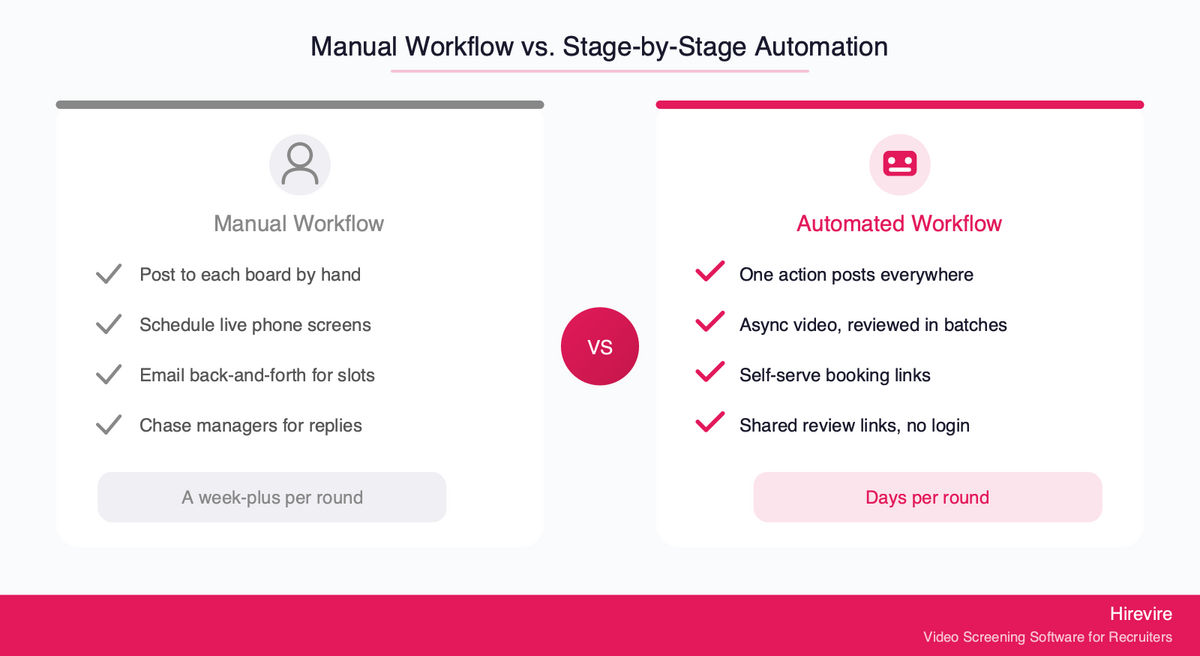
The contrast between a fully manual process and a stage-by-stage automated one is stark once laid out side by side.
| Stage | Traditional manual | Stage-by-stage automated |
|---|---|---|
| Sourcing | Post to each board by hand | One action posts everywhere, applications auto-captured |
| Screening | Read every resume, schedule and run live phone screens | Auto-disqualify knockouts, async video reviewed in batches |
| Scheduling | Email back-and-forth to find a slot | Self-serve booking against live calendars |
| Communication | Manual updates that often never happen | Triggered emails, reminders, and bulk SMS invites |
| Handoff | Forward resumes, chase managers for replies | Shared review link, no login, rate on any device |
| Result | A week-plus per round, candidates lost to silence | Days per round, every candidate kept informed |
The automated column is not science fiction. Every row maps to a tool category that exists today, and most map directly to features inside Hirevire at the screening, communication, and handoff stages.
How to Roll Out Recruiting Workflow Automation: A Practical Sequence
Knowing what to automate is half the battle. Rolling it out without disrupting active hiring is the other half. This sequence keeps risk low.
Phase 1: Map and measure. Document your current six-stage workflow and time each stage for one real role. This baseline tells you which stage to automate first and gives you numbers to prove the payoff later.
Phase 2: Automate screening first. Because screening is the highest-ROI stage, start there. Set up async video with Hirevire, configure auto-disqualification for your objective knockouts, and build custom stages that mirror your real funnel. Run one role through it end to end.
Phase 3: Layer in communication. Once screening works, turn on automated confirmations, stage-change emails, reminders, and bulk SMS invites so no candidate goes silent.
Phase 4: Automate scheduling and handoff. Connect a booking tool for self-serve scheduling, and start using shared review links so managers can decide fast.
Phase 5: Connect the stages. Wire your tools together with integrations and webhooks, and explore agent-assisted steps through MCP once the human-run stages are solid.
Common Pitfalls to Avoid
- Automating a broken process: fix the workflow first, then automate it
- Over-automating judgment: never let software make the hire or no-hire call
- Skipping the compliance check: keep a human accountable for selection decisions and confirm whether bias-audit rules like Local Law 144 apply to you
- Boiling the ocean: automate one stage, prove it, then expand, rather than launching all six at once
Frequently Asked Questions
What does it mean to automate a recruiting workflow?
Automating a recruiting workflow means handing the repetitive, low-judgment tasks at each hiring stage to software, while keeping the decisions with people. In practice that means automated job distribution at sourcing, async video and auto-disqualification at screening, self-serve booking at scheduling, triggered messages at the communication stage, and shared review links at handoff. The evaluation and the offer stay human.
Which recruiting stage should I automate first?
Screening, almost always. It sits at the widest point of the funnel, where the same task repeats hundreds of times per role, so automating it returns the most hours. Moving the first conversation to async video is the single biggest time saver in the whole workflow. Hirevire is built specifically for this stage.
How much time does recruiting workflow automation actually save?
It varies by volume, but the screening stage is where the savings concentrate. Teams using async video report cutting their hiring process by around 75% at the screening stage, because reviewing recorded answers in batches replaces dozens of scheduled live calls. The more applicants per role, the larger the savings.
What should I never automate in hiring?
The hire or no-hire decision, the live interview, and sensitive offer or final-rejection conversations. Automation should gather and move information; people should interpret it. This is also a compliance boundary, since employers remain responsible under Title VII for selection decisions made with software or AI. Keep a human accountable for who advances.
Do I need to replace my ATS to automate my workflow?
No. The better approach is to keep your ATS as the system of record and add automation to the stages where it adds the most value. Hirevire connects to thousands of apps through its integrations, including direct ATS connections, Zapier, Make, and webhooks, so it slots into an existing stack rather than replacing it.
Is automated screening fair to candidates?
It can be, when it is built on transparent rules rather than opaque scoring. Auto-disqualification should filter only on objective knockouts like work authorization or required certifications. AI scorecards should apply a human-created rubric with defined criteria and weights, not a black box. Hirevire's AI scorecards work this way. Note that New York City's Local Law 144 requires an independent bias audit for automated employment decision tools in that jurisdiction.
How does async video screening work?
Instead of scheduling live phone screens, you send qualified applicants a short set of questions they answer on their own time by video, audio, text, or file upload. The recruiter reviews the responses in batches whenever it suits them. With Hirevire, candidates need no login, which keeps completion rates high, and reviewers can rate responses and move candidates through custom stages.
Can automation help with high-volume or hourly hiring?
Yes, and it helps most there. High-volume roles generate the largest applicant pools, so auto-disqualification and async video have the biggest impact. Because most hourly and frontline candidates apply from their phones, bulk SMS invites reach them faster than email and lift response rates significantly.
What is MCP and how does it fit recruiting automation?
MCP lets AI agents like Claude read and summarize your hiring data, such as candidate lists and transcripts, while you keep decision authority. With Hirevire's MCP integration, the agent reads and proposes, the human decides, and any write access stays within your existing, revocable permissions. It is the responsible ceiling of automation: agent-assisted, not agent-decided. For a plain-language walkthrough, see MCP for HR: the complete guide for HR managers.
How do I get hiring managers to actually review candidates?
Remove every barrier to access. Managers will not log into another tool, so send them a shared review link instead. It opens all candidates in a stage with no login required, so a manager can watch async answers and rate them on a phone between meetings, and their input flows straight back into the pipeline.
Conclusion: Automate One Stage at a Time
Recruiting workflow automation works best as a sequence, not a switch. Map your six stages, find the one that wastes the most time, automate it, prove the payoff, then move to the next. For nearly every team that first stage is screening, where async video, auto-disqualification, and custom stages turn a week of phone screens into a day of batch review.
The guiding principle through every stage is the same: automate the collection and movement of information, and keep the interpretation of it human. Software should post the jobs, filter the knockouts, transcribe the answers, route the candidates, send the updates, and surface the shortlist. People should decide who is a good fit and what to offer. That split is what makes automation an asset rather than a liability, both for hiring quality and for compliance.
Key Takeaways
- Automate one stage at a time, starting with the highest-ROI stage: screening
- Async video is the single biggest time saver in the workflow
- Use auto-disqualification for objective knockouts only, never subjective quality
- Keep the hire decision, the live interview, and offer conversations human
- Connect stages with integrations and MCP rather than ripping out your stack
Your Next Steps
- Map your current recruiting workflow across all six stages and time one real role
- Automate the screening stage first, where the time savings are largest
- Try Hirevire's free trial to automate screening with async video, auto-disqualification, custom stages, and bulk invites
Hirevire holds a 4.6/5 rating on G2 (30 reviews), 5/5 on Capterra (26 reviews), and 4.9/5 on AppSumo (70+ reviews).
Ready to automate the stage that wastes the most time first?