What Is Recruiting Automation? A Complete Guide for 2026
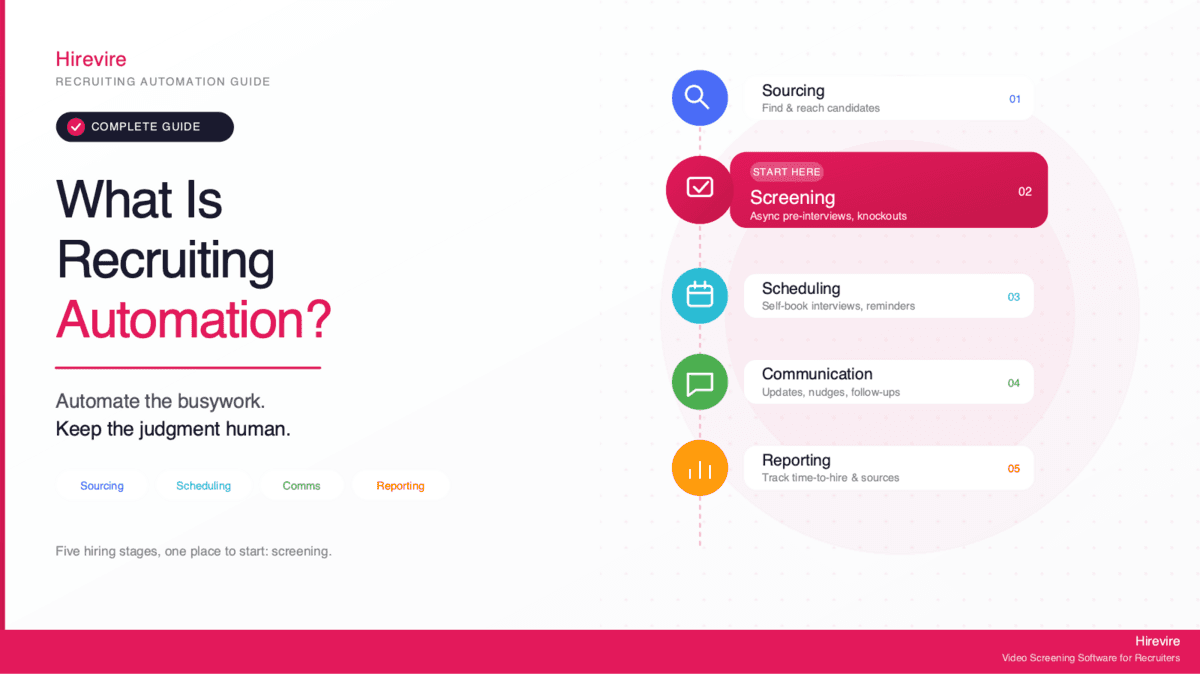
Recruiting automation is the use of software to handle repetitive hiring tasks, sourcing, screening, interview scheduling, candidate communication, and reporting, so recruiters spend their time on judgment instead of admin. Most teams start with screening, the biggest single time drain, using async tools like Hirevire, then layer in sourcing and scheduling automation as they go.
That definition matters because "recruiting automation" gets used loosely, often as a synonym for "AI recruiting." It is broader than that. AI is one technique inside recruiting automation, useful for some tasks and a bad fit for others. A scheduling tool that emails candidates open time slots is automation with no AI in it at all. A resume parser that ranks applicants may use AI, and that is exactly where you need to be careful. This guide separates the two, maps the hiring stages you can realistically automate, and is honest about the one stage everyone wants to automate the most: screening.
Key Takeaways
| Hiring stage | What gets automated | Example tool type |
|---|---|---|
| Sourcing | Finding and reaching passive candidates, building talent pools | Sourcing platforms (Fetcher, HireEZ) |
| Screening | Async pre-interviews, knockout filtering, first-pass evaluation | Async video screening (Hirevire), assessments |
| Scheduling | Booking interviews, sending reminders, managing calendars | Scheduling assistants (Paradox, Sense) |
| Communication | Status updates, follow-ups, nudges, FAQs | Recruiting CRMs, chatbots |
| Reporting | Pipeline metrics, time-to-hire, source tracking | ATS analytics (Greenhouse, Workable) |
According to SHRM's 2025 Talent Trends research, 43% of organizations now use AI in HR tasks, up from 26% in 2024, with just over half using it to support recruiting. Adoption is moving fast, but most teams are bolting tools onto a broken process instead of automating the right stages in the right order. The rest of this guide fixes that.
What Recruiting Automation Actually Means
Recruiting automation is any software that takes a repetitive, rules-based, or high-volume hiring task off a human's plate. The goal is not to remove people from hiring. It is to remove the parts of hiring that do not need a person: copying data between systems, sending the same email 200 times, manually comparing calendars, filtering out applicants who do not meet a hard requirement.
A useful test: if a task is repetitive and the right answer does not change based on context, it is a candidate for automation. If a task requires weighing trade-offs, reading nuance, or making a judgment call, it is not, even if a tool offers to do it for you.
Recruiting Automation vs. AI Recruiting
These two terms get treated as the same thing. They are not, and the distinction protects you.
Recruiting automation is the broad category. It includes simple rule-based automations (auto-reject anyone without a valid work authorization), workflow automations (when a candidate finishes a screening, notify the hiring manager), and data automations (sync new applicants from your careers page into your ATS). None of that requires AI.
AI recruiting is a subset. It uses machine learning to do things rules cannot: transcribe and summarize a video answer, score a written response against a rubric, surface passive candidates who match a role. AI is powerful for pattern-heavy tasks, but it introduces risk, because a model trained on biased data can produce biased outcomes at scale.
The practical takeaway is that you do not have to "adopt AI" to automate recruiting. You can capture most of the time savings with plain automation, then add AI selectively for the tasks where it genuinely helps, with a human reviewing the output.
Who Recruiting Automation Is For
Recruiting automation is not only for large enterprises with dedicated talent teams. The teams that benefit most are often the ones with the least recruiting headcount:
Small and mid-sized businesses hiring without a full recruiting team, where the founder or office manager is also the recruiter and has no spare hours.
High-volume hourly and frontline employers in healthcare, retail, hospitality, warehousing, and call centers, where the same role gets filled dozens or hundreds of times and the bottleneck is throughput, not sourcing.
Recruitment agencies running multiple roles at once, where every hour saved on admin is an hour billable elsewhere.
Growing tech and professional services teams that want a consistent, defensible hiring process as they scale past the point where one person can keep it all in their head.
Why Recruiting Automation Matters Now
The case for automating recruiting comes down to where recruiter time actually goes. It does not go to the high-value work, the conversations, the judgment calls, the relationship building. It goes to admin.
According to LinkedIn's Future of Recruiting research, recruiters spend much of their hiring time on administrative tasks rather than evaluation or candidate relationships. Resume screening, scheduling, and status-update emails eat the calendar, and none of them are why anyone got into recruiting.
The cost of that inefficiency is measurable. SHRM's 2025 Benchmarking Reports put the average cost-per-hire for non-executive roles at $5,475. Drag out time-to-hire and that number climbs, because the best candidates accept other offers while your pipeline sits in someone's inbox. And the cost of getting it wrong is worse still: SHRM data shows the cost of a bad hire can reach 213% of annual salary for senior positions.
Automation attacks both problems. It compresses time-to-hire by removing the waiting and the manual handoffs, and it improves consistency, which is the foundation of better quality-of-hire. When every candidate moves through the same structured process, decisions get more defensible and easier to compare.
There is also a candidate-experience dividend. Most hourly and frontline candidates apply from their phones, and a process that makes them wait days for a reply, or forces them through a clunky login, loses them. Automation that sends an instant acknowledgment and a mobile-friendly next step keeps people in the funnel.
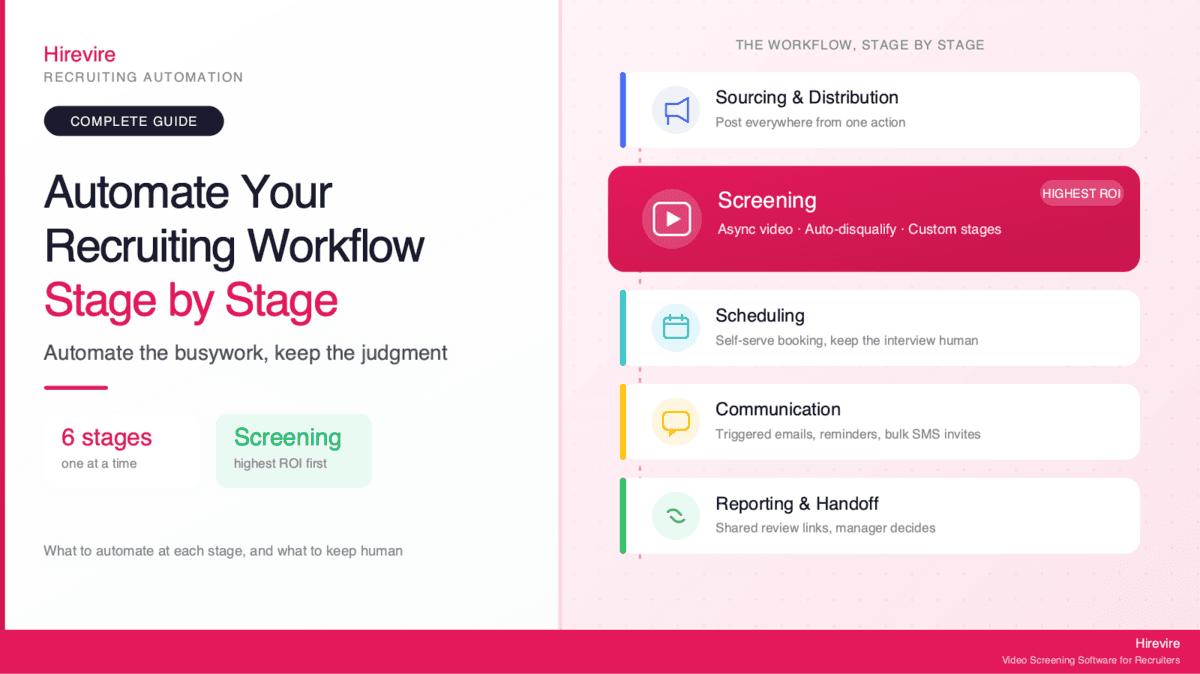
The Five Stages of Recruiting You Can Automate
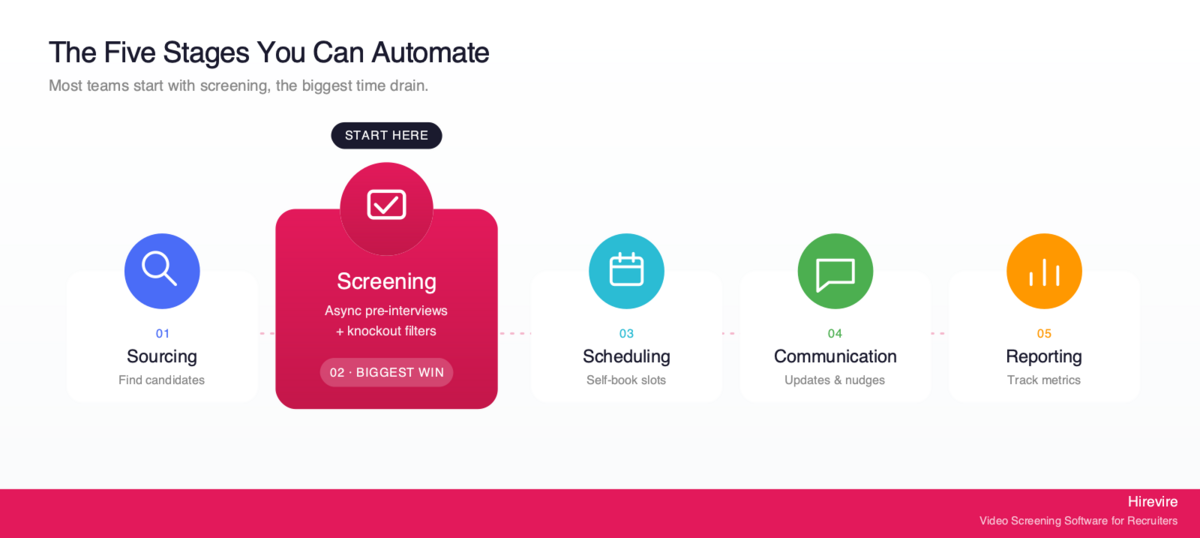
Hiring is a pipeline, and each stage automates differently. Here is the full map, in the order candidates move through it.
Stage 1: Sourcing
Sourcing is finding candidates, especially passive ones who are not actively applying. Automation here means tools that search across job boards, professional networks, and resume databases, then build and nurture talent pools.
Sourcing platforms like Fetcher (rated 4.6/5 on G2) and HireEZ automate candidate discovery and outreach sequencing. They are most valuable for hard-to-fill, competitive roles where the right person is already employed and will not see your job post. For high-volume roles where applicants come to you, sourcing automation matters less, the bottleneck is downstream.
Where AI fits: matching candidate profiles to a role description, and drafting personalized outreach. Where to keep a human: deciding who is actually worth contacting and writing the message that lands.
Stage 2: Screening
Screening is the first-pass evaluation, deciding who advances past the application. This is the biggest time drain in hiring and the stage most teams automate first, which is why it gets its own deep section below. For now: screening automation ranges from simple knockout filters (auto-reject anyone missing a hard requirement) to async video or audio pre-interviews that replace the phone screen entirely.
This is also the highest-stakes stage to automate, because screening is where automation can quietly screen people out on the wrong basis. Get it right and you save the most time. Get it wrong and you create legal and quality-of-hire problems. The screening section covers how to draw that line.
Stage 3: Interview Scheduling
Scheduling is pure coordination overhead: matching candidate availability to interviewer calendars, sending invites, handling reschedules, and chasing no-shows with reminders. It is repetitive, rules-based, and almost entirely automatable with no AI required.
Scheduling assistants like Paradox and Sense let candidates self-book into open slots and send automatic reminders. The time savings are immediate, and the risk is low, because the tool is not making a hiring judgment, it is managing a calendar.
Stage 4: Candidate Communication
Communication automation handles the constant stream of updates, follow-ups, and answers candidates expect. Status updates ("your application is under review"), nudges to complete a next step, FAQ responses about the role or process, and rejection notices can all run on templates and triggers.
Done well, this improves candidate experience rather than degrading it, because the alternative is silence. The line to watch: automate the routine acknowledgments and reminders, but keep a human in the loop for anything that is genuinely a conversation, an offer negotiation, a sensitive question, a final no to someone who got close.
Stage 5: Reporting and Analytics
Reporting automation tracks the pipeline so you do not have to build spreadsheets by hand: time-to-hire, source of hire, stage conversion rates, drop-off points, and cost-per-hire. Most applicant tracking systems, including Greenhouse, Workable, and Zoho Recruit, generate these reports automatically.
This is the stage that makes every other stage better, because it tells you where your process is leaking candidates and where automation is actually paying off. It is low-risk and high-payoff, and it is the stage teams most often skip.
Owning the Screening Stage: Where Automation Earns Its Keep (and Where It Doesn't)
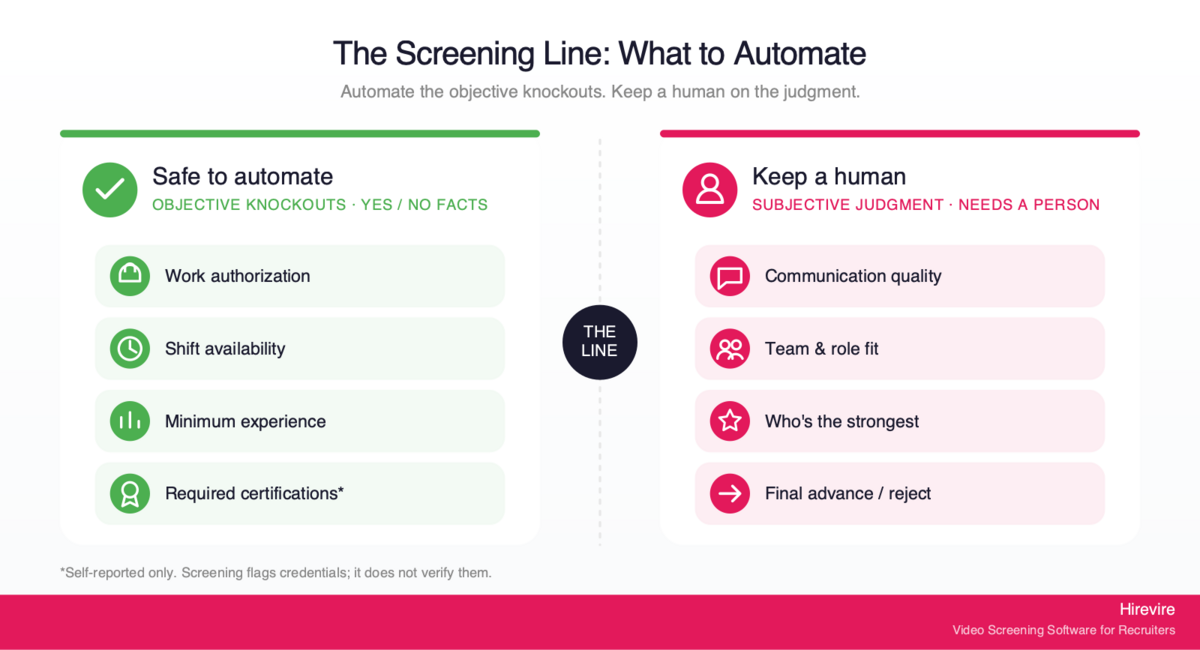
Screening deserves special attention because it is both the biggest opportunity and the biggest trap. 44% of organizations now use AI to screen resumes, the second most common recruiting use of AI after writing job descriptions, according to SHRM. That popularity is earned, screening is genuinely the worst time sink, but it is also where automation does the most damage when it is built wrong.
Why Screening Is the Right Place to Start
For most teams, screening is where automation delivers the fastest, clearest return. Phone screens are the classic bottleneck: a recruiter spends 15 to 30 minutes on a call to learn what could have been captured in a five-minute async recording, and they can only do them one at a time. Multiply that across a pile of applicants and the math is brutal.
Async pre-screening breaks the bottleneck. Instead of scheduling and conducting live calls, candidates record answers to your questions on their own time, and the hiring team reviews them whenever it suits, in a fraction of the time. Hirevire is built for exactly this: candidates respond by video, audio, text, or file upload, with no login required, on any device. One Hirevire customer put the impact bluntly:
"It cuts down my hiring process by at least 75% and made it sooo much easier to see/feel who the candidates were before having to hop on a call with them."
— ElevateClients, AppSumo
That is the screening stage working as intended: less admin, more signal, before anyone spends time on a live conversation.
The Honest Boundary: What Screening Automation Should and Shouldn't Decide
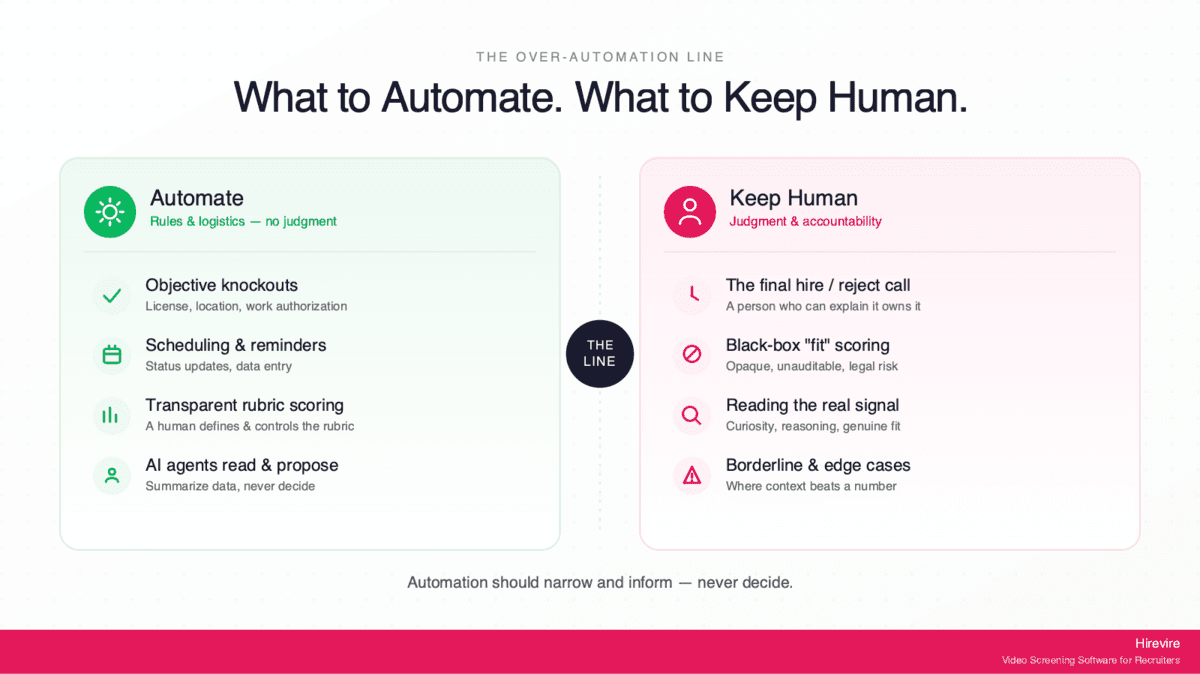
Here is the line that separates safe screening automation from risky screening automation: automate the objective knockouts, keep the human in charge of the judgment.
Objective knockouts are facts with a yes-or-no answer. Does the candidate have the required work authorization? Are they available for the shift? Do they meet a stated minimum years of experience or hold a required certification? These are safe to automate, because the rule is unambiguous and applies equally to everyone. Hirevire's Auto-Disqualification does exactly this: the recruiter sets the must-have criteria, and applicants who fail are filtered to a separate tab before they record, saving review time without making a subjective call.
Subjective judgment is everything else: is this person a good communicator, will they fit the team, are they the strongest candidate in the pool? This is where automation gets dangerous, because a tool that ranks or rejects candidates on subjective grounds can produce biased outcomes at scale, and the law holds you responsible for it.
This is not a hypothetical compliance concern. The EEOC's technical assistance on AI in employment selection makes clear that Title VII applies to an employer's use of software, algorithms, and AI in selection procedures, and a tool that screens out candidates on a protected basis can create unlawful disparate impact even when the employer relied on a vendor's tool. In other words, "the software did it" is not a defense. Some jurisdictions go further: New York City's Local Law 144 requires employers using an automated employment decision tool to commission an independent annual bias audit and publish the results before using the tool to screen candidates.
The safe pattern, then, is automation that does the busywork and surfaces information, while a human makes the actual advance-or-reject decision. That is the design philosophy behind Hirevire's approach to the rest of the screening stage.
How Hirevire Approaches Recruiting Automation
Hirevire is an async screening platform built on a clear principle: automate the busywork, keep the judgment human. It is one tool in the screening stage of the pipeline, not an end-to-end recruiting suite, and that focus is the point. Here is how its core features map to the "automate the repetitive, keep a human on the decision" line.
Auto-Disqualification: Objective Knockouts Only
Auto-Disqualification lets a recruiter set must-have criteria, minimum experience, required certifications, location, work authorization, and automatically filters out applicants who do not meet them before they record. Crucially, it handles objective knockouts only. It is not ranking candidates or guessing at fit. It is applying a hard rule the recruiter defined, which keeps it on the safe side of the line.
AI Scorecards: Transparent Rubric Scoring, Not a Black Box
AI Scorecards let the hiring team define custom evaluation criteria with weighted factors and 1-to-5 scoring levels. The AI then applies that human-created rubric to every candidate, giving consistent scores plus detailed reasoning. The distinction that matters: the human writes the rubric, the AI applies it transparently, and you can see why a candidate scored the way they did. It is decision support, not a black box that spits out a verdict.
MCP Integration: Agents Read and Propose, Humans Decide
Hirevire's MCP integration lets AI agents like Claude read and summarize hiring data, candidate lists, transcripts, while the human keeps decision-making authority. An agent can pull together a summary of the strongest responses; it cannot make the hire. Write access stays within your existing permissions and is revocable. The agent reads and proposes; the human decides. MCP for recruiting walks through what an agent can do with candidate data, which recruiting tools run a server, and a 500-applicant screening run. If you want to know whether the rest of your stack can do the same, we keep a monthly-verified table of which HR tools have MCP servers.
Shared Review Links: The Human Review Step
Shared Review Links generate shareable links for every application in a stage, so any teammate can review and rate candidates collaboratively, no login required. This is the deliberate human-in-the-loop step: after automation has filtered the obvious knockouts and surfaced the rest, real people make the call together.
What Hirevire Does Not Do
Being clear about the boundary is part of trustworthy automation. Hirevire screens for communication, availability, and self-reported qualifications. It does not verify professional certifications, licensure, or clinical competency, and it should not be relied on for that. A candidate stating they hold a credential is a signal to follow up on, not a verified fact. For regulated roles, certification and license verification belongs with a proper background-check and credentialing process, not a screening tool.
Pricing
Hirevire uses fixed monthly or yearly pricing with no per-interview fees, so costs stay predictable as volume grows.
| Plan | Monthly | Yearly | Best for |
|---|---|---|---|
| Essentials | $49/month | $39/month (billed yearly) | A single open position |
| Professional | $149/month | $99/month (billed yearly) | Regular, ongoing hiring with AI Scorecards |
| Agency | $249/month | $199/month (billed yearly) | High-volume and multi-client hiring |
Customer reviews
G2: 4.6/5 stars (30 reviews) - View Reviews. Capterra: 5/5 stars (26 reviews) - View Reviews.
"As a recruiter with over 20 years of experience, I can confidently say this is one of the best recruitment tools I've ever used. It's incredibly simple, intuitive, and efficient, making it perfect for daily operations."
— Jean-Marc M., G2
How to Roll Out Recruiting Automation: A Stage-by-Stage Plan
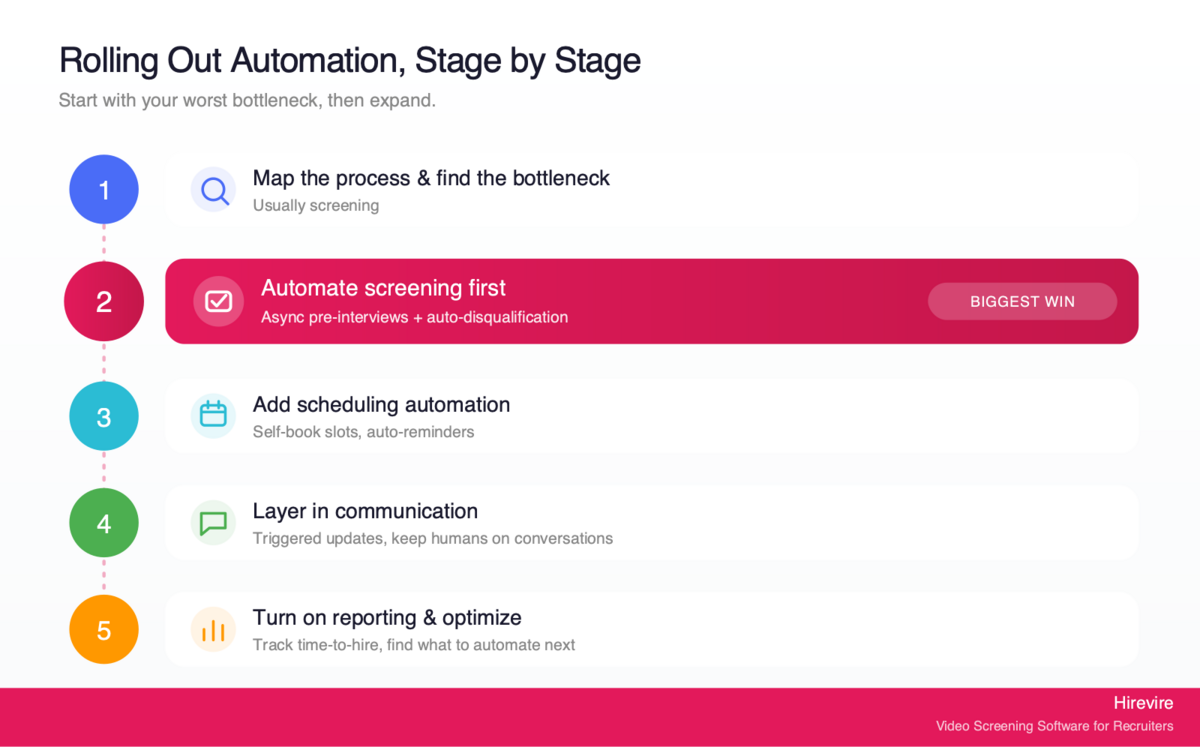
You do not automate the whole pipeline on day one. The teams that succeed start with the stage that hurts most and expand from there. Here is a sensible sequence.
Step 1: Map Your Current Process and Find the Bottleneck
Before automating anything, write down every step a candidate goes through and roughly how long each one takes your team. The bottleneck, the stage where candidates pile up and recruiters lose hours, is almost always screening. Confirm it with your own data rather than assuming.
Step 2: Automate Screening First
Replace live phone screens with async pre-screening. Define your must-have knockouts (work authorization, availability, hard requirements) and let Auto-Disqualification handle them. Write a short set of role-specific questions for candidates to answer by video or audio. This is the change that frees up the most time fastest.
Step 3: Add Scheduling Automation
Once screening surfaces the candidates worth meeting, remove the calendar ping-pong. Let qualified candidates self-book interviews into open slots, with automatic reminders to cut no-shows. Low risk, immediate payoff.
Step 4: Layer in Communication Automation
Set up triggered status updates, acknowledgments, and reminders so no candidate sits in silence. Keep a human on the conversations that matter, offers, sensitive questions, and close calls.
Step 5: Turn on Reporting and Optimize
Use your ATS analytics to watch time-to-hire, conversion by stage, and source of hire. The data tells you where to automate next and whether the changes are working.
Common Pitfalls to Avoid
Automating subjective decisions. Never let a tool reject candidates on subjective grounds without human review. Automate knockouts; keep judgment human.
Skipping the compliance step. If you use an automated tool that influences who advances, know your obligations, including bias-audit requirements like NYC's Local Law 144 where they apply.
Buying tools before fixing the process. Automating a broken process just makes the mess faster. Map first, automate second.
Forgetting the candidate. Automation should make the experience faster and clearer, not colder. Test your flow from the candidate's phone.
Advanced Strategies for Mature Recruiting Automation
Once the basics are running, a few moves separate a good automation setup from a great one.
Connect the stages so data flows. The biggest hidden cost in recruiting is re-entering the same information across tools. Use ATS integrations and webhooks so a candidate who clears screening automatically appears in scheduling, and their data lands in reporting without manual copying.
Standardize before you scale. Automation amplifies whatever process you feed it. A consistent, structured screening process produces consistent, comparable, defensible results at any volume. An inconsistent one just produces more inconsistency.
Audit your automated outcomes. Periodically check whether your automated stages are producing balanced results across candidate groups. This is good practice everywhere and a legal requirement in some jurisdictions. Treat the bias audit not as a box to tick but as a quality check on your pipeline.
Keep a human at every decision point. As AI tools get more capable, the temptation to let them decide grows. The durable design keeps agents and models in a read-and-propose role and keeps people making the calls, which is exactly the pattern Hirevire's MCP integration is built around.
Frequently Asked Questions
What is recruiting automation in simple terms?
Recruiting automation is software that handles the repetitive parts of hiring, sourcing candidates, screening applications, scheduling interviews, sending updates, and tracking metrics, so recruiters can spend their time on the parts that need human judgment. It does not replace recruiters; it removes their busywork.
Is recruiting automation the same as AI recruiting?
No. Recruiting automation is the broad category, and a lot of it involves no AI at all (a tool that auto-sends interview reminders is automation without AI). AI recruiting is a subset that uses machine learning for tasks like scoring responses or matching candidates. You can automate most of recruiting with plain rule-based automation and add AI selectively where it genuinely helps.
Which recruiting stage should I automate first?
Screening, in almost every case. It is the biggest time drain, and async pre-screening with a tool like Hirevire replaces slow, one-at-a-time phone screens with recorded answers your team reviews on its own schedule. Start there, then add scheduling and communication automation.
Does recruiting automation reduce hiring bias or create it?
It can do either, depending on how it is built and used. Automating objective knockouts (work authorization, availability, hard requirements) applies the same rule to everyone and can reduce inconsistency. Automating subjective judgments without human oversight can scale bias instead. The safe approach is to automate the busywork and keep a human making the advance-or-reject decision.
What are the legal compliance considerations?
If a tool influences who advances, you are responsible for the outcome. The EEOC's guidance confirms Title VII applies to AI and algorithms in selection, and a tool causing disparate impact is your liability even if a vendor built it. Some places add specific rules, such as NYC's Local Law 144, which requires an independent annual bias audit before using an automated decision tool.
Can recruiting automation verify certifications or licenses?
Screening automation can ask candidates about credentials and flag answers, but it does not verify them. A candidate stating they hold a certification is a signal to confirm, not proof. Tools like Hirevire screen for communication, availability, and self-reported qualifications; actual certification, licensure, and clinical-competency verification belongs with a proper credentialing and background-check process.
How much does recruiting automation cost?
It varies widely by stage and scale. Async screening tools are among the most affordable: Hirevire starts at $39/month billed yearly with no per-interview fees. Sourcing platforms and enterprise ATS suites run far higher, often into thousands per month. The fastest return usually comes from automating screening first, where the time savings are largest relative to cost.
Is recruiting automation worth it for small teams?
Often more so than for large ones. Small teams without dedicated recruiters feel admin overhead most acutely, so removing it has an outsized effect. Async screening and self-scheduling let a one-person hiring operation handle volume that would otherwise be impossible, without adding headcount.
How long does it take to set up recruiting automation?
A single stage like async screening can be live in a day, define your questions and knockouts, share the link, and start collecting responses. Rolling out automation across multiple stages with full ATS integration takes longer, typically a few weeks of phased setup. Starting with one stage and expanding is faster and lower-risk than trying to automate everything at once.
What metrics should I track to know if it's working?
Watch time-to-hire (should fall), stage conversion rates (where candidates drop off), source of hire (which channels deliver), cost-per-hire, and candidate completion rates for any async steps. Most applicant tracking systems generate these automatically, which is why turning on reporting is part of the rollout, not an afterthought.
Conclusion: Automate the Busywork, Keep the Judgment
Recruiting automation is not a single product or a leap into AI. It is the disciplined removal of repetitive work from each stage of hiring, sourcing, screening, scheduling, communication, and reporting, so the people doing the hiring can focus on the decisions only people should make.
Key Takeaways
- Recruiting automation is broader than AI recruiting; much of it needs no AI at all, and you can capture most of the value with plain rule-based automation.
- The five automatable stages are sourcing, screening, scheduling, communication, and reporting, and screening is where most teams should start.
- The safe line is to automate objective knockouts and busywork while keeping a human in charge of every subjective decision, both for quality of hire and for legal compliance.
- Roll out stage by stage starting with your worst bottleneck, usually screening, and let reporting tell you what to automate next.
The Bottom Line
The teams that win with recruiting automation are not the ones that automate the most. They are the ones that automate the right things in the right order and keep humans on the decisions that matter. Screening is the place to start, because it is the biggest time sink and the clearest win, as long as you draw the line between filtering objective knockouts and making subjective calls.
For teams ready to automate the screening stage without losing the human judgment good hiring depends on, Hirevire provides async pre-screening, objective auto-disqualification, transparent rubric scoring, and collaborative human review, starting at $39/month with no per-interview fees.
Your Next Steps
- Map your hiring process and confirm where candidates pile up (it is usually screening).
- Define your objective knockouts and a short set of screening questions.
- Try Hirevire's free trial to replace phone screens with async pre-screening and feel the time savings firsthand.
Ready to automate the busywork and keep the judgment human?