Warehouse Hiring at Peak: How to Screen and Recruit Hundreds at Warehouse, Fulfilment and Logistics
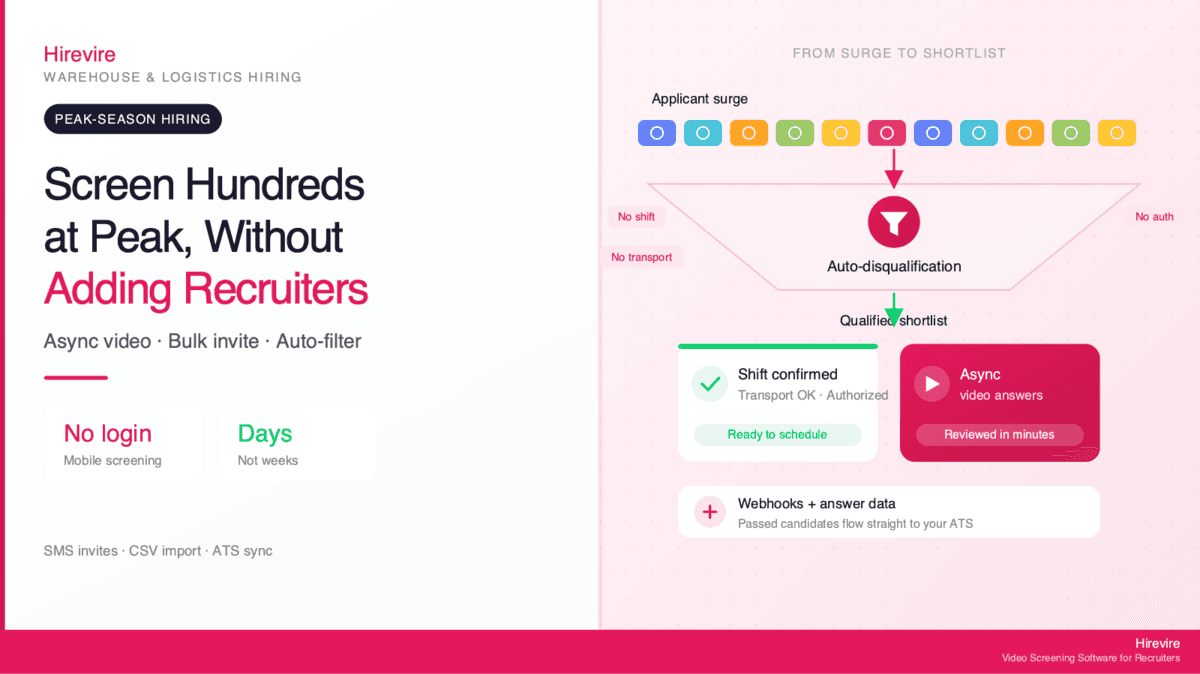
Warehouse and fulfillment teams handle peak hiring surges by replacing live phone screens with async video pre-screening. Candidates confirm shift availability, transportation, and reliability on their phone with no login, and auto-disqualification filters out must-have misses before review. Warehouse hiring software like Hirevire supports bulk invites, SMS, CSV import, and ATS sync, starting at $39/month, so a skeleton team can clear hundreds of applicants in days instead of weeks.
Peak season is a math problem before it is a people problem. A regional fulfillment center that runs 80 associates year-round might need 250 for a six-week surge. The applications arrive in a flood, the recruiting team does not grow, and every day spent scheduling phone screens is a day the floor stays understaffed. The bottleneck is almost never sourcing. It is the screening step in the middle, where a small team tries to talk to hundreds of people one call at a time.
This guide covers how high-volume warehouse and logistics teams compress that step. It walks through the peak-season math, exactly what to screen for in hourly warehouse roles, how an async pre-screening workflow with bulk invites and auto-disqualification works, how to scale the pipeline back down after the rush, and how screened candidates flow into your ATS for scheduling. It includes a ready-to-use screening question template and an honest comparison of async screening against the two methods it usually replaces: mass-text blasts and walk-in hiring days.
Quick Takeaways:
| Question | Short answer |
|---|---|
| What is the real peak-season bottleneck? | The screening step, not sourcing. A skeleton team cannot phone-screen hundreds of applicants in a compressed window. |
| How do teams screen at volume without more recruiters? | Async video and audio pre-screening that candidates complete on their phones, with no login required. |
| What filters out unqualified applicants first? | Auto-disqualification on must-haves (shift availability, reliable transport, work authorization) before a human reviews anything. |
| How do invites scale? | Bulk invites, SMS, and CSV import/export send hundreds of requests at once instead of one-by-one outreach. |
| How does it connect to the rest of hiring? | Webhooks and answer-data integration push screened candidates into your ATS for scheduling and onboarding. |
| What does it cost? | Hirevire starts at $39/month with no per-interview fees, so cost stays fixed as volume spikes. |
The Peak-Season Math: Why Warehouse Hiring Breaks at Volume
Warehouse and fulfillment hiring is one of the largest recurring staffing challenges in the economy. Warehousing and storage employed roughly 1.8 million workers in the U.S. in 2025, and the broader transportation and warehousing sector employs more than 6.5 million people (BLS). A large share of that workforce turns over every year, and a meaningful chunk of every year's hiring is concentrated into a few peak weeks around the holidays and major sales events.
The peak window is getting tighter, not wider. Challenger, Gray & Christmas projected the smallest seasonal hiring gain in 16 years for 2025, and the NRF expects retailers to hire 265,000 to 365,000 seasonal workers in 2025, down from 442,000 the year before. Fewer planned seasonal heads and later commitments mean the hiring that does happen gets squeezed into a narrower stretch, and the team doing it is leaner than ever.
Why the Phone Screen Is the Failure Point
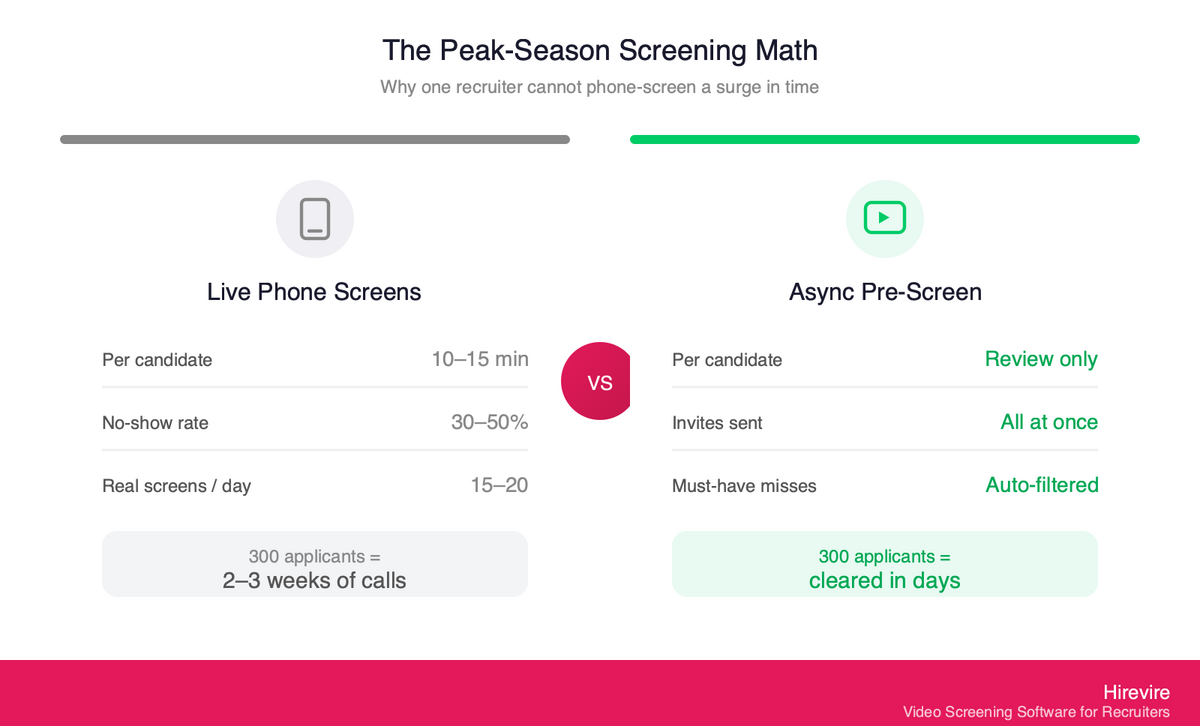
The core problem is throughput. Consider what a single recruiter can realistically do:
- A phone screen for an hourly warehouse role takes 10 to 15 minutes, plus scheduling overhead.
- No-show rates on scheduled hourly phone screens routinely run 30 to 50 percent, so half the booked slots are wasted.
- One recruiter might complete 15 to 20 real conversations in a day.
To screen 300 applicants for a six-week surge, that is two to three weeks of one recruiter doing nothing but phone screens, before a single offer goes out. The applicants who applied first have already taken other jobs by the time the calls reach them. In hourly hiring, speed is the offer. The team that responds in 24 hours wins candidates the team responding in two weeks never gets to talk to.
Where the Money Leaks
Slow screening is expensive in three directions at once. Every unfilled shift during peak is lost throughput on the floor. Every candidate who drops off because the process took too long is a sourcing dollar spent for nothing. And recruiters spend much of their hiring time on administrative tasks like scheduling and chasing no-shows rather than evaluating fit. The fix is not to hire more recruiters for six weeks. It is to remove the live phone screen from the front of the funnel entirely.
What to Screen For in Warehouse and Fulfillment Roles
Hourly warehouse screening is not about resumes. Most candidates do not have one that matters, and the job does not need it. Effective pre-screening for warehouse, logistics, and fulfillment roles focuses on a short list of practical must-haves and a few signal questions.
The Four Things That Actually Predict a Hire
Shift availability. Peak warehouses run nights, weekends, and split shifts. The single most common reason a candidate washes out after orientation is that the shift they were hired for is not one they can actually work. Confirm exact availability up front: which days, which hours, and whether overtime during peak is acceptable.
Reliable transportation. Many fulfillment centers sit in industrial parks with limited transit access and shifts that start before buses run. This is not about owning a car, it is about whether the candidate can reliably arrive on time for their assigned shift. Ask directly.
Work authorization and basic eligibility. Confirm the candidate is legally authorized to work and meets the role's baseline requirements (minimum age for certain equipment, ability to meet the physical demands as described). These are objective knockouts.
Reliability and communication signal. A short async video or audio answer reveals whether someone shows up prepared, speaks clearly enough to follow safety instructions, and took the application seriously. This is a self-reported and communication signal, not a physical-capability test or a background check.
What to Avoid Claiming
Screening software does not assess physical capability and does not run background checks. Frame safety and reliability questions as self-reported and as a communication signal. Ask candidates to confirm they understand and can meet the physical and safety requirements described in the job posting, rather than implying the tool measures whether they can. Keep knockout criteria objective and job-related. Title VII applies to an employer's use of software, algorithms, and AI in selection procedures, and a screening rule that filters people out on a protected basis can create unlawful disparate impact, so every auto-knockout should map to a genuine requirement of the role.
Async Pre-Screening for Surge Hiring: The Bulk + Auto-Disqualify Workflow
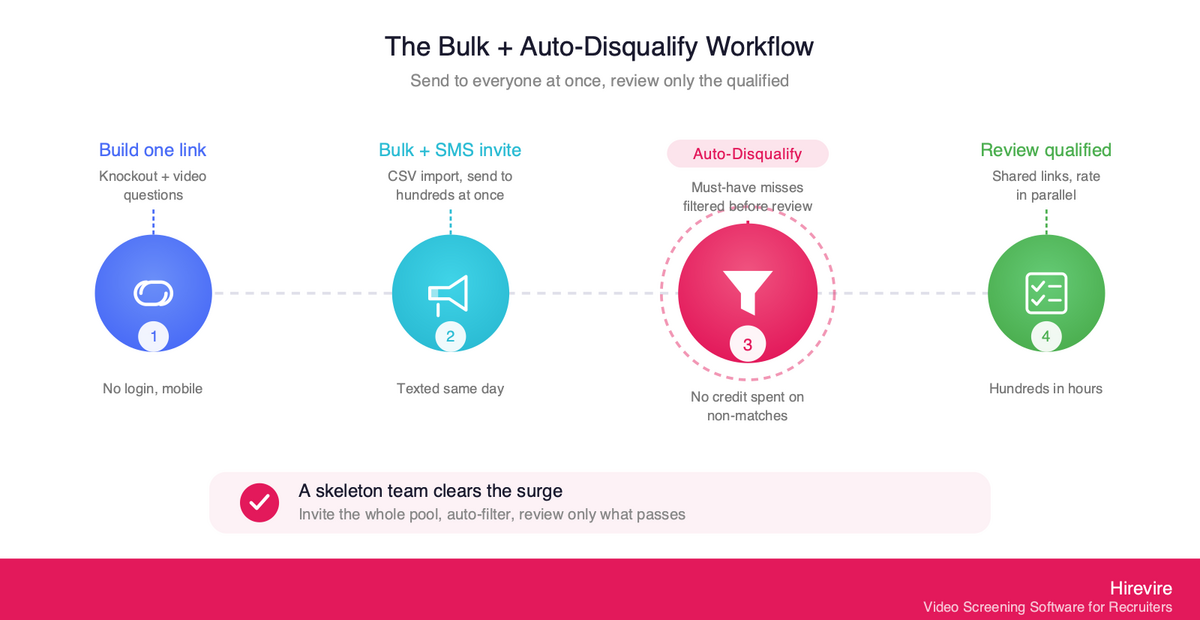
The async model flips the order of operations. Instead of scheduling a call and then asking questions, you send the questions to everyone at once, candidates answer on their own time, and a human only reviews the ones who pass the must-haves. Here is how that workflow runs at peak volume.
Step 1: Build One Screening Link With Knockout Questions
Set up a single screening flow with your warehouse questions: shift availability, transportation, work authorization, and one or two short video or audio prompts. The candidate experience matters at volume. With Hirevire, candidates answer on their phone with no login and no app to download, which is critical because most hourly and frontline candidates apply from their phones. Friction at this step is where you lose people: 60% of job seekers quit applications because of their length or complexity.
Step 2: Invite Everyone at Once With Bulk Operations and SMS
Rather than emailing candidates one at a time, Hirevire supports bulk invites and CSV import/export, so you can upload a list of hundreds of applicants and send the screening link to all of them in one action. SMS invites matter here: hourly candidates open texts far faster than email, and a text invite the same day they applied dramatically lifts completion. The whole applicant pool gets the same fair screen within hours instead of over weeks.
Step 3: Let Auto-Disqualification Filter the Must-Have Misses
This is the step that makes volume manageable. With auto-disqualification, you set the must-have criteria up front, and applicants who fail them are routed to a separate tab before a recording is even reviewed. Someone who cannot work the night shift, has no way to reach the site, or is not authorized to work is filtered automatically. Your team never spends a minute, or a response credit, on candidates who were never eligible. Auto-disqualification handles objective knockouts only, so it removes clear non-matches without making judgment calls that belong to a human.
Step 4: Review Only Qualified Candidates, Collaboratively
What reaches your reviewers is a clean list of candidates who already cleared every must-have. Reviewing a 90-second video is faster than a 12-minute call, and several reviewers can work the queue in parallel. With shared review links, a site lead or operations manager can rate candidates without a login, so the hiring decision is not bottlenecked on one recruiter. A skeleton team reviewing pre-filtered async responses can clear hundreds of candidates in the time it used to take to phone-screen a few dozen.
"It cuts down my hiring process by at least 75% and made it sooo much easier to see/feel who the candidates were before having to hop on a call with them."
— ElevateClients, AppSumo
Scaling the Pipeline Back Down After Peak
The surge ends as fast as it started, and a good peak process is built to wind down cleanly. The same workflow that handled the spike makes the contraction painless.
Because every screen, transcript, and rating lives in one place, the candidates you did not hire during peak do not disappear. They become a warm pipeline for the next surge or for backfilling year-round attrition. When a permanent slot opens in February, you are not starting from a cold job post. You are re-inviting people who already passed your shift-and-transport screen.
Hirevire pricing supports this rhythm directly. Plans are fixed monthly or yearly with no per-interview fees, so the cost does not balloon when you screen 400 people in November and does not strand you on an enterprise contract when you screen 30 in March. You scale the volume of invites up and down freely within your plan's allocation, and the budget stays predictable. That is the difference between fixed costs and per-interview anxiety: you can run a peak surge without a finance conversation about variable screening charges.
A Realistic Setup Timeline Before Peak
The async workflow is fast to stand up, which matters when seasonal commitments arrive late. A typical rollout for a single facility takes a few days, not weeks:
- Day 1: Build the screening flow. Write the four knockout questions and two signal prompts, set the auto-disqualification criteria, and brand the screening page to match your careers site. This is a one-time setup that gets reused every peak.
- Day 2: Wire the integrations. Connect your ATS or scheduling tool through webhooks and the integrations page and test that a passed candidate routes correctly with their answers attached.
- Day 3: Run a small pilot. Send the screen to the first 20 to 30 applicants by SMS, confirm the auto-filter is catching the right knockouts, and check that completion rates hold. Adjust question wording if anything is unclear.
- Day 4 onward: Open the floodgates. Bulk-invite the full applicant pool. From here the process runs itself, and your team reviews qualified candidates as they come in.
The setup is reusable. Next peak, you re-open the same flow, refresh the shift details, and start inviting on day one.
Warehouse and Logistics Screening Questions: A Template
Use this as a starting screening flow for a general warehouse or fulfillment associate role. Keep the whole thing under six questions so completion stays high. Mix knockout questions (used for auto-disqualification) with short open-ended prompts (used for the communication signal).
Must-Have Knockout Questions
These should be multiple-choice or yes/no so they can drive auto-disqualification automatically:
- Shift availability: "This role requires availability for [nights / weekends / overtime during peak]. Can you work this schedule?" (Yes / No / Some shifts)
- Transportation: "Can you reliably arrive on time for shifts that start at [time] at our [location] facility?" (Yes / No)
- Work authorization: "Are you legally authorized to work in the [country] without sponsorship?" (Yes / No)
- Role requirements: "This role involves [standing for full shifts / lifting up to X lbs / operating equipment]. Can you meet these requirements as described?" (Yes / No)
Short Signal Questions
These are quick video or audio prompts (30 to 60 seconds each) that reveal reliability and communication:
- Reliability: "Tell us about a job or situation where showing up on time and being dependable mattered. What did you do?"
- Motivation and fit: "Why are you interested in this warehouse role, and what shift works best for you?"
How the Template Maps to the Workflow
| Question type | Purpose | What it drives |
|---|---|---|
| Shift availability | Confirm schedule fit | Auto-disqualification knockout |
| Transportation | Confirm reliable arrival | Auto-disqualification knockout |
| Work authorization | Confirm eligibility | Auto-disqualification knockout |
| Role requirements | Confirm self-reported fit | Auto-disqualification knockout |
| Reliability prompt | Communication and dependability signal | Human review |
| Motivation prompt | Engagement and shift preference | Human review |
The four knockout questions do the filtering automatically. The two signal questions are the only things a human watches, and only for candidates who already passed all four knockouts.
Best Practices and Common Pitfalls
A few rules keep completion high and the filter fair at peak volume:
- Keep it short. Every extra question costs completions. Six is a good ceiling for hourly roles; ten starts to bleed candidates.
- Lead with the shift. Put the shift-availability question first. It is the most common knockout, so screening it early saves the candidate time and saves you credits.
- Phrase knockouts as plain yes/no. Auto-disqualification works best on objective, unambiguous answers. Avoid "rate yourself 1 to 10" style questions for knockouts; save scales for the human-review prompts.
- Send the invite by text, fast. A screening link that arrives by SMS the same day someone applies completes far more often than an email three days later.
The most common mistakes are over-stuffing the screen with nice-to-have questions, writing knockouts that are not truly job-related (which both filters good candidates and raises compliance risk), and leaving the invite to email only. Keep the flow tight, the knockouts objective, and the delivery instant.
ATS Integration: Getting Screened Candidates to Scheduling
Pre-screening is only half the pipeline. Once a candidate passes, they need to move into scheduling, offer, and onboarding without anyone re-keying their information. At peak volume, manual hand-off between systems is its own bottleneck.
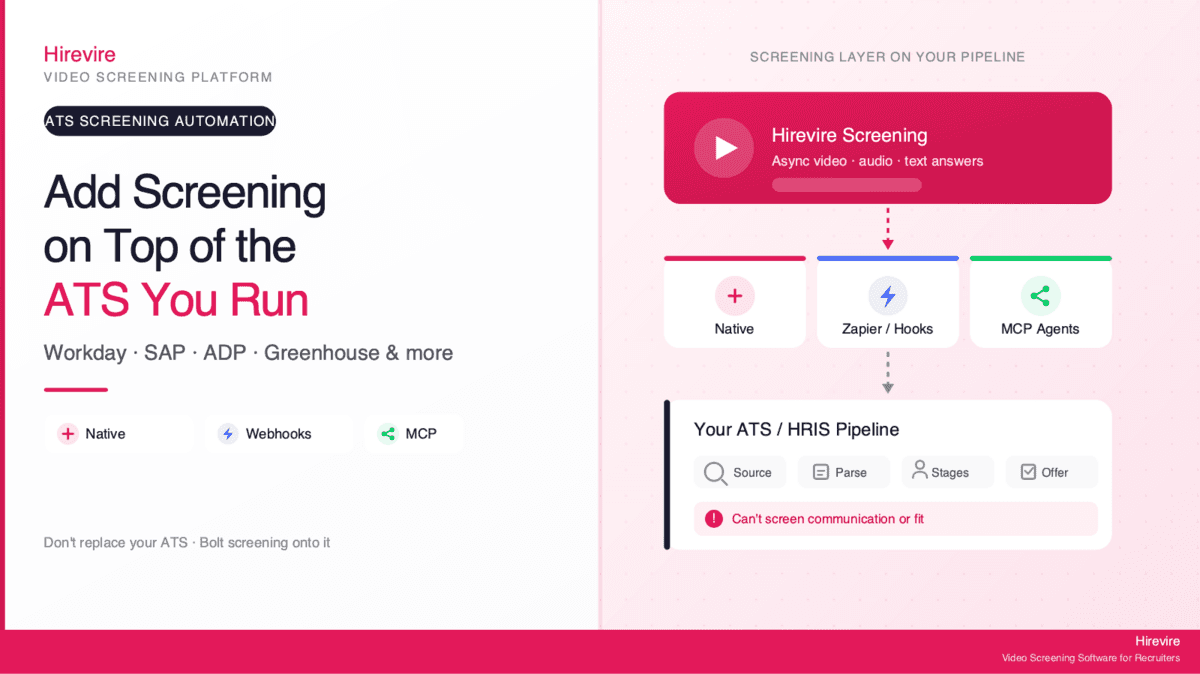
Hirevire connects to the rest of your stack two ways. Webhooks fire the moment a candidate completes or passes a screen, so your ATS or scheduling tool can pick them up in real time. The answer-data integration passes the actual screening answers and ratings downstream, so the next system knows which shift the candidate confirmed and how they were rated, not just that they applied. Through Zapier, Make, and direct connections on the integrations page, screened-and-passed candidates flow straight into the tools your team already uses for scheduling and onboarding.
For high-volume operations, this is what lets a small team run a big funnel. The screening, the filtering, the routing, and the hand-off all happen without a person copying data between tabs. For more on building this kind of end-to-end flow, see Hirevire's guides on high-volume hiring solutions for retail and logistics and AI solutions for fast-tracking mass recruitment.
"The software always works, it's really easy for our candidates to use and their support is really 10/10. If you need an integration or anything, they are there for you."
- Roy Lammers, CEO Remote Talents, G2
Async Screening vs. Mass-Text vs. Walk-In Days
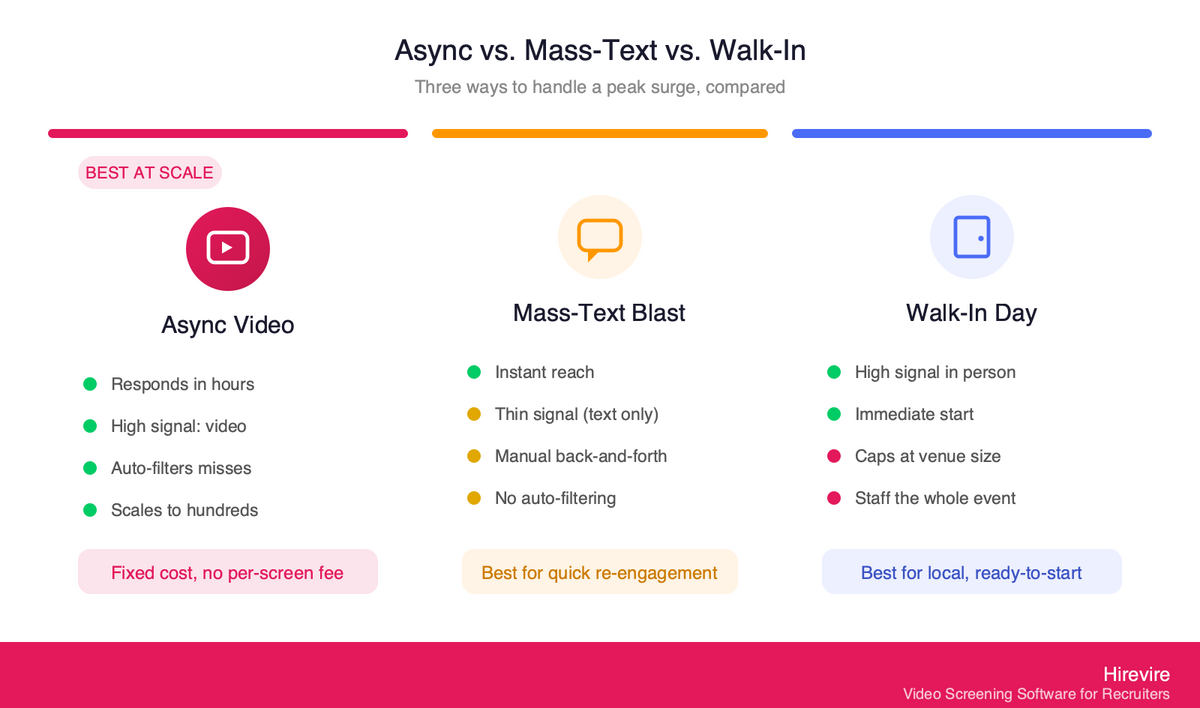
Async pre-screening is not the only way to handle peak warehouse hiring. The two methods it usually replaces are mass-text campaigns and in-person walk-in hiring days. Each has a place, and the honest comparison is below.
| Factor | Async video pre-screen | Mass-text blast | Walk-in hiring day |
|---|---|---|---|
| Speed to first response | Hours (candidate answers on own time) | Minutes to reply, but thin signal | Slow (limited to event date and venue) |
| Depth of signal | High (video/audio + structured answers) | Low (text replies only) | High, but only for who shows up |
| Recruiter time per candidate | Very low (review only qualified) | Medium (live texting back and forth) | Very high (staff the whole event) |
| Knockout filtering | Automatic (auto-disqualification) | Manual | Manual, on the spot |
| Scales to hundreds | Yes, with bulk invites + SMS | Partially (texting still manual) | No (venue and staff limited) |
| Cost predictability | Fixed plan, no per-screen fee | Per-message or per-seat fees | High fixed event cost |
| Best for | Compressed peak surges, distributed pools | Quick reach-out and re-engagement | Local pools, immediate-start needs |
In practice, the strongest peak playbook combines them. Use SMS to reach candidates instantly, point that text at an async screen so the response carries real signal, and reserve walk-in days for final, ready-to-start candidates who already passed the async filter. The async screen is the throughput engine in the middle that the other two methods feed into and draw from.
Frequently Asked Questions
What is warehouse hiring software?
Warehouse hiring software is a tool that helps logistics and fulfillment teams source, screen, and schedule hourly associates at volume. For peak season, the most useful capability is async pre-screening: candidates answer shift, transportation, and reliability questions on their phone, and the software auto-filters anyone who misses a must-have before a recruiter reviews. Hirevire is one such tool, built around no-login mobile screening, bulk invites, and ATS sync, starting at $39/month.
How do you screen hundreds of warehouse candidates quickly?
Replace live phone screens with async video and audio pre-screening sent to the whole applicant pool at once. Bulk invites and SMS push the screening link to everyone the same day they apply, auto-disqualification filters out must-have misses automatically, and your team reviews only the qualified candidates. This lets a small team clear hundreds of applicants in days instead of the weeks a phone-screen approach would take.
What should I ask in a warehouse pre-screen?
Focus on four knockout questions (shift availability, reliable transportation, work authorization, and self-reported ability to meet role requirements) plus one or two short video prompts about reliability and motivation. Keep the whole flow under six questions so completion stays high. The knockout questions drive automatic filtering, and the open prompts give a communication and dependability signal for human review.
Can screening software check if a candidate is physically able to do the job?
No. Screening software does not assess physical capability and does not run background checks. The right approach is to describe the physical and safety requirements in the job posting and ask candidates to confirm, in their own words, that they understand and can meet them. Treat the answer as self-reported and as a communication signal, and keep any automatic knockouts tied to objective, job-related criteria.
How does async screening connect to my ATS?
Through webhooks and data integration. Hirevire fires a webhook when a candidate completes or passes a screen, and the answer-data integration passes their actual answers and ratings downstream. Via Zapier, Make, or direct connections on the integrations page, passed candidates flow into your ATS and scheduling tools automatically, so no one re-keys data between systems.
Does no-login mobile screening really improve completion?
For hourly and frontline roles, yes, and significantly. Most hourly and frontline candidates apply from their phones, and every extra step, especially creating an account, drops completion. No-login mobile screening lets candidates tap a link and answer immediately, which is why it pairs so well with SMS invites for peak surges.
How much does warehouse hiring software cost?
It varies, but Hirevire starts at $39/month (billed yearly) with no per-interview fees, which matters for seasonal hiring because your screening volume spikes and then drops. Fixed pricing means a 400-candidate November does not trigger variable per-screen charges, and a quiet March does not leave you over-paying. Plans scale from a single position up to high-volume agency use (12,000 interviews/year on the Agency plan).
How do I avoid bias when auto-disqualifying candidates?
Keep every automatic knockout tied to a genuine, objective requirement of the role, and frame it that way. Title VII applies to an employer's use of software, algorithms, and AI in selection procedures, so a filter that screens people out on a protected basis can create disparate impact. Auto-disqualification should handle clear, job-related misses (shift, transport, work authorization) and leave judgment calls to human reviewers. In jurisdictions with rules like New York City's Local Law 144 bias-audit requirement, confirm your tooling and process meet local compliance requirements.
What happens to candidates I don't hire during peak?
They stay in your pipeline. Because every screen, transcript, and rating is stored in one place, the qualified candidates you could not place during the surge become a warm list for the next peak or for year-round backfill. When a permanent role opens, you re-invite people who already passed your shift-and-transport screen instead of starting a cold job post.
Is async screening better than a walk-in hiring day?
It depends on the goal. Walk-in days are strong for local pools and immediate-start needs, but they cap out at how many people one venue and team can handle. Async screening scales to hundreds across a distributed applicant pool and filters automatically. The best peak playbook uses both: async to screen at volume, walk-in days for final, ready-to-start candidates who already passed the async filter.
Conclusion: Clear Your Peak Backlog Without Adding Headcount
Peak warehouse and fulfillment hiring breaks at the screening step, not the sourcing step. The applicants are there. What is missing is a way for a small team to talk to all of them fast enough to make offers before the candidates take other jobs. Live phone screens cannot scale into a compressed peak window, and the leaner seasonal hiring market only tightens that window further.
Key Takeaways
- The bottleneck is screening throughput, not sourcing. Removing the live phone screen is the single highest-impact change you can make for peak hiring.
- Screen for four practical must-haves: shift availability, reliable transportation, work authorization, and self-reported ability to meet role requirements.
- Auto-disqualification on objective, job-related criteria is what makes volume manageable, filtering must-have misses before a human reviews.
- Bulk invites, SMS, and CSV import scale outreach to hundreds at once; webhooks and answer-data integration push passed candidates into your ATS.
- Fixed, no-per-interview pricing keeps the budget predictable as volume spikes and drops across the season.
The Bottom Line
Warehouse hiring software earns its place at peak by turning a two-week phone-screen marathon into a same-day async screen that filters itself. A skeleton team can invite the full applicant pool by text, let auto-disqualification clear the non-matches, review only the qualified candidates by video, and pass them straight into scheduling. The result is a peak backlog cleared in days, with the same recruiters you already have.
For warehouse, logistics, and fulfillment teams facing a surge, **Hirevire provides no-login mobile screening, auto-disqualification, bulk invites, and ATS integration** starting at $39/month with no per-interview fees.
Your Next Steps
- Build a six-question screening flow using the template above, with four knockout questions wired to auto-disqualification.
- Connect your ATS or scheduling tool via webhooks and the integrations page so passed candidates route automatically.
- Try Hirevire's free trial and run your next peak surge with the team you already have.
Ready to clear your peak backlog without adding recruiters?
Last updated: June 2026. All statistics and sources verified as of June 13, 2026.