
Collect references when candidates apply
References is a new standard response type. Candidates enter their referees' contact details as part of the application, so you don't have to email a shortlisted candidate for phone numbers before you can make the first call. See how it works.
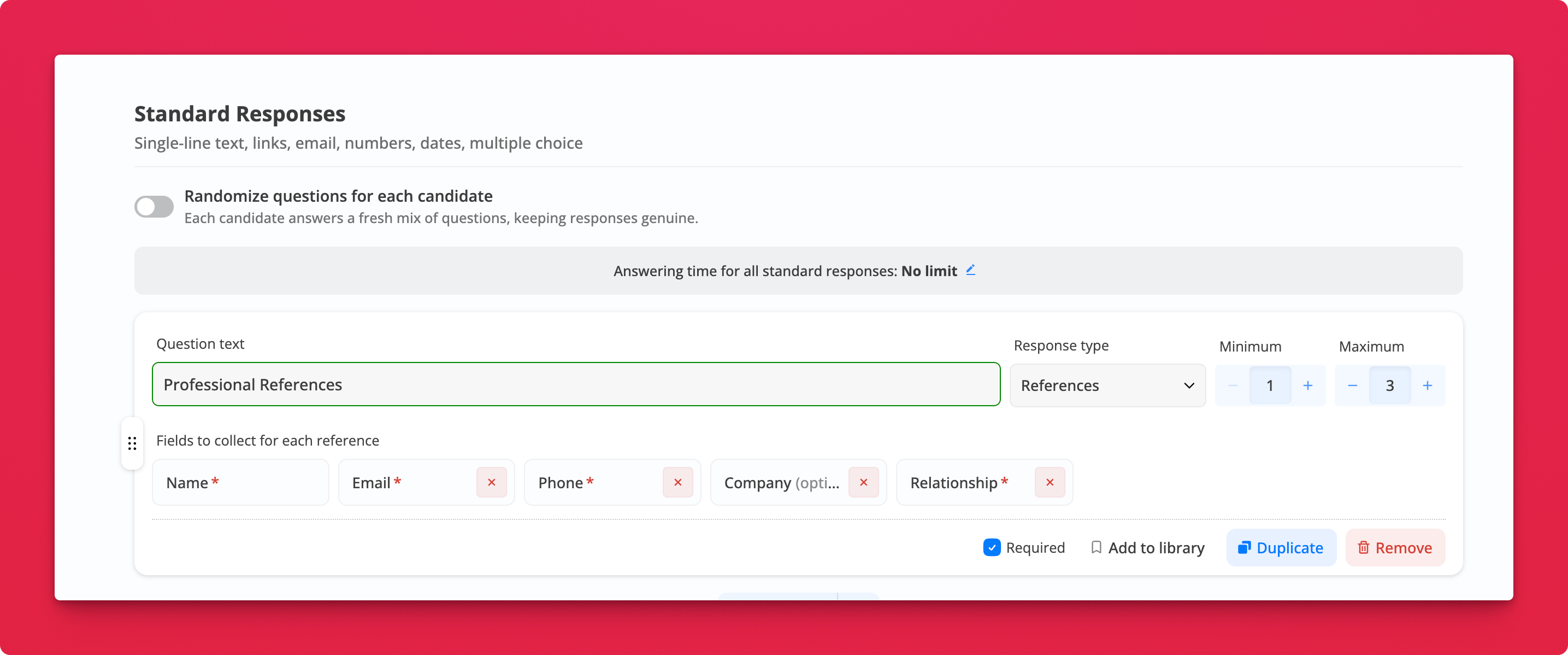
Where: Job → Edit → Questions → Standard Responses → Add questions → Response type: References
How many references
Use the Minimum and Maximum counters to ask for anywhere from 1 to 5. A new question starts at a minimum of 1 and a maximum of 3.
Which details
Name (first and last) is always required. Email, Phone, Company, and Relationship can each be required, optional, or hidden. By default Company is optional and the other three are required.
For Relationship, candidates pick Supervisor, Co-worker, Mentor, Client, or Other. If they pick Other, they describe it in a short text field, for example "board member".
Where references show up
- On the application, as a numbered list
- In the CSV export, one reference per line
- In webhooks that include answers, as a structured array
Notes
- Email and phone are checked before the candidate can submit, so a referee at gmail.con gets fixed by the candidate
- References questions aren't scored and have no Must-have or Good-to-have option
- Raising the minimum above the maximum moves the maximum up with it