Recruitment Automation for Agencies: Automate Screening Without Losing the Personal Touch
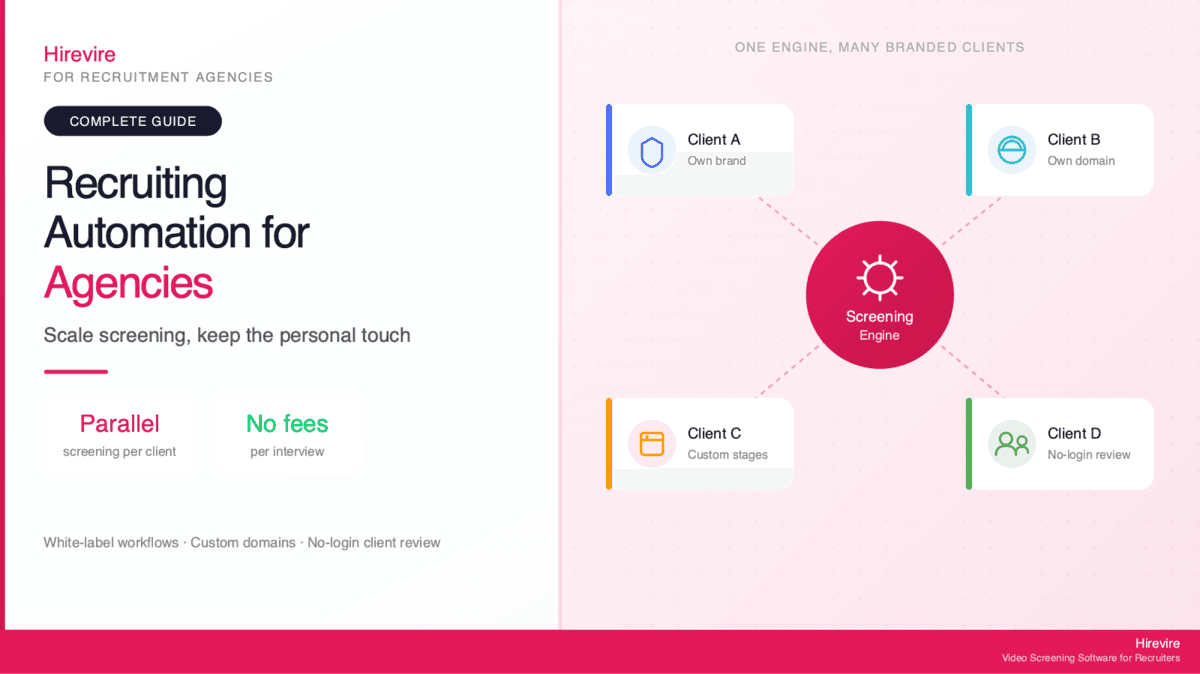
Recruitment agencies automate screening to handle more clients without hiring more recruiters. Async pre-screening runs across many searches in parallel, with per-client branding so each client's candidates see their brand, not yours. Hirevire's Agency plan supports high screening volume with no per-interview fees, custom domains, white-label workflows, and no-login client review, so a small team can carry a bigger book of business without the relationship feeling automated.
Key Takeaways
| Question | Short answer |
|---|---|
| What should agencies automate first? | The repetitive top of the funnel: collecting structured answers, knockout questions, transcripts, and first-pass scoring. |
| What stays human? | Client relationships, shortlist judgment, salary and offer conversations, and candidate advocacy. |
| How does branding work per client? | Custom branding, logos, intro videos, and custom domains let each client's screening look like the client's own careers page. |
| How do agencies screen at volume? | Async video and audio screens run in parallel across every open search, with deep search across the whole candidate pool. |
| How do clients review candidates? | Shared review links let clients rate and comment with no login and no account, keeping you in control of the pipeline. |
| What about pricing? | Flat plans with no per-interview fees mean screening volume does not turn into a surprise invoice. |
For agency recruiters, the math of growth has always been brutal. Every new client means more roles, more applicants, and more first-round screens, but the day still only has so many hours in it. According to SHRM's 2025 Benchmarking Reports, the average cost-per-hire for non-executive roles is $5,475, multiplied across every client search running at once. The bottleneck is rarely sourcing. It is the hours spent on phone screens and scheduling that separate a recruiter who can run five searches from one who can run twenty.
This is where recruiting automation for agencies earns its keep. The goal is not to remove recruiters. It is to remove the parts of the process that do not need a recruiter, so human hours go where they matter: building client trust, reading nuance in a candidate, and closing a placement. Recruiters spend much of their hiring time on administrative tasks rather than the judgment work clients pay for, and async screening is the cleanest way to win those hours back.
This guide covers where agencies hit a screening ceiling, what to automate versus keep human, how per-client branding and white-label workflows keep each client relationship feeling bespoke, how to screen across every search in parallel, how to share candidates with clients without giving them logins, and how flat-rate pricing changes the volume math. Hirevire is referenced throughout as one platform built for this agency use case, but the framework applies regardless of which tool you choose.
Why Agencies Hit a Screening Ceiling
Every agency reaches a point where adding clients stops adding profit. The recruiters are already maxed out, the screening backlog grows, and quality of service starts to slip on the accounts you already have. Understanding why this ceiling exists is the first step to breaking through it.
The Per-Recruiter Throughput Problem
A single recruiter running manual phone screens can complete only a limited number of meaningful first-round conversations per day. Each needs scheduling, a confirmation, a reschedule when the candidate no-shows, the call, and notes afterward. Across a full desk of open roles, the scheduling overhead alone can eat more time than the actual conversations.
The result is a hard cap on throughput. When a new client brings five fresh searches, they compete for the same finite pool of recruiter hours existing clients already depend on. Service quality becomes a zero-sum game, and the agency either turns away growth or accepts slower turnaround that clients notice.
Why Hiring Your Way Out Is Expensive
The obvious answer is to hire another recruiter. But each new hire carries a full cost-per-hire, a ramp period, and ongoing salary whether the pipeline is full or thin. Agencies live with lumpy demand: a wave of mandates one quarter, a quiet stretch the next. Staffing for the peak means paying for idle capacity in the trough; staffing for the trough means drowning during the peak.
Automation changes the unit economics. Instead of adding a recruiter to add screening capacity, an agency adds capacity directly through async tools and keeps headcount focused on the work that needs a human.
The Client Expectation Squeeze
Clients hire an agency because they want a curated shortlist, not a pile of resumes. They expect speed and a human relationship. The squeeze is that those two pull in opposite directions when screening is manual: going faster usually means cutting corners on the human touch, and protecting the human touch usually means going slower.
The way out is to automate the part clients never see, the raw volume of first-pass screening, while keeping the part they do see, the shortlist and the relationship, fully human. That is the core idea behind agency recruiting software automation, and the rest of this guide is about doing it well.
What to Automate vs. What to Keep Human
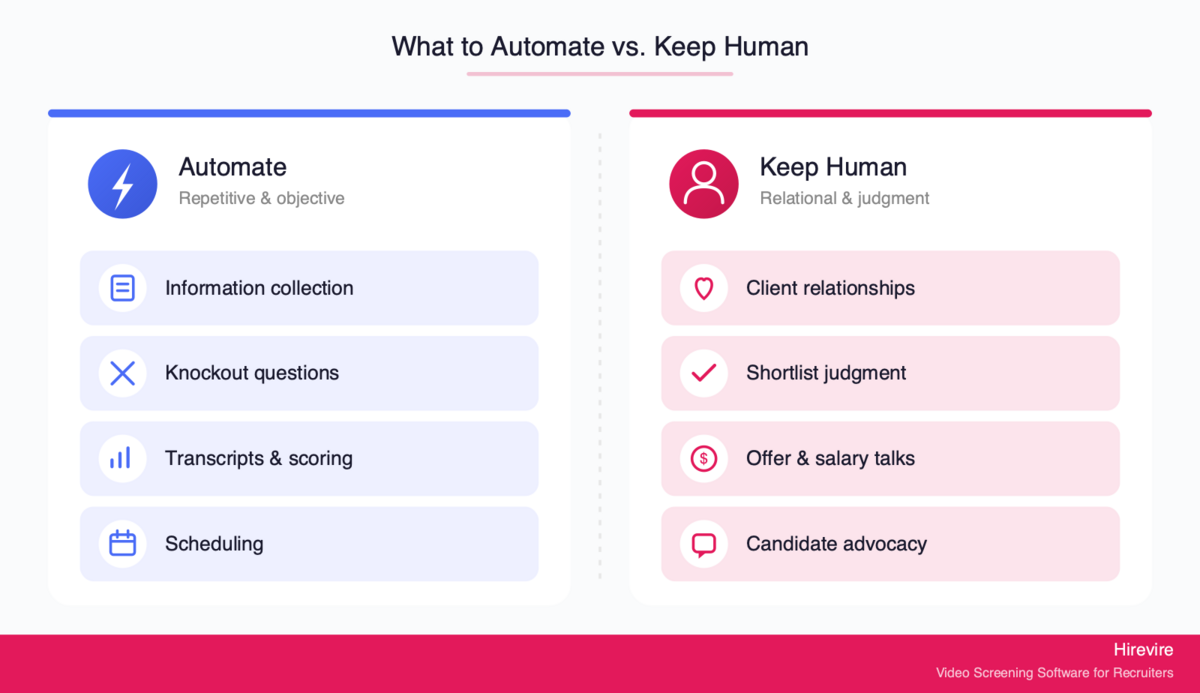
The fastest way to damage an agency relationship is to automate the wrong thing. Clients can tell when they are talking to a script, and candidates can tell when they have been processed rather than represented. The rule of thumb: automate the repetitive and objective, keep the relational and judgment-heavy human.
Safe to Automate
These steps are repetitive, rules-based, and improve when they are consistent rather than improvised:
- Initial information collection. Instead of a phone tag to confirm salary expectations, notice period, location, and work authorization, an async screen collects structured answers up front.
- Knockout questions. Objective must-haves like minimum experience, required certifications, or work authorization can be checked automatically. Hirevire's Auto-Disqualification lets you set those criteria so applicants who clearly do not qualify are filtered to a separate tab before you spend time reviewing them.
- First-pass scoring and transcripts. Async video and audio responses can be transcribed and scored against a rubric you define, giving every candidate a consistent first read.
- Scheduling and reminders. The back-and-forth of booking a call is pure overhead and a prime candidate for automation through integrations.
Keep Human
These are the steps clients are actually paying an agency for, and automating them erodes the value you provide:
- Client relationship management. The trust between an agency and its client is the whole business. That stays a person-to-person relationship.
- Shortlist judgment. Deciding which three of fifteen screened candidates to put in front of a client is judgment work that reflects your read of both the role and the client's unstated preferences.
- Offer and salary conversations. Negotiation, expectation setting, and closing are high-stakes and deeply human.
- Candidate advocacy. Representing a candidate well, coaching them, and managing their experience is what earns repeat placements and referrals.
Hirevire's positioning is built around this split. Automation handles the busywork, while features like AI Scorecards apply a rubric the recruiter defines rather than a black-box decision, and Shared Review Links keep a human in the loop on the final call. The recruiter's judgment is never removed, only freed up.
| Stage | Automate | Keep human |
|---|---|---|
| Intake | Structured questions, knockout criteria | Initial client briefing |
| First screen | Async video/audio, transcripts, first-pass scoring | Reading nuance and red flags |
| Shortlist | Ranking and filtering by rubric | Final shortlist selection |
| Client review | Sharing screened candidates | Presenting and advocating |
| Offer | Scheduling logistics | Negotiation and closing |
Per-Client Branding and White-Label Automation
The single biggest fear agencies have about automation is that it makes every client's hiring feel generic, like candidates flowing through a faceless machine instead of applying to a specific company. Per-client branding solves this directly. Done right, each client's screening experience looks like it belongs to that client, not to you.
Why Branding Matters for Agency Screening
When a candidate applies for a role, they are forming an impression of the employer, not the agency. If the screening page carries the agency's logo and generic copy, two things go wrong: the experience feels disconnected from the job the candidate actually wants, and the client wonders what value the agency adds beyond a middleman layer. A branded experience keeps the candidate attached to the role and signals to the client that the agency represents their brand with care.
It is also a completion-rate issue. A screening page that feels like the real employer's careers page earns more finished responses than a generic intermediary form, and finished responses are the whole point of screening.
How White-Label Workflows Work
White-label recruiting automation means the agency runs the screening engine, but the candidate never sees the engine. With Hirevire, this comes together through a few features working in concert:
- Custom Branding lets you set logos, colors, and intro and outro videos so each client's screening page matches their identity. One agency-side reviewer described the value plainly.
"It has flexible branding, so we can customize the landing page to match our careers site. The UI is very intuitive. This is a major time saver for us." melgipson, AppSumo
- Custom Domain lets the screening live on a domain that reads as the client's own rather than a shared platform URL, removing the last visible seam between the candidate and the employer brand.
- Custom Stages let each client's pipeline reflect that client's actual hiring process, so a tech client's stages can differ from a hospitality client's without you maintaining separate tools.
Another agency operator captured why the polish matters:
"The custom domain feature is an excellent detail. The implementation is straightforward, and the result looks highly professional." Sergio Arias Merino, AppSumo
The practical effect is that one agency can run twenty client searches that each feel like twenty different employers, all from a single screening workflow. That is the difference between automation that dilutes the agency's value and automation that compounds it. For agencies that want to see how the platform frames this use case, Hirevire maintains a dedicated page for recruitment agencies.
Parallel Screening Across Searches
A staffing agency rarely runs one search at a time. The real workload is a dozen or more open mandates across different clients, each with its own candidate flow. The advantage automation gives an agency is the ability to run all of those screens in parallel rather than working a single queue.
Async Screening Removes the Scheduling Bottleneck
With live phone screens, every conversation is a separate appointment, and appointments serialize: you can only be on one call at a time. Async video and audio screening breaks that constraint. Every candidate across every open search records responses on their own schedule, and the recruiter reviews them in batches whenever it suits, often at double speed by skimming transcripts.
This is the mechanism that lets a small team carry a large book of business. The recruiter is no longer the throughput limit on screening conversations, because the conversations happen without the recruiter present. One agency CEO described the shift after switching to async screening.
"It saves a lot of time - otherwise we would need to interview people manually. The software always works, it's really easy for our candidates to use and their support is really 10/10. We use it daily." Roy Lammers, CEO Remote Talents, G2
Deep Search Across the Whole Pool
The other half of parallel screening is finding the right candidate across everyone you have ever screened, not just one job's pipeline. Agencies sit on a valuable asset: a multi-client pool of candidates already recorded, transcribed, and scored. The problem is surfacing the right person when a new mandate lands.
Hirevire's Deep Search searches across the entire candidate pool, including the content of past responses, so a recruiter staffing a new role can find a strong candidate who originally applied for a different client. This turns yesterday's screening work into today's sourcing shortcut, one of the clearest ways automation compounds value over time. Agencies running high volume can read more in Hirevire's guide to the best AI solutions for fast-tracking mass recruitment.
Power-User Automation with MCP
For agencies with technical operators, Hirevire's MCP Integration lets AI agents read and summarize hiring data, such as candidate lists and transcripts, while the human keeps decision-making authority. An agent can read across the pool and propose, but it does not decide, and write access stays inside the recruiter's existing permissions and is revocable. This is the power-user layer for wiring screening into a broader automated workflow without handing judgment to a machine. MCP for recruiting covers which ATS platforms run their own MCP server and how an agent works a 500-applicant pool.
Sharing Screened Candidates With Clients
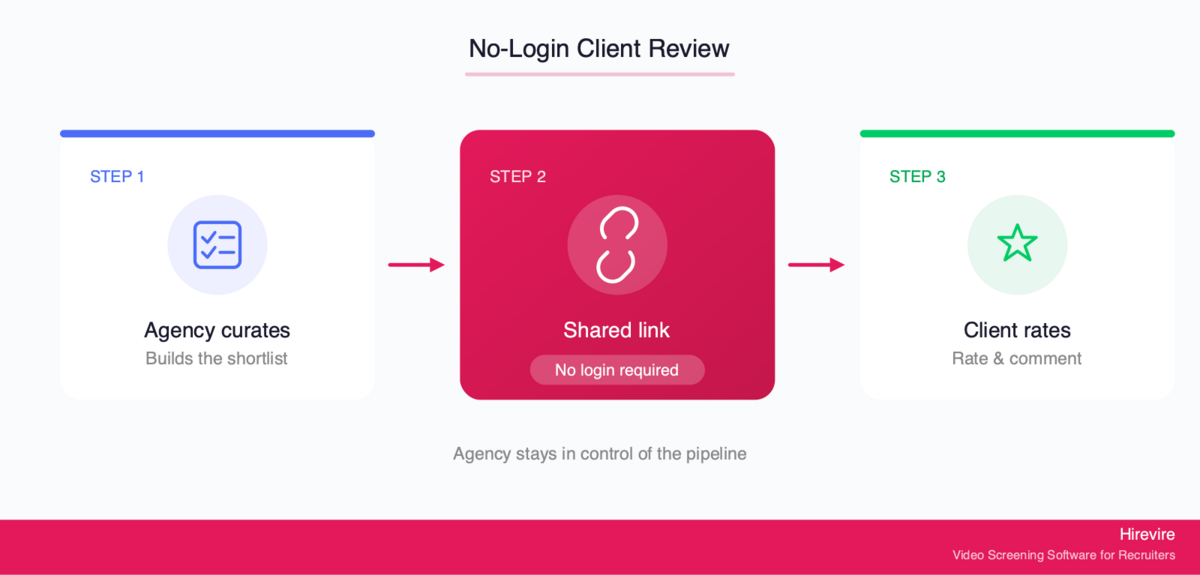
Once an agency has screened a batch, the next step is getting the best candidates in front of the client. This handoff is where many agencies still lose time and polish, emailing PDFs, forwarding video links that expire, or asking clients to create yet another login. Done well, client review is fast, branded, and friction-free, and keeps the agency in control of the pipeline.
The No-Login Review Advantage
Clients are busy and they will not create an account in your ATS to look at three candidates. The moment you ask them to, review slows down and the agency looks like it is adding steps rather than removing them. Hirevire's Shared Review Links generate a shareable link for all candidates in a hiring stage, so any client contact can review and rate candidates collaboratively with no login required.
The client clicks a link, watches the screened responses, leaves ratings and comments, and that is it. No onboarding, no password reset, no support ticket, just the cleanest way to involve the client in the shortlist decision while keeping the experience effortless on their end.
Keeping the Agency in Control
A no-login review link does not mean handing the client the keys to your whole pipeline. The agency decides which candidates appear in the shared stage. The client weighs in on a curated set, not the raw applicant pool. This preserves the agency's core value: a fast, collaborative client review without the agency losing its position as the curator of quality.
This is also where the human and automated meet cleanly. Automation produced the screened, scored candidates. The recruiter applied judgment to build the shortlist. The shared review link hands the client a polished, branded final step. Every layer plays to its strength.
Agency Pricing Math: Volume Without Per-Interview Fees
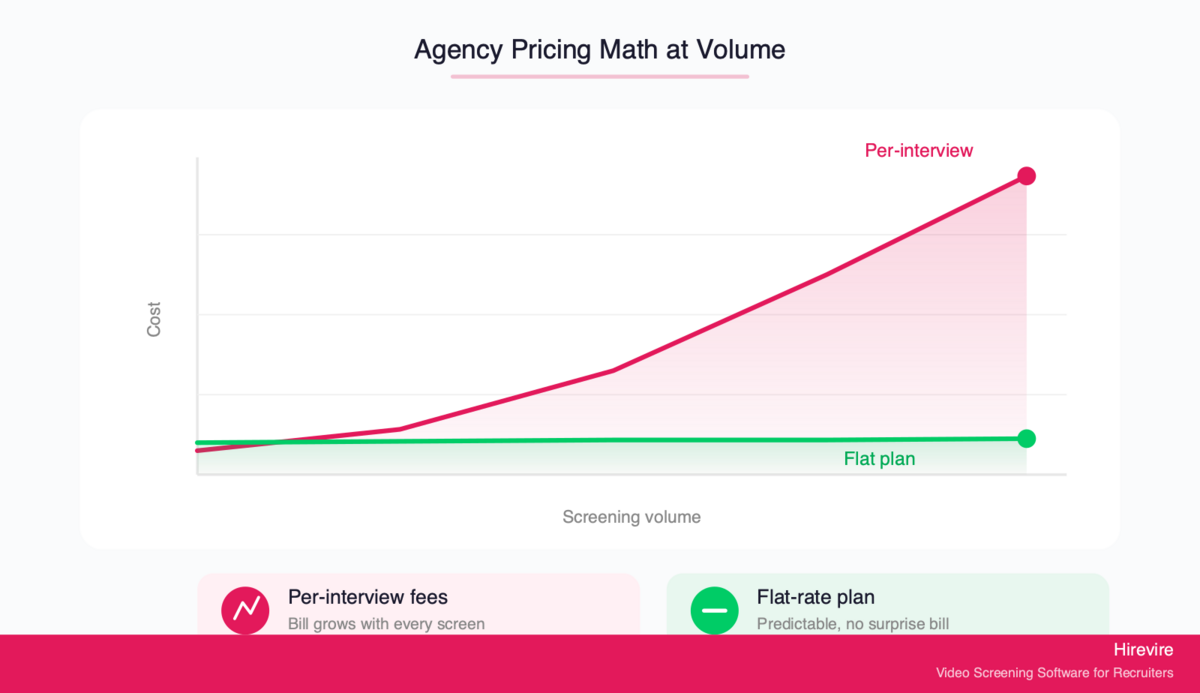
For agencies, the pricing model of a screening tool is not a footnote. It is a structural decision that either rewards growth or punishes it, turning every new client into a bigger bill exactly when volume should be improving margin.
Why Per-Interview Pricing Hurts Agencies
Some screening platforms charge per interview or per candidate. For a single in-house employer hiring occasionally, that can be fine. For an agency running constant high-volume screening across many clients, it is a trap: the more successful the agency becomes at filling its pipeline, the more its screening costs balloon, and the harder it becomes to price client engagements predictably.
Per-interview pricing also creates a perverse incentive to screen fewer candidates to control cost, the opposite of what an agency should do. The whole point of automation is to screen widely and cheaply so the best candidates surface.
How Flat-Rate Plans Change the Math
Hirevire uses flat monthly or yearly plans with no per-interview fees, which means screening volume does not turn into a variable, unpredictable invoice. An agency can screen widely across every search without watching a meter run. The Agency plan is built specifically for this profile, with higher screening allocation, more active jobs and users, and the white-label features discussed above.
| Plan | Monthly | Yearly | Best for |
|---|---|---|---|
| Essentials | $49/month | $39/month (billed yearly) | A single role or solo recruiter |
| Professional | $149/month | $99/month (billed yearly) | Regular multi-role hiring |
| Agency | $249/month | $199/month (billed yearly) | High-volume agency screening, white-label, custom domains |
What is genuinely flexible within a plan is worth being precise about. Plans do not charge per interview, but they are not infinite either. The value is budget predictability: a known monthly cost instead of a per-interview meter, with unlimited questions per screen, unlimited AI transcripts and scoring, and unlimited custom stages inside the plan. For an agency, predictable cost is what makes it safe to screen aggressively, and screening aggressively is what fills client pipelines faster.
What Automation Does Not Replace
It is worth being honest about the boundary. Agency value comes from screening, branding, and sharing, integrated into the agency's own CRM through tools like Zapier or MCP rather than from a native client-CRM or invoicing system inside the screening tool. Hirevire connects to existing stacks through its integrations, including 5000+ apps via Zapier, so screening data flows into the systems an agency already runs on. The platform is the top-of-funnel engine, not a replacement for the agency's operating system.
Implementation Guide: Rolling Out Agency Screening Automation
Moving an agency to automated screening works best as a staged rollout. Prove the workflow on one client, then template it across the book of business.
Step 1: Pick a Pilot Client and Role
Start with one client and one high-volume role where manual screening is clearly the bottleneck. A large applicant flow gives automation the most obvious win and the clearest before-and-after. Avoid starting with a sensitive, relationship-heavy executive search; prove the model on volume first.
Step 2: Build the Branded Screening Experience
Set up the client's branding, logo, intro video, and custom domain so the screening page reads as the client's own. Configure custom stages to match that client's hiring process. Spend time here, because this page is the first impression candidates and clients form of your automation.
Step 3: Define Knockouts and Scoring Criteria
Set objective knockout questions for the must-haves using auto-disqualification, then define the rubric your AI scorecard applies. Keep knockouts strictly objective, things like work authorization or a required license, and leave anything subjective to human review. The rubric should reflect what predicts success in the role, not a generic template.
Step 4: Run the Batch and Share With the Client
Invite the applicant pool to record async responses, review the scored results in batches, build a human shortlist, and share it through a no-login review link. Fast, frictionless client review is the signal that the workflow is working.
Step 5: Template and Scale
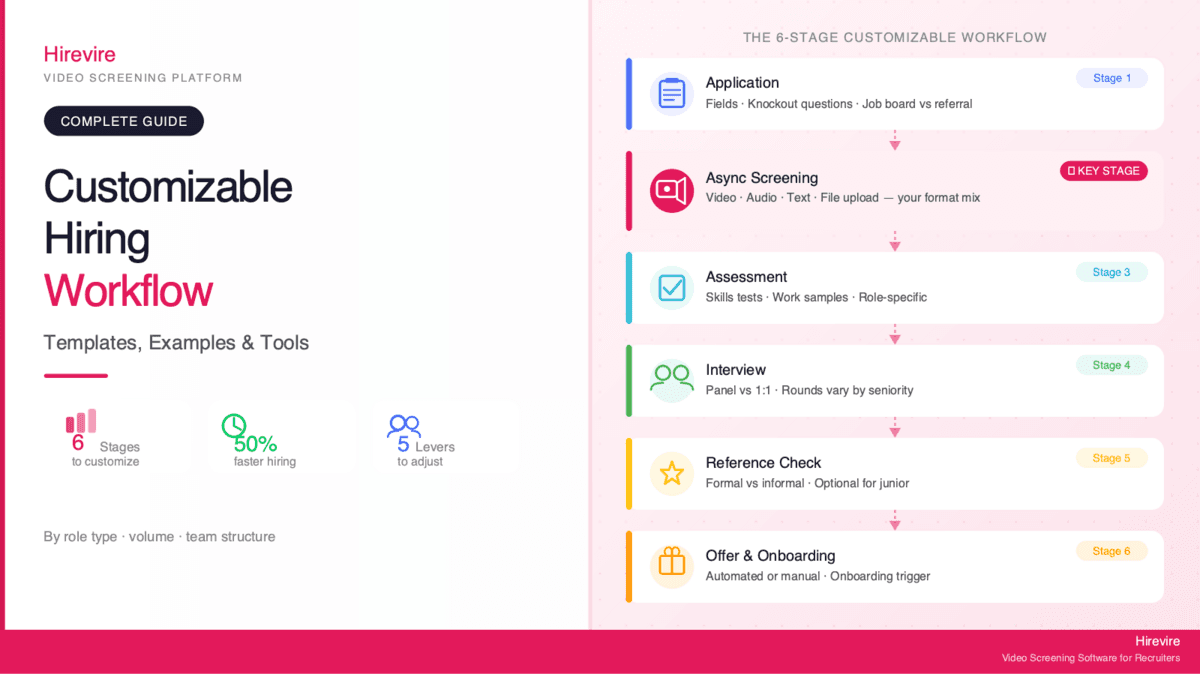
Once the pilot proves out, turn that setup into a template you can clone for the next client and role. This is where throughput gains compound: each new client launch gets faster as your library of branded, staged workflows grows. Hirevire's guide to customizing your hiring workflow covers advanced setups.
Common Pitfalls to Avoid
- Automating the relationship. Never let a client feel handed off to a machine. Keep client communication personal.
- Generic branding. Skipping per-client branding undoes the main benefit. Each client should look distinct.
- Over-broad knockouts. Auto-disqualifying on subjective criteria filters out good people. Keep knockouts objective.
- Hiding behind the tool. Automation should make your shortlist judgment more visible to clients, not less.
Advanced Strategies for Scaling an Agency Desk
Once the basics are running, a few strategies separate agencies that merely use automation from those that build a durable edge with it.
Turn Your Candidate Pool Into a Moat
Every screened candidate adds to a searchable, transcribed, scored pool competitors do not have. Using deep search to staff new roles from past applicants shortens time-to-shortlist and lets you respond to a new mandate faster than an agency starting from a cold sourcing run. Treat the pool as an appreciating asset and protect the data quality that makes it searchable.
Standardize Rubrics Across Similar Roles
Agencies that place the same role types repeatedly, like customer support, sales development, or warehouse staff, benefit from a library of proven scorecards. A standardized rubric per role family keeps screening consistent across clients and easy to hand to a junior recruiter without quality dropping.
Wire Screening Into Your CRM
Through Zapier or MCP, a completed screen can update candidate records and trigger next steps automatically. Screening stops being an island and becomes a step in a larger pipeline, which is where the real per-recruiter throughput gains live.
Watch the Industry Direction
The broader market is moving this way fast. According to SHRM's 2025 Talent Trends, 43% of organizations now use AI in HR tasks, up from 26% in 2024, with just over half using it to support recruiting. Agencies that build automated screening into their operating model now will have a head start on clients who increasingly expect that speed as standard.
Frequently Asked Questions
What is recruiting automation for agencies?
It is the use of software to handle the repetitive, high-volume parts of screening, such as collecting structured answers, running knockout questions, transcribing async responses, and applying first-pass scoring, so a recruiter's time goes to client relationships and shortlist judgment instead. For agencies specifically, it adds per-client branding and white-label workflows so each client's candidates see that client's brand, not the agency's.
How is agency recruiting automation different from in-house automation?
The mechanics are similar, but agencies need two things in-house teams usually do not: per-client branding so each client's screening looks distinct, and the ability to run many client searches in parallel from one workflow. Agencies also benefit more from a searchable multi-client pool and flat-rate pricing, since their volume is far higher and spread across many simultaneous mandates.
What is white label recruiting automation?
White-label recruiting automation means the agency runs the screening engine while the candidate and client see only the client's brand. With features like custom branding, custom domains, and custom stages, the screening page reads as the employer's own careers experience, and the platform powering it stays invisible. This lets one agency present many client-specific hiring experiences from a single tool.
Can clients review candidates without creating an account?
Yes. Hirevire's Shared Review Links generate a shareable link for all candidates in a hiring stage so any client contact can rate and comment with no login required. The agency controls which candidates appear in the shared stage, so the client reviews a curated shortlist rather than the full applicant pool, keeping the agency in control of the pipeline.
How do agencies screen hundreds of candidates without adding recruiters?
Async screening is the mechanism. Instead of serial phone screens that happen one at a time, candidates across every open search record video or audio responses on their own schedule, and recruiters review them in batches, often at double speed using transcripts. Knockout questions auto-filter unqualified applicants and first-pass scoring ranks the rest, so a small team processes far more candidates than manual screening allows.
Does automating screening hurt the candidate experience?
It does not have to, and done well it improves it. Candidates respond on their own time instead of coordinating a phone screen, the screening page carries the real employer's brand, and no login is required. The risk is automating the relational steps; the fix is keeping shortlist judgment, advocacy, and offer conversations human. Reviewers consistently note that async screening stays personalized for candidates while saving the recruiter time.
How does per-interview pricing affect agency costs?
Per-interview or per-candidate pricing penalizes the high screening volume that defines agency work, because costs rise with every candidate you screen. That creates an incentive to screen fewer people, which undercuts the whole point of automation. Flat-rate plans with no per-interview fees, like Hirevire's, keep costs predictable so an agency can screen widely without watching a meter run.
What should an agency keep human when automating?
Client relationship management, shortlist selection, salary and offer negotiation, and candidate advocacy should stay human. These are the judgment-heavy, relational steps clients are actually paying an agency for. Automation should handle information collection, knockout filtering, transcription, first-pass scoring, and scheduling, the repetitive work that does not need a recruiter present.
Can automated screening integrate with an agency's existing CRM?
Yes. Hirevire connects to existing agency stacks through its integrations, including 5000+ apps via Zapier, plus Make, webhooks, and MCP for technical operators. Screening data can flow into the agency's CRM so a completed screen updates candidate records and triggers next steps automatically. The screening platform is the top-of-funnel engine, not a replacement for the agency's operating system. Hirevire's async video screening case study with Remote Talents shows an agency running this daily.
Conclusion: Scaling an Agency Without Losing the Relationship
The agency that wins is not the one that automates the most. It is the one that automates the right things and protects the relationship that automation cannot replace. Recruiting automation for agencies is, at its heart, a division of labor: software handles the repetitive screening volume, and recruiters spend their freed hours on client trust, shortlist judgment, and closing placements.
Key Takeaways
- Automate the funnel, keep the relationship. Information collection, knockouts, transcription, and first-pass scoring are safe to automate. Client relationships and shortlist judgment stay human.
- Brand per client. Custom branding, custom domains, and custom stages let one agency present many distinct client experiences from a single workflow.
- Screen in parallel. Async screening and deep search across the whole pool let a small team carry a large book of business.
- Share without friction. No-login review links keep clients involved in the shortlist while the agency stays in control of the pipeline.
- Price for volume. Flat-rate plans with no per-interview fees mean screening more candidates does not mean a bigger surprise bill.
The Bottom Line
For agency recruiters, the path to more clients has always run through more screening hours. Automation breaks that link. By moving the repetitive top of the funnel to async, branded, parallel screening, an agency grows its book of business without growing headcount in lockstep, and without the client relationship ever feeling handed to a machine. For agencies ready to screen across every search in parallel, Hirevire provides white-label workflows, custom domains, no-login client review, and flat pricing with no per-interview fees, starting at $39/month.
Hirevire holds a 4.6/5 on G2 (30 reviews), 5/5 on Capterra (26 reviews), and 4.9/5 on AppSumo (70+ reviews).
Your Next Steps
- Pick one high-volume client role as a pilot for automated screening.
- Build a branded, custom-domain screening experience for that client.
- Start a Hirevire Agency plan trial and screen across every search in parallel.
Ready to scale your screening without losing the personal touch?