Ashby MCP: An AI Agent Over Your Ashby and Screening Stack
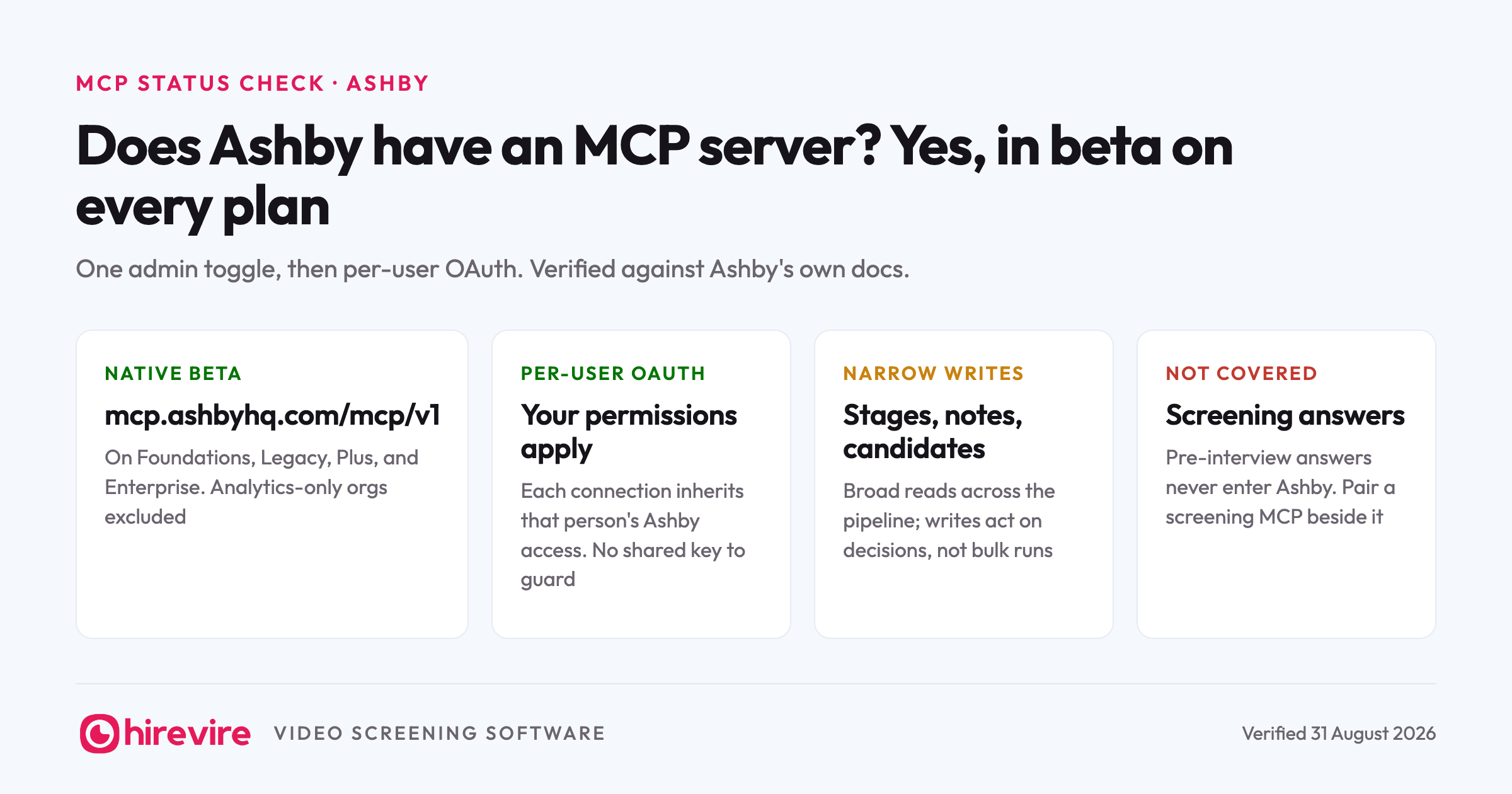
Ashby has a native MCP server in beta, and it is the easiest of the ATS servers to justify turning on: it ships on every plan, an org admin enables it with one opt-in toggle, and every user connects with their own sign-in and keeps their own permissions. If your team runs Ashby, there is a fair chance half of them already use Claude daily, so the practical question is what a connected agent can actually do with your pipeline. This page covers what the beta exposes, how to enable it, and the screening layer that completes the stack.
Last verified: 31 August 2026. Checked against Ashby's MCP server documentation on that date.
Key takeaways
| The piece | The state of it | What it means for you |
|---|---|---|
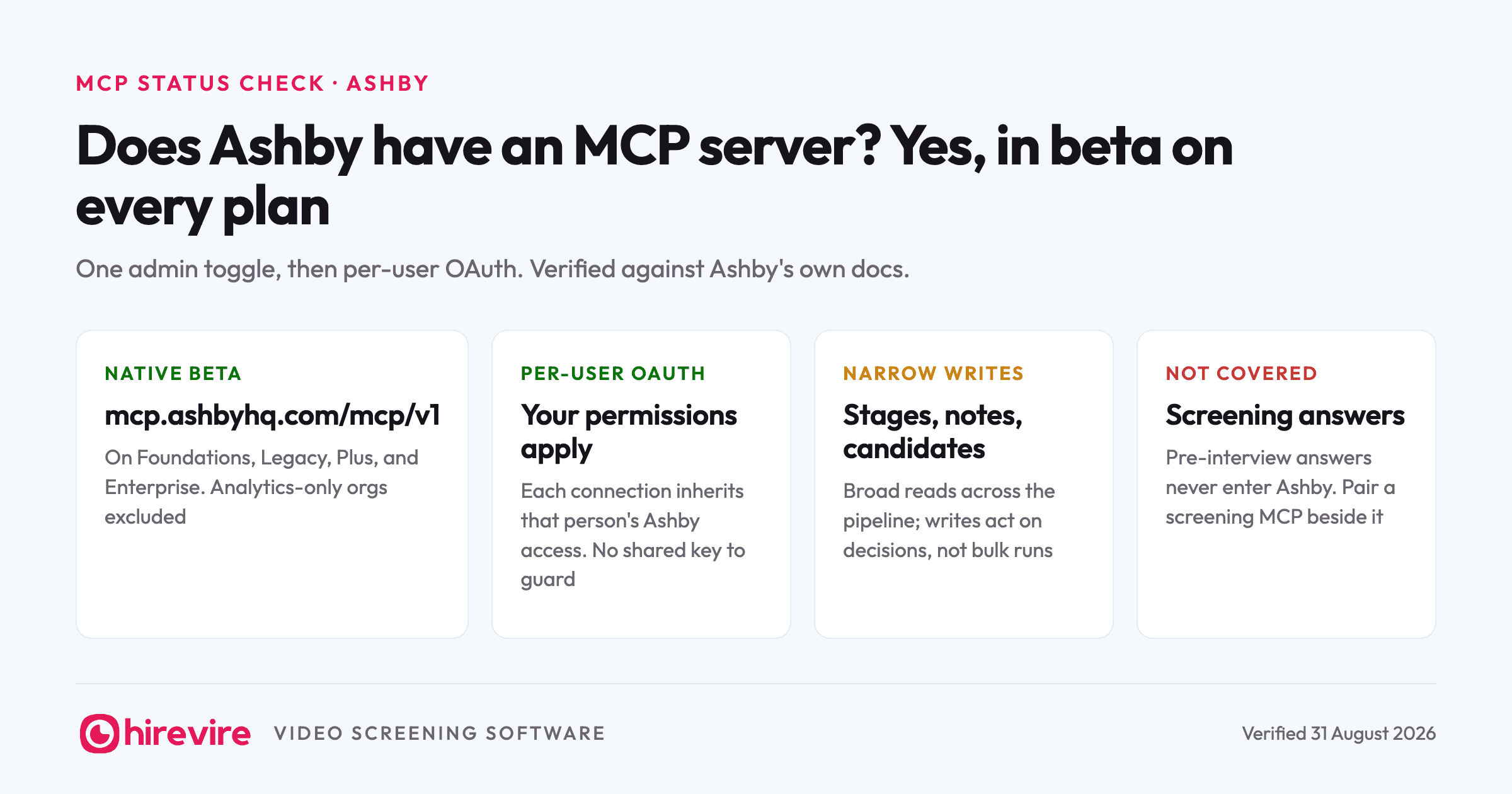
| Ashby MCP (native) | Beta at mcp.ashbyhq.com/mcp/v1, on Foundations, Legacy, Plus, and Enterprise | Available today on every plan, with an admin opt-in as the only gate |
| Permissions | Per-user OAuth; each connection inherits that person's Ashby access | No shared credential, and nobody sees data they couldn't see in Ashby |
| Coverage | Wide reads across the pipeline, targeted writes for stages and notes | Built for asking and acting, not for bulk automation |
| Hirevire MCP alongside | Screening answers and scores next to Ashby's records | Covers the pre-interview stage Ashby's tools don't hold |
The official answer
Yes, Ashby runs a native MCP server, currently in beta at mcp.ashbyhq.com/mcp/v1. It is available across the Foundations, Legacy, Plus, and Enterprise plans, with one exclusion: analytics-only organizations cannot use it. Documented clients cover Claude, ChatGPT, Cursor and other IDEs, Glean, and Gemini CLI.
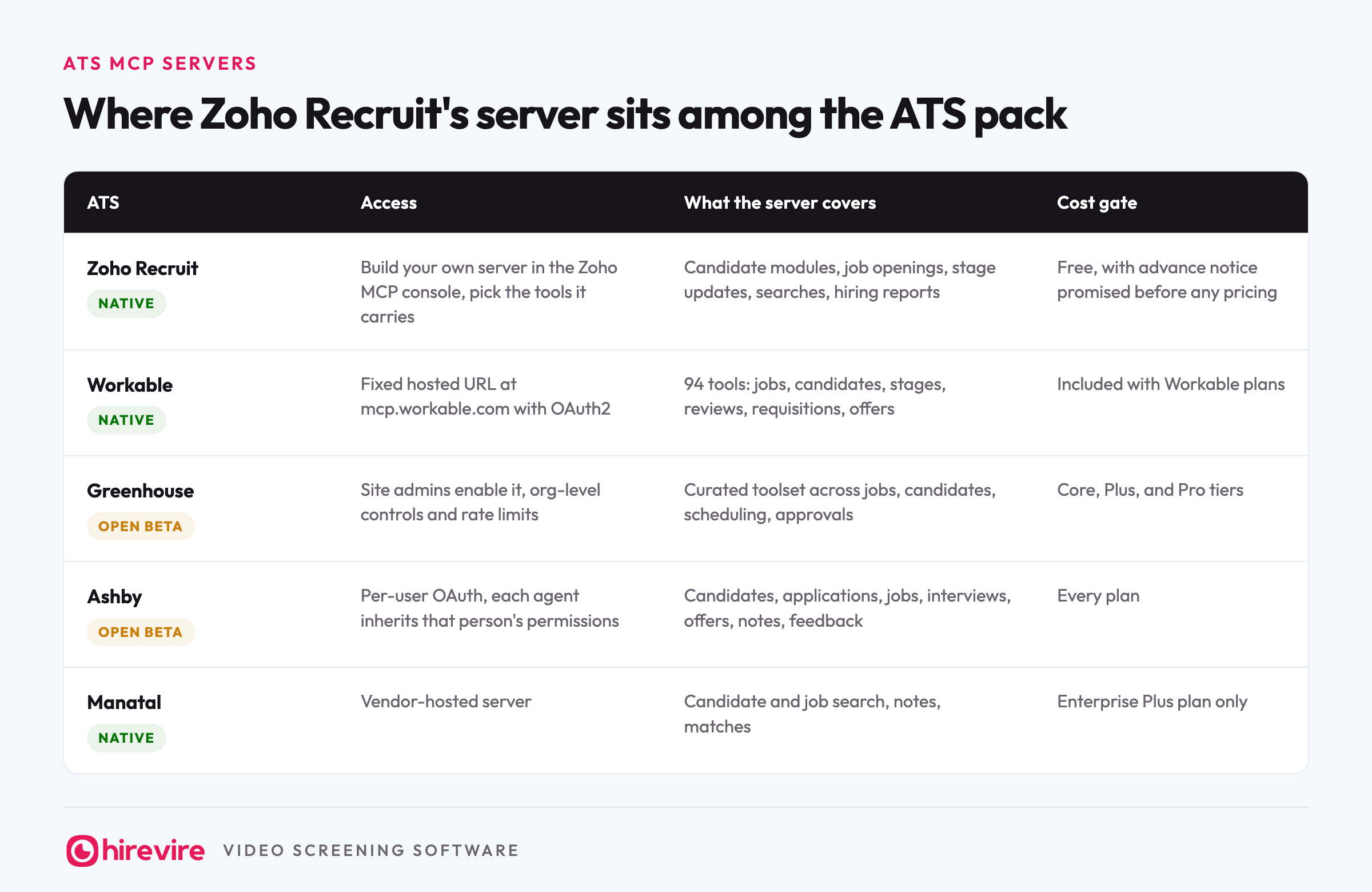
The permissions model is the clean part. Every user authenticates individually over OAuth, and the connection exposes exactly what that person's Ashby permission level already allows. A coordinator's agent sees coordinator-level data. There is no shared key to guard and no scope configuration to design, which is a different trade than Greenhouse made with its admin-controlled scope ceiling; our Greenhouse MCP review covers that contrast in detail.
Turning it on
Two steps, and the first belongs to an admin:
- An org admin opens Admin, Organization Setup, Opt In Features, and enables the MCP server beta.
- Each user adds https://mcp.ashbyhq.com/mcp/v1 to their AI client as a custom connector and signs in with their Ashby account.
That is the whole rollout. No scope design meeting, no invitation list, no per-seat pricing conversation. For a startup where the founder is also the admin, the honest setup time is under five minutes.
What the beta exposes
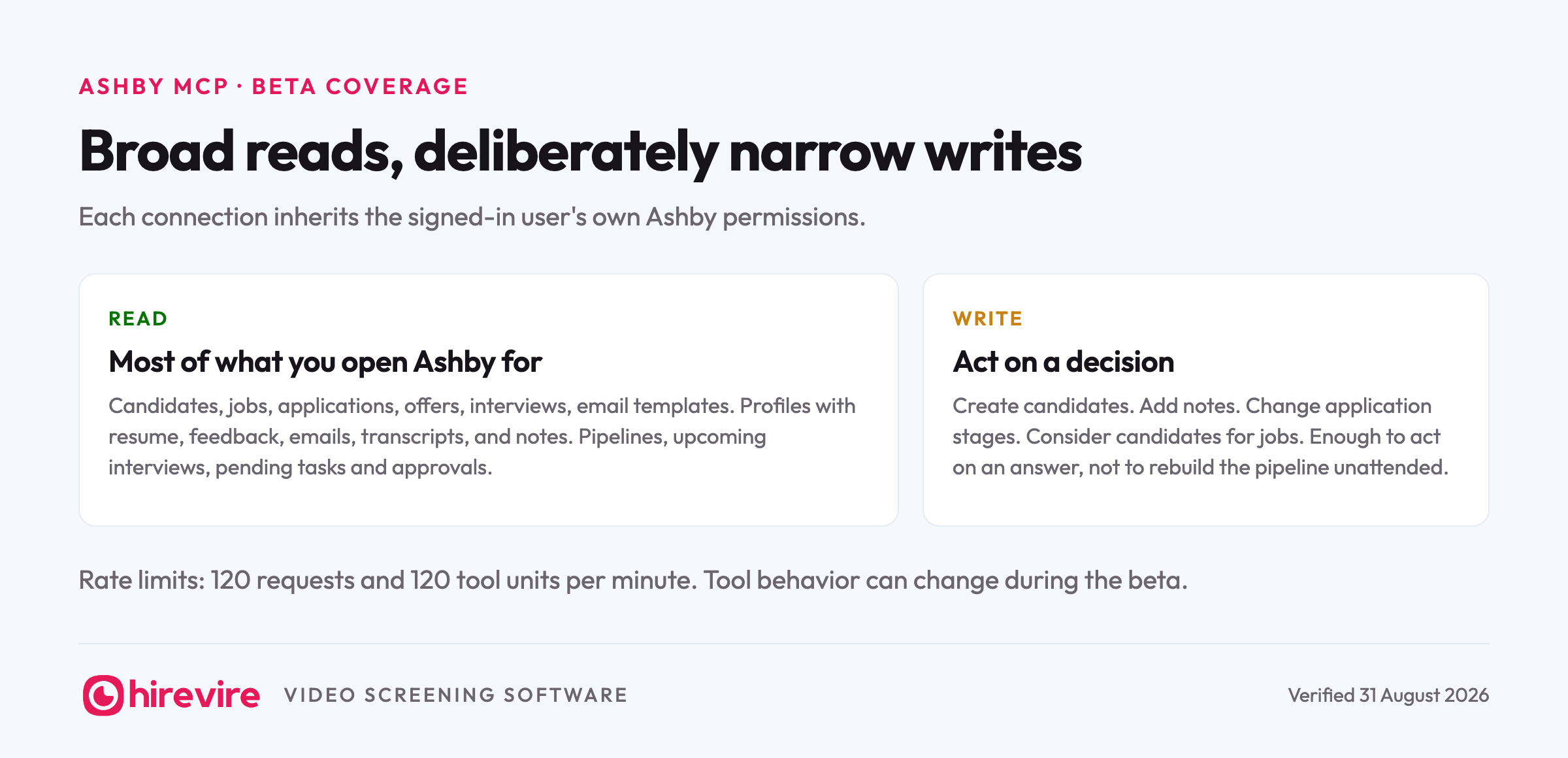
The reads are broad. An agent can search and filter candidates, jobs, applications, offers, interviews, and email templates, open a candidate's profile with resume, feedback, emails, transcripts, and notes, check upcoming interviews and job pipelines, and list pending tasks and approvals. In practice that covers most of what a recruiter opens Ashby to find out.
The writes are deliberately narrower: create candidates, add notes, change application stages, and consider candidates for jobs. Enough to act on a decision made in chat, not enough to rebuild your pipeline unattended.
Concrete asks that work today, on reads alone:
- "Which candidates for the platform engineer role have feedback in but no next step scheduled?"
- "Summarize the interview feedback on our two design finalists and flag anywhere the panel disagreed."
- "What is on my interview calendar this week, and which of those candidates have I not read the resume for?"
- "List every offer and approval that is waiting on someone, and name who."
And with the writes:
- "Add a note to Priya's profile that she's relocating in October, and move her application to the onsite stage."
- "Create a candidate record for the referral I just described and consider her for the platform engineer role."
The email template read deserves a special mention: ask the agent to draft outreach "using our standard follow-up template's tone" and it can actually read that template rather than inventing a voice. Small tool, real difference in how the drafts land.
Where it fits next to Ashby's own automations
Ashby teams usually run automation already: stage-triggered emails, scheduling links, approval chains. The MCP does not compete with any of that, and treating it as an automation tool is how you hit the beta's rough edges. The split that works: automations handle what happens every time, on triggers you predicted. The MCP handles the questions nobody predicted, the Thursday "wait, how many onsites do we actually have next week and who is overloaded" that would otherwise mean twenty minutes of clicking through pipelines.
That is also why the narrow write list is fine in practice. The repetitive writes are already automated inside Ashby; what the agent needs is enough write access to act on the answer it just gave you, and stages plus notes covers most of that.
The beta caveats
Three limits worth knowing before your team leans on it. Rate limits sit at 120 requests per minute per auth token, with a parallel budget of 120 tool units per minute per user and organization pair; a recruiter in a chat window will never notice, a scripted bulk run might. Ashby also states that tool inputs and outputs may change without notice during the beta, so treat any automation built on top as provisional. And analytics-only organizations are excluded entirely.
The stack: Ashby for the pipeline, screening beside it
Notice what the reads cover: resumes, interview feedback, transcripts of interviews that happened. Everything describes candidates who already reached your team's calendar. For a 40-applicant engineering role that is the whole story. For the 300-applicant support or operations role, the expensive question comes earlier: which 30 of these deserve anyone's calendar at all, and the answer lives in whatever asked them questions before the first interview.
Hirevire runs an MCP server for exactly that stage: video screening answers, transcripts, and scores against your own questions. It connects the same way Ashby's does, one URL and a sign-in, with a Read only or Read & write choice at authorization. The two products are also natively integrated, so candidates can be invited to screening straight from your Ashby workflow and results land back against the pipeline.
With both servers in one Claude workspace, the loop closes: "Who applied to the support role this week?" reads Ashby. "Which of them scored above 7 on the Hirevire screening, and what did the top two say about handling refunds?" reads the screening server. "Move those two to the phone screen stage and add a note with their scores" writes back to Ashby. The full version of that workflow, run on 500 applicants, is our Claude screening tutorial.
Frequently asked questions
Does Ashby have an MCP server?
Yes, a native one, in beta as of August 2026 at mcp.ashbyhq.com/mcp/v1. It is available on the Foundations, Legacy, Plus, and Enterprise plans after an org admin enables it under Opt In Features. Analytics-only organizations are excluded.
How do I connect Ashby to Claude?
After the admin opt-in, add https://mcp.ashbyhq.com/mcp/v1 to Claude as a custom connector and sign in with your Ashby account. The connection inherits your own Ashby permissions, and Ashby documents the same flow for ChatGPT, Cursor, Glean, and Gemini CLI.
Does the Ashby MCP cost anything extra?
Ashby lists no separate price for the beta; it is part of the plans it ships on, and the only gate is the admin opt-in. For a team already paying for Ashby, trying it costs the five minutes of setup.
Can the Ashby MCP write to my pipeline?
Yes, within a deliberately short list: create candidates, add notes, change application stages, and consider candidates for jobs. Reads are much broader. Bulk automation should respect the beta's rate limits and the warning that tool behavior can change without notice.
Can the Ashby MCP screen candidates?
No. It reads feedback and transcripts from interviews that already happened, but what applicants answer before the first interview never enters Ashby. That stage needs its own server; Hirevire's MCP handles it and pairs with Ashby's through the native integration.
The short version
Ashby shipped the low-friction ATS server: native, in beta, on every plan, enabled by one admin toggle, with per-user OAuth doing the permissions work and no shared credential to guard. Reads cover most of what recruiters open Ashby for, writes cover stages and notes, and the beta caveats only bite scripted automation. What it cannot reach is the screening stage, so the working stack for volume roles is Ashby's server and Hirevire's screening MCP in the same agent, joined underneath by the native integration. Where every other HR tool stands is in the monthly MCP table, verified against vendor docs each month.
Last verified: 31 August 2026.