
Set up delayed video interview invitations
Delayed invitations let you collect basic candidate details first—like name, email, and phone—before automatically sending the full video interview invite after a set delay. This hides video questions upfront, reducing drop-off on your public application page.
Delayed invitations only apply to new organic applications submitted via your public job page. Manual and bulk invites are sent immediately.
When to use delayed invitations
Use this feature when:
Candidates abandon your application after seeing video questions
You want to collect contact info first and follow up later
You're running high-volume hiring and need better completion rates
After a candidate submits their basic details, they'll see your custom success message. The video interview invite is automatically sent via email or SMS after the delay you configure.
Set up delayed invitations
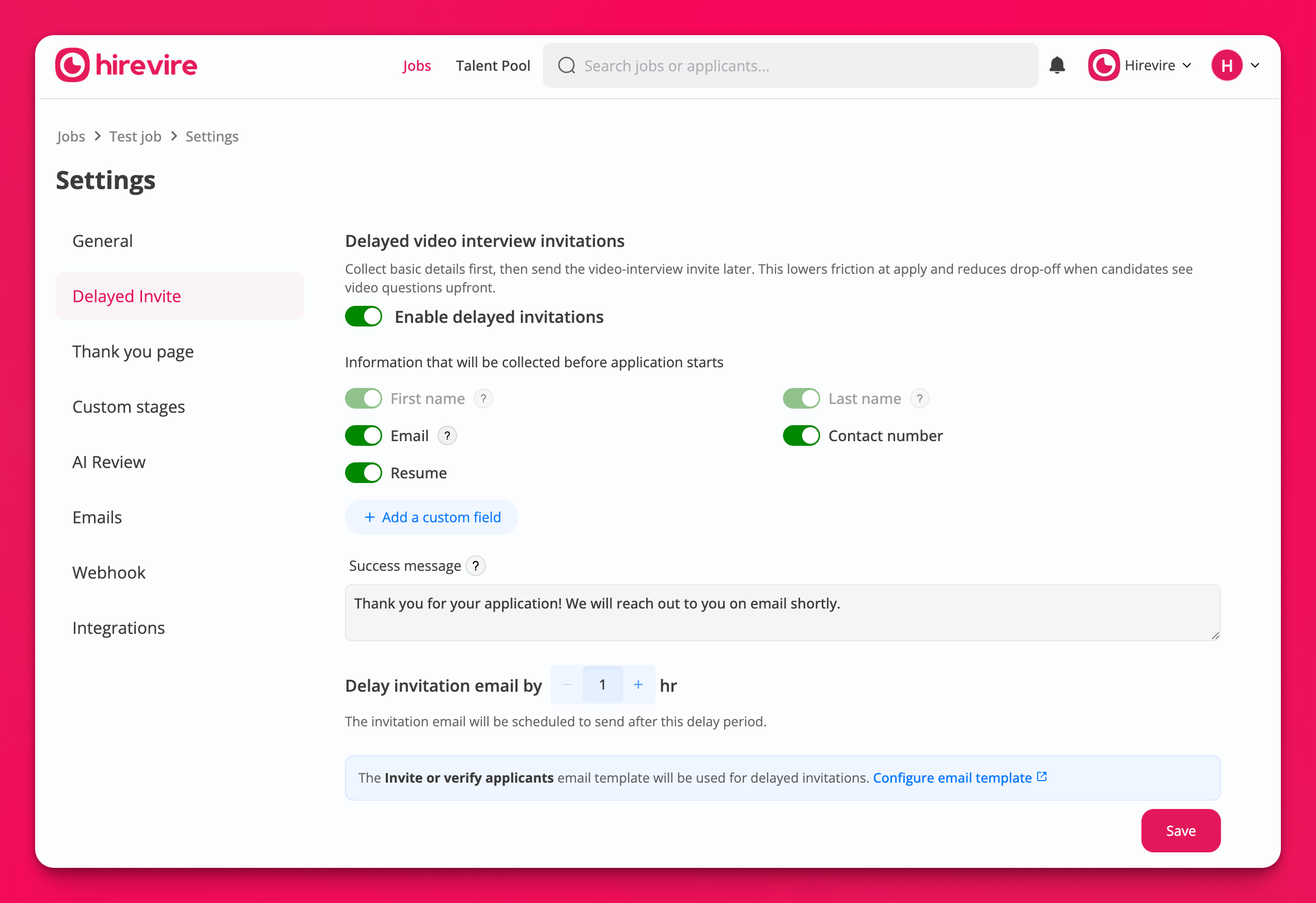
To enable delayed invitations for a job:
Go to Jobs and select the job you want to configure
Click the Settings tab
Scroll to the Delayed Invitations section
Toggle Enable delayed invitations to ON
Select which fields to show on the initial form (email is always required):
Choose Required for mandatory fields like phone number or resume
Choose Optional for fields like LinkedIn profile
Choose Any one if candidates can pick from multiple options
Enter a Success message candidates will see after submitting (e.g., "Thank you for your application! We will reach out to you on email shortly.")
Set the delay in hours (minimum 1 hour) using the Delay invitation email by counter
Click Save
The video interview invite uses your "Invite or verify applicants" email template. Customize it in Settings > Emails to match your brand.
How it works for candidates
When delayed invitations are enabled:
Candidate visits your public job application page
They see a short form with only the fields you selected (name, email, phone, etc.)
After submitting, they see your custom success message
After the delay period, they receive an email or SMS with a link to start the video interview
In your dashboard, these applications appear with a Scheduled status until the invite is sent. The timeline shows when the invite was scheduled and sent.
Requirements and limitations
Email must be a required field (you'll see an error if it's not)
Minimum delay is 1 hour
Only applies to new applications after you enable the feature
Requires an active Hirevire subscription
Your "Invite or verify applicants" email template must be active
Delayed invitations only work for organic applications via your public job page. Candidates you invite manually or via bulk import will receive immediate invites.