
Understanding Hirevire's AI Review Process: Video Analysis and Beyond
Hirevire's AI Reviews feature provides intelligent insights into candidate video and audio responses, helping you quickly identify top matches without watching every submission. By analyzing transcripts against your custom evaluation criteria, AI Reviews augment your judgment with actionable summaries while keeping you in control of hiring decisions.
How AI Reviews Work
AI Reviews analyze video and audio response transcripts based on a custom prompt you provide. You describe your ideal candidate profile in up to 200 characters, and the AI evaluates each response against those criteria.
For each reviewed response, you'll see:
Match Status: A green checkmark indicating "AI Match" or a non-match indicator
Key Insights: Bullet points highlighting relevant skills or experiences mentioned by the candidate
Reasoning: Hover over the insights to view the AI's detailed reasoning

AI Reviews require transcripts to be enabled for your video and audio questions. Current plans (Essentials, Professional, Agency) include all AI actions within plan pricing. Legacy plans (One Job, Startup, Growth) consume AI credits from your monthly allocation.
Key Focus Areas
When analyzing video and audio responses, the AI evaluates:
Keyword Identification: Detects relevant skills, experiences, and qualifications mentioned in responses
Answer Completeness: Assesses whether candidates fully address the question based on your criteria
Clarity and Conciseness: Evaluates how clearly candidates communicate their thoughts
How to Enable and Trigger AI Reviews
Set Up Automatic Reviews in Job Settings
To automatically review all new applications for a job:
Navigate to your job's Settings page
Select AI Review from the left navigation
Toggle on Automatically review applications
Enter your evaluation criteria (up to 200 characters) describing the ideal candidate profile
If you're on a legacy plan (One Job, Startup, Growth), you can optionally set a spend limit on credits for this job
Click Save

Once enabled, every new application will be automatically reviewed using your criteria. Legacy plan users can monitor credit usage directly in the settings page.
Review Individual Candidates Manually
To review a single candidate from the Applications dashboard:
Open your job's Applications page
Locate the candidate you want to review
Click the Review using AI button next to their application

Bulk Review Multiple Candidates
To review multiple candidates at once:
From the Applications list, check the boxes next to candidates you want to review
Click Bulk actions at the top of the list
Select Review using AI from the dropdown menu

A modal will appear showing:
A field to enter or update evaluation criteria
An option to automatically review new applications going forward
If you're on a legacy plan: Your remaining credits and how many credits this bulk review will require
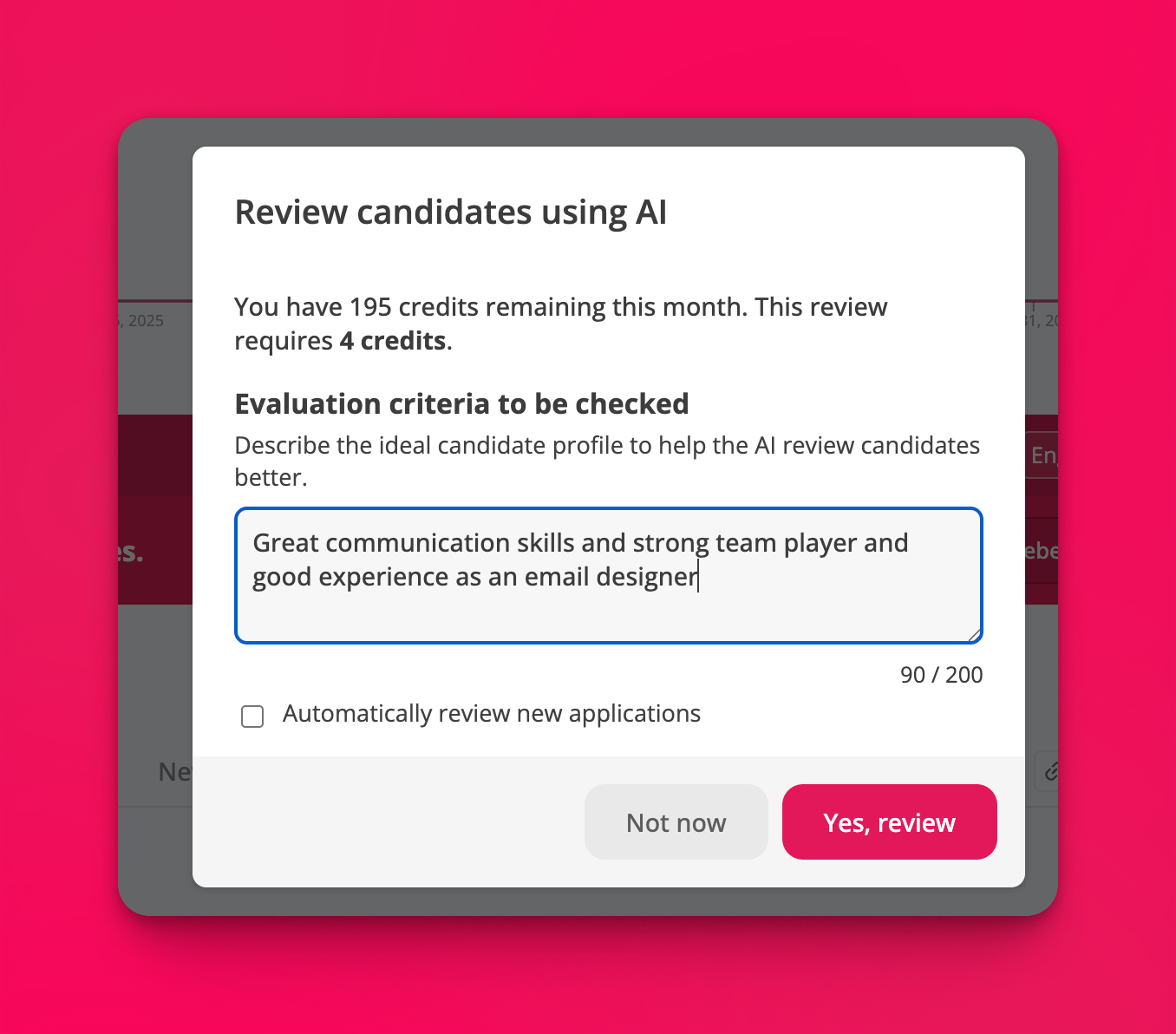
Use bulk reviews when processing high volumes of applications to quickly identify strong matches across multiple candidates simultaneously.
Understanding AI Review Results
After reviewing a candidate, you'll see the AI insights directly on their video or audio response:

The AI Match indicator appears next to the question, with specific insights listed as bullet points. Hover over these insights to see the AI's detailed reasoning for why a candidate matches or doesn't match your criteria.
AI Reviews help you screen 3x more candidates in half the time by surfacing key information from transcripts without requiring you to watch every video.
Current Limitations
AI Reviews currently focus on transcript analysis only. The system does not yet evaluate:
Audio Quality: Tone, enthusiasm, or speaking pace are not analyzed
Visual Elements: Body language, presentation, or video quality are not considered
Other Question Types: Text responses, uploaded documents, or file uploads are not included in AI analysis
AI Reviews work only on video and audio responses with transcripts enabled. Ensure transcripts are activated for questions you want to analyze.
Future Expansion Areas
We're actively expanding AI capabilities to cover all application components:
Detailed Question Scoring: Individual scores for each question based on standard assessment rubrics, replacing the current match/non-match status with granular evaluation
Text-Based Question Responses: Analysis of written answers to standard text questions
Uploaded Documents: Review of resumes, portfolios, and other candidate-submitted files
These enhancements will provide a comprehensive AI-powered review across your entire screening process while maintaining the flexibility to use AI where it adds the most value.