
Automatically disqualify applicants using must-have scoring
Use Auto-disqualify applicants to stop candidates early when they do not meet your must-have requirements. This setting is part of the Scoring step in your job setup and uses the candidate's must-have score to decide whether they should continue.
Set up your must-have scoring rules first. Auto-disqualification depends on those rules and only applies to applications evaluated after you save the job.
What Auto-disqualify does
When Auto-disqualify applicants is turned on, Hirevire evaluates the candidate's must-have score during the application flow.
If the candidate falls below the disqualification threshold, Hirevire:
marks the application as Disqualified
submits the application in that state
sends the disqualification email for that job
stops the candidate before media questions
This helps you avoid reviewing applications that do not meet your required criteria.
Before you turn it on
Auto-disqualification is available only when both of these are true:
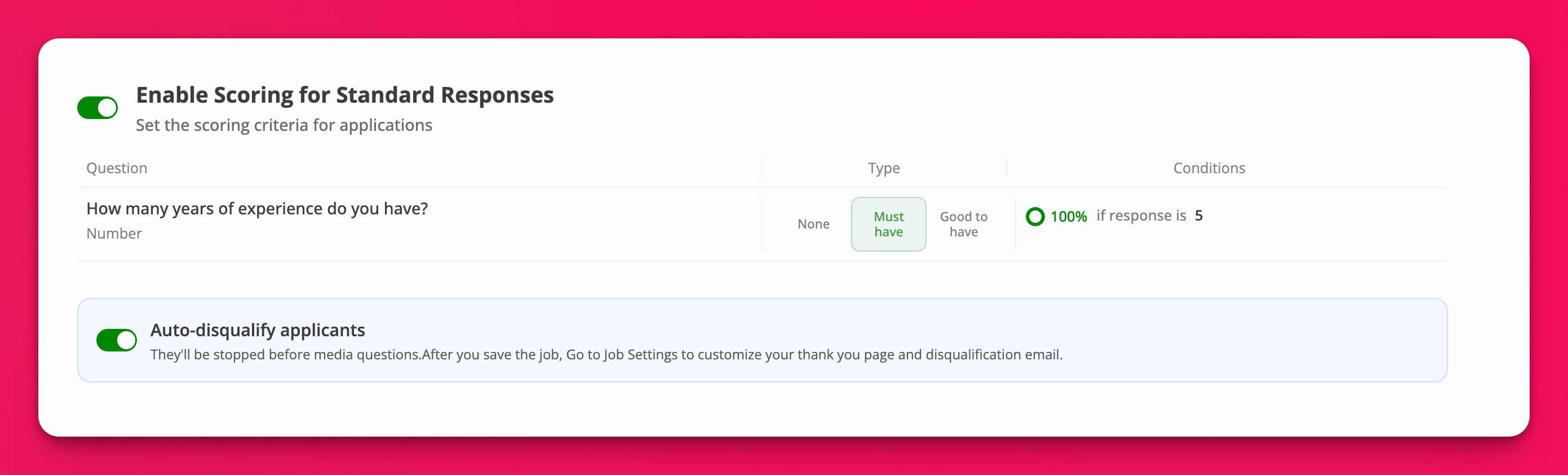
Enable Scoring for Standard Responses is turned on
At least one standard question has scoring set to Must-have
Scoring works on standard questions such as text, number, date, multiple choice, checkboxes, dropdowns, and links. Video, audio, file upload, and screenshare questions are not used for scoring.
If you try to enable Auto-disqualify without a must-have question, Hirevire shows this error: Add at least one must-have question to enable disqualification.
Turn on Auto-disqualify for a job
Open the job you want to update.
Go to the Scoring step in the job editor.
Turn on Enable Scoring for Standard Responses.
For at least one standard question, click Edit criteria and set the rule type to Must-have.
Turn on Auto-disqualify applicants.
Click Save and preview to save the job.
After you save, go to the job settings if you want to customize what disqualified candidates see and receive:
update the thank you page
edit the disqualification email
How the threshold works
Auto-disqualification uses the candidate's must-have score, not the good-to-have score.
Hirevire compares that must-have score against the job's disqualification threshold. If no custom threshold is configured, the default threshold is 100. That means candidates must meet all must-have criteria to continue unless your job is configured with a different threshold.
Example: if you have two must-have questions and a candidate passes one of them, their must-have score is 50%. With the default threshold of 100, that candidate is disqualified.
What candidates and recruiters see
For candidates, disqualification happens during the application flow. Candidates who fall below the threshold are stopped before media questions.
For recruiters, the application appears with the Disqualified status so you can still review the record later if needed.
When to use Auto-disqualify
Use Auto-disqualify when you have clear dealbreakers that candidates must meet before they continue, such as required location, work authorization, certifications, or minimum years of experience.
If you only want to rank candidates without stopping them, keep scoring enabled and leave Auto-disqualify applicants turned off.
Troubleshooting
I do not see the Auto-disqualify toggle
Open the job editor and go to Scoring. The toggle belongs to the scoring setup, not the general job settings page.
The toggle will not turn on
Make sure scoring is enabled and at least one standard question is marked Must-have.
A candidate was not disqualified
Check whether the application was submitted before you saved the scoring changes. Auto-disqualification only applies to applications evaluated after the job is saved.
A candidate was disqualified before finishing the application
This is expected behavior. Auto-disqualification stops candidates before media questions when their must-have score falls below the threshold.