
Team member roles: Admin and Billing Admin access
Updated 7 months ago
Hirevire now supports two team member access levels so you can give teammates the access they need without making everyone the account owner.
This feature is available on Professional and Agency plans.
Available roles
Admin: Can access all current and future jobs. Admins can also manage your career page, custom domains, integrations, and invite team members.
Billing Admin: Has all Admin permissions, plus access to billing and subscription settings.
Your existing access options for All jobs and Specific jobs only still work.
How to assign a role
Go to Team section of My Account Page
Enter the teammate’s email address.
Select Billing Admin or Admin as the access level.
Send the invite.
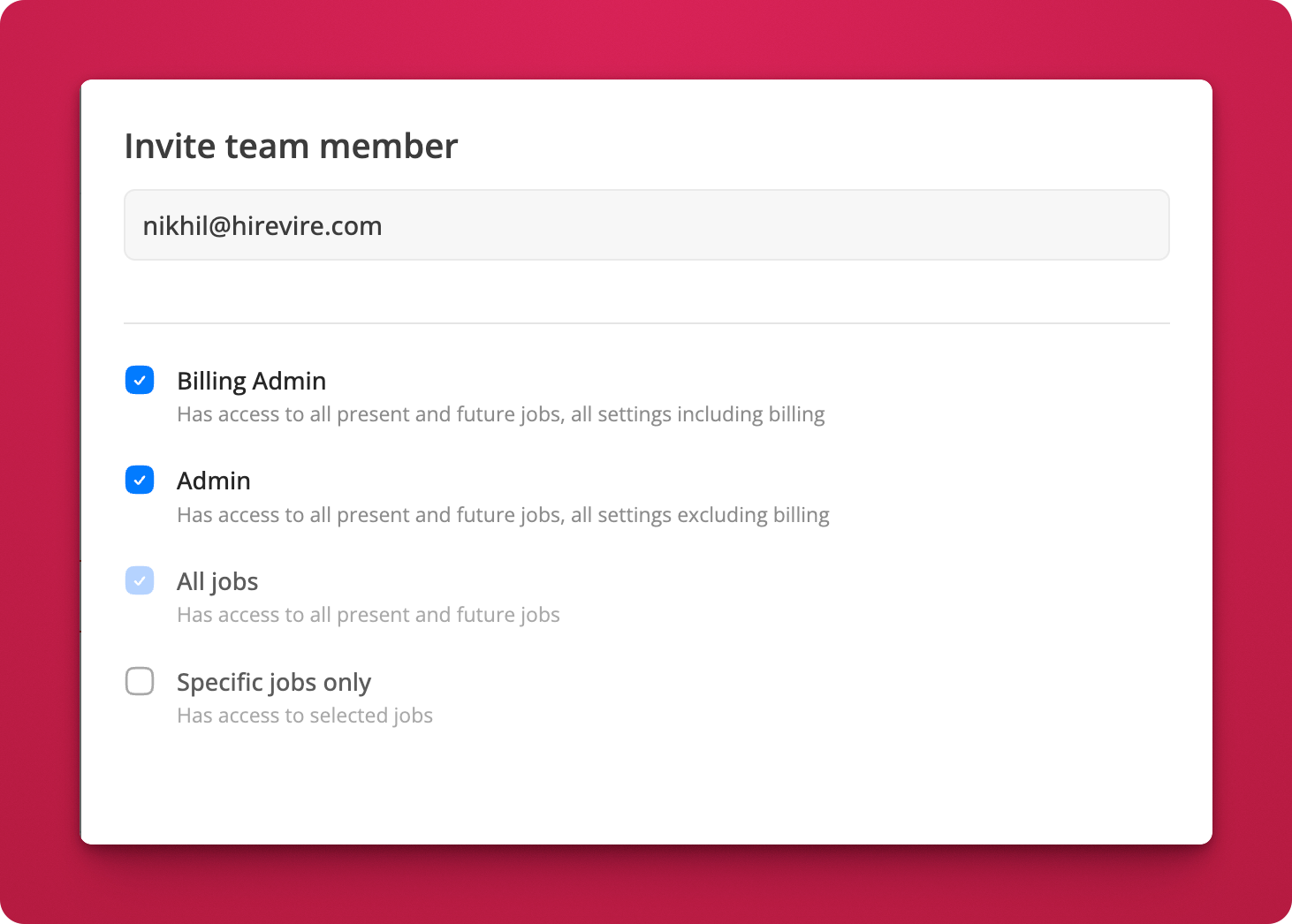
If you want to limit access by job instead, choose Specific jobs only instead of an admin role.
When to use each role
Admin is best for recruiters or hiring managers who need broad account access but should not manage billing.
Billing Admin is best for finance or operations teammates who need to manage plans, invoices, or subscription changes.
What to read next
If you need to add several people at once, see What is the best way to add multiple users to your account?. If you manage separate teams or clients, see Managing Multiple Organizations.
If your admins also need to manage branding or integrations, see White-Labeling and Custom Branding Options, Connect Hirevire to Ashby ATS, and Connect Hirevire to Tellent Recruitee.